
Job Check: BidWise Flags What Will Cost Money Before It Does
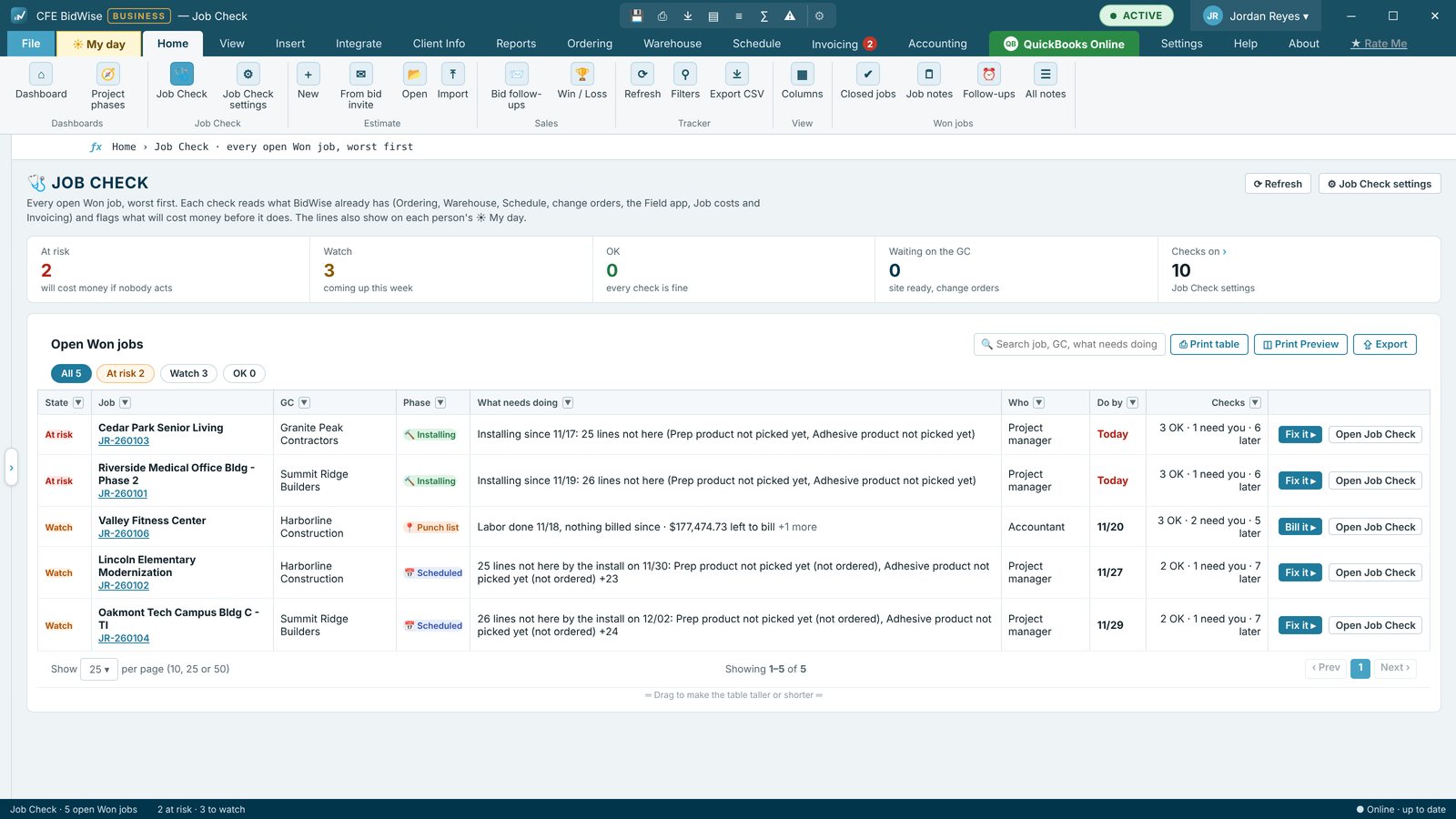
Job Check lists every open won job, worst first, with 11 checks read from data CFE BidWise already has. Material here before the crew, site ready, change orders signed before the work, labor done but not billed, approved change orders not billed, profit slipping, the GC's pay app cut-off day, retainage held and closeout papers. Each line says what needs doing, who does it and by when.
| Checks | 11, each on or off with its own days |
|---|---|
| Reads from | Ordering, Warehouse, Schedule, change orders, Field app, Job costs and Invoicing |
| Where | Home › Job Check, the Dashboard card, the Bid Tracker column, inside a won estimate |
| Who gets it | Picked per check: PM, salesman, accountant, warehouse |
| Plan | Business: all 11 checks. Personal: material here and labor done not billed |
The money a flooring job loses quietly
Most money lost on a flooring job is not lost in the bid. It goes when the crew shows up and the material is not there, when the walls are not painted, when change order work is done before anyone signs, when labor is finished and nobody bills it, or when the pay app misses the GC's cut-off by a day. Job Check watches for these every day so the office hears about them before they cost money.
Eleven checks, from data you already have
- Material here before the crew: every line received before the install, with Fix it on the late ones
- Material checked: count, dye lots and condition ticked before the job moves to Ready to schedule
- Site ready: ask the GC a few days before the install and keep the answer
- Change orders signed before change order work starts
- Labor done, not billed and approved change orders not billed
- Profit slipping: the forecast falls below the bid margin
- Pay app before the GC's cut-off, with a cut-off day per GC
- Retainage still held after the work is done
- Closeout papers: final waiver, warranty letter, care sheets and attic stock
- Crew hours over budget (off until you turn it on)
Worst first, with who and by when
Home › Job Check sorts open won jobs by At risk, Watch and OK. Each row says what needs doing, the phase, who does it, the day it is due and how many checks pass. Click a job for its own panel with Fix it buttons that open the right screen, Print and Email it to the PM. The same panel opens from the ribbon inside a won estimate.
The Dashboard has a Job Check card that follows the phase strip: click a phase, or Waiting on someone, to see only those jobs, and fold the card to one line when you need the room. The Bid Tracker gets a Job Check column too.
Material check and a smarter Book install
When the last line of a job arrives, the job waits in Material coming until someone ticks Checked: Ready to schedule after counting it and checking dye lots and condition. Save, not ready yet keeps a draft. When you book the install, Book install lists line by line any material that will not be here by the first day and offers the first work day after everything is in.
Each person gets their own lines
The Master user turns each check on or off, sets its days and picks who gets it on My day: the project manager, the salesman, the accountant or the warehouse. GC pay app cut-off days are set once per GC. A Monday email can send every At risk job to the Master user.
Set up Job Check
- Open Home › Job Check settings (Master user).
- Tick the checks you want and set their days, for example 3 days before the install for Site ready.
- Pick who gets each check on My day.
- Type each GC's pay app cut-off day in the GC pay app cut-off days table.
- Save, then open Home › Job Check to see every open won job, worst first.
- Click a job and press Fix it on any line that needs doing.
- 11 checks on every open won job
- Worst first: At risk, Watch, OK
- Fix it opens the right screen
- Material check before Ready to schedule
- Site ready question for the GC
- Dashboard card and Bid Tracker column
- Print or email a job's check to the PM
- Lines on each person's My day
The short Job Check: material here before the crew, and labor done but not billed.
All 11 checks, Job Check settings, GC cut-off days, the Dashboard card and Bid Tracker column, Print, Email to the PM and lines on each person's My day.
Compare every feature, Personal vs Business
Try CFE BidWise free for 30 days
Every feature unlocked, with a switch to try it as Personal or Business. No credit card. After the trial, the Estimate Quote and Dashboard keep working for free, or pick Personal ($69.99 a month) or Business ($129.99 a month per user).
Frequently Asked Questions
What does Job Check look at?
It reads data already in CFE BidWise: Ordering, Warehouse receiving, the Schedule, change orders, the crew phones, Job costs and Invoicing. Nobody types anything extra.
Who sees the Job Check lines?
The Master user picks who gets each check on My day: the project manager, the salesman, the accountant or the warehouse.
Can I turn checks off?
Yes. Each of the 11 checks can be turned on or off, with its own days, in Job Check settings.
Is Job Check on the Personal plan?
Personal gets the short Job Check: material here before the crew, and labor done but not billed. All 11 checks come with CFE BidWise Business.
CFE BidWise is made by Commercial Flooring Estimating LLC, built by a flooring professional with over 20 years in the business. Last updated: