
CFE - Advanced Estimating Worksheet Pricing: Free 30-Day Trial, Then $69.99 a Month
CFE - Advanced Estimating Worksheet is free for 30 days with every feature and no credit card. After that it is $69.99 a month per seat (one estimator, two computers), or less on longer plans. If you don't subscribe, it switches to Limited Mode: the Estimate Quote keeps working for free and the advanced features lock.
Plans and prices (per seat)
Prices in USD, per seat. A seat is one estimator and covers two computers (desktop and laptop, one at a time). For a team, choose Team and the number of seats at checkout. Every feature in every plan; auto-renews until you cancel, and you can cancel inside the app (see the refund policy). Start with the free trial first: download CFE - Advanced Estimating Worksheet.
Trial, Limited Mode and subscription compared
| What you can do | 30-day free trial | After the trial (Limited Mode, free) | Subscribed ($69.99/mo) |
|---|---|---|---|
| Estimate Quote: new, open, edit, calculate, save | ✓ Yes | ✓ Yes | ✓ Yes |
| Totals and Total Proposal Price | ✓ Exact | ✓ Exact | ✓ Exact |
| Save the estimate as PDF | ✓ Yes | PDF with a "Limited Mode" watermark | ✓ Yes, plus print and email |
| Dashboard and bid tracker | ✓ Yes | 🔒 Locked | ✓ Yes |
| Change orders and alternates | ✓ Yes | 🔒 Locked | ✓ Yes |
| Proposals, RFI and submittal sheets | ✓ Yes | 🔒 Locked | ✓ Yes |
| Man days, labor rates, sales commission | ✓ Yes | 🔒 Locked | ✓ Yes |
| Material list and work orders | ✓ Yes | 🔒 Locked | ✓ Yes |
| Import, export, email, settings, reports | ✓ Yes | 🔒 Locked | ✓ Yes |
| Your saved estimates | ✓ Kept | ✓ Kept, nothing is deleted | ✓ Kept |
| Credit card needed | No | No | At checkout only |
Limited Mode keeps you estimating
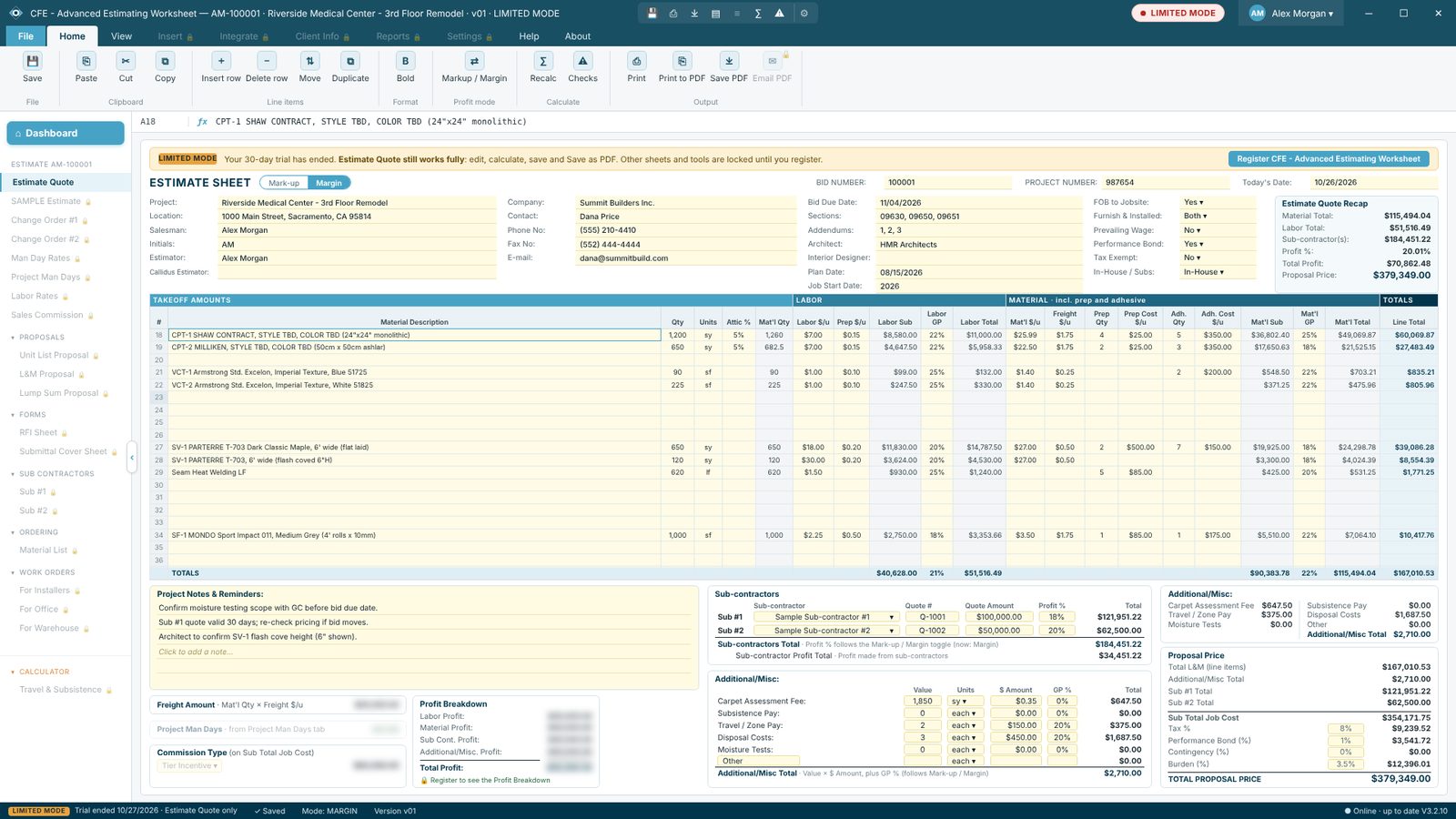
When the trial ends, sign in as usual and your newest estimate opens. A banner says the trial has ended and the Estimate Quote still works fully: new, open, edit, calculate, save and Save as PDF. PDFs carry a "Limited Mode" watermark, and some detail figures (freight, man days, commission and the profit breakdown) are blurred, while the totals and the proposal price stay exact.
Click Register CFE - Advanced Estimating Worksheet any time to subscribe; everything unlocks at once and nothing is lost.

Try CFE - Advanced Estimating Worksheet free for 30 days
Every feature unlocked. No credit card. After the trial, the Estimate Quote keeps working for free, or subscribe for $69.99 a month to keep everything.
Frequently Asked Questions
What happens when the 30-day trial ends?
CFE - Advanced Estimating Worksheet switches to Limited Mode. The Estimate Quote keeps working for free: you can still create, open, edit, calculate and save estimates and save them as PDF (with a Limited Mode watermark). The advanced features lock until you subscribe, and nothing you made is deleted.
How much does CFE - Advanced Estimating Worksheet cost after the trial?
$69.99 a month per seat, billed monthly. A seat is one estimator and covers two computers. You can also pay every 3 months ($209.97), every 6 months ($398.94, save 5%) or yearly ($713.90, save 15%). Every plan includes every feature and auto-renews until you cancel.
Do I need a credit card for the free trial?
No. Download, install and create your user with your name and email. There is one free trial per PC and per email.
How do I subscribe?
In the app go to About › License info and choose a plan, or use a Subscribe button on this page. Checkout is handled securely by Lemon Squeezy. Your license key is emailed right away; paste it in License info and click Activate.
Can I cancel?
Yes, any time, right inside the app: About › License info › Cancel subscription. Everything keeps working until the end of the period you paid for, and you can Resume before then. After a paid subscription ends, your estimates stay on your PC and can still be opened read-only.
CFE - Advanced Estimating Worksheet is made by Commercial Flooring Estimating LLC, estimating commercial flooring since 2008. Last updated: