
CFE BidWise Field: the Crew's Phone Is Now Part of the Job
CFE BidWise Field is a phone app for your installers that works on any iPhone or Android, with no app store. The crew sees the jobs booked for them, the address, plans, rooms and material, never costs or bid totals. The GC super signs change orders and extra work tickets with a finger, and everything comes back to the job by itself.
| Works on | Any iPhone, iPad or Android phone, added to the Home Screen |
|---|---|
| App store | Not needed |
| No signal | Keeps working and sends everything later |
| Prices on the phone | Never |
| GC sign-off | Change orders, extra work tickets and job done |
| Phones | 1 on Personal, up to 25 on Business |
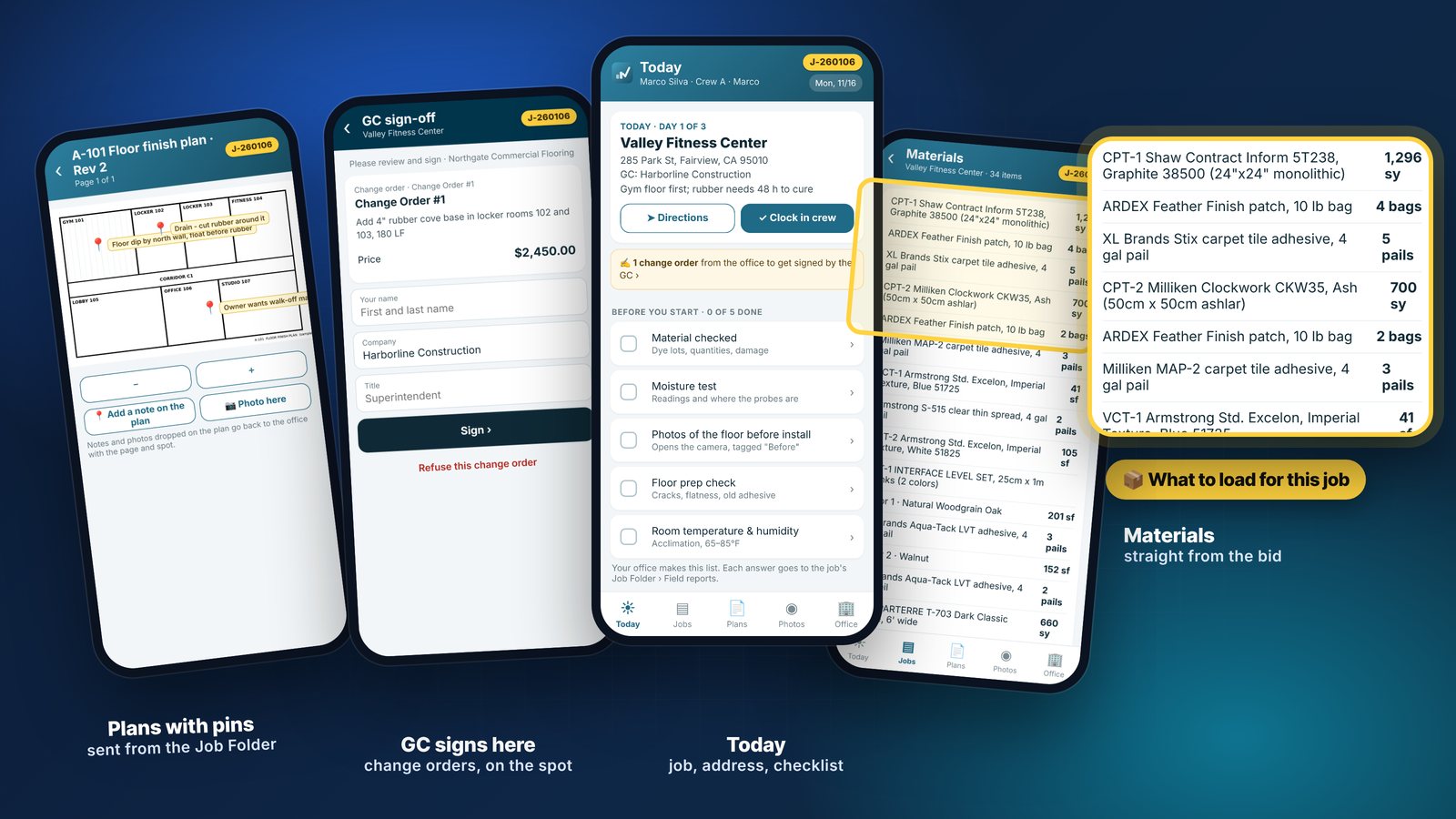
What the crew can do
- See today's job, the address with Directions, work hours, materials and contacts
- Open the plans you sent from the Job Folder, with pins
- Run the Today checklist, a moisture test with readings marked on the plan, a material check with dye lots and shorts, a punch list, a wait or delay log and a safety talk
- Take photos, which go to Job Folder › Photos named with date, room and crew
- Ask for a change order and record job done, both signed by the GC
The GC signs on the phone
The crew hands the phone to the GC super, who signs extra work tickets and change orders with a finger. Signed change orders turn Approved, refused ones Rejected, and a signed copy goes to Job Folder › Change Orders. The GC can get an email copy.
Recorded by itself
Reports land as printable pages in Job Folder › Field reports, a change order request becomes a Draft CO, and moisture over the limit, shorts and waits become job notes. The job's Estimator or PM gets one email per crew visit. It keeps working with no signal and sends everything when signal comes back.
You approve every phone
The Master user makes a crew code with a QR code. A phone that signs in waits for your office until someone approves it on Schedule › Field app.
Put a crew on CFE BidWise Field
- Open Schedule › Field app and make a crew code for the crew.
- The installer scans the QR code, types their name and mobile number and adds the app to the Home Screen.
- Approve the phone on Schedule › Field app.
- Book the crew on an install: the job shows on their phone with address, plans and materials.
- Any iPhone or Android, added to the Home Screen
- Works with no signal
- Plans, checklists, moisture tests, punch list
- GC signs change orders and extra work
- Photos to the Job Folder by themselves
- No costs or bid totals on the phone
One crew phone with photos, extra work and GC sign-off.
Up to 25 crew phones, clock in and hours to Job costs, room progress to Job health, leftovers, material requests, problems and the daily report.
Compare every feature, Personal vs Business
Try CFE BidWise free for 30 days
Every feature unlocked, with a switch to try it as Personal or Business. No credit card. After the trial, the Estimate Quote and Dashboard keep working for free, or pick Personal ($69.99 a month) or Business ($129.99 a month per user).
Frequently Asked Questions
Do installers need to download an app?
No. CFE BidWise Field is a web app added to the Home Screen of any iPhone or Android phone. There is no app store.
Can the crew see our prices?
No. The crew sees jobs, rooms, material and people on the job, never costs or bid totals.
What happens with no signal?
The app keeps working and sends everything when signal comes back.
CFE BidWise is made by Commercial Flooring Estimating LLC, built by a flooring professional with over 20 years in the business. Last updated: