
Flooring Bid Tracker: the CFE - Advanced Estimating Worksheet Dashboard
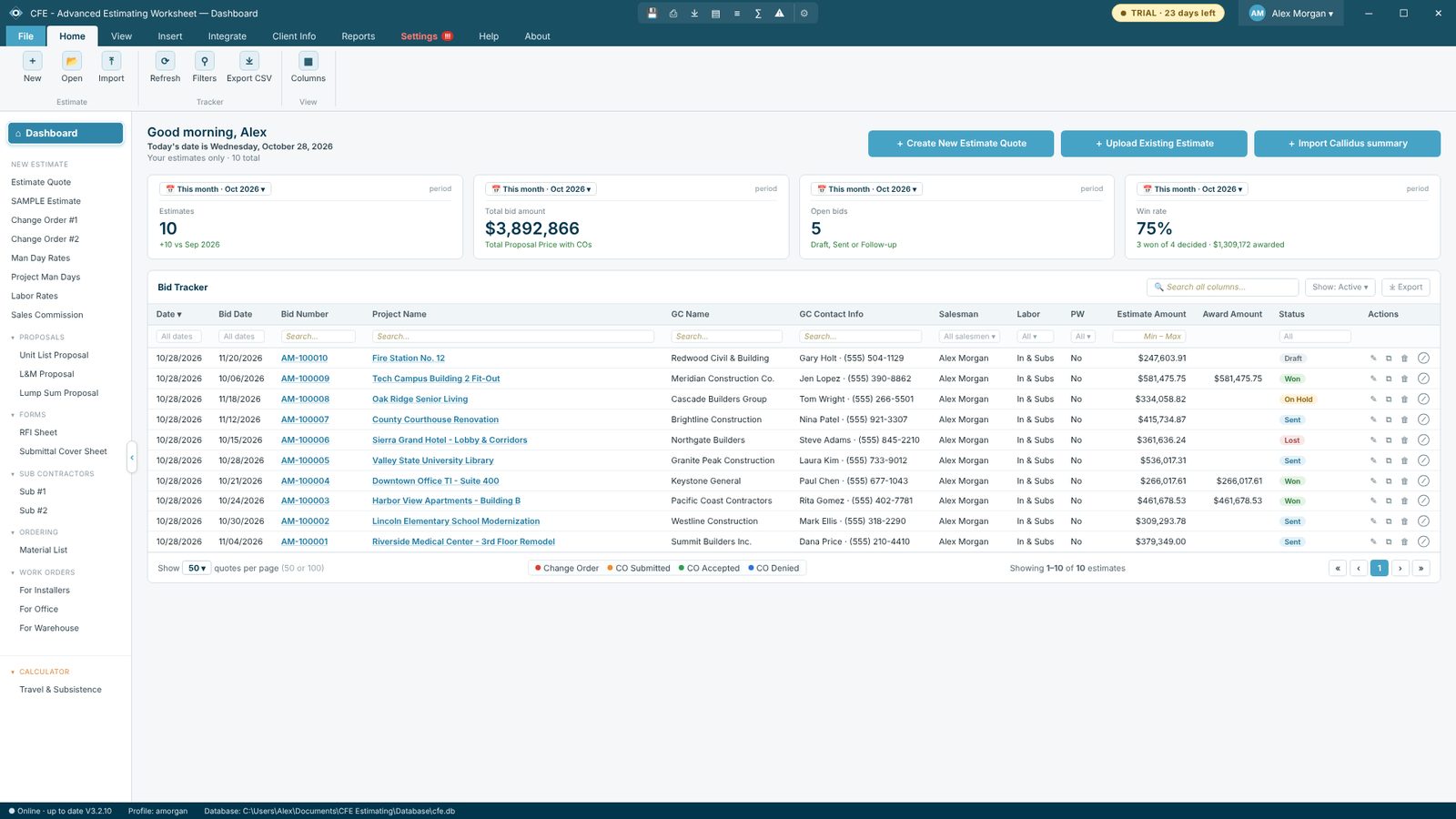
The CFE - Advanced Estimating Worksheet dashboard is a bid tracker for flooring estimates. Every estimate you save is listed with its bid date, GC, amount and status, and the cards on top show how many bids you sent, their total value, how many are still open and your win rate.
How the bid tracker works
Find any bid in seconds
Filter by date, bid number, project, GC, contact, salesman, amount range or status, or search every column at once. Click a bid number or project name to open the estimate.
Status at a glance
Mark each bid Draft, Open, Sent, Won, Lost or On Hold. Change orders show their own colors: change order, CO submitted, CO accepted and CO denied.
Start new work from here
+ Create New Estimate Quote gives the next bid number in your format. + Upload Existing Estimate loads a .cfe file, a CSV or your old Excel worksheet. + Import Callidus summary brings in takeoff quantities.
Edit, duplicate, delete
Each row has actions to edit, duplicate, delete or ignore a bid, so old bids stay out of your numbers without being lost.
Try CFE - Advanced Estimating Worksheet free for 30 days
Every feature unlocked. No credit card. After the trial, the Estimate Quote keeps working for free, or subscribe for $69.99 a month to keep everything.
Frequently Asked Questions
What does the CFE bid tracker show?
Every estimate with its date, bid date, bid number, project name, GC name and contact, salesman, labor type, prevailing wage, estimate amount and status (Draft, Open, Sent, Won, Lost or On Hold).
Can I filter and search bids?
Yes. Every column has its own filter, there is a search box for all columns, and you can show 50 or 100 bids per page and pick which columns to show.
Does it calculate my win rate?
Yes. The dashboard cards show the number of estimates, total bid amount, open bids and win rate for the period you pick.
Can I export the bid list?
Yes. Export CSV saves the bid list for Excel, and the dashboard bid list can be printed.
CFE - Advanced Estimating Worksheet is made by Commercial Flooring Estimating LLC, estimating commercial flooring since 2008. Last updated: