
CFE guide · Tracking and reports
Waiting on Someone, and Folding the Job Check Card
Click the dark red Waiting on someone chip on the Dashboard. The Job Check card shows only the jobs held up by someone outside your team, such as a GC, a submittal or late material. Click Show all to clear it. Click ▲ to fold the card to one line; the counts stay, so nothing is missed, and ▼ opens it again.


Why look at the jobs you are waiting on?
A job held up by a change order nobody signed, a submittal sent back or material still on a truck does not fix itself. Nobody on your team owns the next move, so it is easy to wait a week before anyone calls.
The Waiting on someone chip puts those jobs in one list, so the follow-up call happens today.
The five steps
- Click Waiting on someoneThe dark red chip.
- See the held-up jobsJob Check follows the chip.
- Show allClear the filter.
- Fold the card▲ folds it, ▼ opens it.
- What can go wrongZero, or the wrong jobs.
1Click Waiting on someone

On the Dashboard, the Won jobs · Where we are bar has a dark red chip on the right: Waiting on someone, with the number of jobs held up by someone outside your team. Here it is 1.
Click it. It turns darker, and the Job Check card under it follows.
2See only the held-up jobs

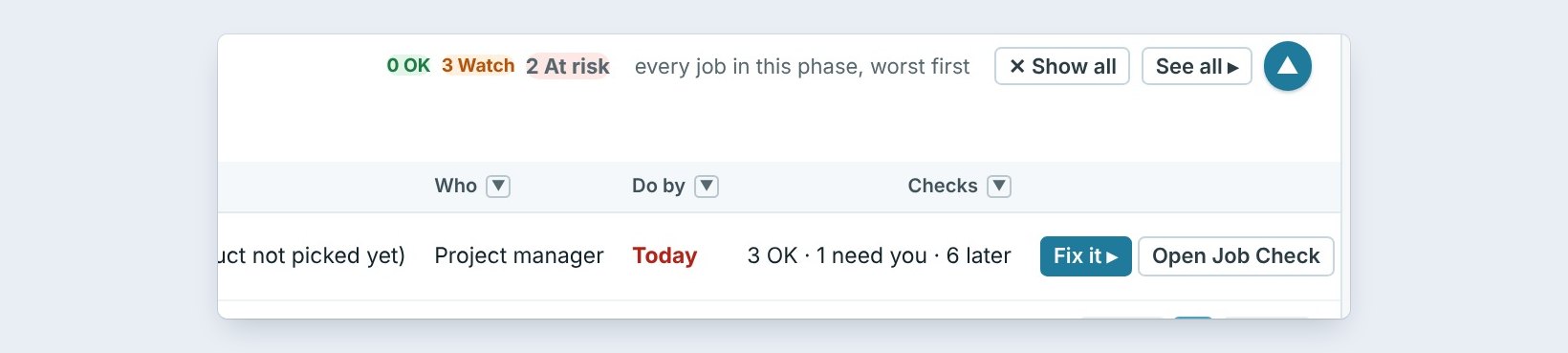
The card now reads Job Check · Waiting on someone · 1 job. Riverside Medical Office Bldg, Phase 2, for Summit Ridge Builders, is installing and At risk: 26 lines are not here yet.
The line says who acts, the project manager, and by when, Today. Click Fix it, or Open Job Check to see every check on the job.
Call the person you are waiting on, then type what they said in the job notes. Tomorrow the next person sees the answer instead of calling again.
3Show every job again

Click ✕ Show all, on the bar or on the card, to see every open job again.
Waiting on someone and the phase chips work the same way: one at a time, and Show all clears it.
4Fold the Job Check card to one line

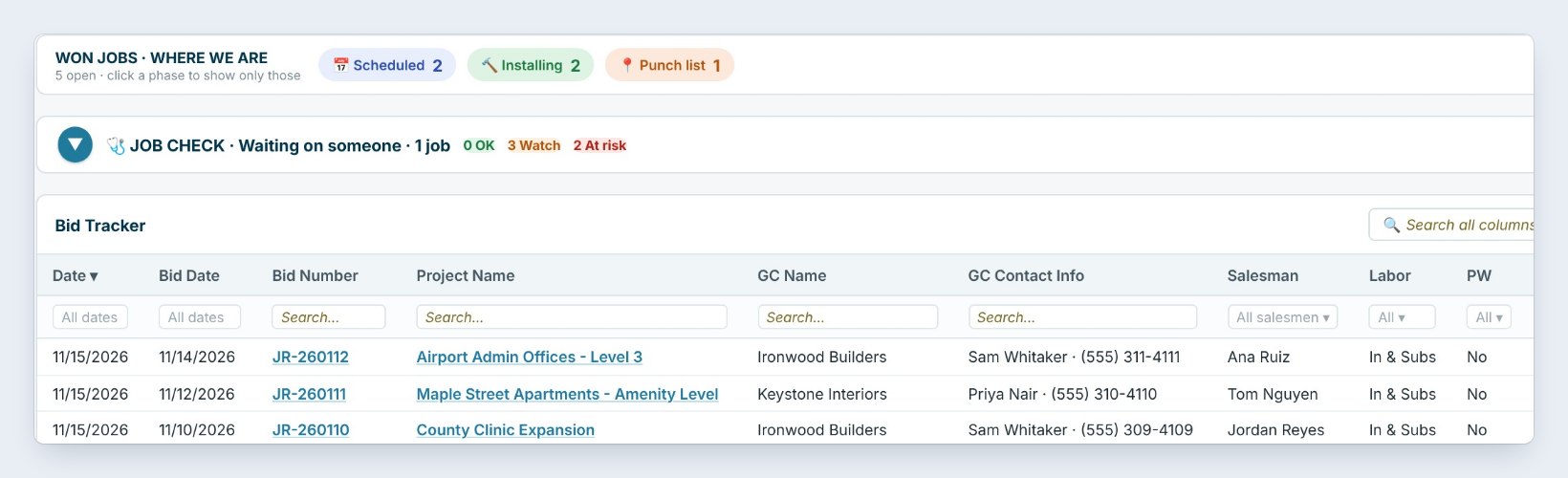
When you need the room for the Bid Tracker, click the round ▲ on the right of the card. It folds to one line: the title and the counts, 0 OK, 3 Watch, 2 At risk.
The counts stay so nothing is missed. Click ▼ to open the table again.
5What can go wrong, and how to fix it
Waiting on someone shows 0. No open job is held up by someone else right now. That is good news.
A job is held up but not on the list. The chip counts what BidWise knows a job is waiting on: a change order not signed, a submittal sent back or late material. Open the job in Job Check and check that the change order, submittal or delivery is entered.
The card stays folded. Click ▼. The counts in the folded line are still live.
Worked example: one held-up job
November 20, Waiting on someone picked:
| Job | GC | Phase | State | Who | By |
|---|---|---|---|---|---|
| Riverside Medical Office Bldg, Phase 2 | Summit Ridge Builders | Installing | At risk | Project manager | Today |
One call to Summit Ridge, written in the job notes, and the card goes back to Show all.
What to do next
Next, log follow-up calls on your bids in Log follow-up calls and count follow-ups this month.
Stop waiting on the GC
Job Check is part of CFE BidWise Business. Start with the 30-day free trial, no credit card.
Frequently Asked Questions
What does Waiting on someone count?
Won jobs held up by someone outside your team, such as a change order to sign, a submittal sent back or late material.
Does folding the card hide problems?
No. The folded line keeps the OK, Watch and At risk counts.
How do I clear the filter?
Click Show all on the bar or on the card.

Written by
Cristian Valcu – Founder & CEO, Commercial Flooring Estimating LLC
Cristian has estimated commercial flooring for over 20 years and built CFE BidWise around the way flooring contractors actually price, propose and track their bids.
Last updated: