
Flooring Invoicing Software: Bill Every Won Job From the Bid
CFE BidWise makes the invoice from the won bid, at sell prices, so nothing is retyped. Bill in full, as a deposit or a custom amount, add approved change orders, hold and release retainage, and let Collect & bill tell you each morning who owes you and what you forgot to send.
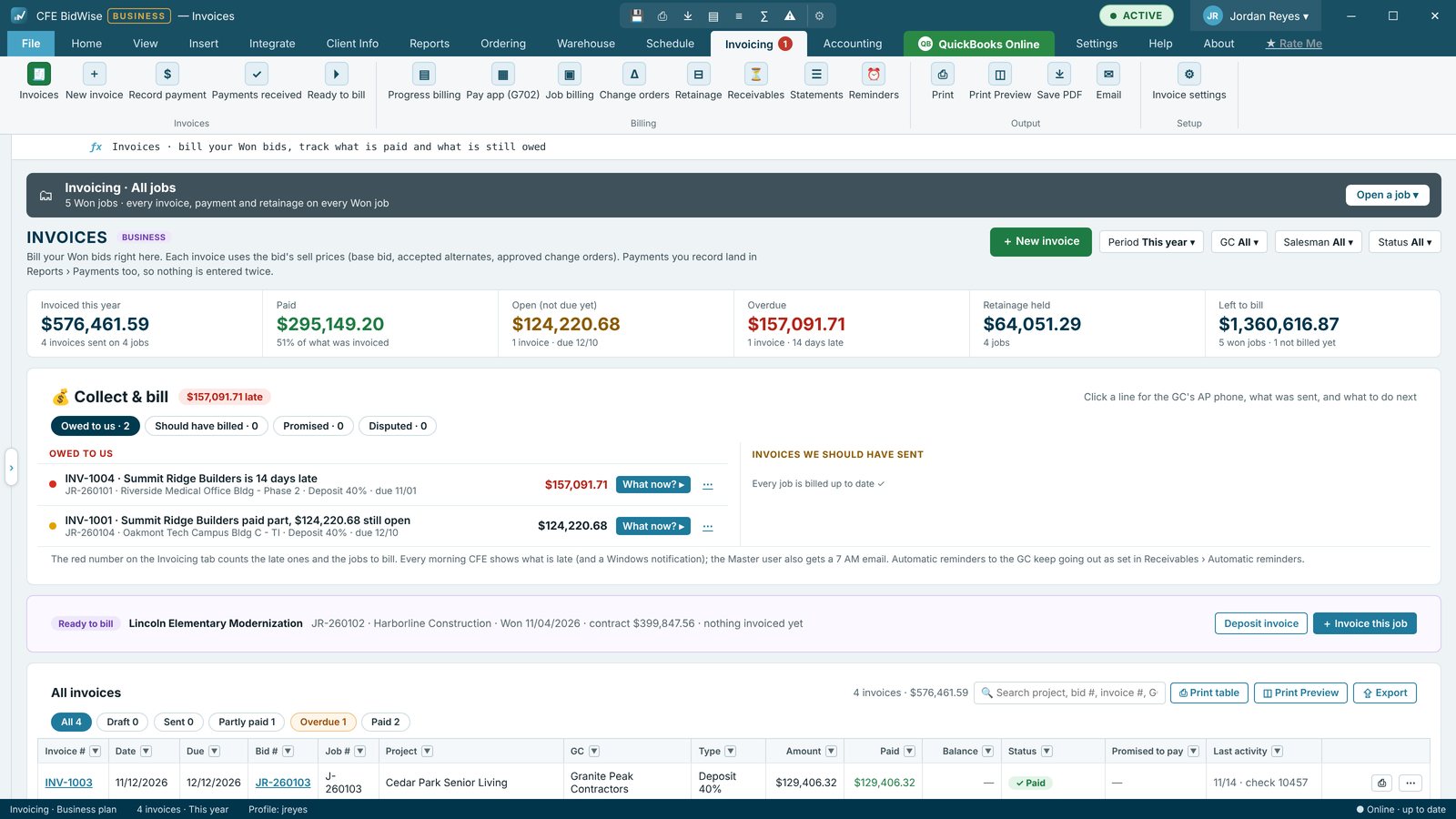
From the bid to the invoice
Invoicing › New invoice lists ① new jobs not invoiced yet and ② jobs with something left to bill. Pick one and the lines come from the bid at sell prices: the base bid, accepted alternates and approved change orders. Each invoice has its own number, terms, job number, PDF, print and email.
A Due to bill this month list shows jobs whose install is booked or done and not billed since, and approved change orders waiting to be billed, so nothing slips.
Collect & bill
Collect & bill has two lists. Owed to us shows invoices that are late, short-paid, promised, disputed or due in 10 days. Invoices we should have sent shows this month's pay app and retainage not billed yet. Each line has What now?: call, send a reminder or statement, save a promised date, record a payment, mark it disputed, check lien rights or hand it to the owner. A promised date keeps the reminders quiet; a missed one shows promise broken.
Emails that get paid
Invoices go out from your own email (Microsoft 365, Outlook.com, Gmail or SMTP) in the look you pick: Classic, Branded or Modern summary, with your logo, the amount due, the PDF attached and a Pay Now button when Stripe is connected.
Team billing: estimators send, the office invoices
On CFE Business, the estimator presses 📨 Ready to bill when a job is done and says what to bill: the rest of the job, a deposit, this period's work or an approved change order. The person who invoices sees a banner and a red count, and the invoice and payments are copied back to the estimator's bid. See how the Master user sets who invoices.
Using other invoicing software?
One switch in Invoice settings, "Our company does its invoicing in other software", hides Invoicing, reminders and Collect & bill. Turn it back on anytime.
- Invoice in full, as a deposit % or a custom amount
- Lines from the bid at sell prices, with approved change orders
- Record payments; one Payments list, never counted twice
- Collect & bill with What now? on every line
- A morning pop-up and, on Business, a 7 AM email from the Master PC
- Search by project, bid #, invoice # or GC
A shorter invoice form, deposits and full invoices, record payment, Payments received, Ready to bill and Pay Now.
Adds progress billing by line, pay apps, retainage held and released, receivables aging, GC statements, automatic reminders, Invoice selected and the three email looks.
Compare every feature, Personal vs Business
Try CFE BidWise free for 30 days
Every feature unlocked, with a switch to try it as Personal or Business. No credit card. After the trial, the Estimate Quote and Dashboard keep working for free, or pick Personal ($69.99 a month) or Business ($129.99 a month per user).
Frequently Asked Questions
Can I invoice a deposit before the job starts?
Yes. Invoice a won bid in full, as a deposit percent or as a custom amount. The next invoice picks up what is left to bill.
Are change orders added to the invoice?
Approved change orders are added to the job's contract and can be billed on the next invoice or pay app. A CO to bill badge shows on jobs with approved change orders waiting.
Can I keep invoicing in QuickBooks?
Yes. On CFE Business the Master user picks one place to make invoices: in CFE BidWise, copied to QuickBooks Online, or in QuickBooks, shown read-only in CFE. Or turn Invoicing off with one switch.
CFE BidWise is made by Commercial Flooring Estimating LLC, built by a flooring professional with over 20 years in the business. Last updated: