
Download CFE - Advanced Estimating Worksheet for Windows
CFE - Advanced Estimating Worksheet is free to download and free to use for 30 days, with every feature unlocked and no credit card required. After the trial it is $69.99 a month. If you don't subscribe, the Estimate Quote worksheet keeps working for free; only the advanced features lock.
Download Free Trial for WindowsWindows 10 & 11 · 64-bit · 30 days free · no credit cardVersion 3.2.10 · 4 MB setup, digitally signed by Commercial Flooring Estimating LLC · How the install works · Offline installer & MSI
- ✓ 30 days free
- ✓ No credit card
- ✓ Estimate Quote stays free
- $69.99/mo for everything
- Made by
- Commercial Flooring Estimating LLC
- Runs on
- Windows 10 & 11, 64-bit
- Free trial
- 30 days, no credit card
- Price after
- $69.99/month per seat
- After the trial
- Estimate Quote stays free
- Seat covers
- 1 estimator, 2 computers
- Your data
- Stored on your PC
- Version
- 3.2.10 (Oct 2026), signed
Install in four steps
The file you download is a 4 MB web installer, signed by Commercial Flooring Estimating LLC. It fetches the full program from our server, so the download starts right away and you always get the newest version.
- Download the setup fileClick Download. Your browser saves CFE-Advanced-Estimating-Worksheet-Setup.exe (about 4 MB).
- Run it and click InstallTick I agree, click Install and say Yes to Windows. It adds WebView2 if needed and installs the program. Click Open CFE.
- Create your userName, email, company and a password. A 6-digit code confirms your email. No card.
- Start estimatingYour 30-day trial starts with every feature on. Open the SAMPLE Estimate to see a finished job.
Updates come by themselves: CFE tells you when a new version is ready, or click Help › Check now. Your estimates and settings stay as they are.
Offline installer and MSI for IT
Most people only need the Download button above. These are for PCs without internet during the install, and for IT departments that deploy software to many computers. All three are signed and install the same program.
| File | Best for | Download |
|---|---|---|
| Web setup (.exe, about 4 MB) | Everyone. Always installs the newest version. | Setup.exe |
| Offline installer (.exe) | PCs with slow or blocked internet. WebView2 is inside. | Setup-Offline.exe |
| MSI package (.msi) | IT: Group Policy, Intune or silent installs (msiexec /i … /qn). Needs WebView2, which Windows 10 and 11 already have. | .msi 3.2.10 |
Try CFE - Advanced Estimating Worksheet free for 30 days
Every feature unlocked. No credit card. After the trial, the Estimate Quote keeps working for free, or subscribe for $69.99 a month to keep everything.
Free for 30 days, then $69.99 a month, and the Estimate Quote stays free
The trial is the full program. When it ends, CFE - Advanced Estimating Worksheet does not stop working: it goes into Limited Mode, where the Estimate Quote keeps working and the advanced features wait for a subscription. Subscribe any time and everything unlocks at once, with all your estimates still there.
| What you can do | 30-day free trial | After the trial (Limited Mode, free) | Subscribed ($69.99/mo) |
|---|---|---|---|
| Estimate Quote: new, open, edit, calculate, save | ✓ Yes | ✓ Yes | ✓ Yes |
| Totals and Total Proposal Price | ✓ Exact | ✓ Exact | ✓ Exact |
| Save the estimate as PDF | ✓ Yes | PDF with a "Limited Mode" watermark | ✓ Yes, plus print and email |
| Dashboard and bid tracker | ✓ Yes | 🔒 Locked | ✓ Yes |
| Change orders and alternates | ✓ Yes | 🔒 Locked | ✓ Yes |
| Proposals, RFI and submittal sheets | ✓ Yes | 🔒 Locked | ✓ Yes |
| Man days, labor rates, sales commission | ✓ Yes | 🔒 Locked | ✓ Yes |
| Material list and work orders | ✓ Yes | 🔒 Locked | ✓ Yes |
| Import, export, email, settings, reports | ✓ Yes | 🔒 Locked | ✓ Yes |
| Your saved estimates | ✓ Kept | ✓ Kept, nothing is deleted | ✓ Kept |
| Credit card needed | No | No | At checkout only |
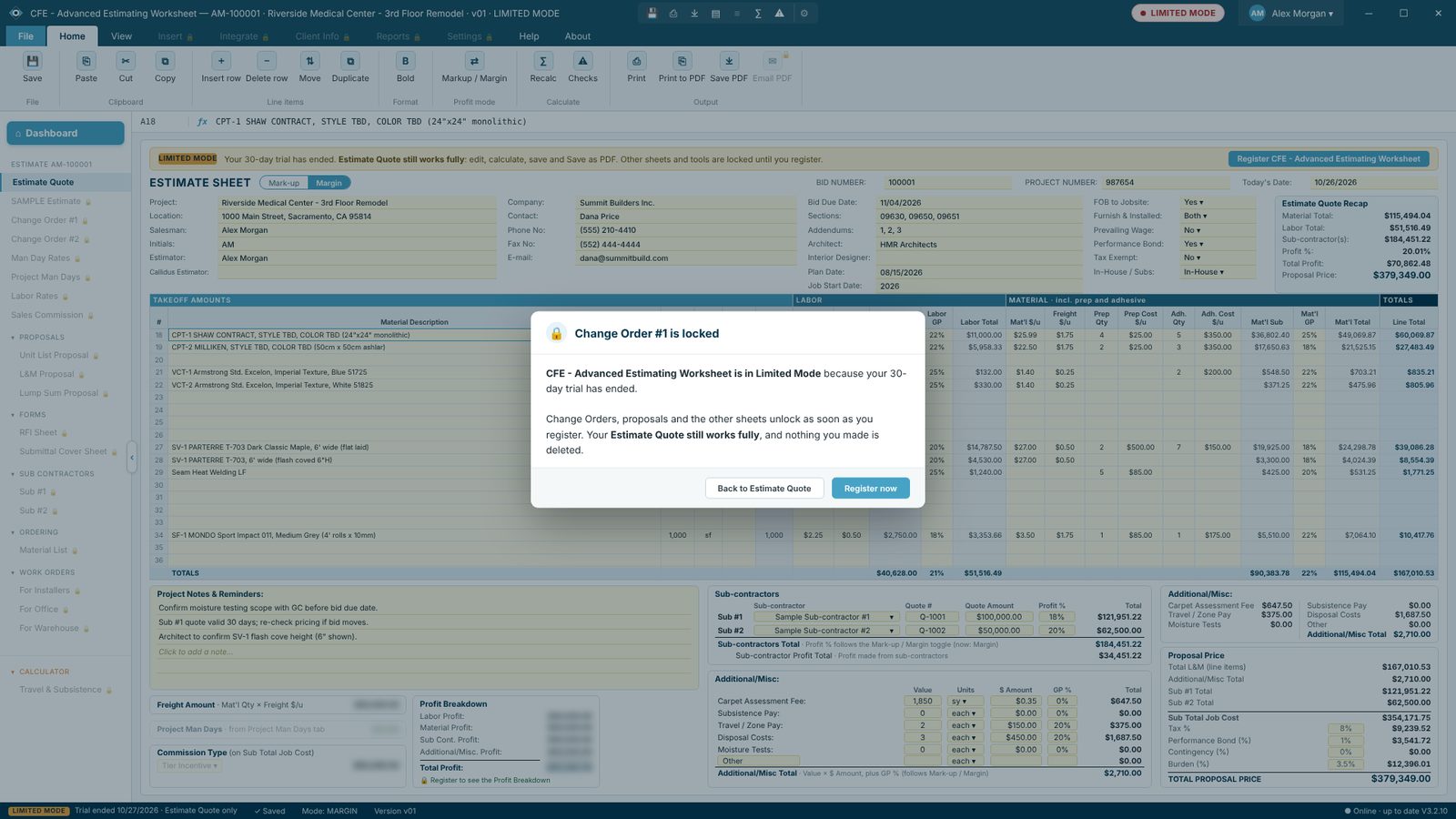
What Limited Mode looks like
A red LIMITED MODE badge sits next to your name, and locked items in the menu carry a small lock. Click one and CFE - Advanced Estimating Worksheet tells you what it does and offers Register now. Your Estimate Quote, its totals and the Total Proposal Price stay exact.
What you get in CFE - Advanced Estimating Worksheet
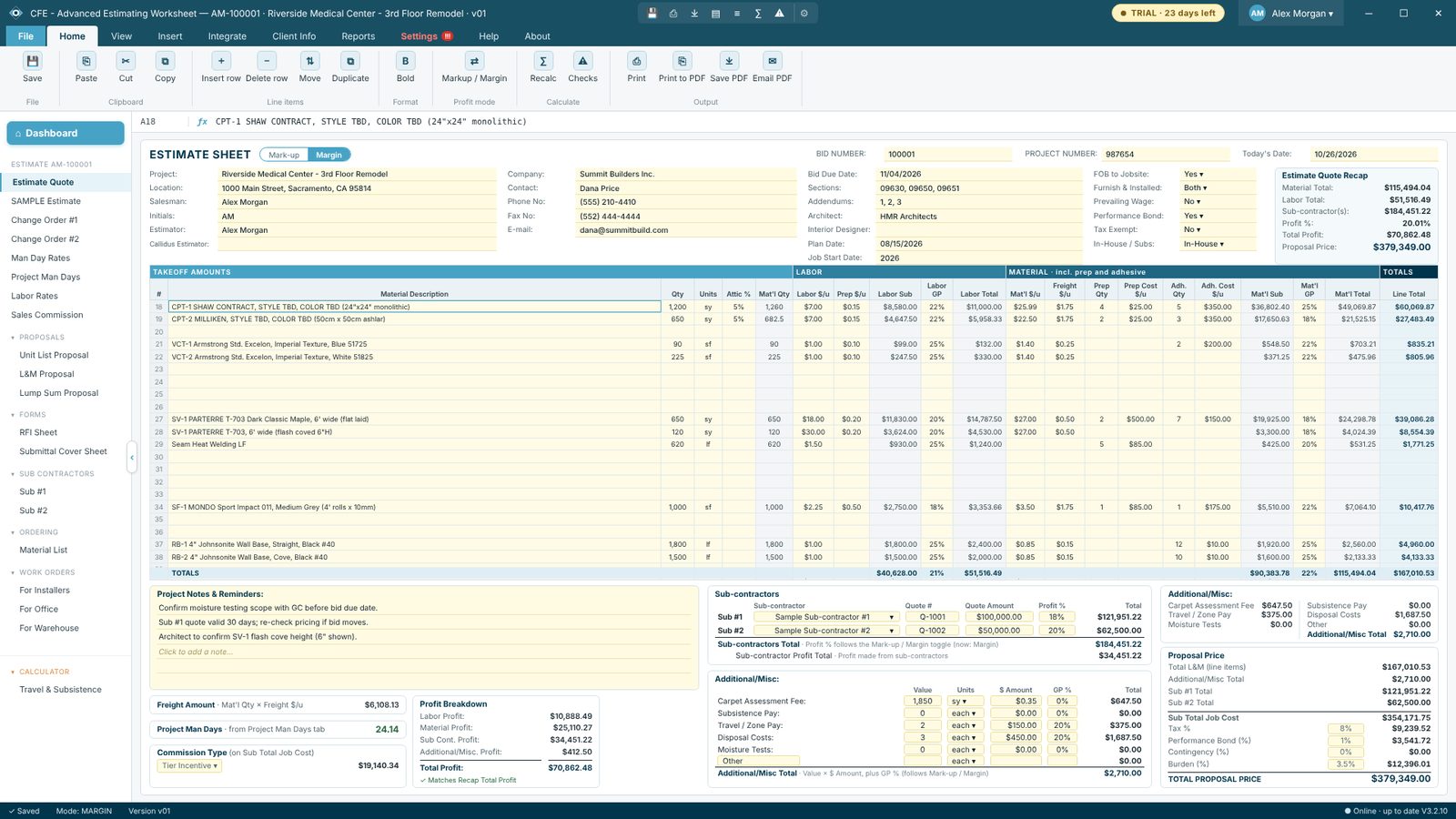
Built by a commercial flooring estimator from the Advanced Estimating Worksheet that flooring contractors have used in Excel, rebuilt as a Windows program with a database, a bid tracker and one-click proposals.

Estimate Quote worksheet
Line items with quantity, attic stock, labor, prep, adhesive, freight and material, priced by markup or margin, with sub-contractors, tax, bond and burden.
See how it works →
Dashboard and bid tracker
Every estimate in one list with bid date, GC, amount and status. Filter any column, see total bid amount, open bids and your win rate.
See how it works →
Change orders and alternates
Change orders and alternates on the same sheet layout, each with its own ID, added to the Total with COs.
See how it works →
Proposals in one click
Unit List, L&M and Lump Sum proposals on your letterhead, with terms, exclusions and qualifications, plus RFI and submittal sheets.
See how it works →
Man days, labor and commission
Man day rates, project man days, labor rates with overtime, and five sales commission systems side by side.
See how it works →
Material list and work orders
Order list with vendor, PO and status, plus work orders for installers, office and warehouse, made from the estimate.
See how it works →All the features, fully customizable
From the first takeoff quantity to the installer’s job form. Set it up with your own logo, letterhead, rates, defaults and proposal wording.
Estimating
- Estimate Quote worksheetOne page per bid: labor, material, prep, adhesive, freight, attic stock, subs, tax, bond and burden.
- Markup or MarginOne switch changes how every GP % is applied, on every line, sub and misc item.
- Change orders & alternatesUp to nine per estimate, each with its own ID and totals.
- Man days & labor ratesProduction rates, project man days, straight time, overtime and burden.
- Sales commissionFive commission systems, figured on every bid.
- Callidus takeoff importRead a Callidus Summary Report PDF or the Excel worksheet (.xlsm) straight into the estimate.
- Travel & subsistenceDrive time and mileage past your free zone, hotel nights and meals, from the crew plan.
Proposals, ordering & field paperwork
- Proposals on your letterheadUnit List, L&M and Lump Sum proposals in one click.
- Material orderingMaterial List with vendor, PO number, order date and status for every product.
- Installer pick ticketsWarehouse work orders list what to pull and load for each job.
- Installer job formsWork orders for installers and the office with scope, rooms and man days.
- RFI & submittal sheetsFilled in from the estimate’s project info.
- Sub-contractor profilesQuote, scope, insurance and approvals for Sub #1 and Sub #2.
Reports, customizing & team
- Report generatingPrint or PDF any sheet, export to Excel or CSV, email the PDF.
- Reports tabEvery report for a job on one screen: print, PDF, email or export each one.
- Fully customizableYour logo, letterhead, rates, defaults, proposal terms, exclusions and qualifications.
- Bid tracker dashboardEvery bid with GC, amount and status; won and lost details, win rate and totals.
- Team seatsA Master user invites estimators, adds or reduces seats.
- Desktop & laptopTwo computers per seat with sync through OneDrive, Google Drive or Dropbox.
- Safe dataAutosave, version history, daily cloud backups and password recovery codes.
- Help built inFull User Guide, Remote Support and automatic updates (Help › Check now).
System requirements
- Operating system
- Windows 10 or Windows 11, 64-bit
- Display
- 1366×768 or larger; designed for full HD (1920×1080) and up
- Disk space
- About 300 MB once installed
- Install rights
- Windows asks once for permission (it installs for all users in Program Files)
- Internet
- Needed to install, update and check the license; estimating works offline
- Also uses
- Microsoft Edge WebView2 Runtime (part of Windows 10 and 11; added by the installer if missing)
- Not supported
- Mac, Linux, 32-bit Windows, tablets and phones
Frequently Asked Questions
Is CFE - Advanced Estimating Worksheet really free to download?
Yes. The download and the 30-day trial are free, with every feature unlocked. No credit card is asked for. You only create your user inside the app with your name and email.
What happens when the 30-day trial ends?
CFE - Advanced Estimating Worksheet switches to Limited Mode. The Estimate Quote keeps working for free: you can still create, open, edit, calculate and save estimates and save them as PDF (with a Limited Mode watermark). The advanced features lock until you subscribe, and nothing you made is deleted.
How much does CFE - Advanced Estimating Worksheet cost after the trial?
$69.99 a month per seat, billed monthly. A seat is one estimator and covers two computers. You can also pay every 3 months ($209.97), every 6 months ($398.94, save 5%) or yearly ($713.90, save 15%). Every plan includes every feature and auto-renews until you cancel.
Which Windows versions does it run on?
Windows 10 and Windows 11, 64-bit. It uses the Microsoft Edge WebView2 Runtime that is already part of Windows 10 and 11; the installer adds it if a PC is missing it.
Why is the download file so small?
You download a small setup file (a web installer, about 4 MB). When you run it and click Install, it downloads the latest full version of CFE - Advanced Estimating Worksheet from our server, adds Microsoft Edge WebView2 if the PC needs it, and installs it, so you always start on the newest build. An offline installer and an MSI for IT departments are also on this page.
Is the installer digitally signed?
Yes. The setup files, the MSI and the program itself are code-signed by Commercial Flooring Estimating LLC. Right-click the downloaded file, choose Properties and open the Digital Signatures tab to see it.
How do I get updates?
CFE - Advanced Estimating Worksheet checks for updates by itself and tells you when a new version is ready. You can also click Help › Check now. The update installs in a minute and reopens the program; your estimates and settings stay as they are.
Where is my estimating data stored?
On your own PC, in Documents\CFE Estimating. Every estimate is saved in a local database plus a .cfe file, autosaved every 30 seconds, and can be backed up to OneDrive, Google Drive, Dropbox or a network folder.
Can I use one license on two computers?
Yes. Each seat covers two computers, for example a desktop and a laptop, used one at a time. Open it on the other computer and it asks Move it here?; the first computer turns read-only and keeps a copy of any unsaved work. Desktop and laptop sync keeps your estimates the same on both through OneDrive, Google Drive or Dropbox.
Can my whole team use it?
Yes. Choose Team and the number of seats when you subscribe. The person who buys is the Master user: they invite estimators by email with a 6-digit team code, add or reduce seats, and remove users from Integrate › Team.
Do I need the internet to use it?
Only to install it, to check for updates and to check your license now and then. Estimating works offline.
Can it import my Callidus takeoff?
Yes. Import a Callidus Summary Report PDF or the Excel worksheet (.xlsm) and the quantities fill the Estimate Quote. The PDF is read on your PC by plain code; nothing is uploaded and no AI reads your plans.
Is there a user guide?
Yes. The full User Guide is built into the program (Help › User Guide) and is also online, with step-by-step help for every screen. If you get stuck, Help › Remote Support lets us look at your screen with your permission.
CFE - Advanced Estimating Worksheet is made by Commercial Flooring Estimating LLC, estimating commercial flooring since 2008. Last updated: