
My day: Built-in Reminders That Run the Flooring Office
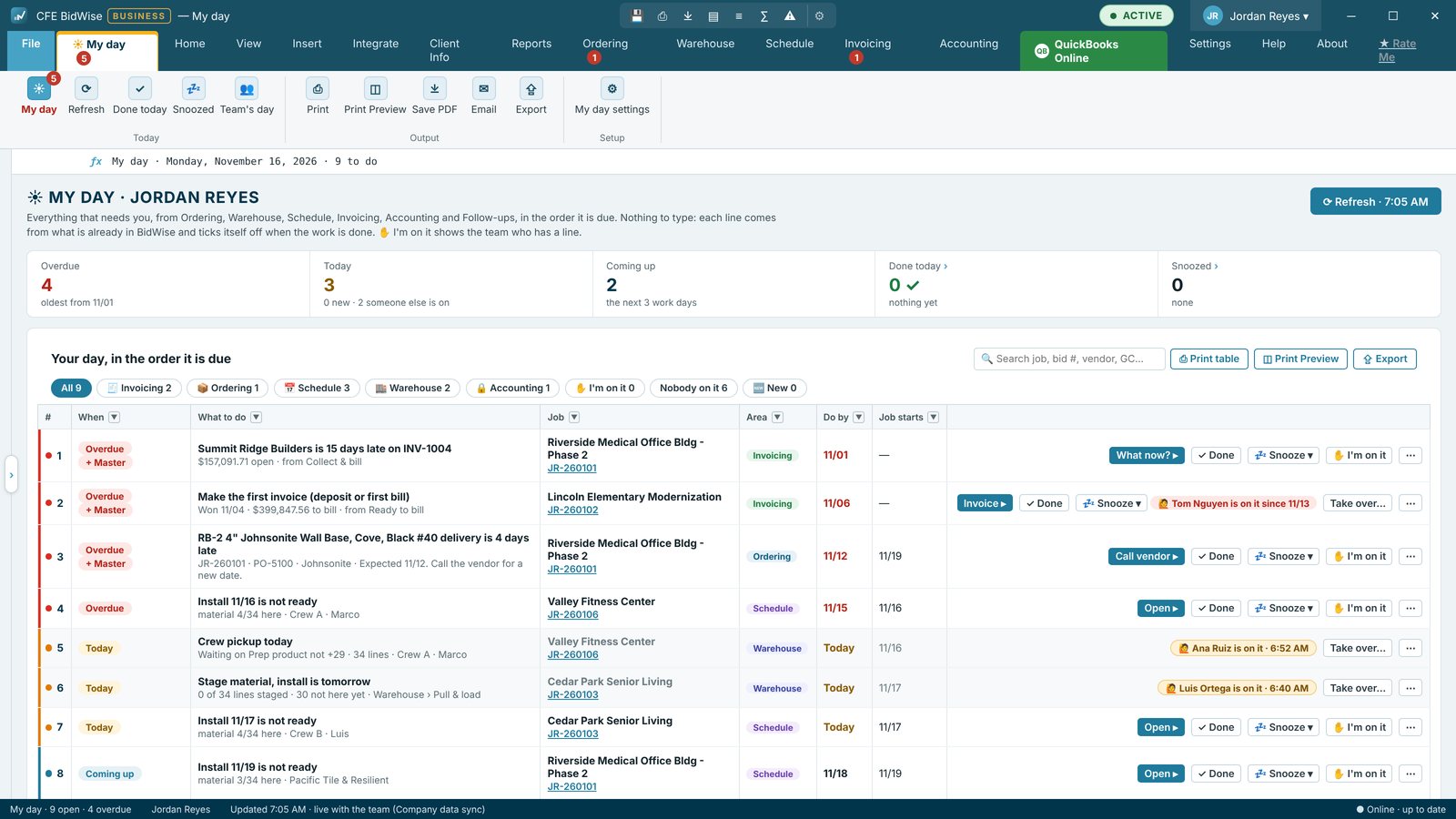
My day is a to-do list that CFE BidWise makes for each person every morning, with reminders built in. It gathers what needs that person today from across the app: late orders, deliveries and pickups, installs that are not ready, jobs to bill, money to collect, bills coming due and job follow-ups. Overdue comes first, then Today and Coming up, and Do it ▸ opens the exact screen to handle each line.
| What it is | A ☀ My day tab with each person's to-do list for the day |
|---|---|
| Where the lines come from | Ordering, Warehouse, Schedule, Invoicing, Accounting and job follow-ups |
| Reminders | Good morning window, 10 AM and 2 PM nudges for overdue lines, Windows notifications, optional daily email |
| Who sees what | Only lines from the areas a person can open |
| Plans | Personal and Business; Business adds team features |
Why a flooring office needs built-in reminders
A commercial flooring office juggles dozens of small deadlines at once. A carpet tile order that has to go out today to make an install date. A delivery that was due yesterday. A pay app that has to reach the GC before the cutoff. Retainage that can be billed this week. A follow-up call promised to a GC. None of these are hard on their own; the cost is in the one that gets forgotten.
Most offices keep these reminders in sticky notes, inboxes and memory. My day replaces that with one list per person, built from the work already in CFE BidWise, so nothing depends on someone remembering.
What lands on your list
- Ordering: order reminders, material not ordered yet, late deliveries
- Warehouse: pickups today, jobs to stage, deliveries due, damaged material and mixed dye lots
- Schedule: installs that are not ready and won jobs with no install booked
- Invoicing: Collect & bill lines and the first invoice for jobs ready to bill
- Accounting: bills coming due
- Job follow-ups: calls and visits you promised, on the day they come due
Each person only sees lines from the areas they can open. A new won job lands on the list where its dates put it, and lines tick themselves off when the work is done somewhere else.
The reminders built in
- Good morning window once a day at the time you pick, with the day's count and the first lines, and Remind me at 10:00 AM if you are not ready yet
- 10 AM and 2 PM nudges while overdue lines are still open
- A Windows notification when a new line arrives
- A red count of overdue and today lines on the My day tab, on every screen
- An optional daily email of your list, 7 AM by default, sent from your own email
- Count work days only, so Coming up skips weekends
Handle it in one click
Do it ▸ opens the exact screen for that line: the Material List to call the vendor, the invoice to send, the install to book. ✓ Done asks how it was done (done another way, or not needed) and keeps a note. Snooze moves a line to later today, tomorrow morning, next Monday or a day you pick; on ordering lines it is the same snooze as Order reminders, so the two never disagree.
Print it for the warehouse or the truck
Print Preview makes a to-do sheet with a tick box in front of each line and a Notes column, for anyone who works better on paper. Export sends the list to Excel.
Run the whole team's day (Business)
On CFE BidWise Business, ✋ I'm on it shows the team who is working each line within a minute, so two people never chase the same vendor. Take over a line (the app asks the person who has it first, unless it is left from an earlier day), or hand it to a teammate. The Master user sees lines that have been overdue for a set number of days.
Team's day shows everyone's open lines, who is on what, and a monthly log of what each person did. The Master user also decides, per role, what My day shows.
Set up My day for your office
- Open the ☀ My day tab. Your list is already there.
- Open My day settings and pick the time for the Good morning window, the reminders, Windows notifications and the daily email.
- Use Do it ▸ on each line, or ✓ Done and Snooze.
- On Business, the Master user sets what each role sees and whether lines can be handed to teammates.
- One list for each person: Overdue, Today and Coming up
- Lines from ordering, warehouse, schedule, invoicing, accounting and follow-ups
- Good morning window, 10 AM and 2 PM nudges, Windows notifications
- Do it ▸ opens the right screen
- Done with a note, or Snooze
- Printable to-do sheet and optional daily email
My day with every built-in reminder, Do it, Done, Snooze, the printable sheet and the daily email.
Adds I'm on it, Take over, Hand to a teammate, overdue lines shown to the Master user, Team's day with its monthly log, and settings per role.
Compare every feature, Personal vs Business
Try CFE BidWise free for 30 days
Every feature unlocked, with a switch to try it as Personal or Business. No credit card. After the trial, the Estimate Quote and Dashboard keep working for free, or pick Personal ($69.99 a month) or Business ($129.99 a month per user).
Frequently Asked Questions
What is My day in CFE BidWise?
My day is a tab with each person's to-do list for the day. CFE BidWise builds it from orders, deliveries, installs, invoices, bills and follow-ups, with Overdue lines first.
Do I have to type the to-do list?
No. My day builds itself from what CFE BidWise already tracks, and lines tick themselves off when the work is done.
What reminders does My day send?
A Good morning window at the time you pick, reminders at 10 AM and 2 PM while overdue lines are open, a Windows notification for new lines, and an optional daily email.
Will two people work the same line?
On CFE Business, I'm on it shows the team who is working each line, and lines can be taken over or handed to a teammate.
Is My day on the Personal plan?
Yes. Every built-in reminder is on both plans. The team features come with CFE Business.
CFE BidWise is made by Commercial Flooring Estimating LLC, built by a flooring professional with over 20 years in the business. Last updated: