
Bid Follow-Ups: Every Sent Bid Gets Followed Up, On Time
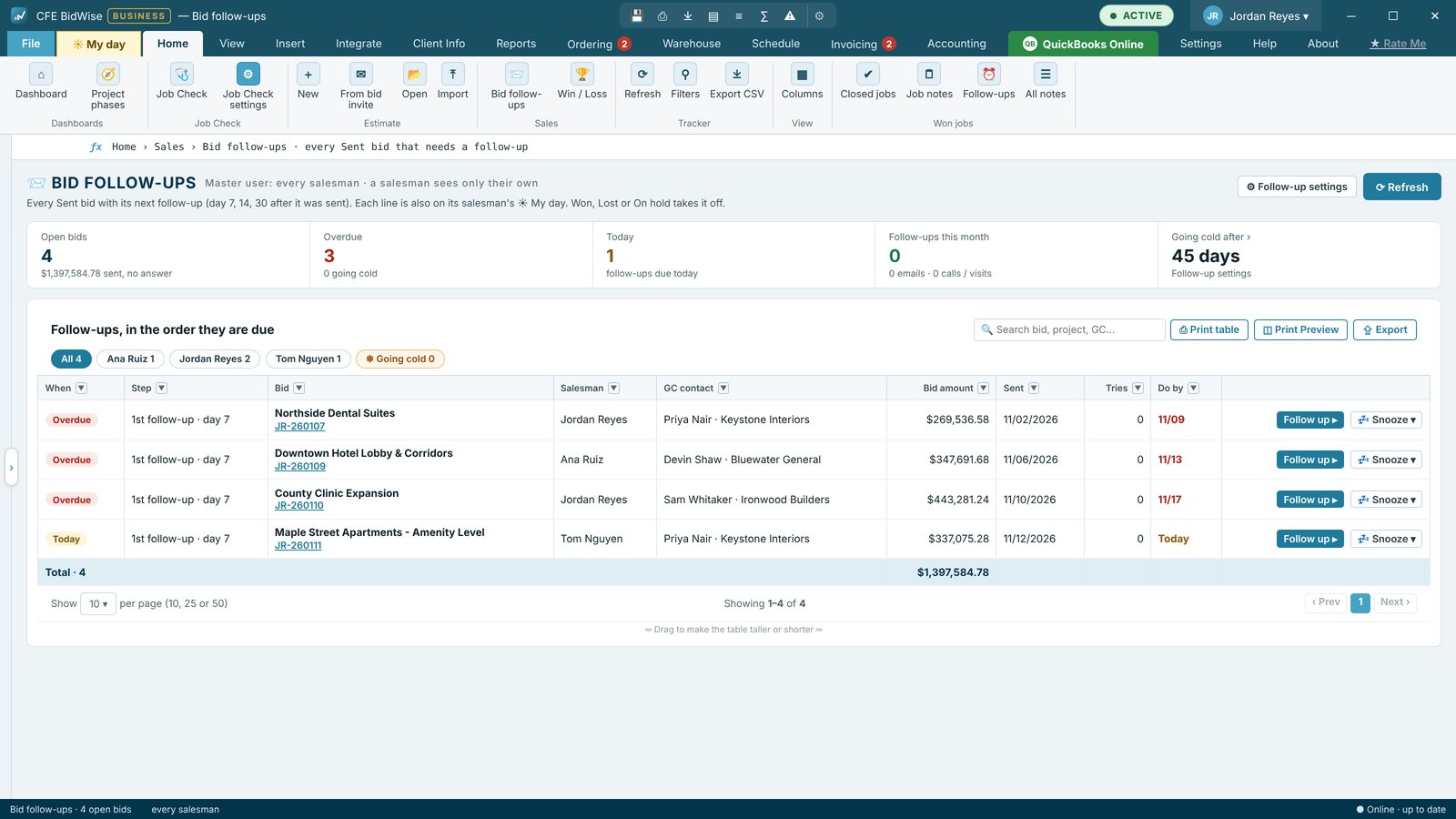
Every bid you send gets a 1st, 2nd and 3rd follow-up, 7, 14 and 30 days after it went out, on the salesman's My day. Follow up writes the email from your template, or logs a call or a visit, and moves the bid to Follow-up. At 45 days a bid is Going cold and CFE BidWise asks once what happened.
| Follow-ups | 1st, 2nd and 3rd, at day 7, 14 and 30 by default |
|---|---|
| Going cold | At 45 days, asks once what happened |
| Ways | Email from your template, phone call or visit |
| Where | Home › Bid follow-ups, My day and the Bid Tracker |
| Plan | Personal and Business |
Why follow-ups win flooring bids
General contractors get several flooring numbers on every bid day. The contractor who calls back, answers the scope question and offers an alternate is often the one who gets the job. The hard part is remembering to do it for every bid, week after week. CFE BidWise does the remembering.
A follow-up plan for every sent bid
When a bid is sent, it gets a 1st follow-up at day 7, a 2nd at day 14 and a 3rd at day 30, counted from the day it first went out. Each one lands on the salesman's My day on its day. At 45 days with no answer, the bid shows Going cold and asks once: still open, Lost, Won, On hold, or stop following up.
Email, call or visit in one window
Follow up opens a window with the GC contact and the bid's history. Pick Email and the message is written from your template with the project, the amount and the date sent: send it from CFE BidWise, copy it, or open it in Outlook. Pick Phone call or Visit and type what was said. Every follow-up is kept on the bid and the bid moves to Follow-up on the Bid Tracker.
Count what the team did
Home › Bid follow-ups shows open bids, overdue and today's follow-ups, and Follow-ups this month, emails and calls, which keeps counting after a bid is won or lost. Salesmen see their own bids and count; the Master user sees everyone's. On a team, follow-ups made on any PC show up for everyone.
Your days, your words
Follow-up settings set the days for each follow-up, whether each is an email or a call, the days before a bid goes cold, a dollar amount under which bids are skipped, and the three email templates. Drafts can get their own due-date reminder too.
- A 1st, 2nd and 3rd follow-up on every sent bid
- Emails written from your templates
- Send from BidWise, copy or open in Outlook
- Log calls and visits
- Going cold at 45 days
- Follow-ups this month by salesman
- Lines on each salesman's My day
Bid follow-ups for every bid you send, with templates, calls and Going cold.
Adds follow-ups across the team: each salesman sees their own, the Master user sees everyone's, with Follow-ups this month per salesman.
Compare every feature, Personal vs Business
Try CFE BidWise free for 30 days
Every feature unlocked, with a switch to try it as Personal or Business. No credit card. After the trial, the Estimate Quote and Dashboard keep working for free, or pick Personal ($69.99 a month) or Business ($129.99 a month per user).
Frequently Asked Questions
When does CFE BidWise remind me to follow up on a bid?
At 7, 14 and 30 days after the bid was first sent, on the salesman's My day. You can change the days in Follow-up settings.
Does it send the follow-up email for me?
It writes the email from your template. You send it from CFE BidWise, copy it, or open it in Outlook, and it is logged on the bid.
What happens to a bid nobody answers?
At 45 days it shows Going cold and asks once what happened: still open, Lost, Won, On hold, or stop following up.
Is it on the Personal plan?
Yes. Bid follow-ups are in both plans. On Business the team's follow-ups are shared and the Master user sees everyone's count.
CFE BidWise is made by Commercial Flooring Estimating LLC, built by a flooring professional with over 20 years in the business. Last updated: