
CFE guide · Tracking and reports
Bid Follow-Ups: Every Sent Bid, On Time
Bid follow-ups lists every Sent bid with its next follow-up, in the order they are due. The 1st is on day 7, the 2nd on day 14 and the 3rd on day 30. Click Follow up, and the email is already written with the GC’s name, the project and the amount. Send and log it, and the next one is booked. Each line also lands on the salesman’s My day.


Why follow up on every bid?
Most flooring bids are lost to silence, not to price. The GC had a question, nobody called, and the job went to the contractor who did.
Bid follow-ups makes sure every Sent bid gets three touches, on time, without anyone keeping a list.
The five steps
- Open Bid follow-upsEvery Sent bid, in the order due.
- Send the follow-upThe email is already written.
- Won, Lost or SnoozeClose it out, or move it.
- Set the days and emailsFollow-up settings, for the company.
- What can go wrongA bid is missing, or no email goes.
1Open Bid follow-ups
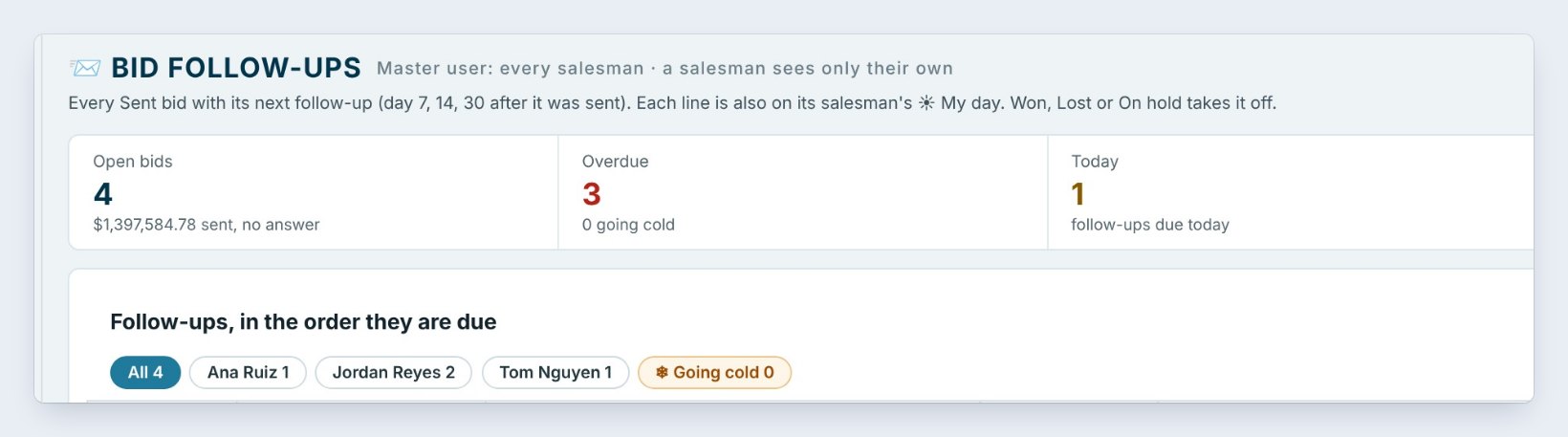
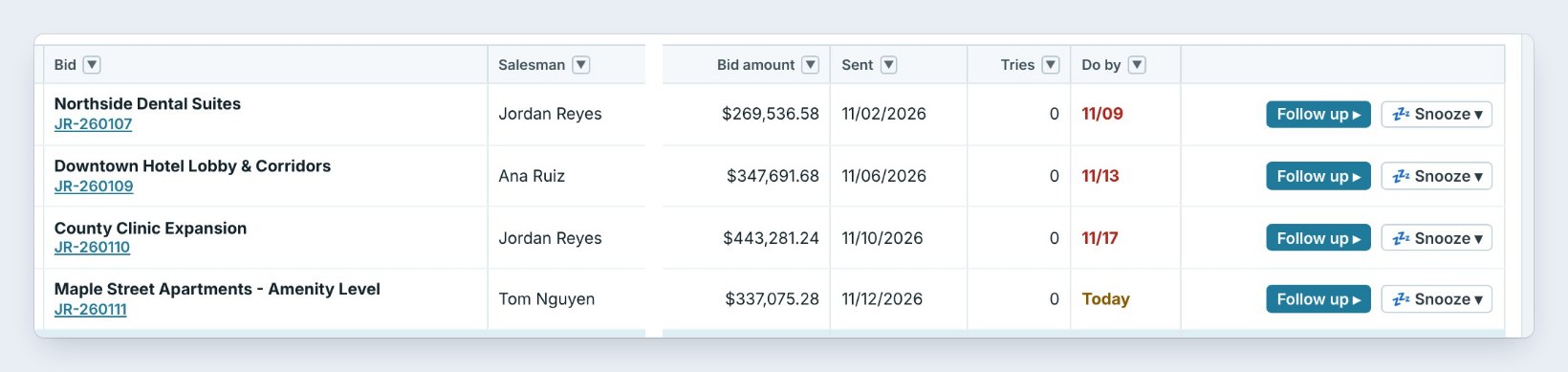
Click Bid follow-ups on the Home ribbon. The tiles show Open bids, here 4 for $1,397,584.78 sent with no answer, Overdue 3, Today 1, and Going cold after 45 days.
The list shows every Sent bid in the order it is due: the step, such as 1st follow-up, day 7, the bid, the salesman, the GC contact, the amount, the date sent and Do by. The Master user sees every salesman; a salesman sees only their own.
2Click Follow up, and send it
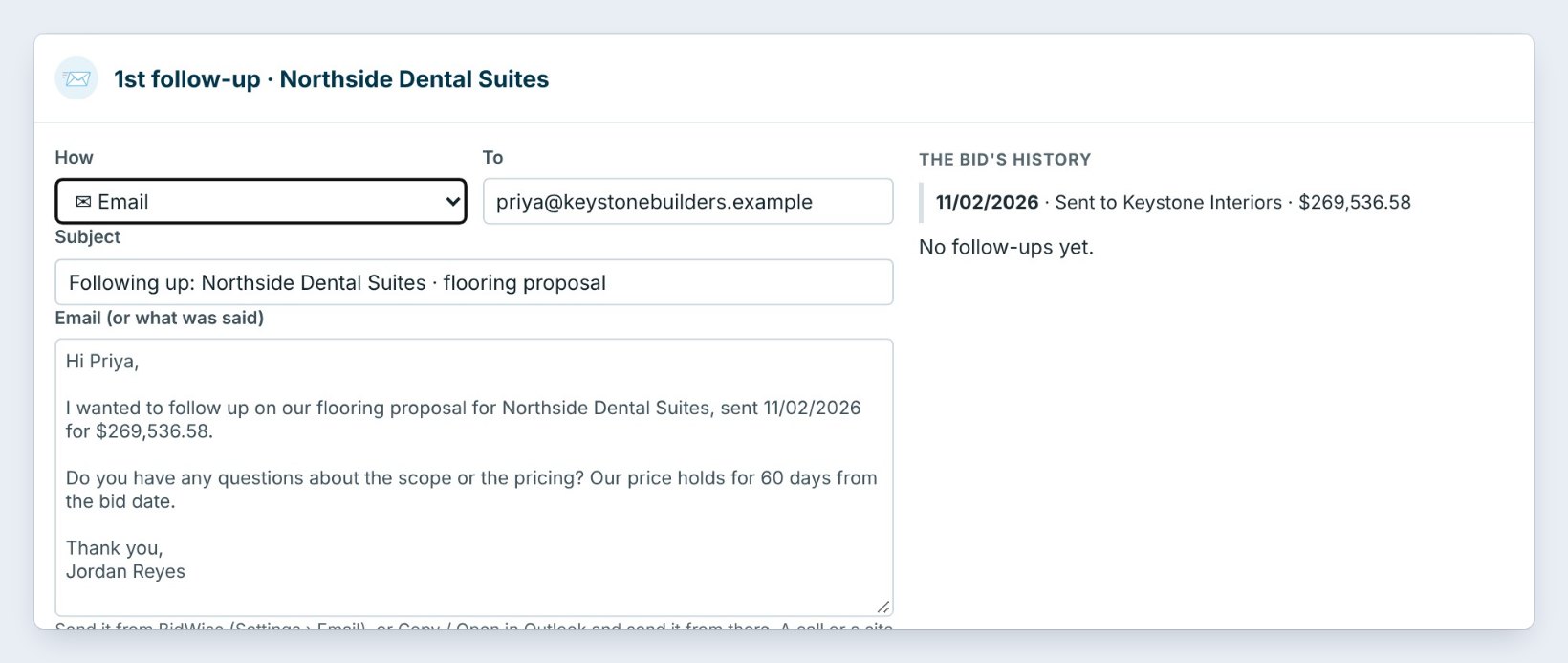
Click Follow up on Northside Dental Suites. The email is filled in: Hi Priya, I wanted to follow up on our flooring proposal for Northside Dental Suites, sent 11/02/2026 for $269,536.58. On the right, The bid’s history shows when it was sent and every follow-up since.
Click Send and log it to send from BidWise, or Copy text or Open in Outlook. For a call or a site visit, set How and type what was said; it is just logged. The bid moves to Follow-up and the next one is booked.
Ask a question in every follow-up, not just "checking in". A question about the scope, an alternate or the schedule gets an answer, and an answer tells you where you stand.
3Mark it Won or Lost, or snooze it

If the GC says you got it, or that it went another way, click Won / Lost. Won, Lost or On hold takes the bid off the follow-up list for good.
If the GC asks you to call back next week, click Snooze on the row and pick the new day.
4Set the days and the emails
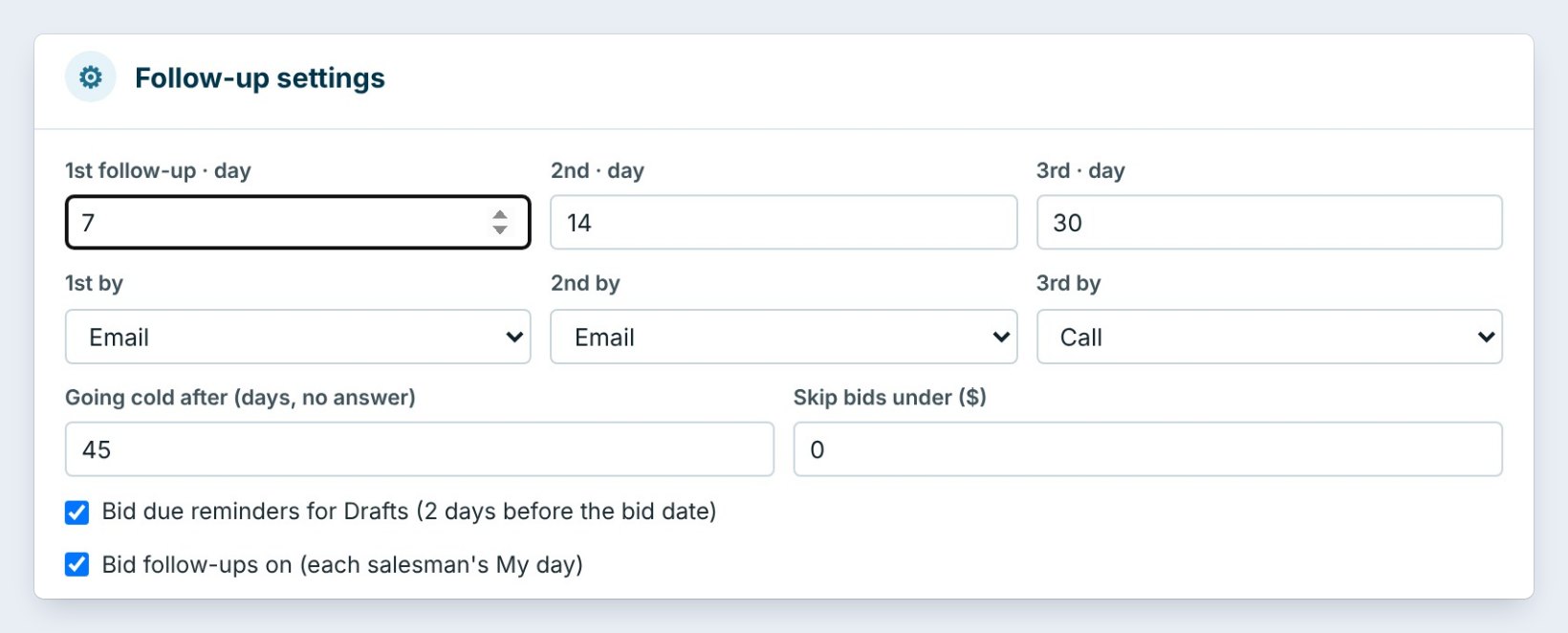
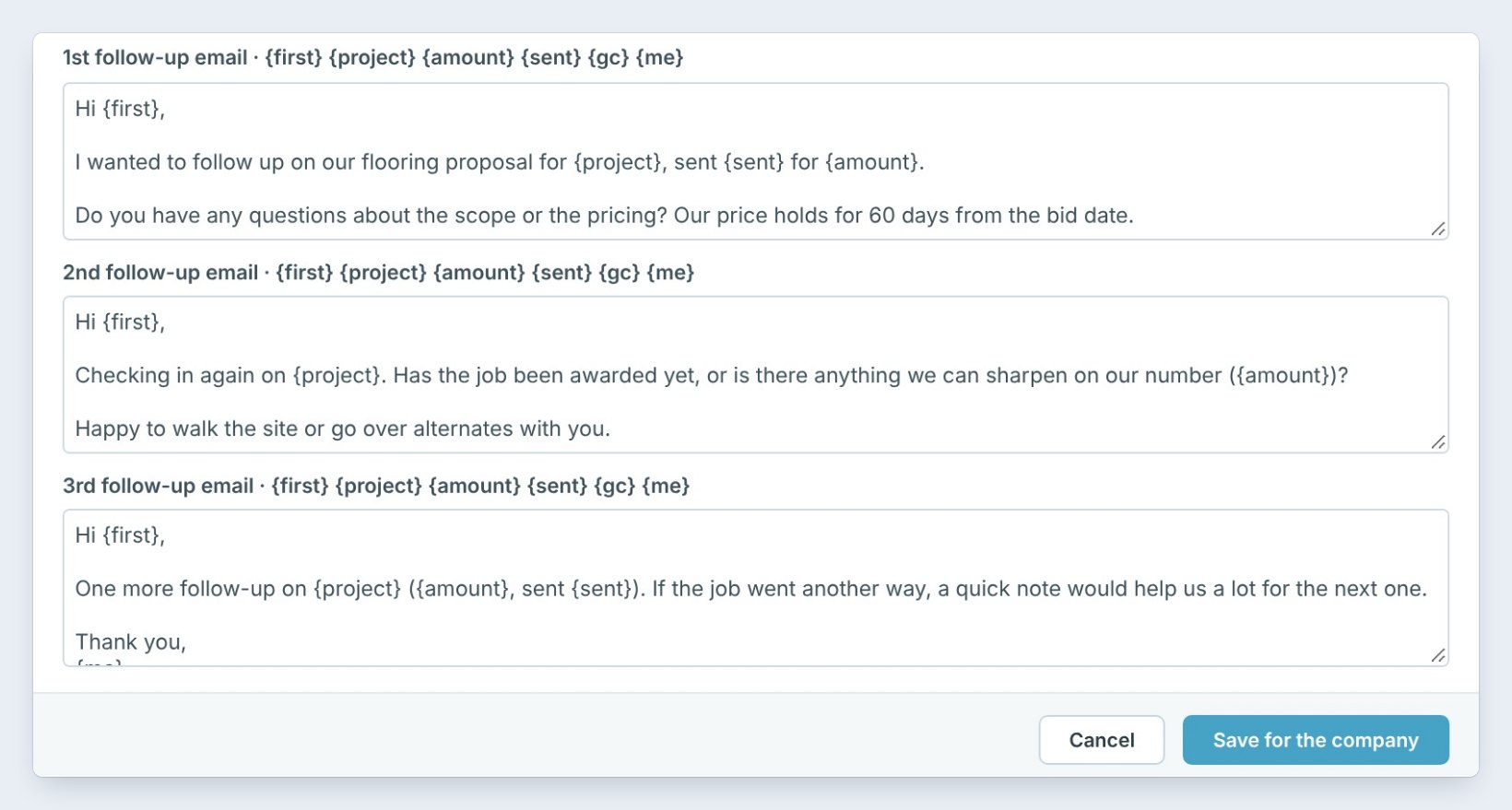
Click Follow-up settings. Set the day of each follow-up, here 7, 14 and 30, and how: email, email, then a call. Going cold after 45 days with no answer marks the bid going cold.
Write the three emails once. {first}, {project}, {amount}, {sent}, {gc} and {me} are filled in from each bid. Click Save for the company.
5What can go wrong, and how to fix it
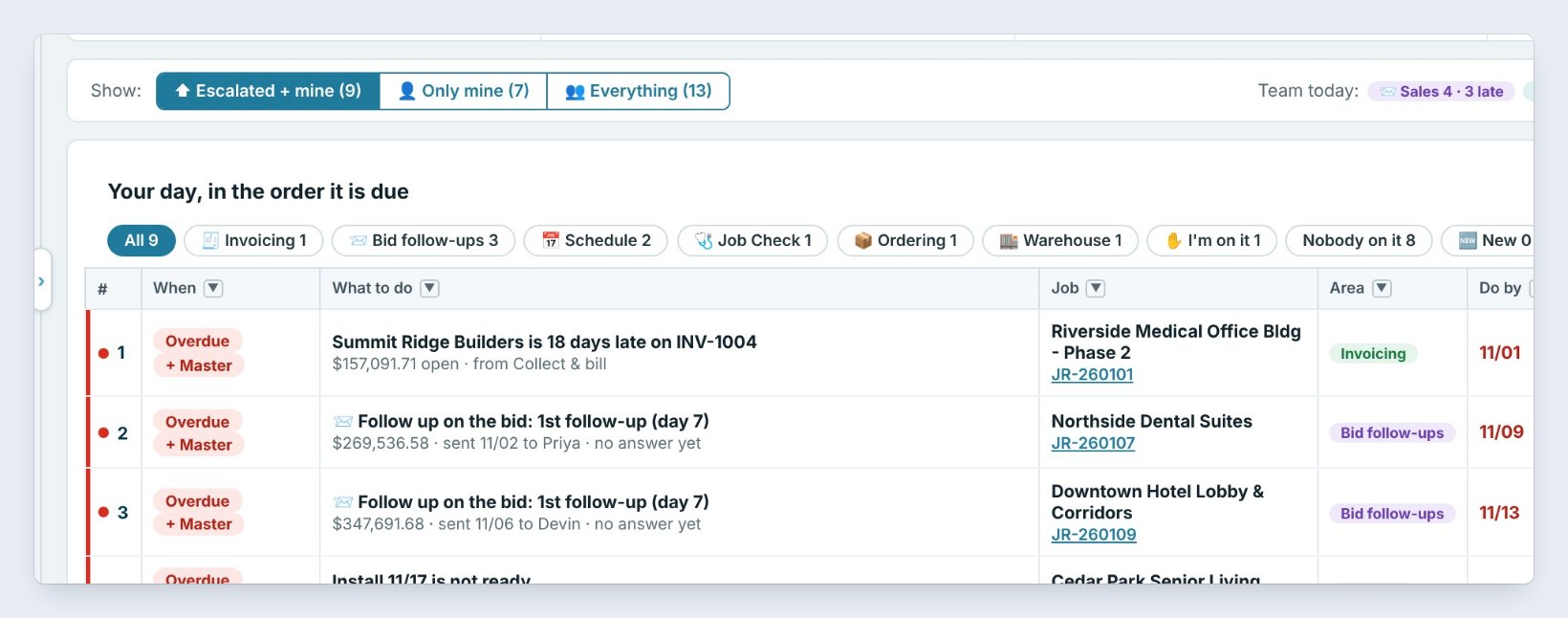
A bid is not on the list. Only bids marked Sent are followed up. Set the status and the sent date in the Bid Tracker.
Send and log it does not send. Set up email under Settings › Email, or use Open in Outlook.
The GC contact has no email. Add it on the GC’s contact, or log a call instead.
Worked example: Thursday follow-ups
Jordan opens Bid follow-ups on November 19:
| Bid | Amount | Step | Done |
|---|---|---|---|
| Northside Dental Suites | $269,536.58 | 1st follow-up, day 7 | Email sent and logged |
| County Clinic Expansion | $443,281.24 | 1st follow-up, day 7 | Called Sam, alternate asked for |
| Maple Street Apartments | $337,075.28 | 1st follow-up, today | Tom sends it from his My day |
Three follow-ups in ten minutes, and the 2nd ones are already booked for day 14.
What to do next
Next: see who is free next on the schedule.
Follow up on every bid, on time
Bid follow-ups is part of CFE BidWise Business. Start with the 30-day free trial, no credit card.
Frequently Asked Questions
When does a bid get followed up?
On day 7, 14 and 30 after it was sent, by default. The Master user can change the days in Follow-up settings.
Does a salesman see other salesmen’s bids?
No. A salesman sees only their own follow-ups. The Master user sees every salesman.
What stops the follow-ups?
Marking the bid Won, Lost or On hold.

Written by
Cristian Valcu – Founder & CEO, Commercial Flooring Estimating LLC
Cristian has estimated commercial flooring for over 20 years and built CFE BidWise around the way flooring contractors actually price, propose and track their bids.
Last updated: