
CFE guide · Estimating
Your First Flooring Estimate in CFE, Step by Step
A complete estimate is five moves: create a new Estimate Quote, fill the project header, enter the takeoff lines (with ↳ sub-lines for things like flash cove and seam welding), price labor and material with your gross profit per line, then run Checks and email the PDF. The recap at the top right updates on every keystroke, so you always know the proposal price.

Why build the estimate on one sheet?
Most flooring contractors start out pricing in a spreadsheet they built themselves. It works until a formula gets overwritten, a sub-line is left out of the total, or the proposal is retyped from the estimate with a different number on it. On a $170,000 bid, one broken cell can be the whole profit.
The Estimate Quote in CFE - Advanced Estimating Worksheet is that spreadsheet with the formulas locked: takeoff amounts on the left, labor in the middle, material (including prep and adhesive) on the right, and every total, tax, bond and proposal price worked out for you. The same sheet feeds the proposals, the material list and the installer work orders, so nothing is typed twice.
This guide follows a real sample bid from the app: Eastgate Retail Center – Shell B, bid JE-100006 for Lakeshore Construction Co. in Tucson, AZ.
The five steps
- Create the Estimate QuoteDashboard, green Create New Estimate Quote button.
- Fill the project headerProject, GC, dates, scope and the Yes / No selectors.
- Enter the takeoff linesOne row per product, ↳ sub-lines for the extras.
- Price labor and materialLabor $/u, Mat’l $/u, freight, prep, adhesive and GP.
- Check and sendChecks, then Email PDF straight to the GC.
1Create a new Estimate Quote
On the Dashboard, press the green Create New Estimate Quote button. A blank estimate opens with the next bid number already filled in (100047 here), today’s date and your name and initials as the estimator. The status bar says New estimate · auto-save every 30 seconds, so you never lose a half-built bid.
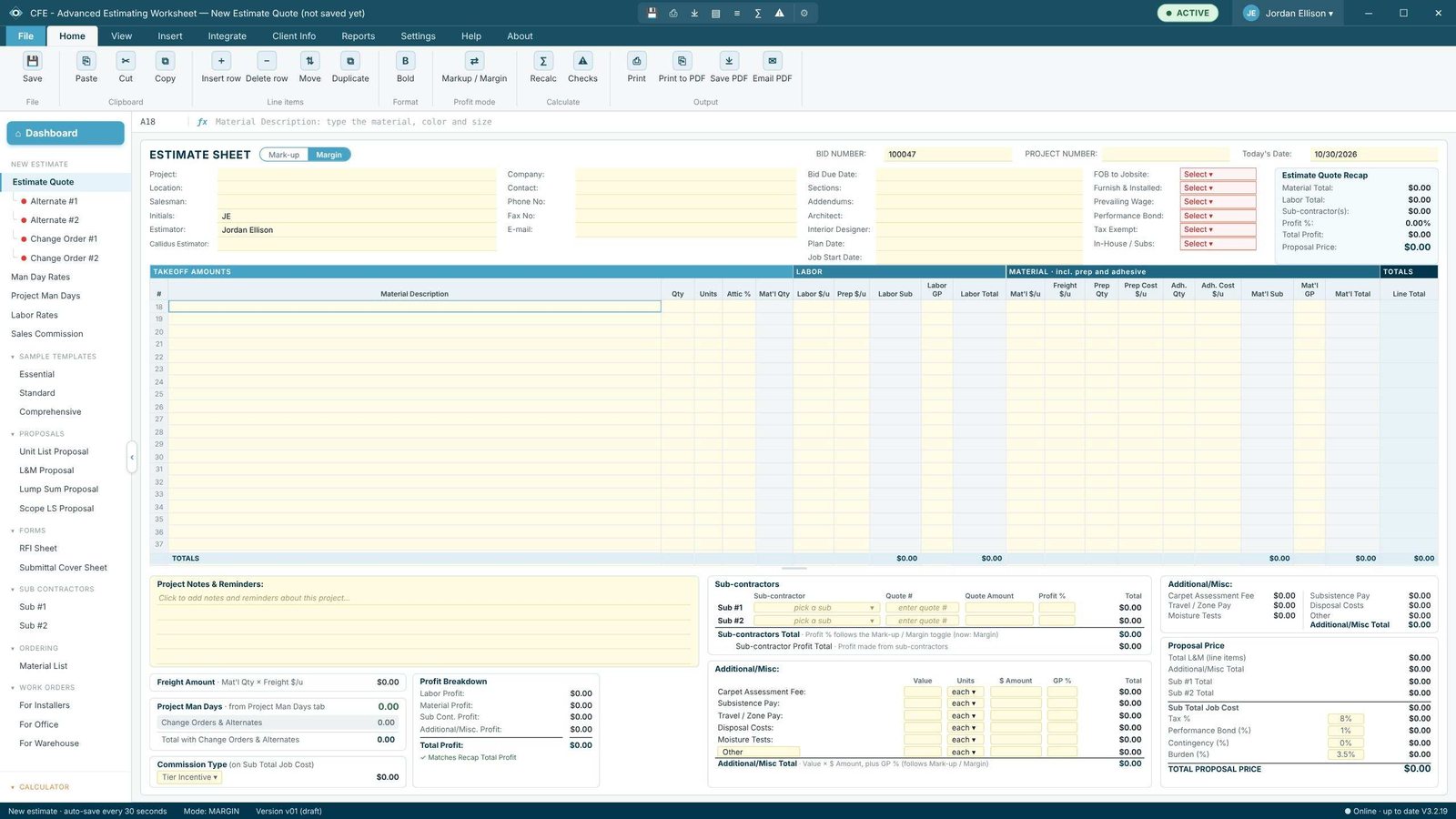
The left menu already lists everything the estimate will feed: Alternates and Change Orders, Man Day Rates, Project Man Days, Labor Rates, Sales Commission, the four proposals, the RFI and Submittal sheets, the Material List and the work orders.
Not starting from zero? Open one of the read-only Sample Templates (Essential, Standard or Comprehensive) in the left menu and use Copy to new estimate. Then change only the quantities and prices that differ.
2Fill in the project header

Fill the three columns across the top: project name and location, salesman and estimator; the GC’s company, contact, phone and email; then the bid due date, spec sections (09630, 09650, 09651 here), addenda (1, 2, 3), architect, plan date and job start. The yellow Select boxes on the right are the questions that change your price: FOB to jobsite, furnish and installed, prevailing wage, performance bond, tax exempt and in-house or subs.
Everything you type here prints on the proposals and forms later, so you fill it once. The project header guide covers each field.
3Enter the takeoff lines and sub-lines
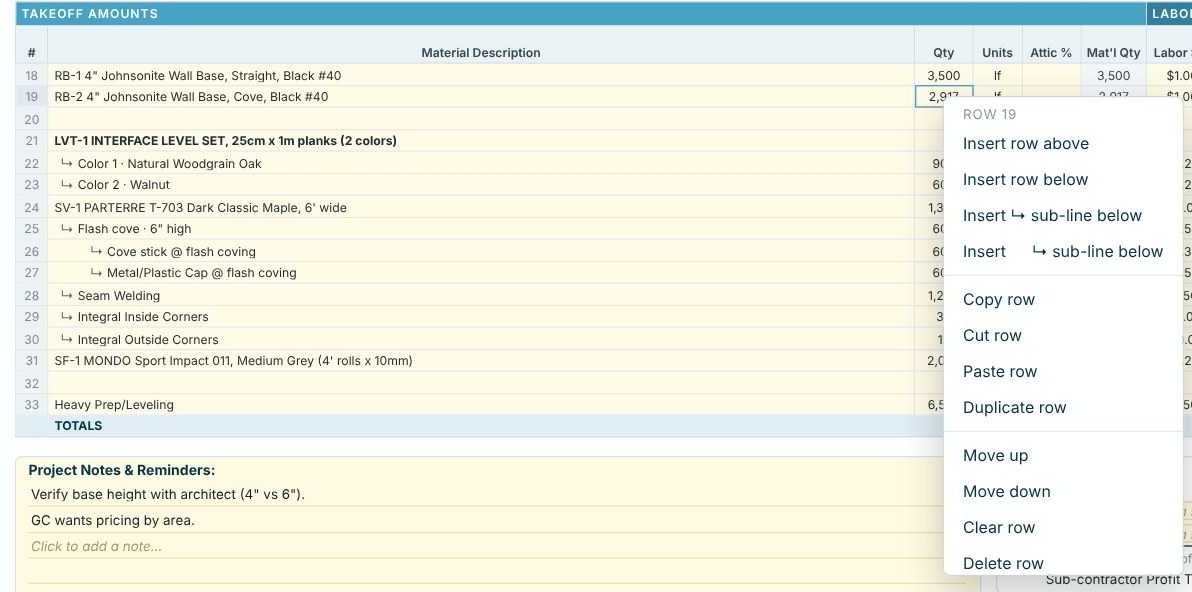
Type one line per product in Material Description with its Qty and Units. Keep the finish schedule code at the front (RB-1, LVT-1, SV-1) so the line matches the plans. Products with parts go on ↳ sub-lines: on Eastgate, the SV-1 Parterre sheet vinyl has flash cove, cove stick, metal cap, seam welding and integral corners under it, and the LVT-1 set has one sub-line per color.
Already have the quantities in a takeoff? Import the Callidus Summary Report or an Excel or CSV takeoff instead of typing.
4Price labor and material on each line

For each line, enter Labor $/u (and Prep $/u if the floor needs it), then Mat’l $/u, Freight $/u, and prep or adhesive quantities and costs. Labor GP and Mat’l GP start from your company defaults and can be changed per line: base is at 29% labor GP on this job, the sheet vinyl at 17%. Use Attic % where the spec asks for extra stock; it raises the Mat’l Qty you buy without changing the takeoff.
Price the labor on the quantity your installers are paid on, not the quantity you buy. If they are paid on the net area, turn on View › Net Area and see installer labor pay on net areas.
5Run Checks, then email the PDF
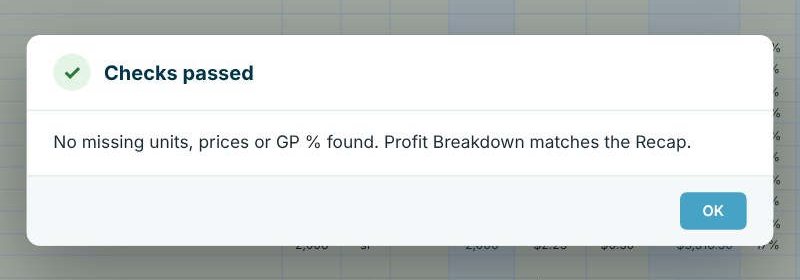
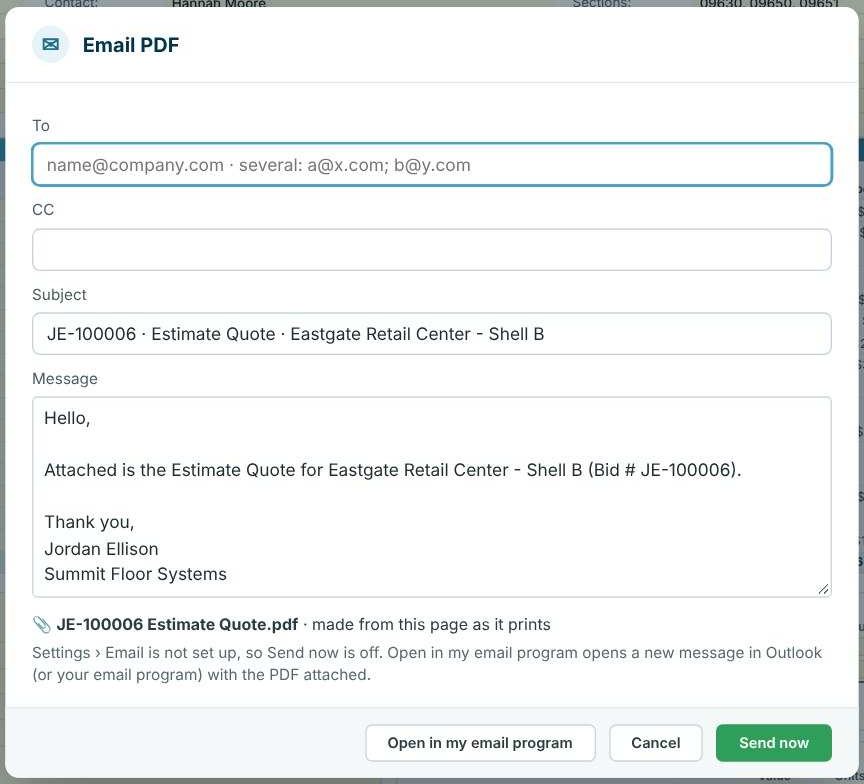
Press Home › Checks. CFE looks over every line for missing units, prices or GP % and confirms the Profit Breakdown matches the Recap. Then Email PDF sends the sheet as a PDF named after the bid, from your own email address once Settings › Email is set up. With no email set up it still works: Open in my email program opens a new Outlook message with the PDF attached, and you press Send. Most GCs want a proposal rather than the estimate itself; see unit list proposals.
Worked example: one line, start to finish
Row 18 of the Eastgate estimate is RB-1, 4" Johnsonite wall base, straight, black #40. The estimate is in Margin mode, so price = cost ÷ (1 − GP).
| Item | Calculation | Amount |
|---|---|---|
| Labor sub | 3,500 lf × $1.00 | $3,500.00 |
| Labor total at 29% GP | $3,500.00 ÷ 0.71 | $4,929.58 |
| Material | 3,500 lf × $0.85 | $2,975.00 |
| Freight | 3,500 lf × $0.15 | $525.00 |
| Adhesive | 12 × $10.00 | $120.00 |
| Mat'l sub | $2,975 + $525 + $120 | $3,620.00 |
| Mat'l total at 26% GP | $3,620.00 ÷ 0.74 | $4,891.89 |
| Line total | $4,929.58 + $4,891.89 | $9,821.47 |
Add up all sixteen lines and you get $153,713.79 for labor and material. The bottom of the sheet then builds the proposal price:
| Proposal price | Amount |
|---|---|
| Total L&M (line items) | $153,713.79 |
| Additional / Misc: carpet assessment fee, travel, disposal | $2,710.00 |
| Sub Total Job Cost | $156,423.79 |
| Tax 8% (on material) | $6,821.85 |
| Performance bond 1% | $1,564.24 |
| Burden 3.5% | $5,474.83 |
| Total proposal price | $170,284.71 |
The Profit Breakdown shows where the $30,295.14 of profit comes from: $13,439.58 on labor, $16,443.06 on material and $412.50 on the additional costs, a 19.37% profit on the job.
Start from a sample template instead
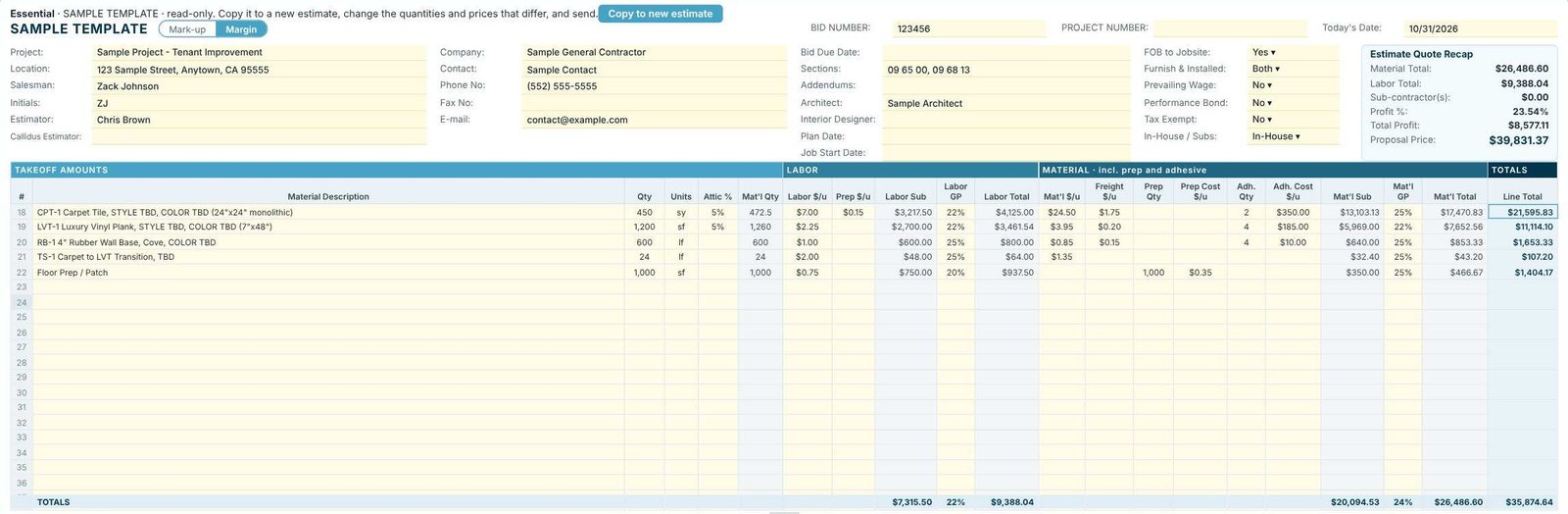
The left menu has three read-only Sample Templates. Essential is a short tenant improvement estimate with carpet tile, LVT, rubber base, a transition and floor prep; Standard adds more; Comprehensive is the full sample with sub-lines, bold heading lines and the flash cove layout. Open one, press Copy to new estimate, and it becomes your own bid with the next bid number. You can also save any finished estimate as a template from its right-click menu.
What to do next
Next, decide how your profit is worked out with markup or margin, add waste and attic stock, and turn the estimate into a unit list proposal. The Estimate Quote worksheet page walks through every column.
Build your first estimate free
Every feature in this guide is in the 30-day free trial, with the sample templates ready to copy. No credit card.
Frequently Asked Questions
Do I need a takeoff before I start an estimate?
You need quantities. You can type them from your own takeoff, import a Callidus Summary Report or an Excel / CSV takeoff, or send the plans to our estimating service and get the takeoff back.
What is a sub-line in CFE?
A sub-line (marked ↳) is a part of the product above it, such as flash cove, cove stick, seam welding or a second color. It is priced on its own row but moves, copies and deletes with its product.
Does the estimate save by itself?
Yes. A new estimate auto-saves every 30 seconds, and the status bar shows whether the latest changes are saved.
Can I use CFE for both markup and margin?
Yes. The Mark-up / Margin switch at the top of the sheet changes how GP turns cost into price for the whole estimate. The markup or margin guide shows the difference on this same job.

Written by
Cristian Valcu – Founder & CEO, Commercial Flooring Estimating LLC
Cristian has estimated commercial flooring for over 20 years and built CFE - Advanced Estimating Worksheet around the way flooring contractors actually price, propose and track their bids.
Last updated: