
CFE guide · Estimating
Markup or Margin? Set How CFE Prices Your Flooring Bid
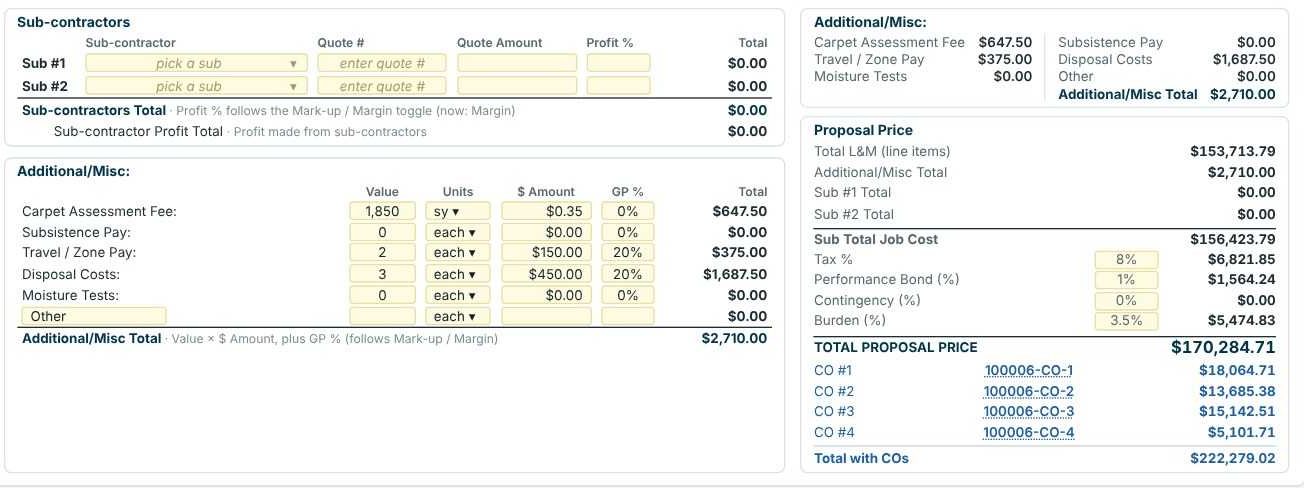
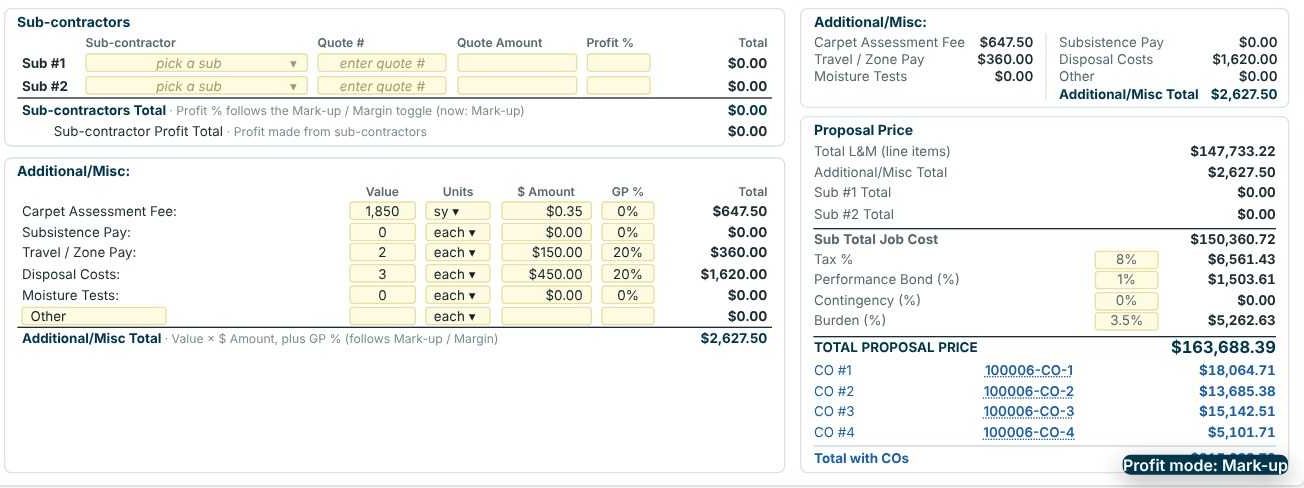
Margin and markup use the same GP % but give different prices. In Margin mode CFE prices a line at cost ÷ (1 − GP); in Mark-up mode at cost × (1 + GP). On the Eastgate Retail Center sample bid, the same percentages give a $170,284.71 proposal in Margin and $163,688.39 in Mark-up, a $6,596.32 difference. Pick the one your company really means, set it as the default, and switch per estimate when a job calls for it.

Why the difference matters on a flooring bid
Ask ten flooring contractors what "20% on labor" means and you will get two answers. Some mean markup: take the cost and add 20% of it. Others mean margin: 20% of the selling price is profit. On the same cost, margin always gives the higher price, and the gap widens as the percentage goes up.
The mistake is mixing them: a company that sets its targets as margins but prices with a markup sheet leaves money on every job without noticing. Our article on profit margin vs markup covers the theory. This guide shows the switch in CFE - Advanced Estimating Worksheet and what it does to a real bid.
The four steps
- Set your defaultSettings › Estimate defaults › Profit mode.
- Check the switch on the sheetMark-up / Margin at the top left of the Estimate Sheet.
- Compare the totalsLabor, material, profit and proposal price change together.
- Run ChecksConfirm the Profit Breakdown matches the Recap.
1Set the default profit mode for new estimates
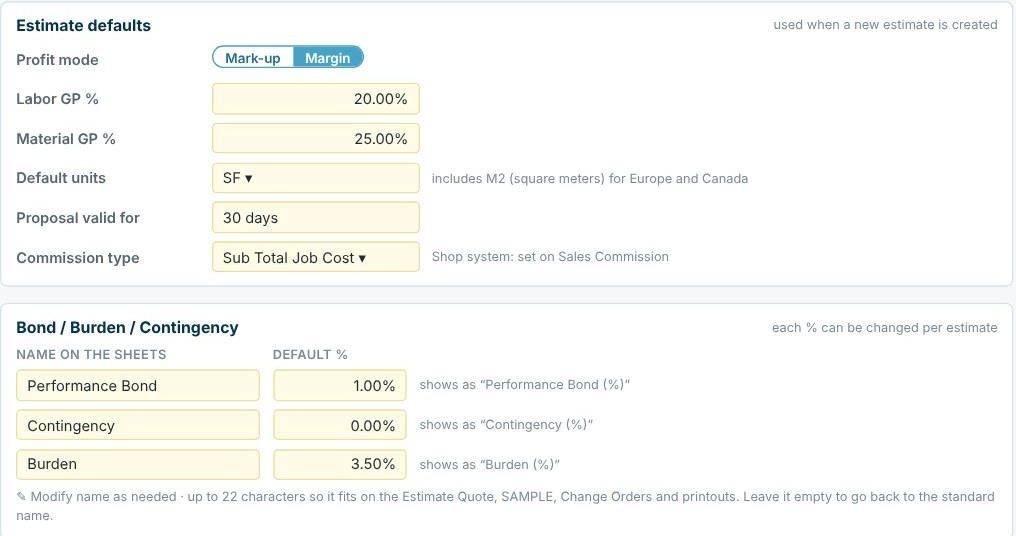
Open Settings › Estimate defaults. Profit mode has the same Mark-up / Margin switch as the estimate, and Labor GP % and Material GP % are the starting percentages on every new line (20% and 25% in the sample company). Save settings, and every new estimate starts this way. Settings are shared by all users of the company and need an Admin to change.
2Check the switch on the estimate
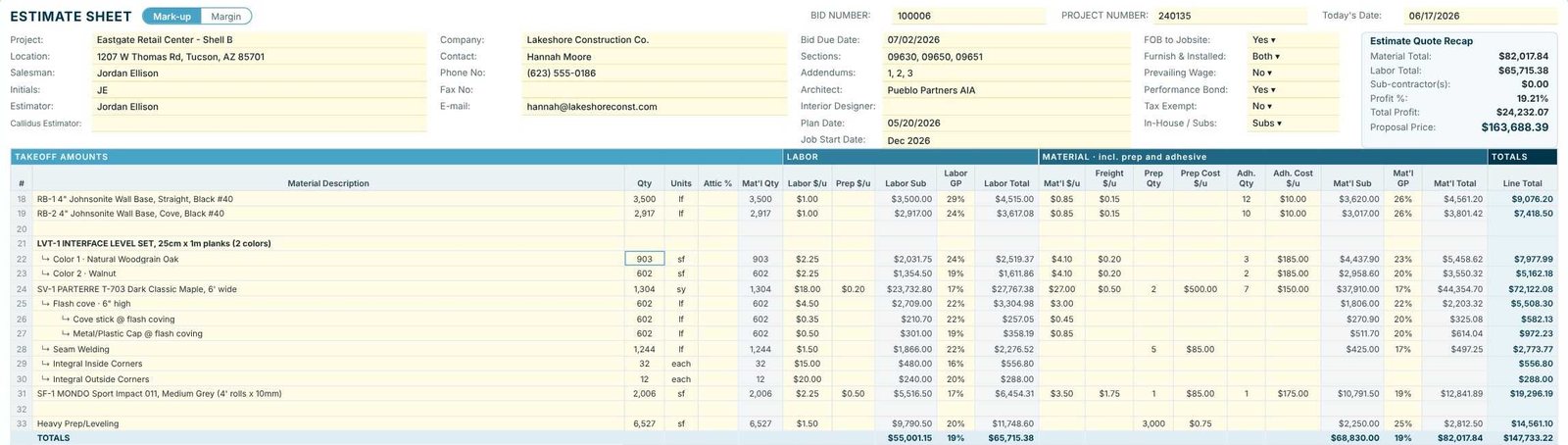
The switch sits next to ESTIMATE SHEET, and Home › Markup / Margin on the ribbon flips it too. The status bar always says which mode the estimate is in (Mode: MARGIN or Mode: MARK-UP). Each estimate keeps its own mode, so you can price one job with markup and the next with margin.
3Compare what changes
Every price that uses a GP % follows the switch: each line’s labor and material totals, the sub-contractor totals, the Additional / Misc costs with a GP %, the profit breakdown and the commission. Costs, quantities, tax rates and the bond and burden percentages do not.
4Run Checks after switching
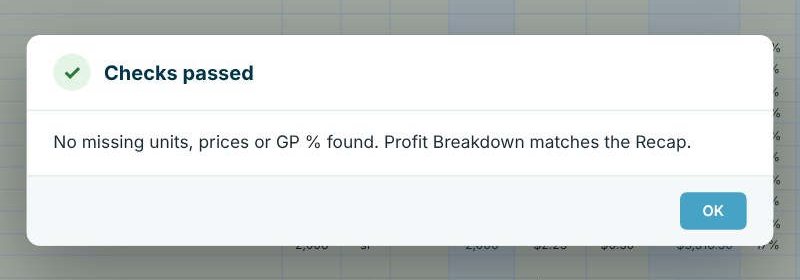
After a switch, press Home › Checks. CFE looks for lines with no GP %, missing units or prices, and confirms the Profit Breakdown still matches the Recap before you send anything.
Talk about profit in the same language your accountant uses. Most income statements show gross profit as a share of revenue, which is margin. If your targets come from your financials, keep CFE on Margin and price with those percentages.
Worked example: Eastgate Retail Center both ways
Same bid, same costs and the same GP % on every line. Only the switch changed.
| Margin | Mark-up | |
|---|---|---|
| RB-1 base labor ($3,500 cost, 29% GP) | $3,500 ÷ 0.71 = $4,929.58 | $3,500 × 1.29 = $4,515.00 |
| RB-1 base material ($3,620 cost, 26% GP) | $4,891.89 | $4,561.20 |
| Travel / zone pay ($300 cost, 20% GP) | $375.00 | $360.00 |
| Disposal costs ($1,350 cost, 20% GP) | $1,687.50 | $1,620.00 |
| Labor total | $68,440.73 | $65,715.38 |
| Material total | $85,273.06 | $82,017.84 |
| Total profit | $30,295.14 (19.37%) | $24,232.07 (19.21%) |
| Commission (Tier Incentive) | $10,937.36 | $8,675.48 |
| Total proposal price | $170,284.71 | $163,688.39 |
The cost to do the job is identical in both columns. Margin brings in $6,063.07 more profit on the same work, which is why the mode has to match what your percentages mean.
Which one should a flooring contractor use?
Use the one your targets are written in. If you were taught "labor at 20%, material at 25%" as markups, keep Mark-up and your prices stay where they have always been. If those percentages are meant as profit on the selling price, switch to Margin, otherwise you are under-pricing every bid by the difference above.
A quick test: on a $100 cost at 25%, markup gives $125 and margin gives $133.33. If you expect $25 of profit on a $125 sale, that is a 20% margin, not 25%.
What to do next
Next, set the percentages themselves in company settings, then add freight, tax, bond and burden. Our article on profit margin vs markup covers the math in more depth.
See your own bid both ways
Open any estimate in the 30-day free trial and flip the switch. No credit card.
Frequently Asked Questions
Does switching between markup and margin change my costs?
No. Quantities, unit costs, freight, prep and adhesive stay the same. Only the prices worked out from GP % change, along with the profit and commission that follow from them.
Can I use different GP % on different lines?
Yes. Labor GP and Mat’l GP start from your Settings defaults, and you can type a different percentage on any line. On the Eastgate sample, labor GP ranges from 16% to 29%.
Does the switch also apply to sub-contractors and additional costs?
Yes. The sheet says so under each box: the sub-contractor Profit % follows the Mark-up / Margin toggle, and Additional / Misc costs add their GP % the same way.
What is the formula CFE uses for margin?
Price = cost ÷ (1 − GP). For markup it is price = cost × (1 + GP). A $3,500 labor cost at 29% is $4,929.58 in margin and $4,515.00 in markup.

Written by
Cristian Valcu – Founder & CEO, Commercial Flooring Estimating LLC
Cristian has estimated commercial flooring for over 20 years and built CFE - Advanced Estimating Worksheet around the way flooring contractors actually price, propose and track their bids.
Last updated: