
CFE guide · Proposals and field paperwork
Create a Unit List Proposal Straight From Your Estimate
The Unit List Proposal builds itself from the Estimate Quote. Open it from the left menu and every product prints with its quantity, units, labor sub-total, material sub-total and L&M total, followed by additional costs, sub-contractors, change orders and alternates, tax, bond, burden and the proposal amount. Tick which text boxes print on the Insert tab, pick For: to print it for one change order, and email it as a PDF.

Why a unit list proposal?
A unit list proposal shows the GC every product you are carrying, with its quantity and price. GCs and owners like it because they can compare scopes line by line and price changes from it. You like it because a quantity question gets settled on paper before the job, not on the floor.
The risk is retyping. A proposal rebuilt by hand from the estimate is where a line goes missing or a total stops matching. In CFE - Advanced Estimating Worksheet the Unit List Proposal is linked to the Estimate Quote: change a price on the estimate and the proposal follows.
The five steps
- Open the proposalLeft menu, Proposals › Unit List Proposal.
- Choose the text boxesInsert tab: tick what prints and set the order.
- Pick who it is forFor: the Estimate Quote, or one CO or alternate.
- Edit and lay outEdit Proposal, Page Break, Portrait or Landscape.
- Print or emailPrint, Print to PDF, Save PDF or Email PDF.
1Open the Unit List Proposal
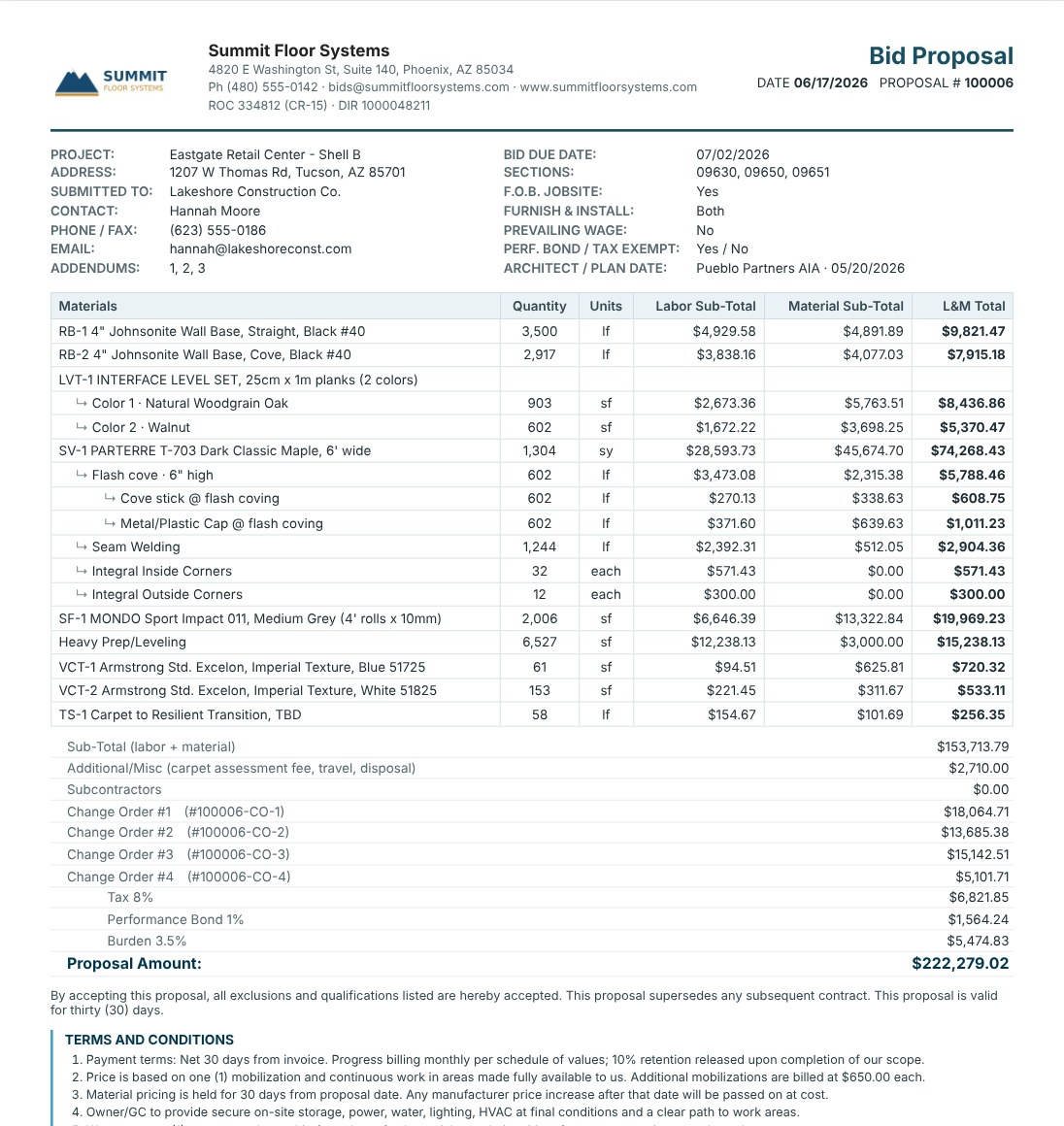
Click Unit List Proposal under Proposals in the left menu. The page opens in page view, with a note at the top: Linked to Estimate Quote · Page view · prints on 2 pages. The header comes from your company settings; the project block (project, address, GC, contact, bid due date, sections, FOB, furnish and install, prevailing wage, bond, tax exempt, architect and plan date) comes from the estimate header.
The Materials table lists every line with Quantity, Units, Labor Sub-Total, Material Sub-Total and L&M Total, with ↳ sub-lines indented under their product, exactly as on the estimate.
2Choose which text boxes print

On the Insert tab, tick the boxes that print on this proposal: company logo and header, Terms & Conditions, Standard Exclusions, Qualifications, Special Provisions, Notice to Proceed, List of Sub-Contractors, custom boxes such as Payment Schedule and Warranty, My Signature and the signature block. Move up and Move down set the order. Edit this bid changes the wording for this proposal only, and Reset to Settings brings back your standard text. The library itself is covered in proposal terms, exclusions and qualifications.
Never send a unit price proposal without exclusions. Floor prep, moisture testing, furniture moving and after-hours work are the four that cost flooring contractors the most when left off. Our article on flooring bid qualifications and exclusions has a full list.
3Print it for a change order or alternate
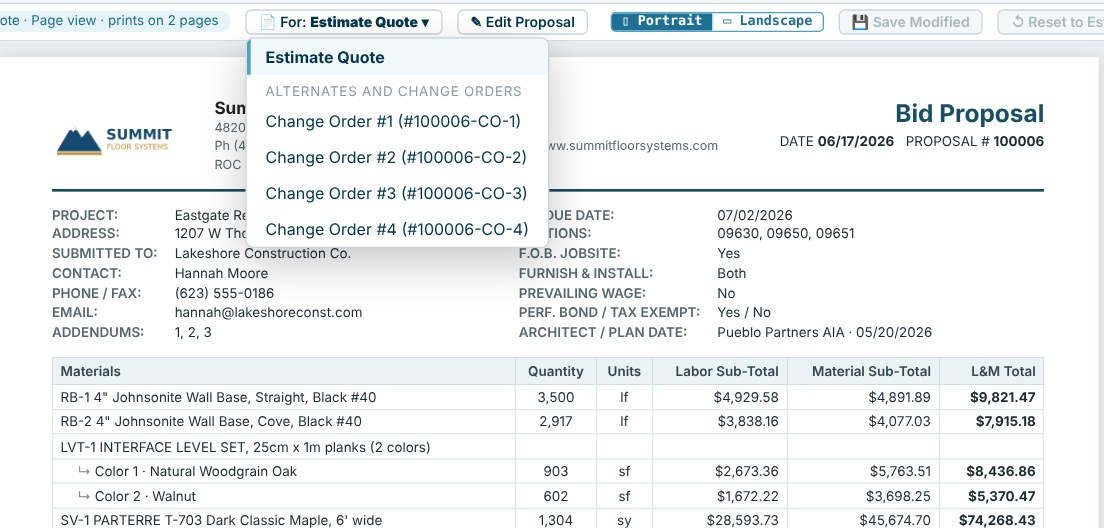
The For: button at the top picks what the proposal prices: the Estimate Quote, or one Alternate or Change Order. Printed for Alternate #1 of the police substation bid, the proposal is titled Alternate #1, numbered 100002-ALT-1 and lists only that alternate’s lines, for a proposal amount of $28,502.97.
4Edit the layout if you need to

Edit Proposal lets you change rows and columns on this proposal (row above or below, delete row, add or delete a column) with Undo and Redo; Save Modified keeps your edit and Reset to Estimate rebuilds it from the estimate. Portrait or Landscape sets the page, and View › Page Break shows where each printed page ends.
5Print or email it
Use Print, Print to PDF, Save PDF or Email PDF from the ribbon or the bar at the top right. Email PDF attaches the proposal as a PDF and fills the subject with the bid number and project name.
Worked example: how the Eastgate proposal amount adds up
The bottom of the Eastgate Retail Center Unit List Proposal, printed for the Estimate Quote with its four change orders.
| Line | Amount |
|---|---|
| Sub-Total (labor + material) | $153,713.79 |
| Additional / Misc (carpet assessment fee, travel, disposal) | $2,710.00 |
| Subcontractors | $0.00 |
| Change Order #1 (#100006-CO-1) | $18,064.71 |
| Change Order #2 (#100006-CO-2) | $13,685.38 |
| Change Order #3 (#100006-CO-3) | $15,142.51 |
| Change Order #4 (#100006-CO-4) | $5,101.71 |
| Tax 8% | $6,821.85 |
| Performance Bond 1% | $1,564.24 |
| Burden 3.5% | $5,474.83 |
| Proposal Amount | $222,279.02 |
Under the total, the proposal says that by accepting it, all exclusions and qualifications listed are accepted, and that the proposal is valid for thirty (30) days. (Proposal valid for in your estimate defaults is 30 days in the sample company.) Then the text boxes you ticked follow: Terms and Conditions, Standard Exclusions, Qualifications and so on.
Unit list or another format?
The Unit List is one of four proposals built from the same estimate. The L&M Proposal shows one combined labor and material price per line, the Lump Sum Proposal shows one price for the job, and the Scope LS Proposal is a lump sum with a Scope of Work box you type in. See L&M and lump sum proposals for when to use each.
What to do next
Next, compare the L&M and lump sum proposals, set up your terms and exclusions, and track the bid on the Bid Tracker. The flooring proposals page shows every format.
Send your next proposal from CFE
All four proposal formats are in the 30-day free trial. No credit card.
Frequently Asked Questions
Does the unit list proposal update when I change the estimate?
Yes. It is linked to the Estimate Quote, so prices, quantities and totals follow the estimate. If you edit the proposal itself, Reset to Estimate rebuilds it from the estimate.
Can I print a unit list proposal for just one change order?
Yes. Use the For: button and pick the Change Order or Alternate. The proposal is titled with its name, numbered with its ID and priced from its sheet.
Which terms and exclusions print on the proposal?
The ones you tick on the Insert tab. The wording comes from Settings › Proposal text, and Edit this bid changes it for one proposal only.
Can I print the proposal in landscape?
Yes. Switch between Portrait and Landscape at the top of the proposal.

Written by
Cristian Valcu – Founder & CEO, Commercial Flooring Estimating LLC
Cristian has estimated commercial flooring for over 20 years and built CFE - Advanced Estimating Worksheet around the way flooring contractors actually price, propose and track their bids.
Last updated: