
CFE guide · Estimating
Fill In the Project Header Once, Use It Everywhere
The project header at the top of the Estimate Quote is typed once and used everywhere. It holds the bid and project numbers, the project and location, your salesman and estimator, the GC company and contact, the bid due date, sections, addenda, architect, plan date and job start, and six selectors: FOB to Jobsite, Furnish & Installed, Prevailing Wage, Performance Bond, Tax Exempt and In-House / Subs. The proposals print it as their project block, and the Bid Tracker shows the GC, contact, salesman, labor and prevailing wage columns from it.

Why the header deserves two careful minutes
The header is the part of an estimate nobody checks, and it is the part the GC reads first. A proposal that names the wrong addendum, the old plan date or the wrong contact tells the GC you priced someone else’s bid. Missing “prevailing wage” on a public job is worse: it changes the labor price.
In CFE - Advanced Estimating Worksheet you fill the header once on the Estimate Quote. The Unit List, L&M, Lump Sum and Scope LS proposals print it as their project block, and the Bid Tracker shows it as columns, so there is nothing to retype and nothing to fall out of step.
The four groups of fields
- Numbers and projectBid number, project number, project, location.
- The GCCompany, contact, phone, fax, email.
- Dates and plansBid due, sections, addenda, architect, plan date, job start.
- The selectorsFOB, Furnish & Installed, PW, bond, tax, labor.
1Numbers, project and your people

Across the top: BID NUMBER (a new Estimate Quote gets the next one), PROJECT NUMBER and Today’s Date. Then the left column: Project, Location, Salesman, Initials, Estimator and Callidus Estimator. Your name and initials fill the estimator fields from your sign-in. The bid number becomes the ID of every change order and alternate, such as 100034-ALT-1.
2The general contractor
The middle column is who you are bidding to: Company, Contact, Phone No, Fax No and E-mail. On the proposal these print as Submitted to, Contact, Phone / Fax and Email, and on the Bid Tracker as the GC Name and GC Contact Info columns. When the same GC sends you several invites, bid each one as its own estimate; the GC and sub-contractor database keeps their card, contacts and every bid sent to them.
Put the person who sent the invite in Contact, not the GC’s front desk. When you follow up from the Bid Tracker, that is the name you need.
3Dates, sections and the plan set
The third column describes the plans you priced: Bid Due Date, Sections (the spec sections, such as 09630, 09650, 09651), Addendums, Architect, Interior Designer, Plan Date and Job Start Date. Job Start Date takes text, so “Nov 2026” or “Q1 2027” works. On the proposal, the architect and plan date print together on one line, which is how a GC checks you bid the current set.
4The six Yes / No selectors

The right column has six drop-downs: FOB to Jobsite, Furnish & Installed (Both in the samples), Prevailing Wage, Performance Bond, Tax Exempt and In-House / Subs (In-House, Subs or In & Subs). They print on the proposal so the GC sees your assumptions, and Prevailing Wage and In-House / Subs show on the Bid Tracker as the PW and Labor columns, so you can filter for every prevailing wage bid.
Worked example: the header on the proposal
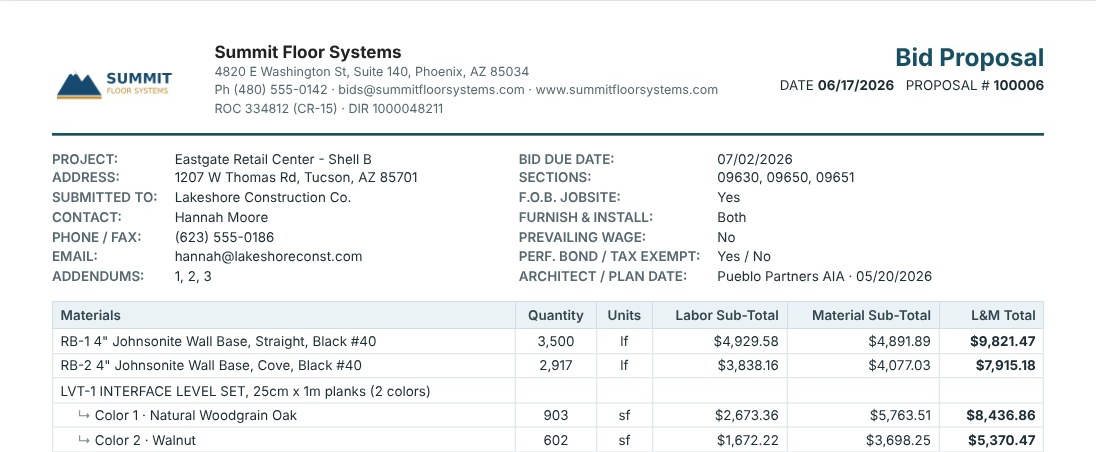
The Eastgate Retail Center header, as the Unit List Proposal prints it.
| Proposal line | Eastgate Retail Center – Shell B |
|---|---|
| Project / Address | Eastgate Retail Center – Shell B, 1207 W Thomas Rd, Tucson, AZ 85701 |
| Submitted to / Contact | Lakeshore Construction Co., Hannah Moore |
| Addendums | 1, 2, 3 |
| Bid due date / Sections | 07/02/2026, 09630, 09650, 09651 |
| F.O.B. jobsite / Furnish & install | Yes / Both |
| Prevailing wage / Perf. bond / Tax exempt | No / Yes / No |
| Architect / Plan date | Pueblo Partners AIA, 05/20/2026 |
None of these lines was typed on the proposal. Change the addendum count on the estimate and every proposal picks it up. See the unit list proposal guide for the rest of the page.
See it on the proposal
What to do next
Next, enter the takeoff lines and sub-lines, or import them from Callidus or an Excel / CSV takeoff. The full walk-through is in your first estimate.
Start an estimate in CFE
The full Estimate Quote and every proposal are in the 30-day free trial. No credit card.
Frequently Asked Questions
What goes in the project header of a CFE estimate?
Bid and project numbers, project and location, salesman and estimator, the GC company and contact, bid due date, sections, addenda, architect, interior designer, plan date, job start, and six selectors: FOB to Jobsite, Furnish & Installed, Prevailing Wage, Performance Bond, Tax Exempt and In-House / Subs.
Do I retype the project information on the proposal?
No. The Unit List, L&M, Lump Sum and Scope LS proposals print the header from the estimate as their project block.
Where does In-House / Subs show up?
On the Bid Tracker as the Labor column (In-House, Subs or In & Subs), next to the PW column for prevailing wage.
Can the job start date be a month or a quarter?
Yes. Job Start Date takes text, so Nov 2026 or Q1 2027 works.

Written by
Cristian Valcu – Founder & CEO, Commercial Flooring Estimating LLC
Cristian has estimated commercial flooring for over 20 years and built CFE - Advanced Estimating Worksheet around the way flooring contractors actually price, propose and track their bids.
Last updated: