
CFE guide · Estimating
Price Change Orders and Alternates on Their Own Sheets
Each Change Order and Alternate in CFE is its own estimate sheet under the bid. The header comes from the Estimate Quote, so you only add the takeoff lines and prices. Each one gets its own ID (100006-CO-1, 100002-ALT-2), price and status (Draft, Submitted, Accepted or Denied), shows on the Bid Tracker under its bid, and can be printed as any proposal with the For: button.

Why give every change order its own sheet?
Change orders are where flooring contractors lose track of money. The CO gets priced in a hurry on a copy of the estimate, the copy gets edited again, and three months later nobody knows which number the GC accepted. Alternates have the same problem at bid time: the base bid and three add or deduct alternates all live in one file with the totals mixed up.
In CFE - Advanced Estimating Worksheet each Change Order and Alternate is a full Estimate Sheet of its own, tied to its bid. It has the same columns, the same tax, bond and burden, and its own recap. Its price feeds the Estimate Quote’s Total with COs, and its status follows it onto the Bid Tracker. Our change orders page shows the feature; this guide prices one.
The five steps
- Open or add the sheetLeft menu, under Estimate Quote. Right-click to duplicate.
- Price the linesSame columns as the estimate; the header is pulled in.
- Set the statusDraft, Submitted, Accepted or Denied.
- Check the totalsEach price feeds the Estimate Quote’s Total with COs.
- Print the proposalFor: button on any proposal.
1Open a Change Order or Alternate, or add one
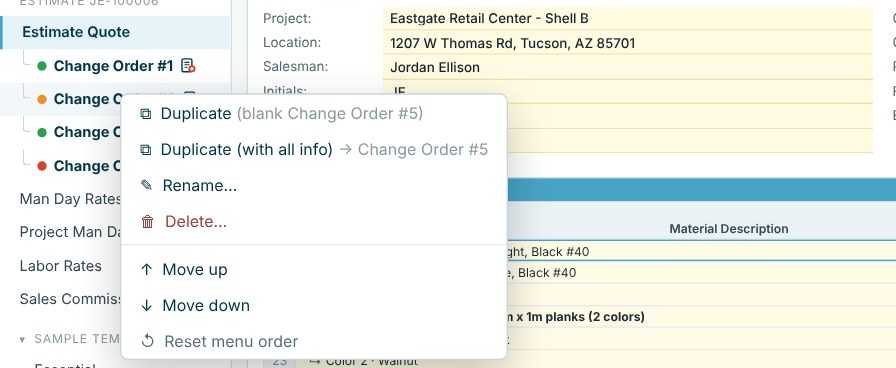
Change Orders and Alternates are listed in the left menu, indented under Estimate Quote, each with a colored dot for its status. Click one to open it. To add another, right-click an existing one and choose Duplicate (blank) for an empty sheet with the next number, or Duplicate (with all info) to start from a copy. Rename gives it a name the GC will recognise, and Move up / Move down sets the order.
2Price the change order lines
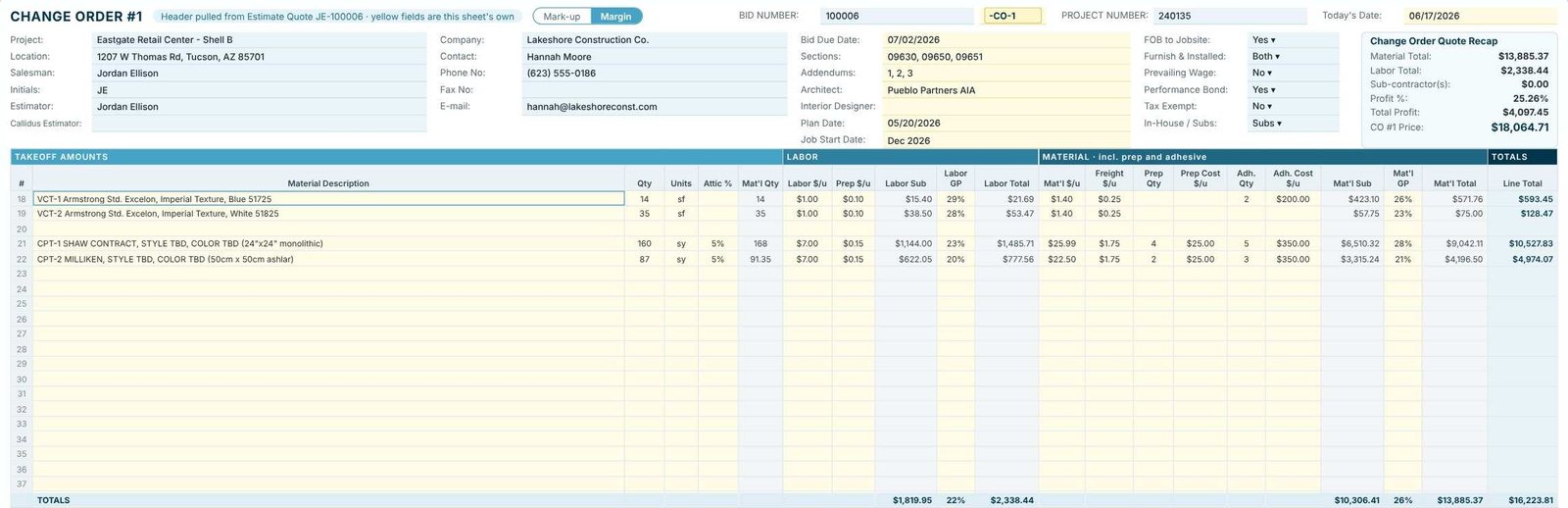
The top of the sheet says Header pulled from Estimate Quote JE-100006 · yellow fields are this sheet’s own: project, GC and dates are already filled in, and the ID box shows -CO-1. Enter the takeoff lines and prices exactly as on the estimate, or import a takeoff straight into this sheet with the Callidus import or spreadsheet import. The sheet uses the same Mark-up / Margin mode as the Estimate Quote.
Write the GC’s CO number and the approval in the change order’s own Project Notes box. Six months later, when the final billing is argued, that note is the record.
3Set its status on the Bid Tracker
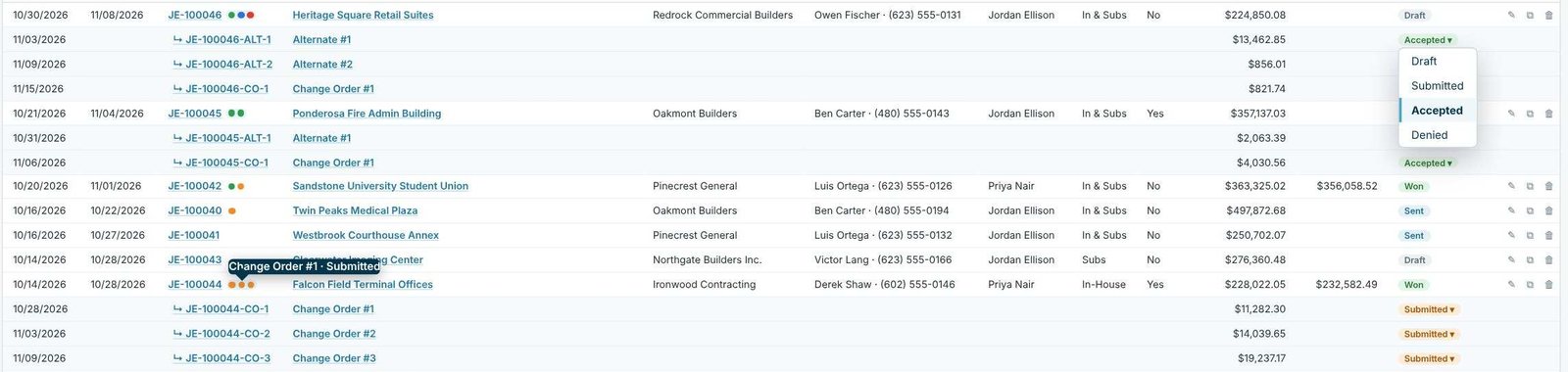
On the Dashboard, each Change Order and Alternate has its own row under its bid, with its ID, amount, created date and status. Click the status to set Draft, Submitted, Accepted or Denied. The dots next to the bid number and in the left menu follow it: green for Accepted, orange for Submitted, red for Draft and blue for Denied. Hover a dot to see the name, amount and status, and click a row to open that sheet.
4Check how it rolls into the bid
The bottom right of the Estimate Quote lists each change order under Total Proposal Price with a link to its sheet, and adds them into Total with COs. Alternates are listed the same way (ALT #1, ALT #2). The status bar on the change order says which cell it feeds, for example Total feeds Estimate Quote AF74.
5Print a proposal for one change order
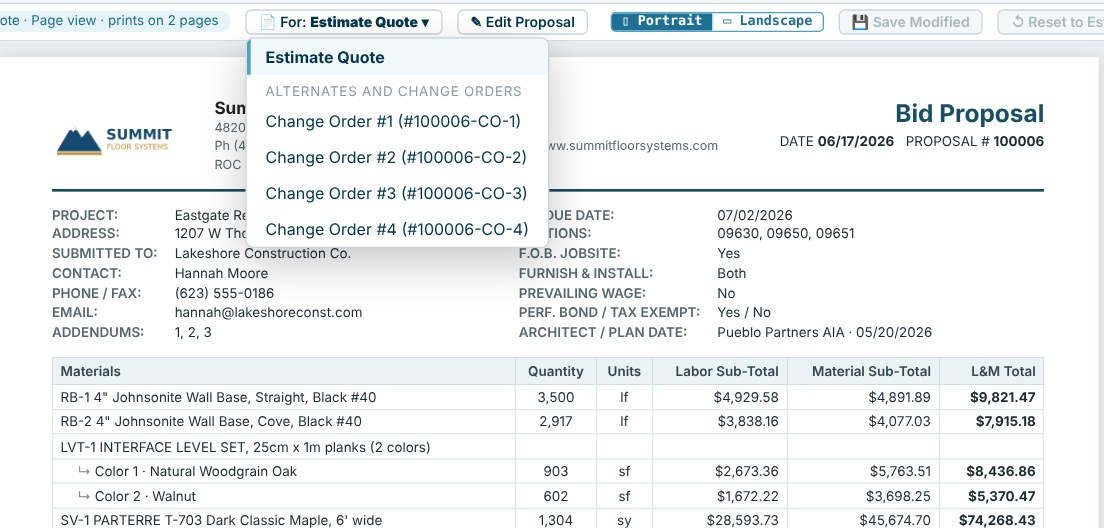
Open any proposal (Unit List, L&M, Lump Sum or Scope LS) and use the For: button at the top to pick the Estimate Quote or one Alternate or Change Order. The proposal is then titled with that change order’s name and priced from its sheet. See unit list proposals and L&M and lump sum proposals.
Worked example: Change Order #1 on Eastgate Retail Center
CO-1 adds VCT and carpet tile to the Eastgate bid. It is priced in Margin mode like the base estimate and was Accepted.
| Line or total | Qty | Amount |
|---|---|---|
| VCT-1 Armstrong Excelon, Blue 51725 | 14 sf | $593.45 |
| VCT-2 Armstrong Excelon, White 51825 | 35 sf | $128.47 |
| CPT-1 Shaw Contract, 24"x24" monolithic (5% attic → 168 sy) | 160 sy | $10,527.83 |
| CPT-2 Milliken, 50cm x 50cm ashlar (5% attic → 91.35 sy) | 87 sy | $4,974.07 |
| Total L&M | $16,223.81 | |
| Tax 8% | $1,110.83 | |
| Performance bond 1% | $162.24 | |
| Burden 3.5% | $567.83 | |
| Total CO #1 price | $18,064.71 |
Profit on the change order is $4,097.45 (25.26%), and it adds 1.78 man days. On the Estimate Quote the four change orders are listed under the $170,284.71 base price:
| Change order | Status | Price |
|---|---|---|
| CO #1 (100006-CO-1) | Accepted | $18,064.71 |
| CO #2 (100006-CO-2) | Submitted | $13,685.38 |
| CO #3 (100006-CO-3) | Accepted | $15,142.51 |
| CO #4 (100006-CO-4) | Draft | $5,101.71 |
| Total with COs | $222,279.02 |
Alternates work the same way
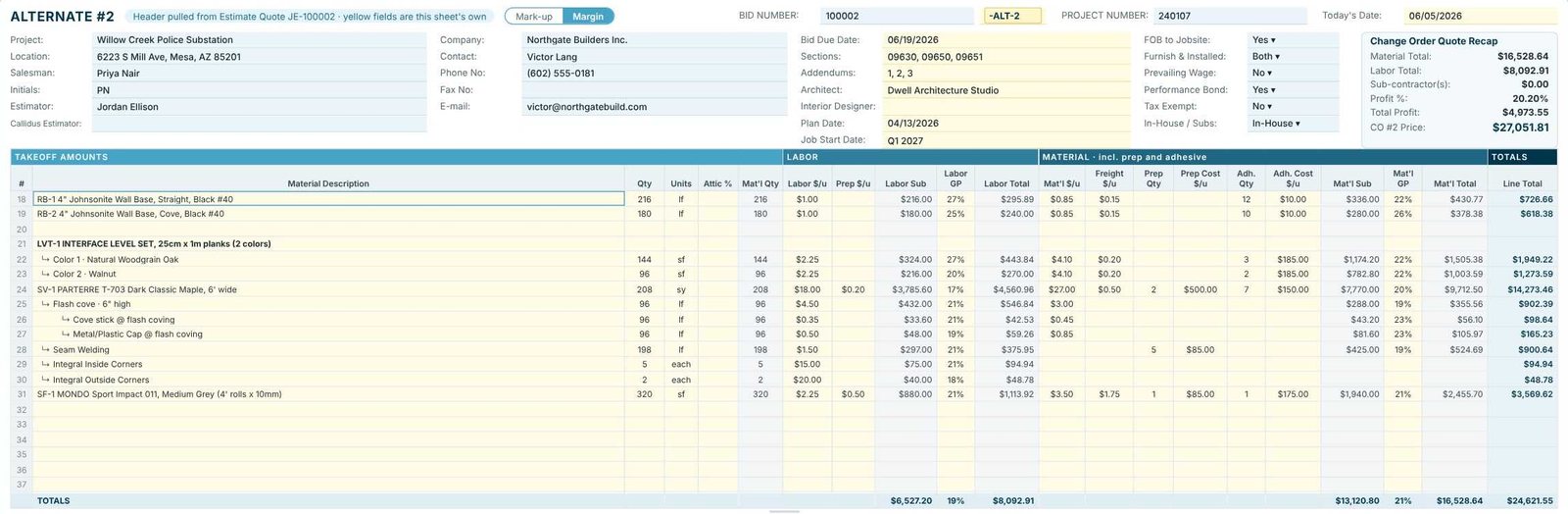
Alternates are priced at bid time instead of after award, but the sheet is the same. On the Willow Creek Police Substation sample, three Alternates sit under the Estimate Quote. Alternate #2 (ID 100002-ALT-2) adds base, LVT, sheet vinyl with its flash cove sub-lines and sports flooring, and comes to $27,051.81; it was Accepted. Alternate #3 was Denied, and its blue dot says so in the left menu and on the tracker.
What to do next
Next, see the crew time each change order adds in man days from installation rates, and follow every status on the Bid Tracker. The change orders and alternates page shows the full feature.
Price your next change order free
Change orders, alternates and the For: button are all in the 30-day free trial. No credit card.
Frequently Asked Questions
Do I have to retype the project header on a change order?
No. The header is pulled from the Estimate Quote. Only the yellow fields on the change order are its own.
What do the colored dots next to change orders mean?
Green is Accepted, orange is Submitted, red is Draft and blue is Denied. They show in the left menu and next to the bid number on the Bid Tracker.
Can I import a takeoff straight into a change order?
Yes. The Callidus and Excel / CSV imports ask where the lines go: a new Estimate Quote, an existing estimate, one of its Change Orders or Alternates, or a new Change Order.
Can I print a proposal just for one change order?
Yes. Every proposal has a For: button. Pick the Change Order or Alternate and the proposal is titled with its name and priced from its sheet.

Written by
Cristian Valcu – Founder & CEO, Commercial Flooring Estimating LLC
Cristian has estimated commercial flooring for over 20 years and built CFE - Advanced Estimating Worksheet around the way flooring contractors actually price, propose and track their bids.
Last updated: