
CFE guide · Proposals and field paperwork
Send an L&M, Lump Sum or Scope LS Proposal
The same estimate prints four ways; pick the one the GC asked for. The L&M Proposal lists every line with its quantity and one combined labor and material price. The Lump Sum Proposal shows one bid amount, with the spec sections it covers. The Scope LS Proposal is a lump sum with a Scope of Work box you type in. All three are linked to the Estimate Quote, print the same terms and exclusions, and can be printed for one change order or alternate.

Why one estimate needs several proposal formats
GCs do not all want the same paper. A construction manager comparing scopes wants every line. A GC with a bid form wants one number per section. An owner on a small remodel wants a price and a plain sentence about what is included. Rebuilding the estimate for each one is how proposals end up with different totals.
CFE - Advanced Estimating Worksheet prints all of them from the same Estimate Quote. Change a price and every proposal follows; the totals, change orders, tax, bond and burden always match. Only the layout changes.
The four steps
- L&M ProposalEvery line, one labor and material price.
- Lump Sum ProposalOne bid amount by spec section.
- Scope LS ProposalLump sum with a Scope of Work you type.
- Print for one CO or alternateFor: picks the sheet; then print or email.
1The L&M Proposal: every line, one price
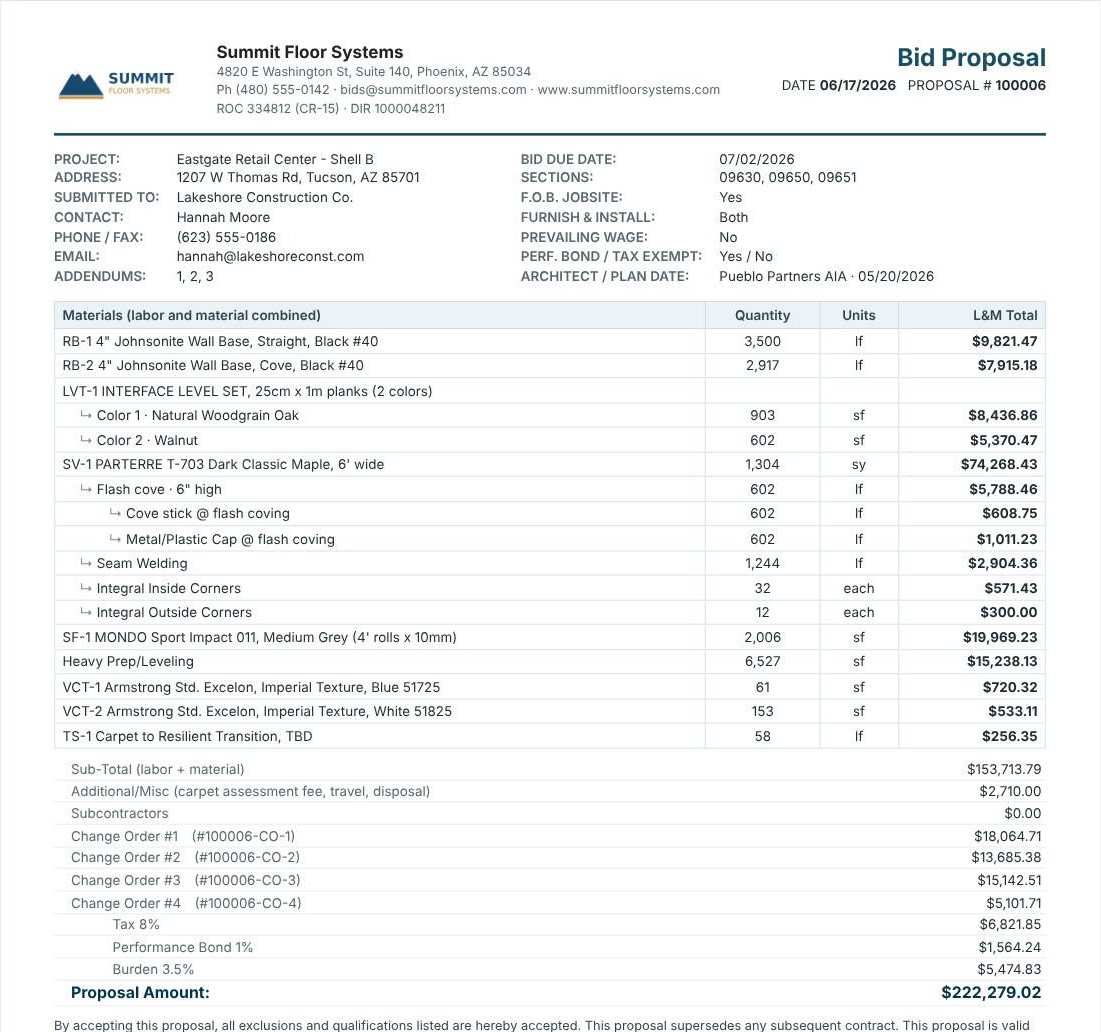
Open L&M Proposal under Proposals in the left menu. The table is headed Materials (labor and material combined) and shows each line’s Quantity, Units and L&M Total, with ↳ sub-lines indented, as on the estimate. Under it come the Sub-Total, Additional / Misc, Subcontractors, each change order with its ID, Tax, Performance Bond, Burden and the Proposal Amount. Use it when the GC wants to see every product but not your split between labor and material; the Unit List Proposal shows that split.
2The Lump Sum Proposal: one price
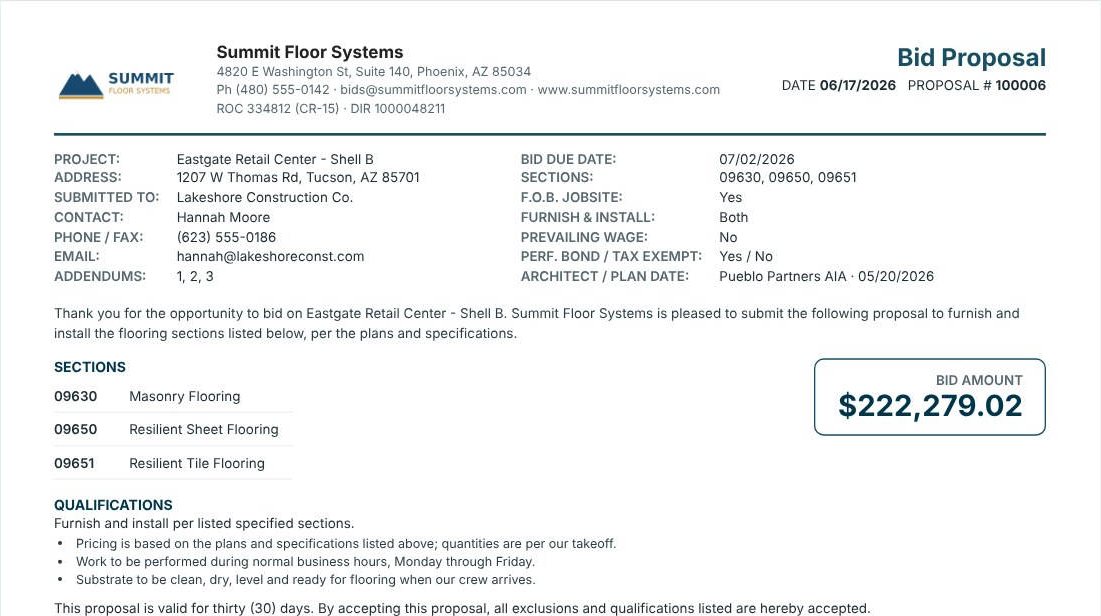
The Lump Sum Proposal has no line items. After a thank-you paragraph naming the project, it lists the Sections from the project header with their names (09630 Masonry Flooring, 09650 Resilient Sheet Flooring, 09651 Resilient Tile Flooring) and one BID AMOUNT box: $222,279.02, the same proposal amount as the other formats. Its qualifications open with Furnish and install per listed specified sections, followed by your text boxes.
Send a lump sum only with a tight exclusions list. With no line items on the page, the exclusions are the only place the GC can see what your number leaves out.
3The Scope LS Proposal: your scope of work
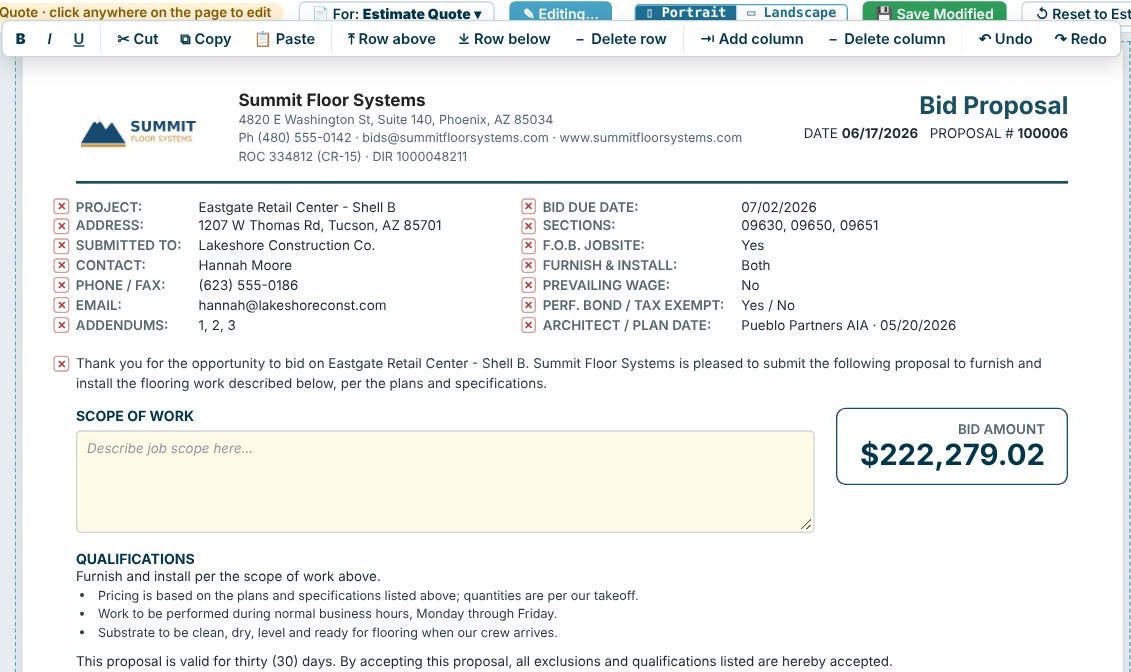
The Scope LS Proposal is the lump sum layout with a Scope of Work box in place of the sections. Press Edit Proposal, type the scope (what you furnish and install, where, and how), and the qualifications read Furnish and install per the scope of work above. In edit mode, ✕ next to a header line or text box removes it from this proposal, and the toolbar has bold, cut, copy, paste, rows, columns, Undo and Redo. The note at the top says the proposal is unlinked from the Estimate Quote while you edit; Save Modified keeps it, and Reset to Estimate rebuilds it.
4Print for one change order or alternate
Each proposal has the For: button at the top: the Estimate Quote, or one Alternate or Change Order. The proposal is then titled with that sheet’s name and priced from its sheet: the samples include a Lump Sum Proposal for Change Order #4 of a medical office and an L&M Proposal for Alternate #2 of a behavioral health bid. Then Print, Print to PDF, Save PDF or Email PDF. See change orders and alternates.
Worked example: one estimate, three proposals
Eastgate Retail Center – Shell B, printed for the Estimate Quote.
| Format | What the GC sees | Amount |
|---|---|---|
| L&M Proposal | 17 rows (16 priced lines) with quantity and L&M Total, then the totals and 4 change orders | $222,279.02 |
| Lump Sum Proposal | Sections 09630, 09650 and 09651, and one bid amount | $222,279.02 |
| Scope LS Proposal | Your Scope of Work and one bid amount | $222,279.02 |
| Unit List Proposal | Every line with labor and material sub-totals and L&M total | $222,279.02 |
Four layouts, one number. Each prints the same Terms and Conditions, Standard Exclusions, Special Provisions and the other boxes you tick on the Insert tab; see proposal terms and exclusions.
What to do next
Next, see the unit list proposal, set up your terms and exclusions, and follow the bid on the Bid Tracker. The flooring proposals page shows every format.
Send the proposal the GC wants
All four proposal formats are in the 30-day free trial. No credit card.
Frequently Asked Questions
What is the difference between the L&M and Unit List proposals?
The L&M Proposal shows one combined labor and material total per line. The Unit List Proposal shows each line’s labor sub-total, material sub-total and L&M total.
What does a lump sum proposal show?
The spec sections it covers and one bid amount, followed by your qualifications, terms and exclusions. There are no line items.
How do I write a scope of work on a CFE proposal?
Open the Scope LS Proposal, press Edit Proposal, and type in the Scope of Work box. Save Modified keeps it; Reset to Estimate rebuilds the proposal.
Do all proposal formats show the same total?
Yes. They are all built from the same Estimate Quote, so the proposal amount, change orders, tax, bond and burden match.

Written by
Cristian Valcu – Founder & CEO, Commercial Flooring Estimating LLC
Cristian has estimated commercial flooring for over 20 years and built CFE - Advanced Estimating Worksheet around the way flooring contractors actually price, propose and track their bids.
Last updated: