
Stripe Online Payments: Get Paid From the Invoice, Recorded by Itself
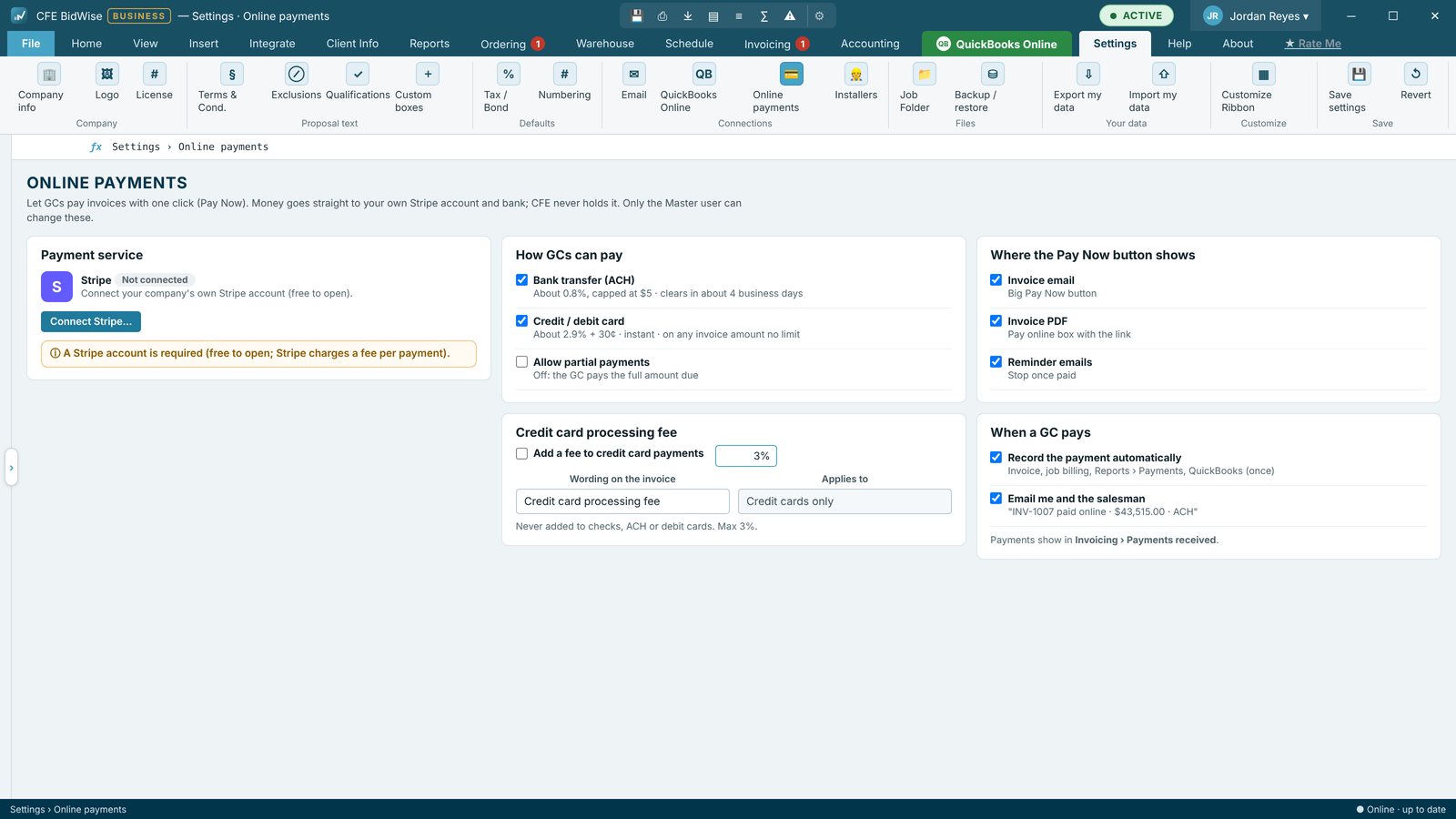
CFE BidWise connects to your company's own Stripe account in a few minutes, with no code and no extra software. From then on, every invoice email and PDF carries a Pay Now link. The GC pays by bank transfer (ACH) or card, the money goes straight to your Stripe account, and the payment is recorded on the invoice, the job and Reports › Payments without anyone typing it.
| Payment processor | Stripe, your company's own account |
|---|---|
| How GCs pay | Pay Now link on the invoice email and PDF |
| Payment methods | ACH bank transfer or card (US); card or pre-authorized debit (Canada) |
| Card fee | Optional, cards only, up to 3% (2.4% in Canada, off in Quebec) |
| Recording | Automatic: invoice, job billing and Reports › Payments |
| Plans | CFE Personal and CFE Business |
Why flooring contractors add online payments
Commercial flooring is paid slowly. Checks sit in a GC's accounts payable queue, get mailed late, and get deposited days after they arrive. Every day a payment is in transit is a day your crews, materials and payroll are financed out of your own pocket.
A Pay Now link removes the paper. The GC's accounts payable team can pay the moment the invoice is approved, by ACH bank transfer, without cutting a check. You see the payment the same day, already applied to the right invoice.
How easily it connects
There is nothing to install and no code to write. The Master user opens Settings › Online payments and presses Connect Stripe. Stripe's own pages open to sign in to an existing Stripe account or create one for your company, and to verify the business and bank account. When Stripe sends you back, CFE BidWise shows the account as connected and every invoice from then on carries Pay Now.
Your Stripe account stays yours. CFE BidWise never holds the money and never sees card numbers; Stripe handles the payment page and pays out to your bank on your Stripe schedule.
What the GC sees
The invoice email arrives from your own email address in the look you picked (Classic, Branded or Modern summary), with your logo, the amount due, the PDF attached and a Pay Now button. The PDF carries the same link, so an AP clerk who only forwards PDFs can still pay online. The link opens Stripe's secure payment page for that invoice and amount.
Recorded by itself
When the payment goes through, CFE BidWise records it on the invoice, the job's billing and Reports › Payments. Collect & bill drops the line, the GC's days-to-pay updates, and if your company invoices in CFE BidWise and syncs to QuickBooks Online, the payment goes there too. Payments received shows the Stripe numbers once Stripe is connected.
Card fees, your choice
Cards cost more to process than ACH. You can add an optional credit card fee for card payments only, up to 3%; the invoice email shows the fee note so the GC knows before paying. ACH has no added fee. For Canadian companies the fee is capped at 2.4%, and it cannot be turned on for a Quebec company, where card surcharges are not allowed.
In Canada
Canadian companies get paid in CAD by card or Canadian pre-authorized debit in place of ACH, with the same automatic recording. See the Canada setup.
Connect Stripe to CFE BidWise
- Open Settings › Online payments as the Master user.
- Press Connect Stripe and sign in to your Stripe account, or create one, on Stripe's pages.
- Finish Stripe's business and bank verification and return to CFE BidWise.
- Choose whether to add a card fee for card payments.
- Email an invoice: it now carries a Pay Now button and link.
- Connect Stripe in minutes, no code
- Pay Now on invoice emails and PDFs
- ACH or card in the US; card or pre-authorized debit in Canada
- Optional card fee, cards only
- Payments recorded on the invoice, job and Payments report
- On CFE Personal and CFE Business
Try CFE BidWise free for 30 days
Every feature unlocked, with a switch to try it as Personal or Business. No credit card. After the trial, the Estimate Quote and Dashboard keep working for free, or pick Personal ($69.99 a month) or Business ($129.99 a month per user).
Frequently Asked Questions
How do I accept online payments for flooring invoices?
Connect your company's Stripe account in CFE BidWise under Settings › Online payments. Every invoice email and PDF then carries a Pay Now link for ACH or card.
Do I need my own Stripe account?
Yes. Each company connects its own Stripe account, and payments go straight to it. CFE BidWise never holds the money.
Does the GC need an account to pay?
No. The GC clicks Pay Now on the invoice email or PDF and pays on Stripe's secure page by ACH or card.
Can I pass the card fee to the GC?
You can add an optional fee on card payments only, up to 3% in the US and 2.4% in Canada. It cannot be turned on for a Quebec company.
Is online payment on the Personal plan?
Yes. Pay Now works on both CFE Personal and CFE Business.
CFE BidWise is made by Commercial Flooring Estimating LLC, built by a flooring professional with over 20 years in the business. Last updated: