
Team Access: the Master User Decides Who Opens What
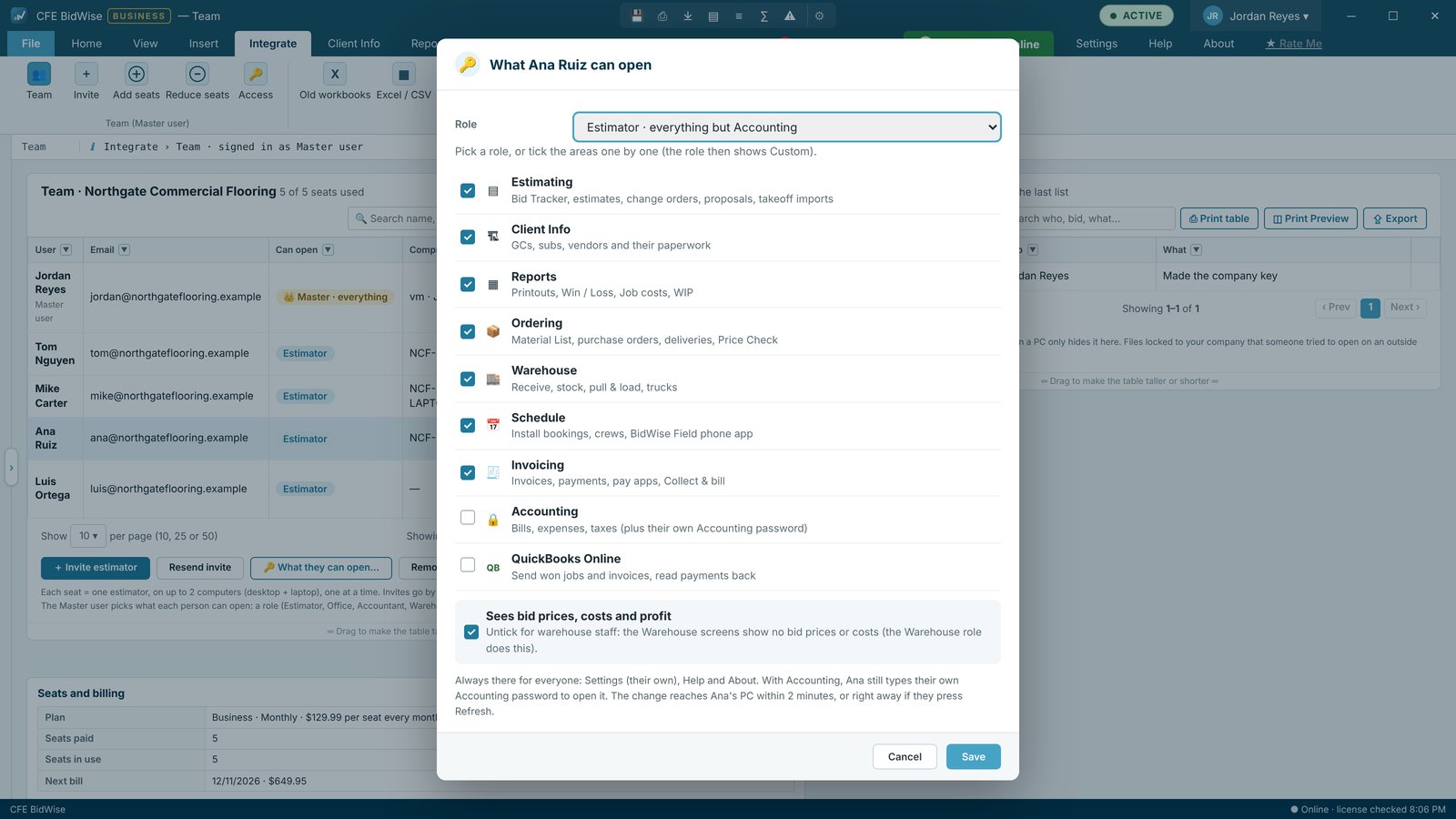
On CFE BidWise Business, the Master user sets what every person in the office can open. Pick a role (Estimator, Project manager / Office, Accountant / bookkeeper, Warehouse or Everything) or choose the areas one by one, decide who sees bid prices, and choose who sends invoices. The change reaches that person's PC within two minutes, and the Master user always has everything.
| Who sets access | The Master user, on Integrate › Team |
|---|---|
| Areas | Estimating, Client Info, Reports, Ordering, Warehouse, Schedule, Invoicing, Accounting, QuickBooks Online |
| Extra switch | Sees bid prices, costs and profit |
| Takes effect | Within 2 minutes on the person's PC |
| Accounting | Its own password on top, and an optional end date |
| Plan | CFE Business |
Why access control matters in a flooring office
As a flooring company grows, the office fills with people who need different things. Estimators need the bids. A project manager needs ordering, the schedule and the crews. The bookkeeper needs invoices and bills but not the takeoffs. The warehouse needs pull lists, not prices. Giving everyone everything exposes your margins and your books; giving everyone the same narrow view slows the office down.
CFE BidWise Business lets the Master user, usually the owner, decide exactly what each person opens, and change it in seconds when someone's job changes.
Pick a role or choose the areas
On Integrate › Team › What they can open, the Master user picks a ready-made role or ticks the areas one by one. Each area opens its tab: Estimating (Bid Tracker, estimates, change orders, proposals, imports), Client Info, Reports, Ordering, Warehouse, Schedule (with the Field app), Invoicing, Accounting and QuickBooks Online. Accounting can be given until a date, for a year-end accountant, and still needs its own Accounting password.
The access is kept on the license server and the person's PC follows it within two minutes, so it cannot be changed on the PC itself.
Who sees your prices
Sees bid prices, costs and profit is its own switch. Turn it off and a project manager can run a job, order material and book crews without seeing your margins. Warehouse users never see prices.
Who sends the invoices
Estimators do not invoice by default. In Invoice settings › Who invoices, the Master user chooses whether Ready to bill goes to everyone with Invoicing or to one person, and whether they see every won job or only the ones sent to billing.
When a job is done, the estimator presses 📨 Ready to bill in the Bid Tracker and says what to bill: the rest of the job, a deposit, the work done this period or an approved change order, with a note. The invoicing person sees a banner and a red count on the Invoicing tab. Invoices and payments they make are copied back into the estimator's bid, and a read-only Billing box on the estimate shows the estimator what has been invoiced, paid and is still open. Team billing travels through your company folder, locked with the company key; nothing goes to CFE's servers.
Nobody gets stuck
When someone without Estimating opens a bid, CFE BidWise shows who is responsible for it, the Estimator and Salesman, with email, cell and office numbers and buttons to email or call them. Each person types their numbers once in About › Account.
When people come and go
Every bid belongs to the company, so access changes never lose work. Remove a seat and the bids are already in the company copy; give the new hire a role and they start where the last person left off. Read how the company owns the bids.
The ready-made roles
| Role | Can open | Bid prices |
|---|---|---|
| Estimator | Estimating, Client Info, Reports, Ordering, Warehouse, Schedule | Yes |
| Project manager / Office | Client Info, Reports, Ordering, Warehouse, Schedule, Invoicing | Yes |
| Accountant / bookkeeper | Client Info, Reports, Invoicing, Accounting, QuickBooks Online | Yes |
| Warehouse | Warehouse only | No |
| Everything | Every area, like the Master user | Yes |
| Custom | Any mix of areas you tick | Your choice |
Settings, Help and About are always open. My day only shows lines from the areas a person can open.
Set what a teammate can open
- Sign in as the Master user and open Integrate › Team.
- Click the person and open What they can open.
- Pick a role, or tick the areas one by one, and set Sees bid prices.
- For Accounting, add an end date if the access is temporary.
- Save. The person's PC follows within two minutes.
- Five ready-made roles, or custom
- Nine areas, ticked one by one
- Sees bid prices, costs and profit switch
- Accounting with an end date and its own password
- Who invoices, Ready to bill and the Billing box
- Changes reach the PC within two minutes
Personal is one user, the Master user, with everything.
Roles, areas, Sees bid prices, Who invoices, Ready to bill and team billing.
Compare every feature, Personal vs Business
Try CFE BidWise free for 30 days
Every feature unlocked, with a switch to try it as Personal or Business. No credit card. After the trial, the Estimate Quote and Dashboard keep working for free, or pick Personal ($69.99 a month) or Business ($129.99 a month per user).
Frequently Asked Questions
Can I limit what an employee sees in CFE BidWise?
Yes. On CFE Business the Master user picks a role or the areas one by one for each person, and decides whether they see bid prices.
Can I hide our margins from project managers?
Yes. Turn off Sees bid prices, costs and profit for that person. They can still order, schedule and run the job.
Who can send invoices?
Whoever has Invoicing. In Invoice settings › Who invoices the Master user can send all billing to one person. Estimators send jobs with 📨 Ready to bill.
How fast does a change take effect?
Within two minutes. Access is kept on the license server, and the person's PC follows it.
Does the Master user always see everything?
Yes. The Master user always has every area.
CFE BidWise is made by Commercial Flooring Estimating LLC, built by a flooring professional with over 20 years in the business. Last updated: