
Job Bid Board for Commercial Flooring Contractors
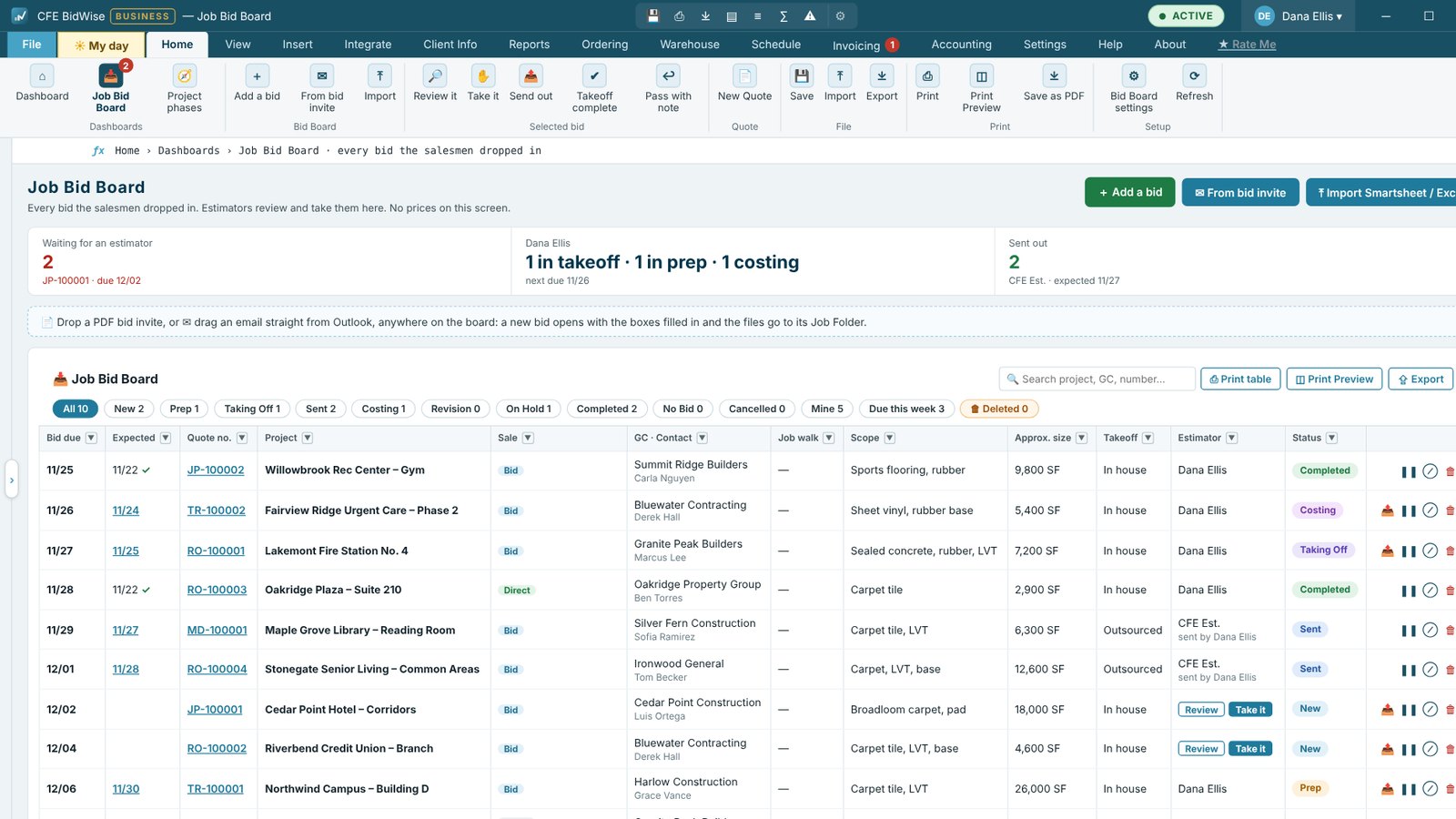
Never ask “did anyone take that bid?” again. The Job Bid Board puts every bid your company is chasing on one screen: the due date, who is taking it off, when it is expected and where it stands. It is included in the CFE BidWise Personal and Business plans. Salesmen send their bids from BidWise Sales, a free app, and on Business an outside estimating company can work its bids from a guest page. It replaces the shared spreadsheet, the Smartsheet and the “who’s doing this one?” emails.
- In Personal and Business
- Guest page for estimators
- No prices on the board
- Never double-bid a GC


One download, one sign-up: BidWise Demo for the office and BidWise Sales Demo for the salesman. All 40 sample jobs are on the Job Bid Board, so you can review, take and pass bids right away.
Who uses the Job Bid Board
The board is included in CFE BidWise Personal and Business, with the estimators who take the bids, price them and print the proposal. Compare plans
They add bids in the free BidWise Sales app and see who took them. Personal links 1 salesman, Business any number. Free Sales Dashboard
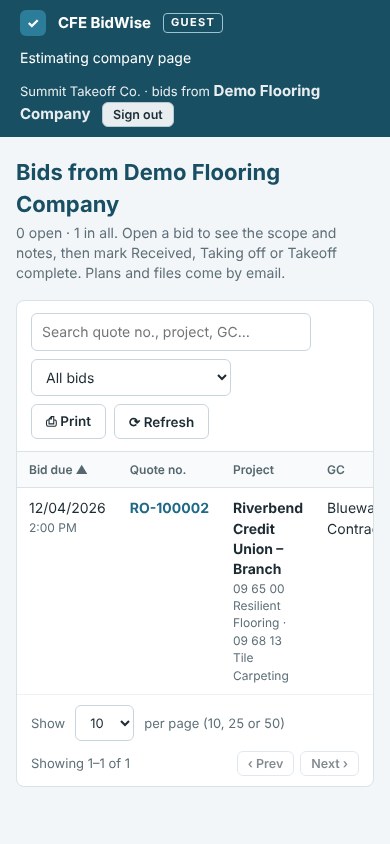
An estimating company you send takeoffs to uses a guest web page, nothing to install, and marks where each takeoff stands. The guest page comes with Business. Open the guest page
What is a bid board for commercial flooring?
A bid board is one shared list of every job your company is bidding. In a lot of commercial flooring companies that list lives in a hallway conversation: a salesman forwards an invite, mentions it at lunch, and two days before bid day somebody finds out nobody started it. The Job Bid Board replaces the hallway. Every bid a salesman adds lands on one board, with who has it, when it is expected and where it stands.
How a bid moves across the board
- A bid comes inAdd a bid in 3 boxes, drop a PDF bid invite or an Outlook email, or import Smartsheet / Excel.
- Estimator takes itA red count shows new bids. Review it, then Take it or Pass with note.
- Takeoff gets doneIn house, or sent out to an estimating company on the guest page.
- New QuoteThe Estimate Quote fills in from the bid: same quote number, same Job Folder.
| Columns | Bid due, Expected, Quote no., Project, Sale, GC · Contact, Job walk, Scope, Approx. size, Takeoff, Estimator, Status |
|---|---|
| Cards on top | Waiting for an estimator, who is taking off what, and what is sent out |
| Prices | Never shown on the board |
| Change orders | Colored dots by the quote number: grey Draft, orange Submitted, green Accepted, red Denied. Click to open them down |
| Plans | Included in CFE BidWise Personal ($69.99 a month) and Business ($129.99 a month per user). Business adds Send out and the guest page |

Bid tracking software that replaces the spreadsheet
Each row shows the bid due date, the expected date, the project, GC and contact, the scope, size, takeoff, estimator and status. Filter chips count every status: New, Prep, Taking Off, Sent, Costing, Revision, Standby, Completed, No Bid, On Hold and Cancelled, plus Mine and Due this week.
Change orders and alternates show as colored dots next to the quote number, the same as the Project Bid Tracker. Click the dots and the bid opens down with each one under it. The board never shows a price.
From salesman to estimator: Take it, or Pass with a note
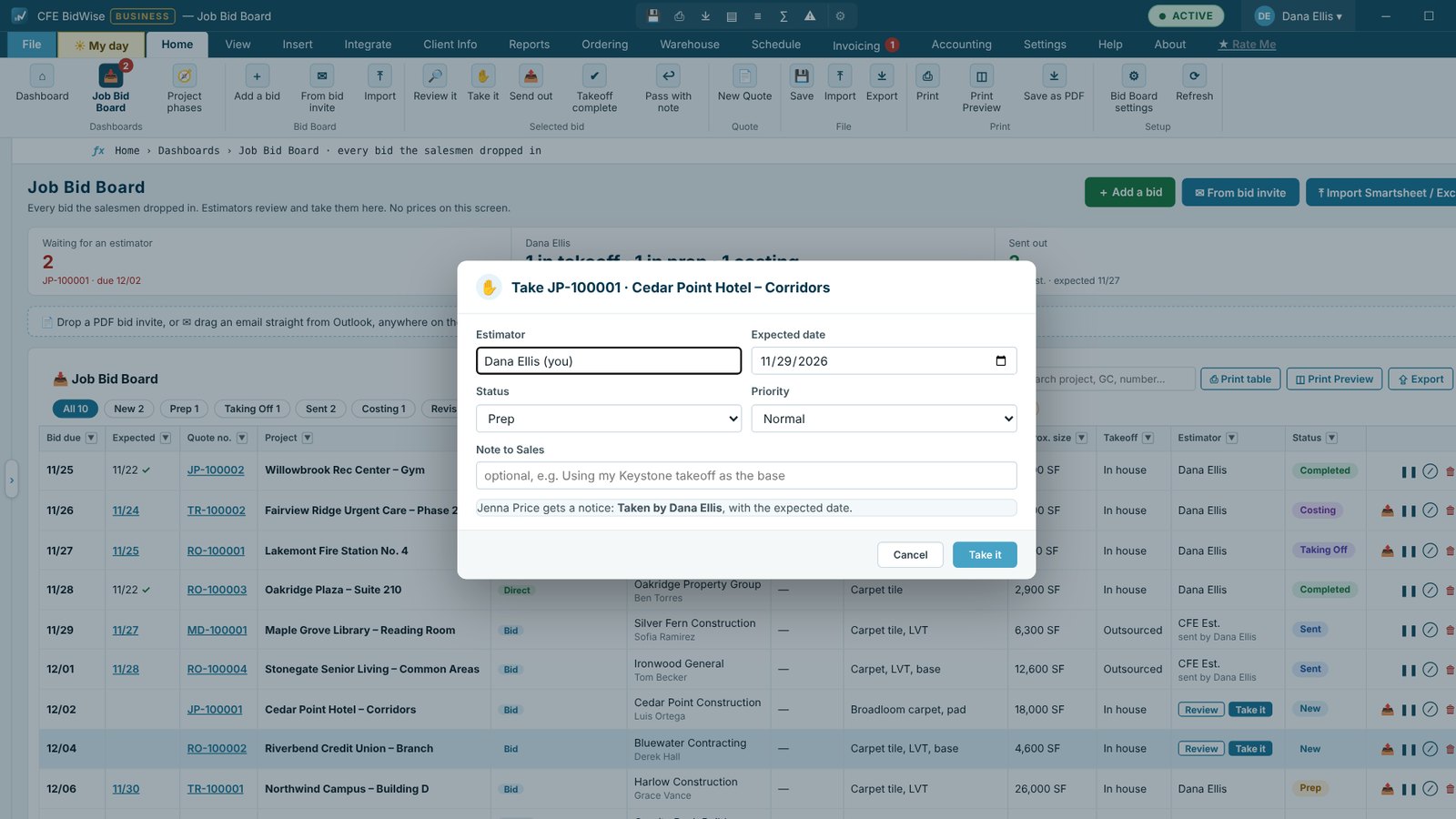
An estimator presses Review on a new bid and sees every box the salesman filled in: project, dates, scope sections and who it goes to. Then Take it, with the estimator, the expected date, the status and the priority.
The salesman gets a notice right away: taken, with the date it should be ready. If the company is not bidding it, Pass with note says why, and the salesman knows that too.
Outsourced takeoff tracking with a guest page
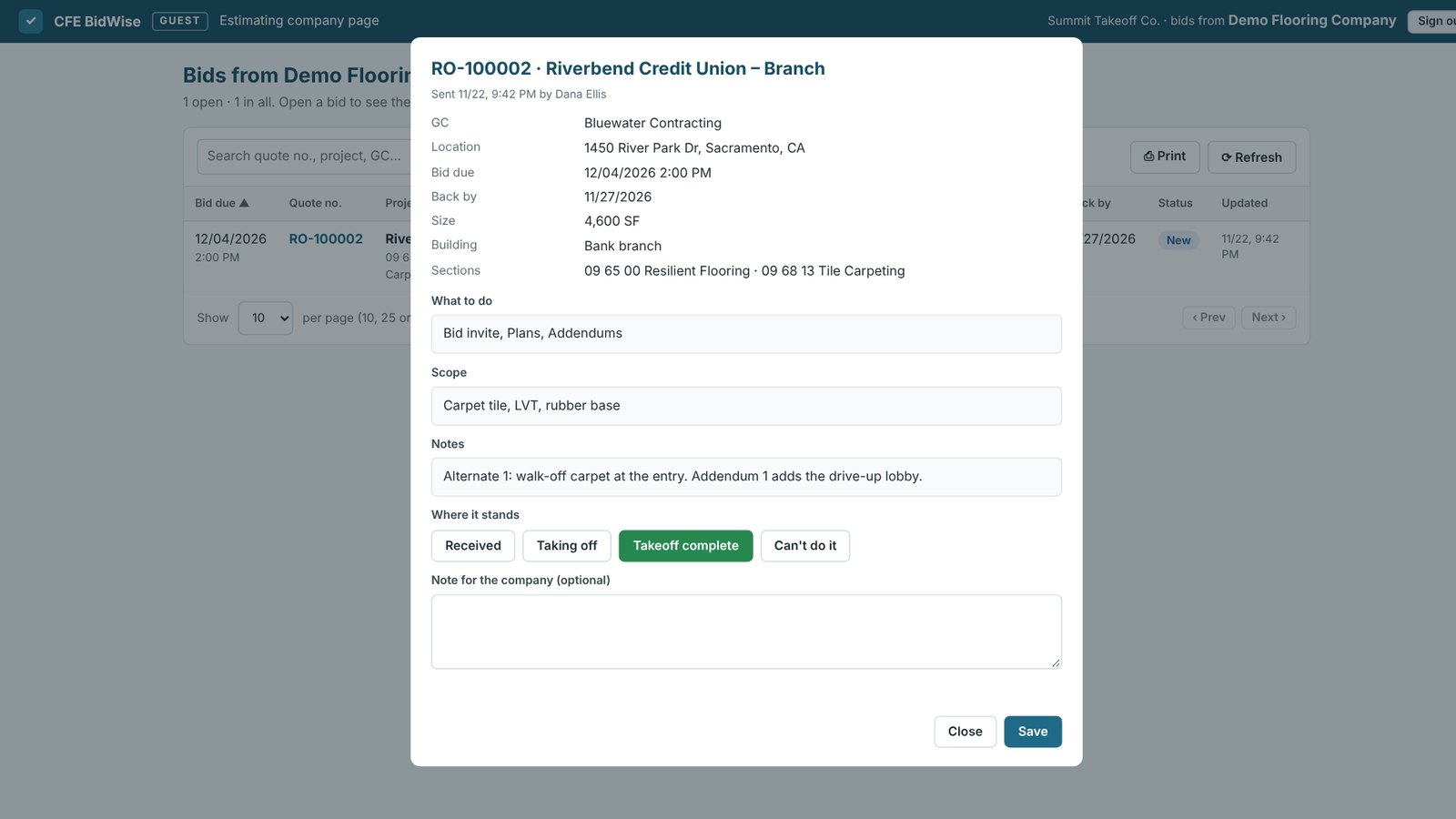
Busy weeks happen, and many commercial flooring contractors send some takeoffs to an outside estimating company. Press Send out, pick the company and the back-by date, and tick Put it on the guest page.
The estimating company signs in with its guest code and sees only the bids you sent it, with the project, due date, scope and your notes. No prices and no GC contacts. It marks Received, Taking off, Takeoff complete or Can't do it, with a note, from any browser or phone. It shows on your board within a minute.
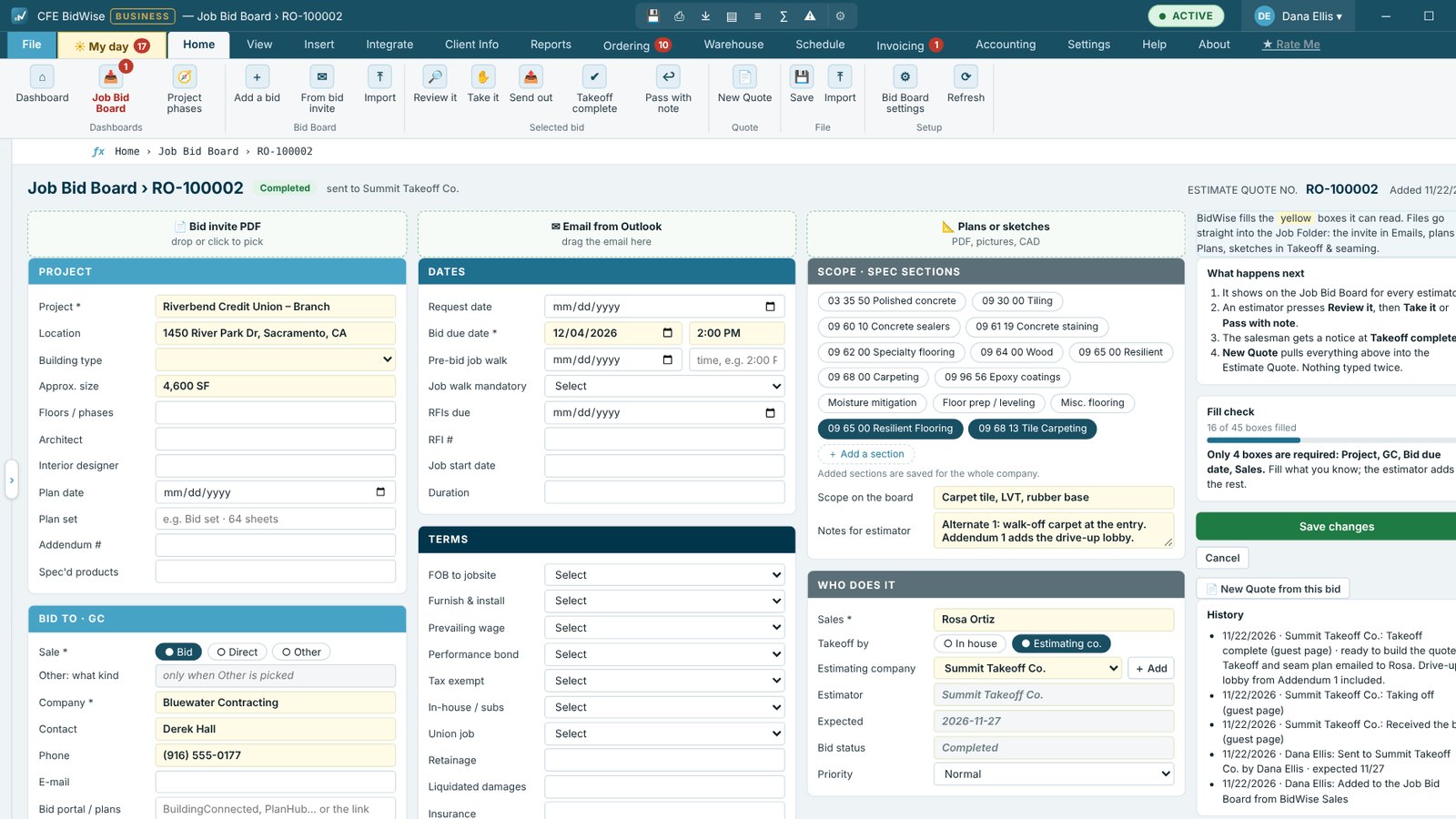
Every step on the record, then New Quote
The bid's History shows every step the estimating company marked, with the time and the note. When the takeoff is done, the salesman is told, and New Quote from this bid opens the Estimate Quote with the same quote number, the same Job Folder and the boxes already typed. Change orders and alternates move over too, each on its own sheet, ready to price. The job then shows in the Project Bid Tracker.
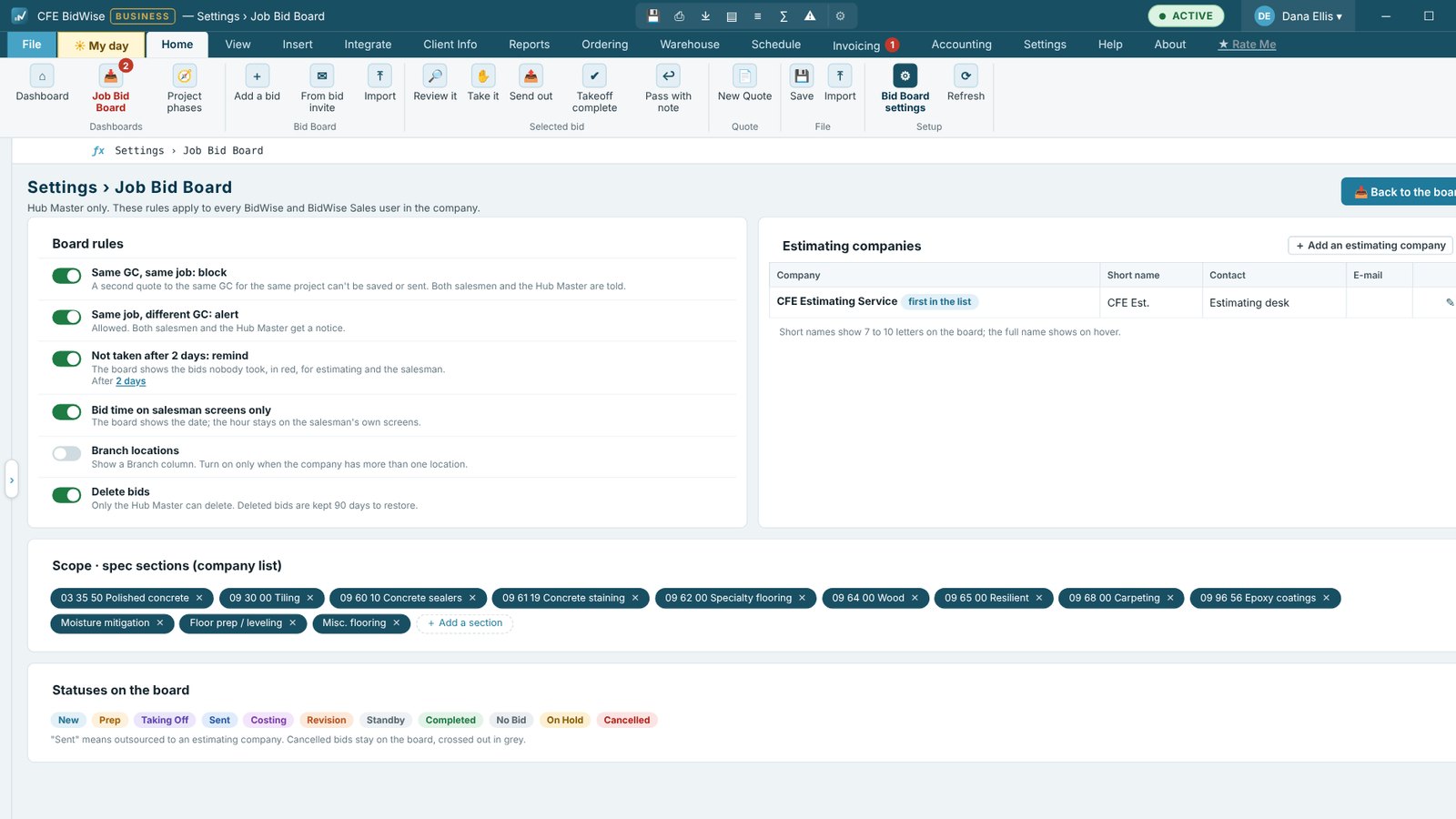
Never double-bid a GC: built-in board rules
- Same GC, same project: blocked, so a GC never gets two quotes for one job
- Same project, different GC: flagged on both bids
- A reminder when a bid is not taken after the days you set
- Branches, for companies with more than one office
- Only the Hub Master can delete, and a delete can be undone
- Every change is logged in the bid's History
Your salesmen get a free Sales Dashboard too
BidWise Sales gives each salesman leads, a pipeline, bid follow-ups, Win / Loss and commission tracking with the same math as the company. One invite code links it, and every bid they add lands on your board.
See the free Sales Dashboard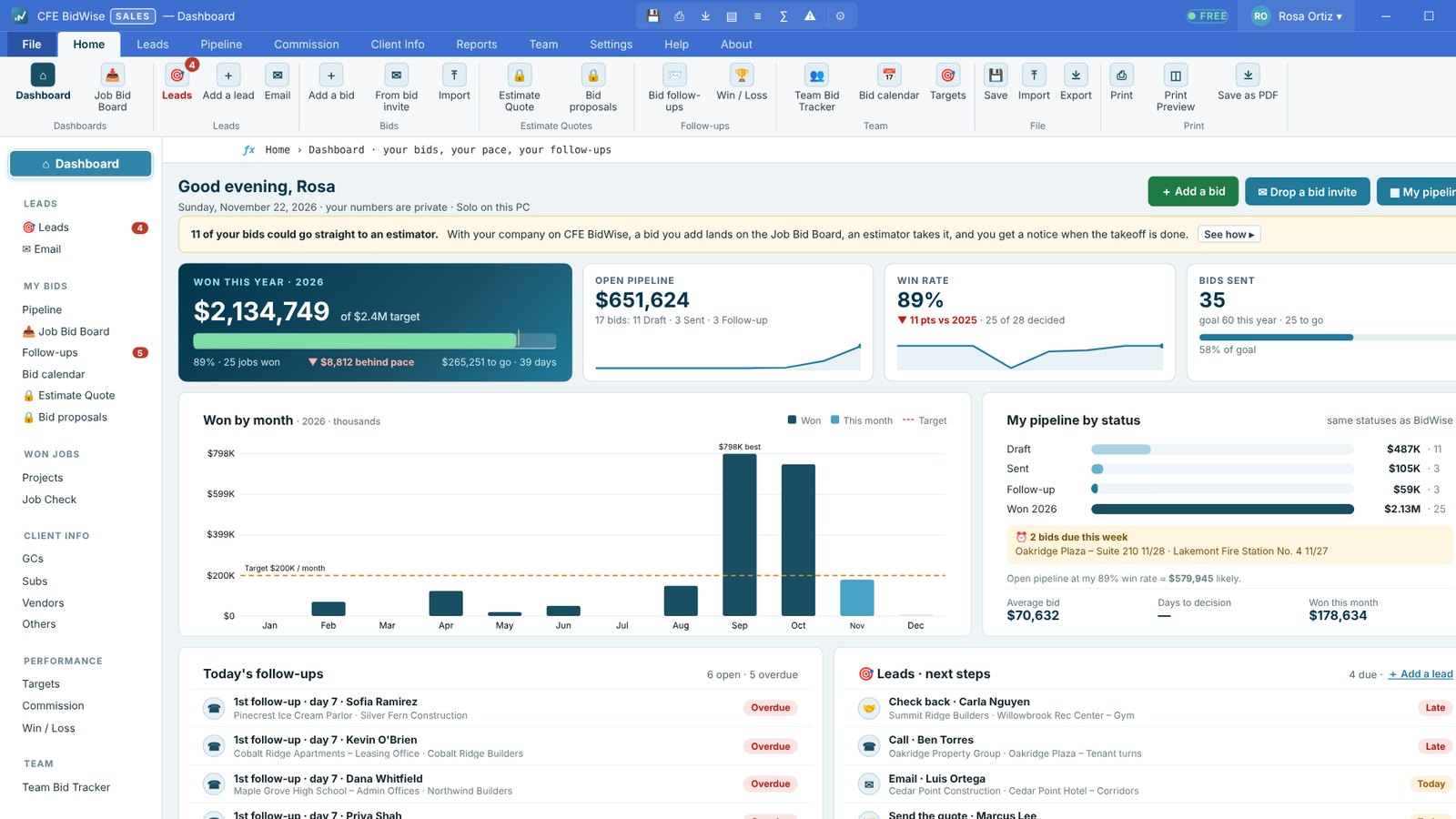
Try the Job Bid Board for 30 days
Download CFE BidWise and the 30-day trial shows the full Business board on one PC, with no credit card. The Job Bid Board is included in Personal ($69.99 a month) and Business ($129.99 a month per user).
Frequently Asked Questions
What is a bid board?
A bid board is one shared list of every job your company is bidding, with the due date, who has it, where the takeoff stands and the status. The Job Bid Board in CFE BidWise is that list for a commercial flooring contractor: salesmen add bids, estimators take them, and every team PC sees it at once.
Which plans include the Job Bid Board?
The Job Bid Board is included in CFE BidWise Personal and Business. Personal links 1 salesman; Business links any number of salesmen and adds Send out and the guest page for outside estimating companies. Salesmen use the free BidWise Sales app.
Does the Job Bid Board show prices?
No. Amounts stay with the salesman and the Estimate Quote, so the board can be shared with people who should not see the numbers.
Can the same GC get two quotes for one project?
No. The board blocks the same GC on the same project. The same project with a different GC is flagged on both bids.
Do outside estimating companies need BidWise?
No. They open the guest page in any browser, phone included, sign in with their guest code and email, and mark each bid Received, Taking off, Takeoff complete or Can't do it.
Can I import my bids from Smartsheet or Excel?
Yes. Import Smartsheet / Excel brings in your bid list from Smartsheet, any Excel or CSV file, or the BidWise template. Bid amounts are never imported.
Can CFE BidWise Personal use the board?
Yes. The Job Bid Board is included in Personal, which links 1 salesman. Send out and the guest page are Business only. Business links any number of salesmen.
Can I try it on the 30-day trial?
Yes. The trial shows the full Business board on one PC. Linking a salesman needs a paid Personal or Business plan, and the guest page needs Business.
CFE BidWise and BidWise Sales are made by Commercial Flooring Estimating LLC, built by a flooring professional with over 20 years in the business. Last updated: