
CFE guide · Getting started
My Day: Everything That Needs You Today, in One List
My day is your to-do list, and you never type it. Every morning it gathers what needs you from Ordering, Warehouse, Schedule, Invoicing, Accounting and Follow-ups, puts it in the order it is due, and ticks each line off by itself when the work is done in CFE BidWise. Overdue lines stay at the top until you finish them, snooze them or hand them off.


Why a daily list?
A flooring office runs on a dozen small deadlines a day: a GC who is late paying, a first invoice nobody sent, wall base that has not shown up, a crew that needs its material pulled before seven. They live in different tabs and different heads, and the one that slips is the one that costs you.
My day reads all of them from the work already in CFE BidWise and puts them on one screen, oldest first. When the invoice goes out or the delivery is received, the line leaves the list by itself.
The five steps
- Start with Good morningThe day’s count and the first lines, at sign-in.
- Read the listOverdue, Today, Coming up, with filters by area.
- Do itThe button opens the exact screen for the job.
- Done or SnoozeClose what you did elsewhere; push the rest.
- Print and set it upA to-do sheet with tick boxes; your own start time.
1Start with the Good morning window
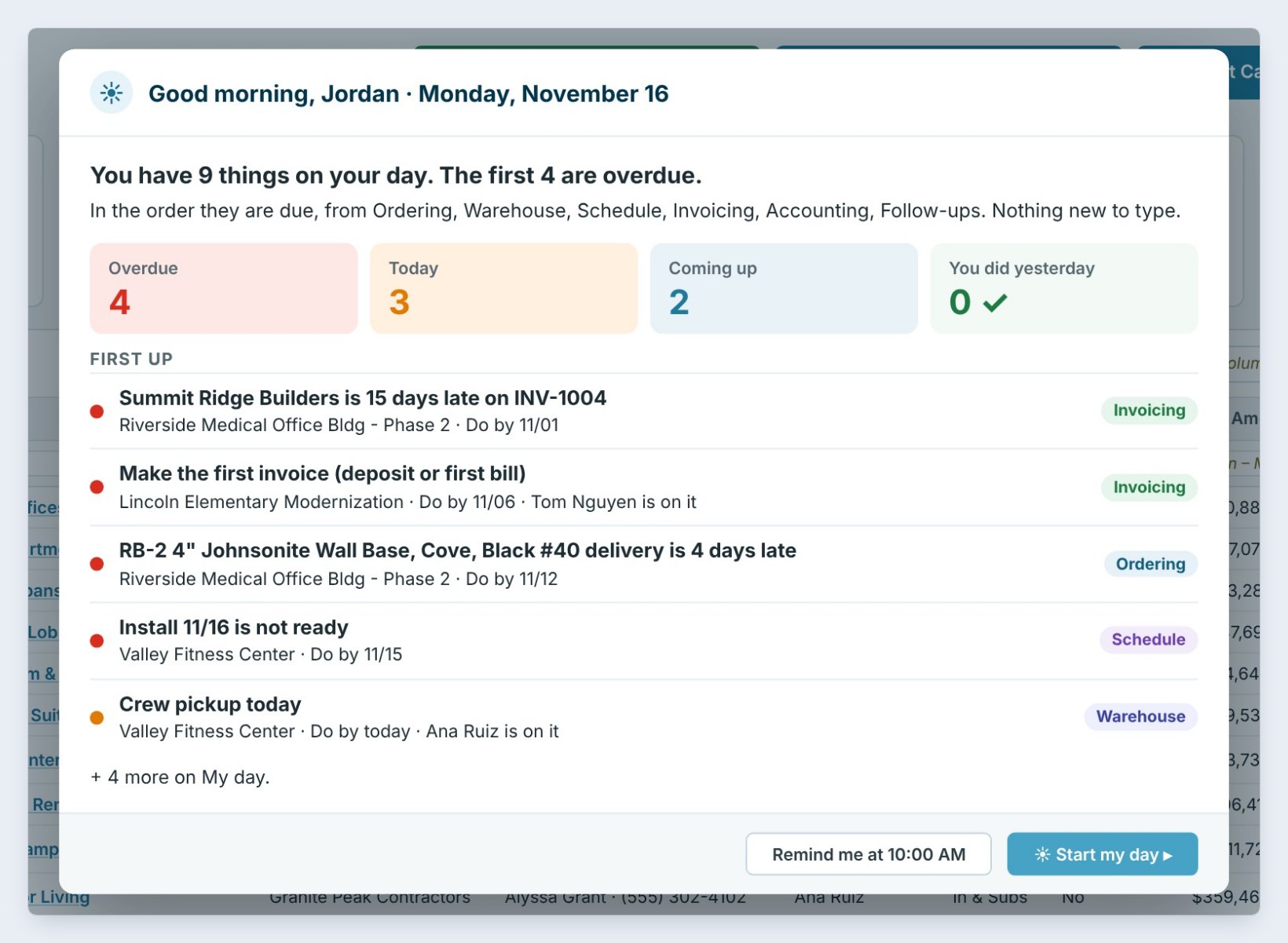
The first time you sign in each morning, the Good morning window opens. It counts the day: here 9 things, 4 overdue, 3 today and 2 coming up, and shows the first lines in the order they are due, each tagged with where it comes from, such as Invoicing, Ordering or Schedule.
Click Start my day to open the full list, or Remind me at 10:00 AM if you are on your way to a job.
2Read your day, in the order it is due
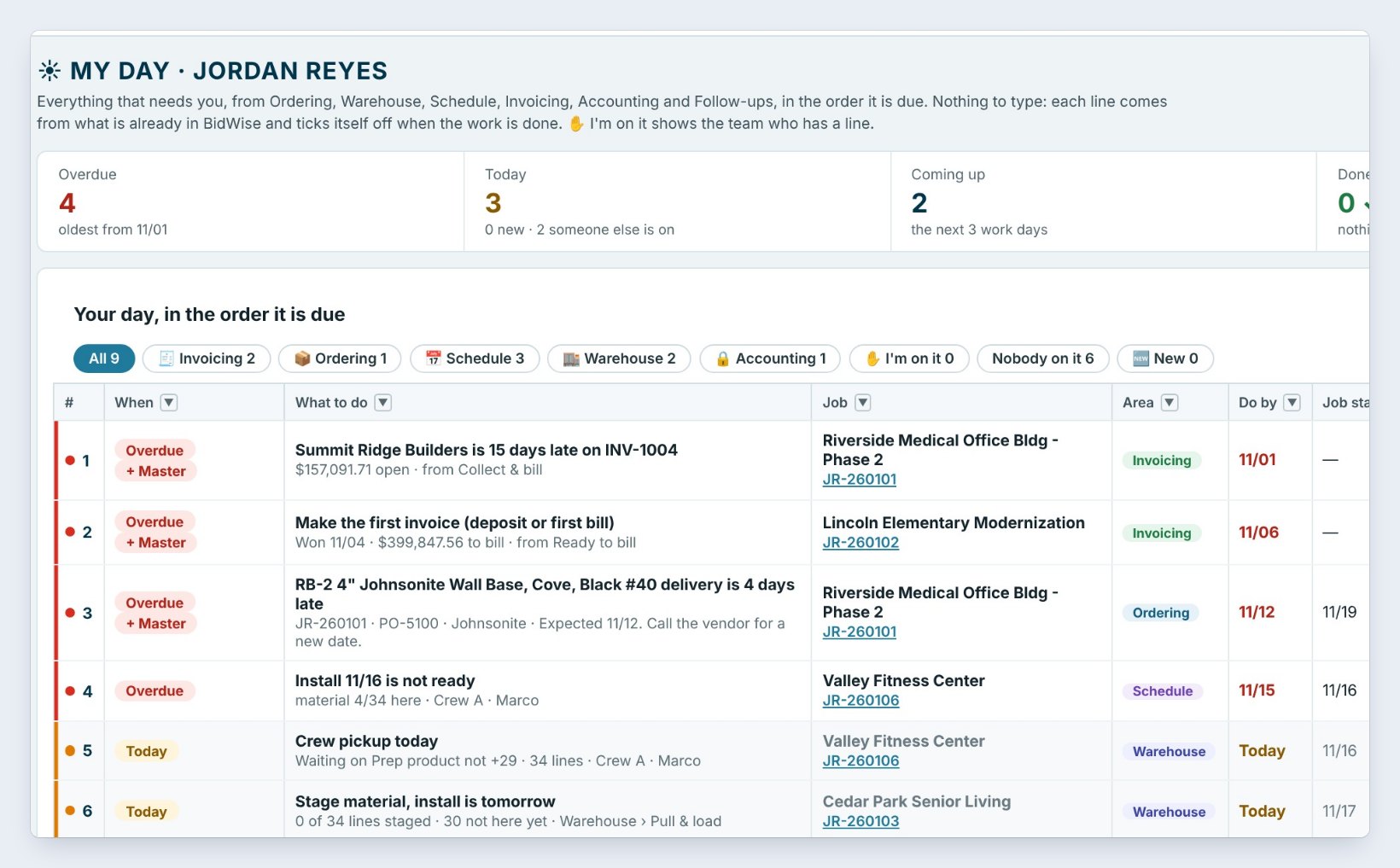
The My day tab lists every line with When, What to do, the Job, the Area and the Do by date. Overdue lines are red and stay on top. The tiles across the top count Overdue, Today, Coming up, Done today and Snoozed, and the chips filter the list by area, such as Invoicing or Ordering.
Nothing here was typed. Summit Ridge Builders being 15 days late on an invoice, a delivery that is 4 days late and an install that is not ready all come from the jobs themselves.
Click the Overdue tile first. Those are the lines that cost money every day they wait: a late payment, a late delivery or an install that is not ready.
3Do it: the button opens the exact screen
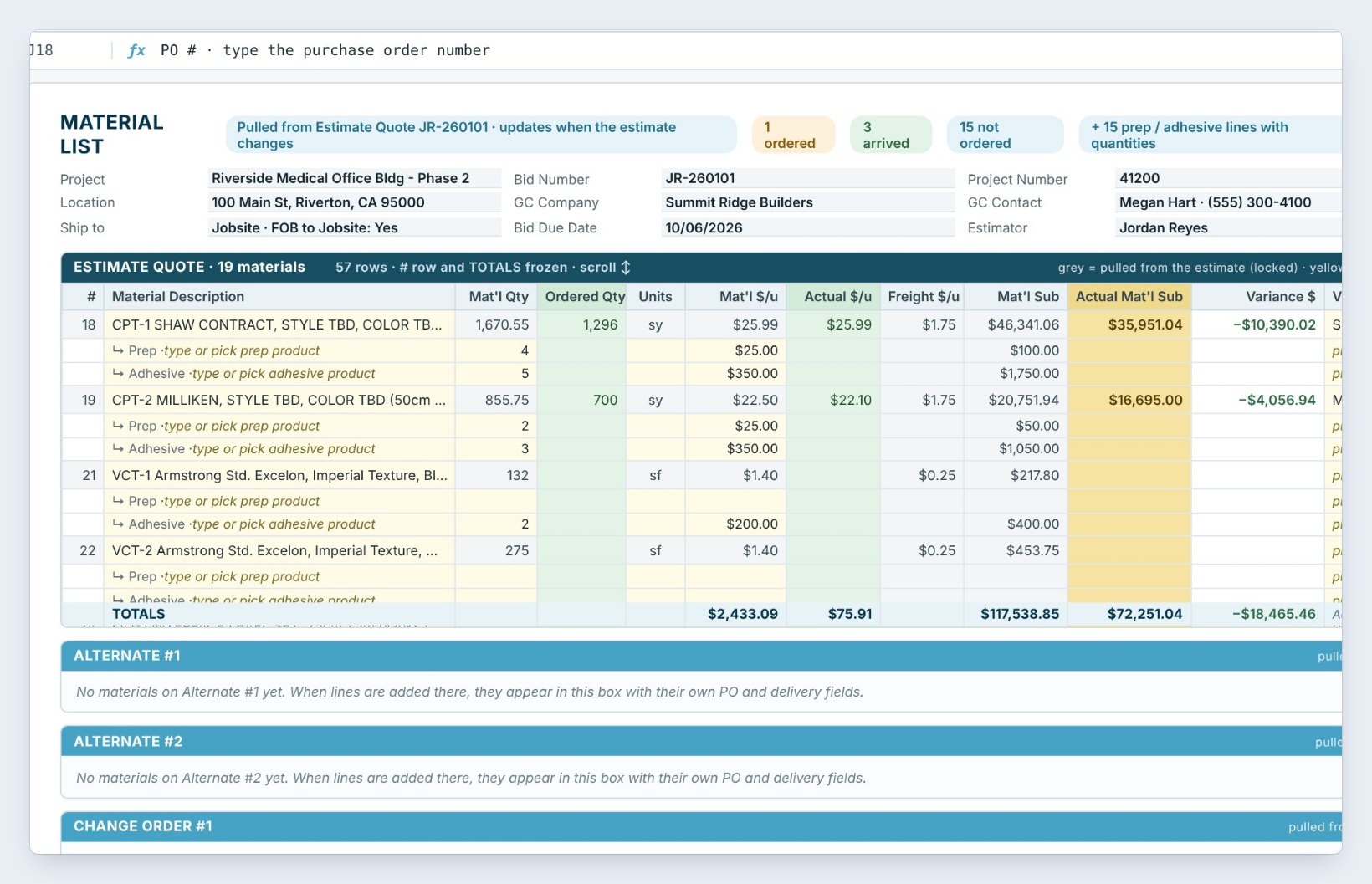
Each line has a blue button named for the work: Invoice, Call vendor, Open or Pull & load. It opens the exact screen for that job. For the late wall base on Riverside Medical Office, Call vendor opens the job’s Material List with the PO and the expected date, so you can call and put in the new date.
When the work is done in CFE BidWise, the line ticks itself off and moves to Done today.
4Mark it Done, or Snooze it
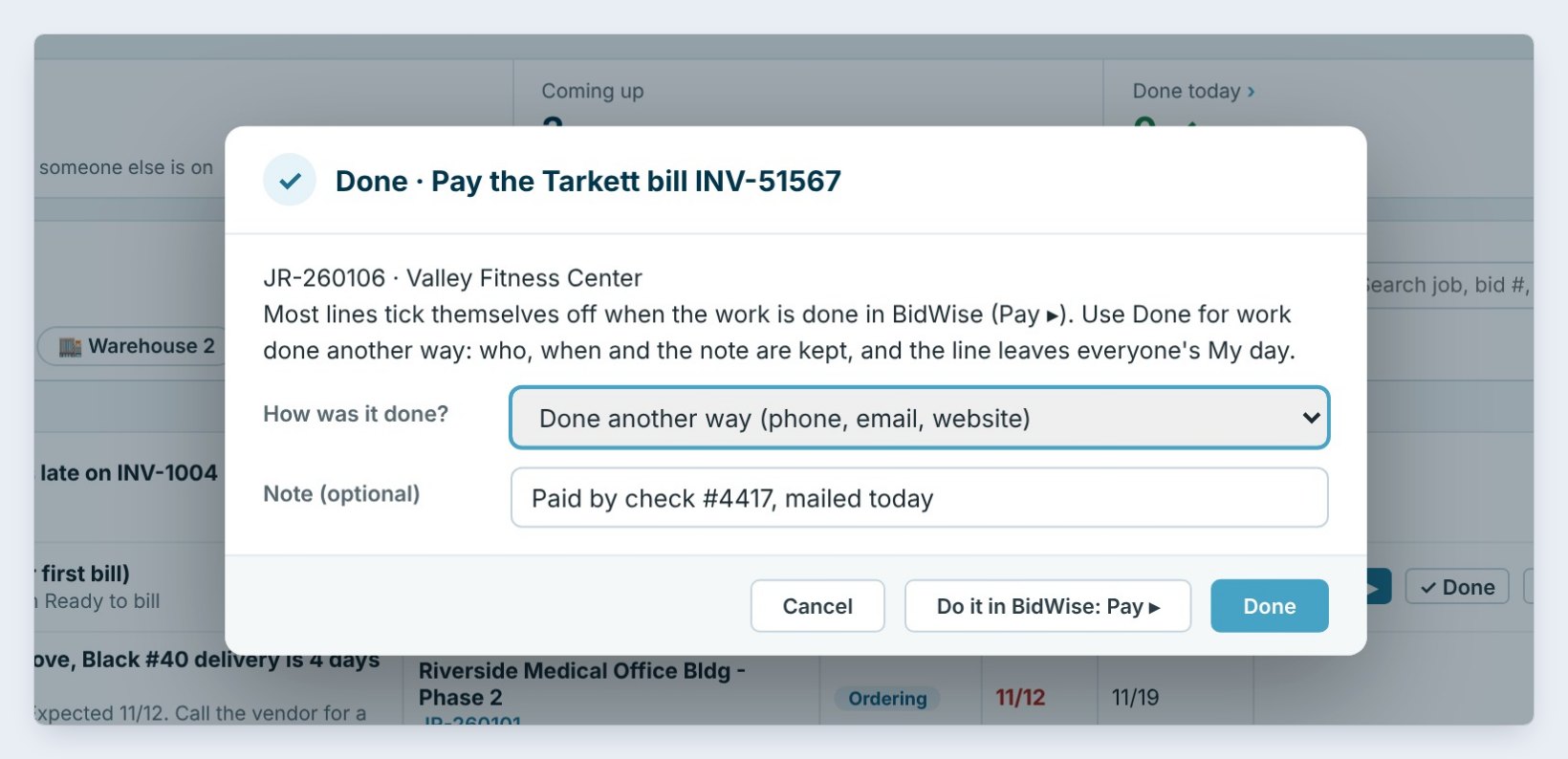
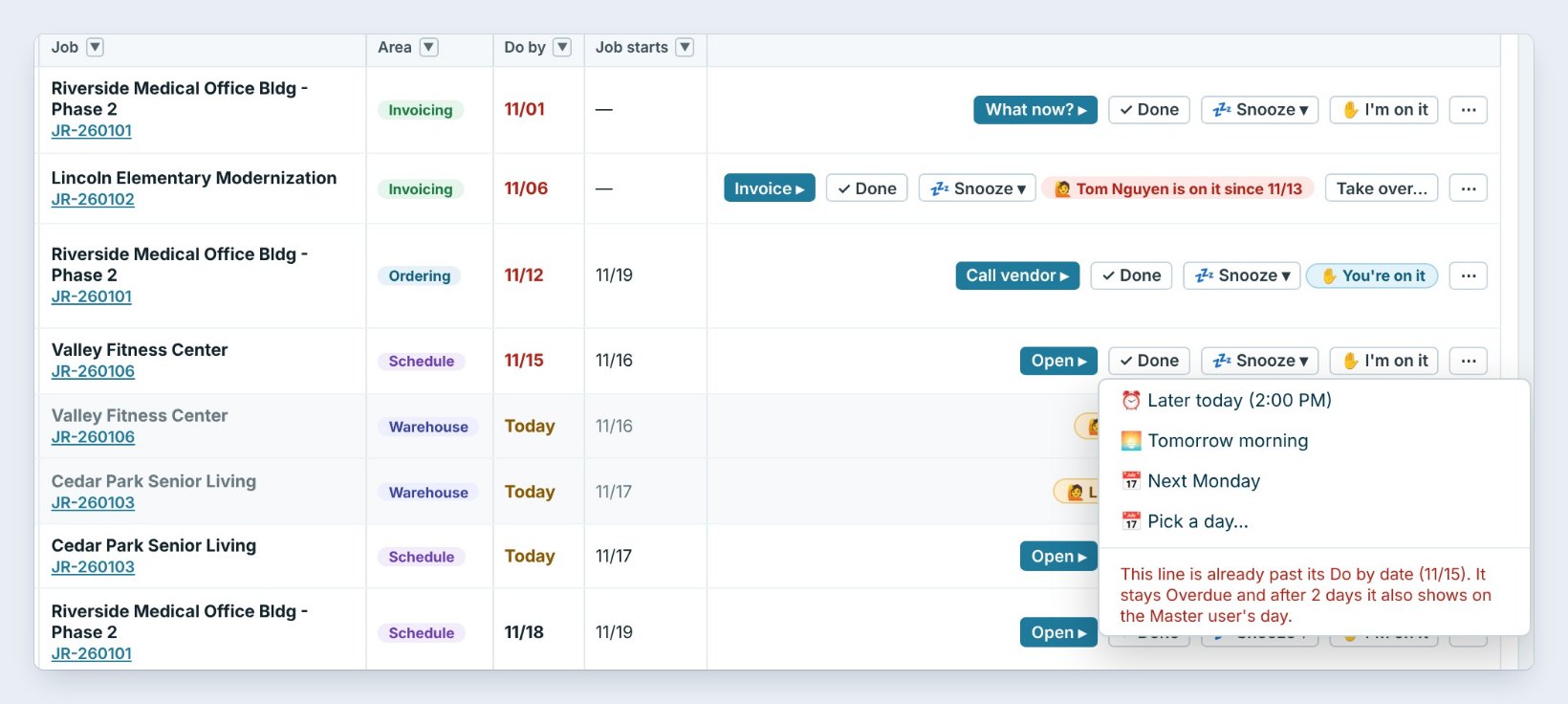
Did the work outside the app, by phone or on a website? Click Done, pick how it was done and add a note, such as Paid by check #4417, mailed today. The line leaves everyone’s My day and the note is kept.
Can’t get to it yet? Snooze it to later today, tomorrow morning, next Monday or a day you pick. It comes back on its own. A line already past its Do by date stays Overdue, and after 2 days it also shows on the Master user’s day.
5Print your day and set it up your way
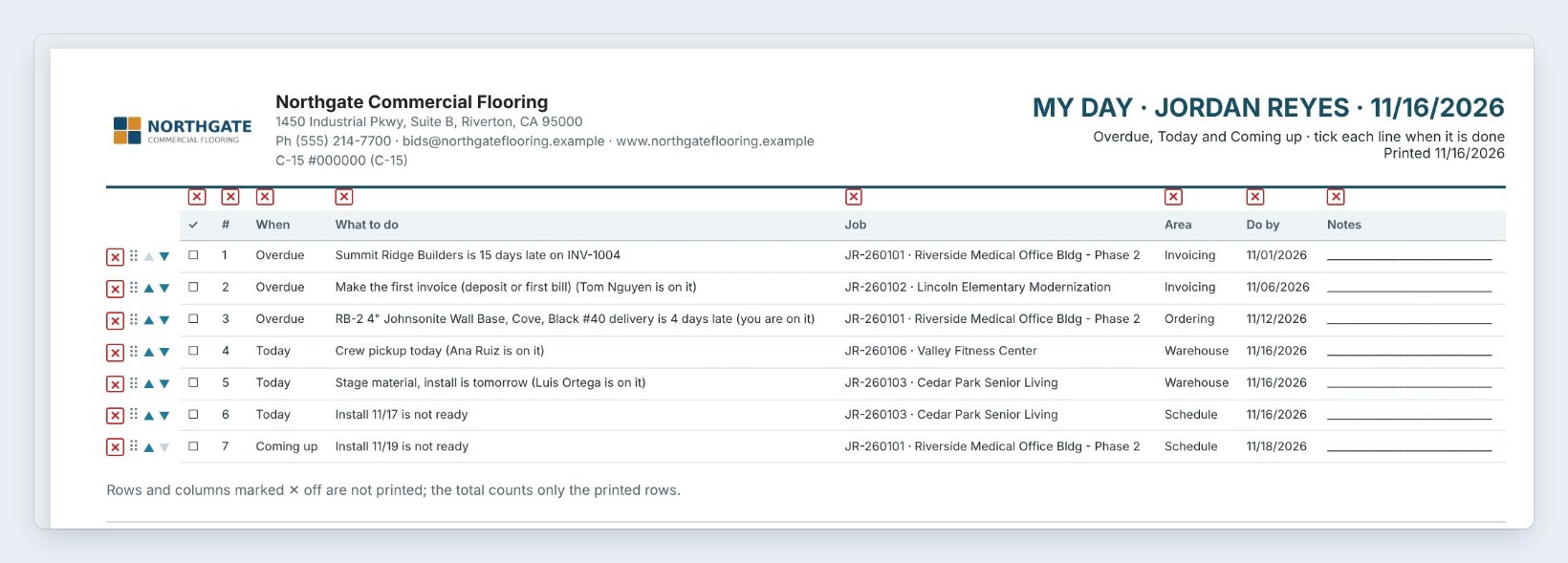
Print Preview turns the list into a one-page to-do sheet with tick boxes and a Notes column for the truck or the jobsite. Save PDF, Email and Export are next to it.
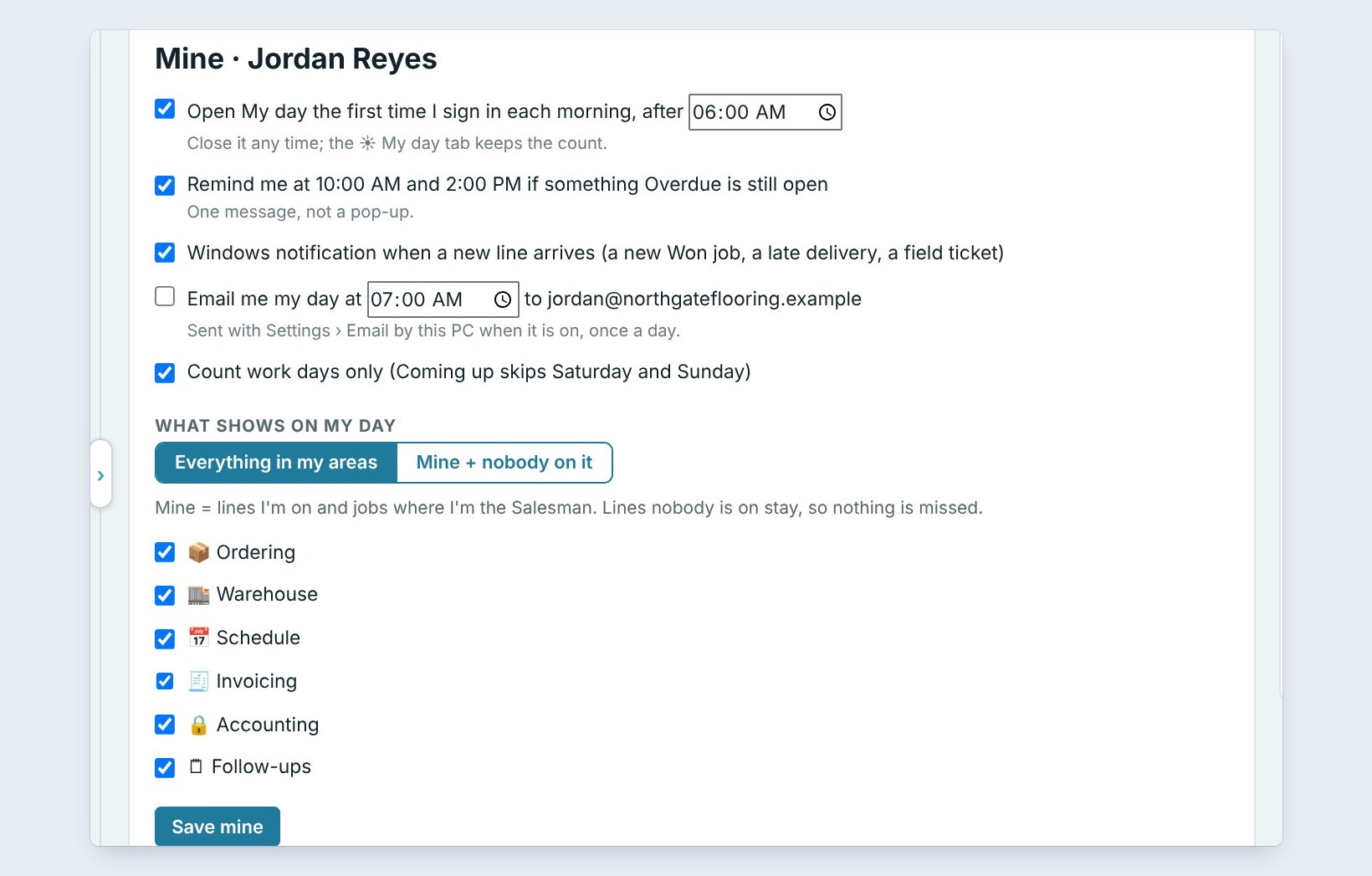
My day settings sets when it opens (here 6:00 AM), the 10:00 AM and 2:00 PM reminders when something is still overdue, a Windows notification when a new line arrives, an optional daily email, and which areas you see. On CFE Business, the Master user also sets what each role sees, so the warehouse gets warehouse lines and the bookkeeper gets accounting lines.
Worked example: Jordan’s Monday, November 16
Jordan Reyes signs in at 7:05 AM to 9 lines. This is how the morning went:
| Line | Area | What happened |
|---|---|---|
| Summit Ridge Builders is 15 days late on INV-1004 ($157,091.71) | Invoicing | What now: called the GC, snoozed to tomorrow morning |
| RB-2 4" Johnsonite wall base is 4 days late | Ordering | Call vendor: new date put on the PO |
| Pay the Tarkett bill INV-51567 | Accounting | Done another way: paid by check #4417 |
| Install 11/16 is not ready | Schedule | Snoozed to Tuesday, 6:00 AM |
| Left on the list at 10:05 AM | 7 open, 3 overdue |
At 10:00 AM the reminder said 3 overdue lines were still open, and Jordan cleared the next one before lunch.
What to do next
On CFE Business, share the day with your team in the Bid Tracker and the rest of the guides.
Start your day in one list
My day is part of CFE BidWise, on Personal and Business. Start with the 30-day free trial, no credit card.
Frequently Asked Questions
Do I have to type my to-do list?
No. Every line comes from work already in CFE BidWise: invoices due or late, deliveries late, installs not ready, material to pull, bills to pay and follow-ups. When the work is done in the app, the line ticks itself off.
Is My day on CFE Personal?
Yes. My day is on both plans. On CFE Business it also shows who on the team is on each line, and lets you hand a line to a teammate or take one over.
What happens to an overdue line I ignore?
It stays at the top in red. The 10:00 AM and 2:00 PM reminders tell you it is still open, and after 2 days it also shows on the Master user’s day.
Can I print my day?
Yes. Print Preview makes a to-do sheet with tick boxes and a Notes column. You can also save it as a PDF, email it or export it.

Written by
Cristian Valcu – Founder & CEO, Commercial Flooring Estimating LLC
Cristian has estimated commercial flooring for over 20 years and built CFE BidWise around the way flooring contractors actually price, propose and track their bids.
Last updated: