
CFE guide · Proposals and field paperwork
Pull and Deliver the Job With the Warehouse Order and Pick Ticket
The warehouse and the crew each get a checklist built from the Material List. Work Orders › For Warehouse lists every material with the ordered quantity, PO #, Arrived · BOL #, a Bin / Location and Staged, Loaded and Delivered boxes, and prints as a Warehouse Order with a check-off for whoever pulls, checks, drives and receives it. The Installer Pick Ticket gives the crew the same materials without prices, with the labor and man days, and a sign-off that everything arrived.

Why the warehouse needs its own list
Most short deliveries are not ordering mistakes. The material was ordered and arrived; it just sat in the wrong bin, or the adhesive stayed on the shelf, or the change order’s carpet went out with the base bid’s truck. The warehouse works from a list someone retyped, and the crew finds out at 7 a.m. on site.
CFE - Advanced Estimating Worksheet gives the warehouse a list built from the Material List: what was ordered, the PO and the BOL it arrived on, where it sits, and three boxes to tick on the way out. The crew gets the same list without prices and signs for it at the jobsite, so a shortage is written down the morning it is found.
The four steps
- Open For WarehouseWork Orders › For Warehouse: the pick list.
- Print the Warehouse OrderPick & delivery, with a check-off.
- Print the crew’s pick ticketFor Installers › Print Pick Ticket, no prices.
- Send or file itPrint, PDF, email or export.
1Open the work order for the warehouse

Open For Warehouse under Work Orders. The banner says Pick and delivery list · PO and arrival dates come from the Material List, and the count at the top says how much of the job is in: 0 of 17 in the warehouse on this sample. Fill in Delivery Date and Truck / Driver; Deliver to and the Site Contact come from the estimate. Each section is a Pick List, for the Estimate Quote and each change order, with Qty (ordered), Units, PO #, Arrived · BOL #, Bin / Location and Staged, Loaded and Delivered. The legend says who fills in what: Bin, Staged, Loaded and Delivered are filled in by the warehouse.
Type the Bin / Location when the material arrives, not when the job ships. Whoever pulls the job next month will not be the person who put it away.
2Print the Warehouse Order
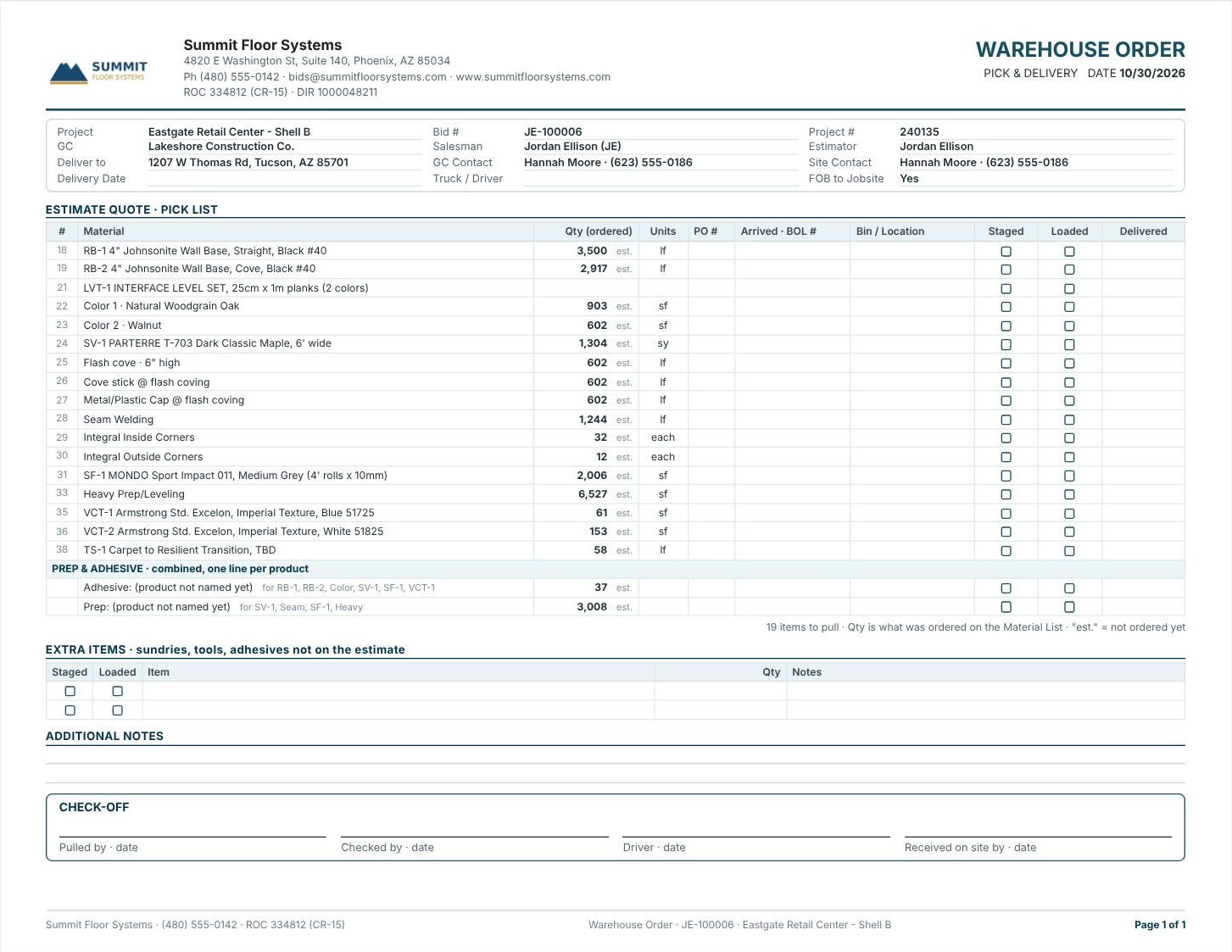
Press Print Warehouse Order. It is headed WAREHOUSE ORDER · PICK & DELIVERY and prints landscape on one page here. The toolbar chooses Portrait or Landscape, change orders Separate or Attached, and Project or one change order. Prep and adhesive print combined, one line per product, with the products they serve. Below the pick list come Extra Items (sundries, tools, adhesives not on the estimate), Additional Notes, and the Check-off: Pulled by, Checked by, Driver and Received on site by, each with a date.
3Give the crew the pick ticket
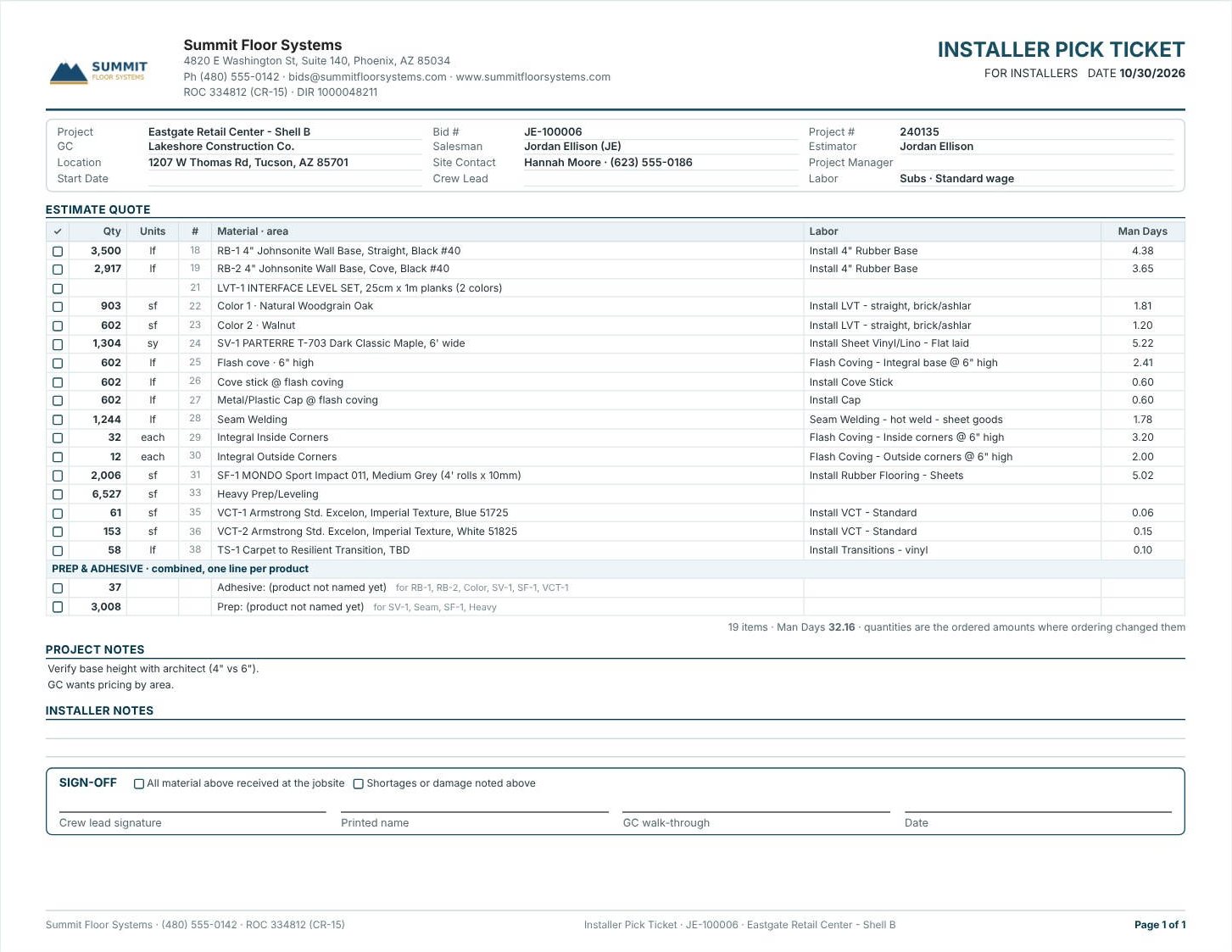
On For Installers, press Print Pick Ticket. The Installer Pick Ticket lists every line with a checkbox, the Qty, Units, the material and area, the Labor description and Man Days, and no prices. The footer says 19 items · Man Days 32.16 · quantities are the ordered amounts where ordering changed them. Under the Project Notes and Installer Notes, the Sign-off has two boxes, All material above received at the jobsite and Shortages or damage noted above, and lines for the crew lead’s signature, printed name, the GC walk-through and the date.
4Send it, file it, track it
Both printouts have Print, Print to PDF, Save PDF, Email PDF and Export, and Edit, Save Modified and Reset to change the printout without touching the estimate. On the For Warehouse sheet itself, tick Staged, Loaded and Delivered as the job moves, so the office can see where every line is. The same sheet has Excel (.xlsx) and CSV for a warehouse system, and Refresh from estimate after a change.
Print change orders Separate. A change order delivered three weeks after the base bid needs its own pick list, check-off and signature.
Worked example: what goes on the Eastgate truck
Eastgate Retail Center – Shell B, Estimate Quote pick list. The Warehouse Order says 19 items to pull.
| Group | Lines | Count |
|---|---|---|
| Base and LVT | RB-1, RB-2, LVT-1 with Color 1 and Color 2 | 5 |
| Sheet vinyl and its parts | SV-1, flash cove, cove stick, cap, seam welding, inside and outside corners | 7 |
| Rubber and prep | SF-1, Heavy Prep/Leveling | 2 |
| VCT and transition | VCT-1, VCT-2, TS-1 | 3 |
| Prep & adhesive, combined | Adhesive (37), Prep (3,008) | 2 |
| Items to pull | 5 + 7 + 2 + 3 + 2 = 19 |
17 material lines from the estimate plus 2 combined prep and adhesive lines make the 19 items on both the Warehouse Order and the Installer Pick Ticket, so the warehouse and the crew count the same list.
What to do next
Next, order what is missing on the Material List, send the crew the installer job order, and print any sheet from Reports.
Ship your next job complete
Warehouse orders and pick tickets are in the 30-day free trial. No credit card.
Frequently Asked Questions
What is a flooring pick ticket?
A list of the materials to pull for a job. In CFE the Installer Pick Ticket lists each line with a checkbox, quantity, units, labor and man days, without prices, and a sign-off at the jobsite.
Where do the PO and arrival dates on the warehouse order come from?
From the Material List. The warehouse fills in Bin / Location, Staged, Loaded and Delivered.
Can I print one change order’s warehouse order?
Yes. Pick Project or one change order on the toolbar, and print change orders Separate or Attached.
Does the pick ticket show prices?
No. The Installer Pick Ticket prints without prices; the Installer Job Order can show or hide them.

Written by
Cristian Valcu – Founder & CEO, Commercial Flooring Estimating LLC
Cristian has estimated commercial flooring for over 20 years and built CFE - Advanced Estimating Worksheet around the way flooring contractors actually price, propose and track their bids.
Last updated: