
CFE guide · Invoicing and getting paid
Get Paid Online With Stripe Pay Now on Every Invoice
Connect your own Stripe account once in Settings › Online payments, and every invoice email and PDF gets a Pay Now button. GCs pay by bank transfer (ACH) or credit card, the money goes straight to your bank, and CFE BidWise records the payment on the invoice by itself. CFE never holds your money.


Why take payments online?
Checks get lost, sit on a desk for a week and still have to be typed in when they arrive. A GC who can pay from the invoice email with two clicks usually pays sooner, and nobody has to match the deposit to the invoice later.
With Pay Now, the invoice itself carries the payment link. When the GC pays, Stripe tells CFE BidWise, and the invoice, job billing and payment reports update on their own.
The five steps
- Connect StripeSettings › Online payments, once, by the Master user.
- Pick how GCs payACH, cards, partial payments and the card fee.
- Send the invoiceThe email carries a Pay Now button.
- The GC paysCFE records the payment by itself.
- See every paymentPayments received: checks, ACH and Stripe in one list.
1Connect your Stripe account
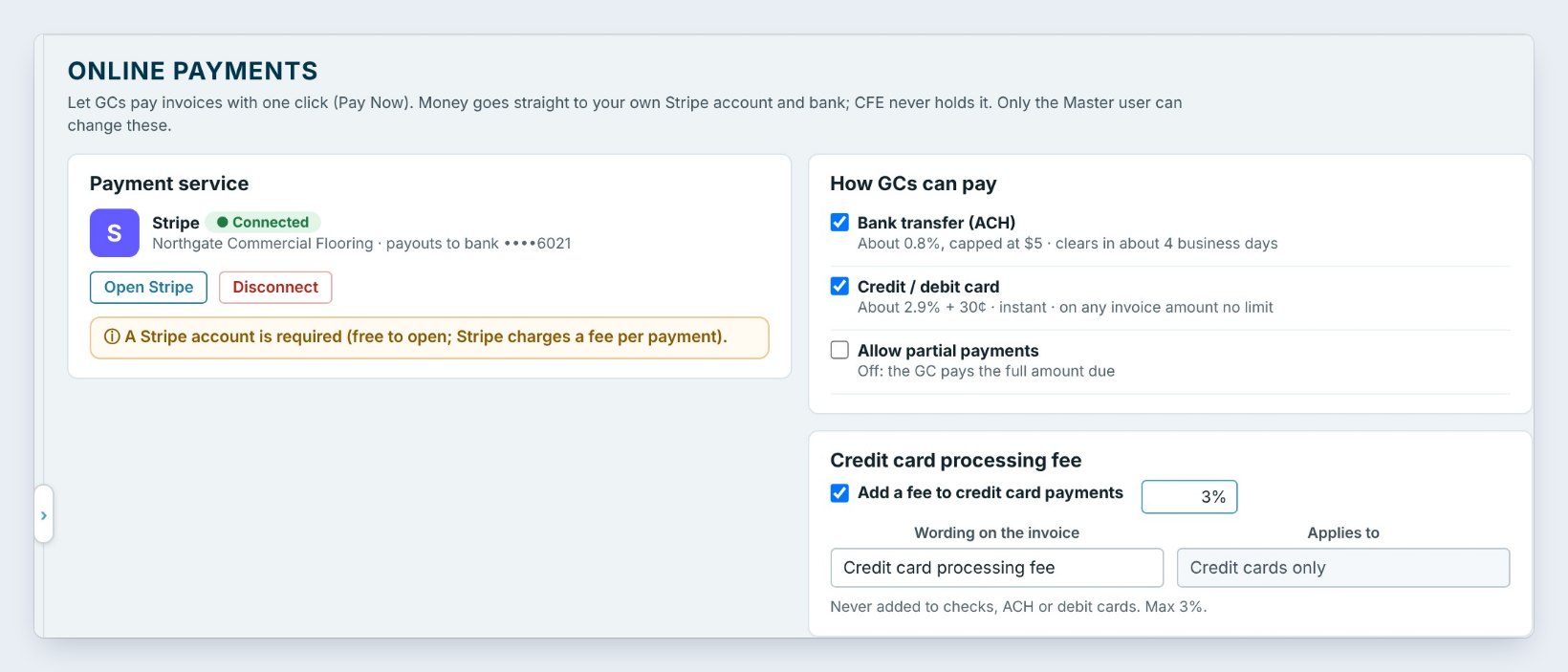
Go to Settings › Online payments and click Connect Stripe. Sign in to your own Stripe account, or open one; it is free, and Stripe charges a fee per payment. When it says Connected, payouts go to your bank account. Only the Master user can connect or disconnect.
2Pick how GCs can pay
Under How GCs can pay, tick Bank transfer (ACH), about 0.8% capped at $5 and clearing in about 4 business days, and Credit / debit card, about 2.9% plus 30 cents and instant. Leave Allow partial payments off and the GC pays the full amount due.
To pass the card cost on, tick Add a fee to credit card payments and set it, up to 3%. It is never added to checks, ACH or debit cards. Under Where the Pay Now button shows, tick the invoice email, the invoice PDF and the reminder emails.
Turn on ACH even if you add a card fee. Most GCs paying a large flooring invoice will choose the bank transfer, which costs you $5 at most.
3Send the invoice with its Pay Now button
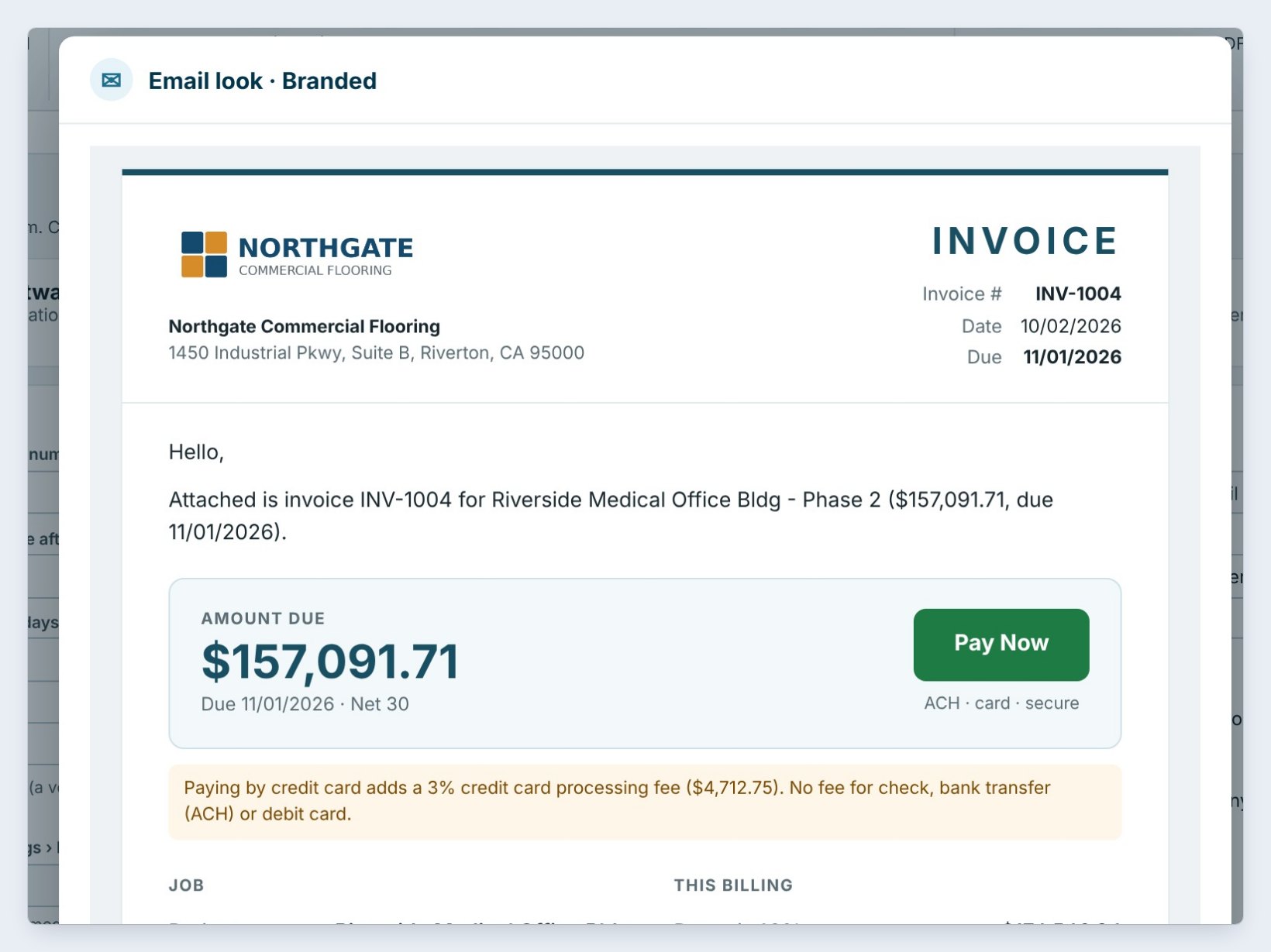
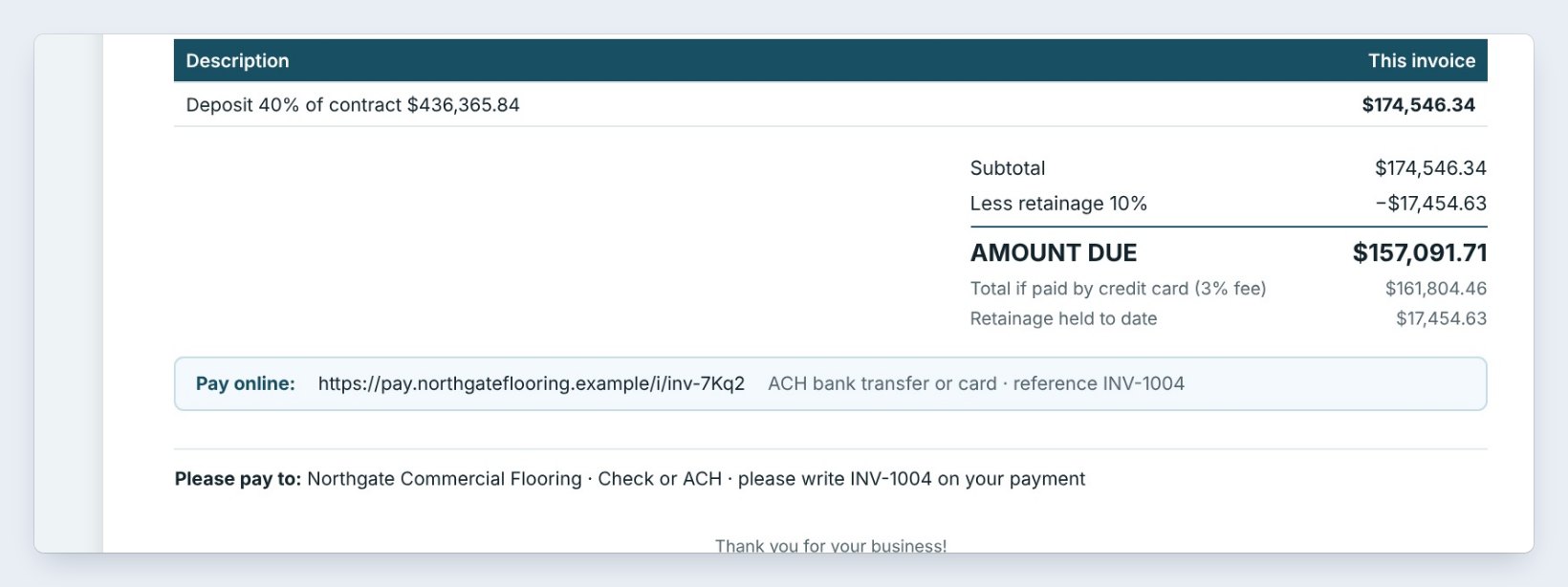
Send the invoice as usual from Invoicing. The email shows the amount due, here $157,091.71 on INV-1004, with a big Pay Now button. Pick the email look in Invoice settings: Branded, Modern summary or Classic.
The PDF carries a Pay online line with the link, and, when you add a card fee, the total if paid by credit card, so the GC sees it before paying.
4The GC pays, and CFE BidWise records it
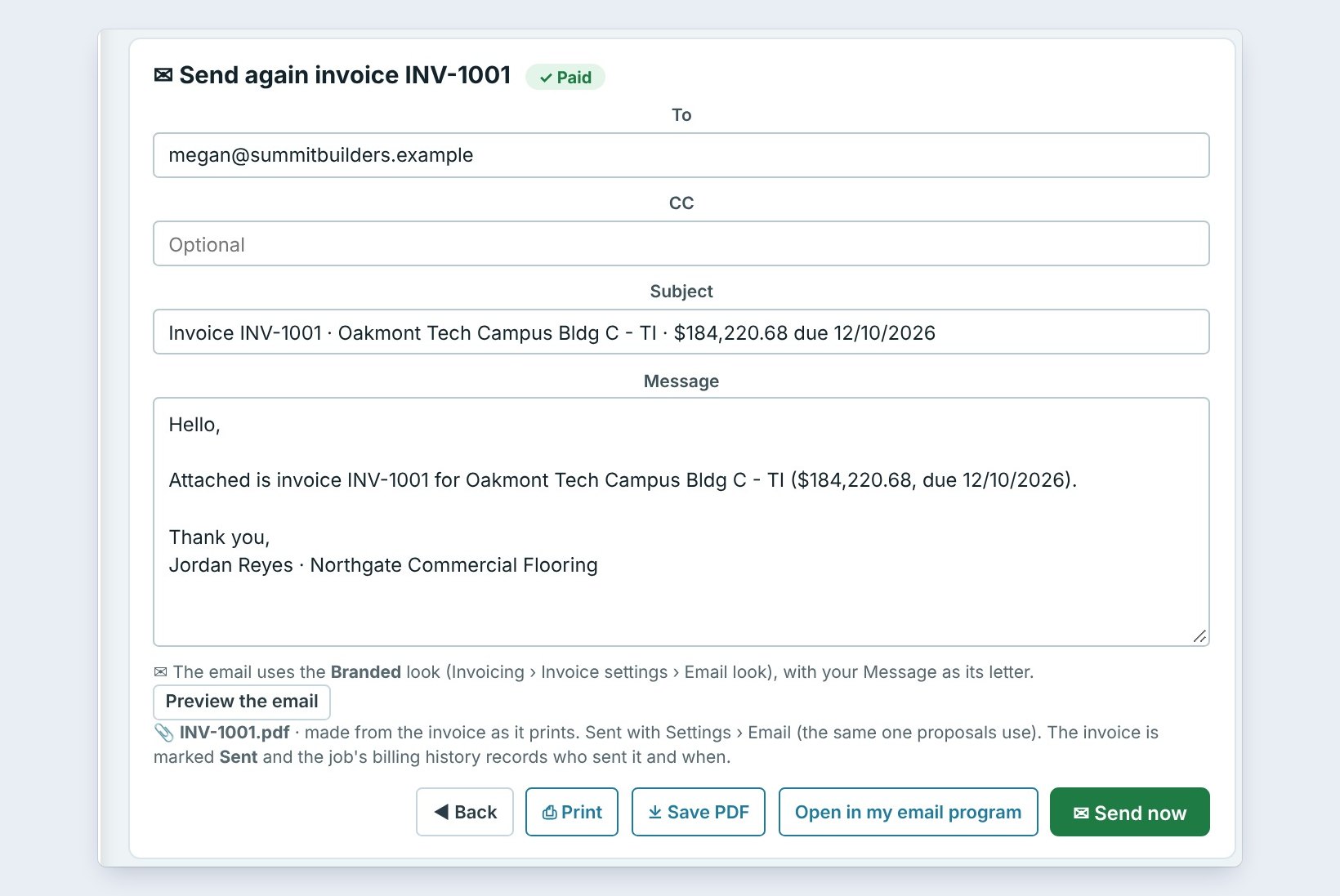
When the GC pays, Stripe tells CFE BidWise. With Record the payment automatically on, the payment lands on the invoice, the job billing, Reports › Payments and QuickBooks Online if you use it, and the invoice shows Paid. Tick Email me and the salesman to get a note such as INV-1007 paid online, $43,515.00, ACH. Reminder emails stop once it is paid.
5See every payment in one list
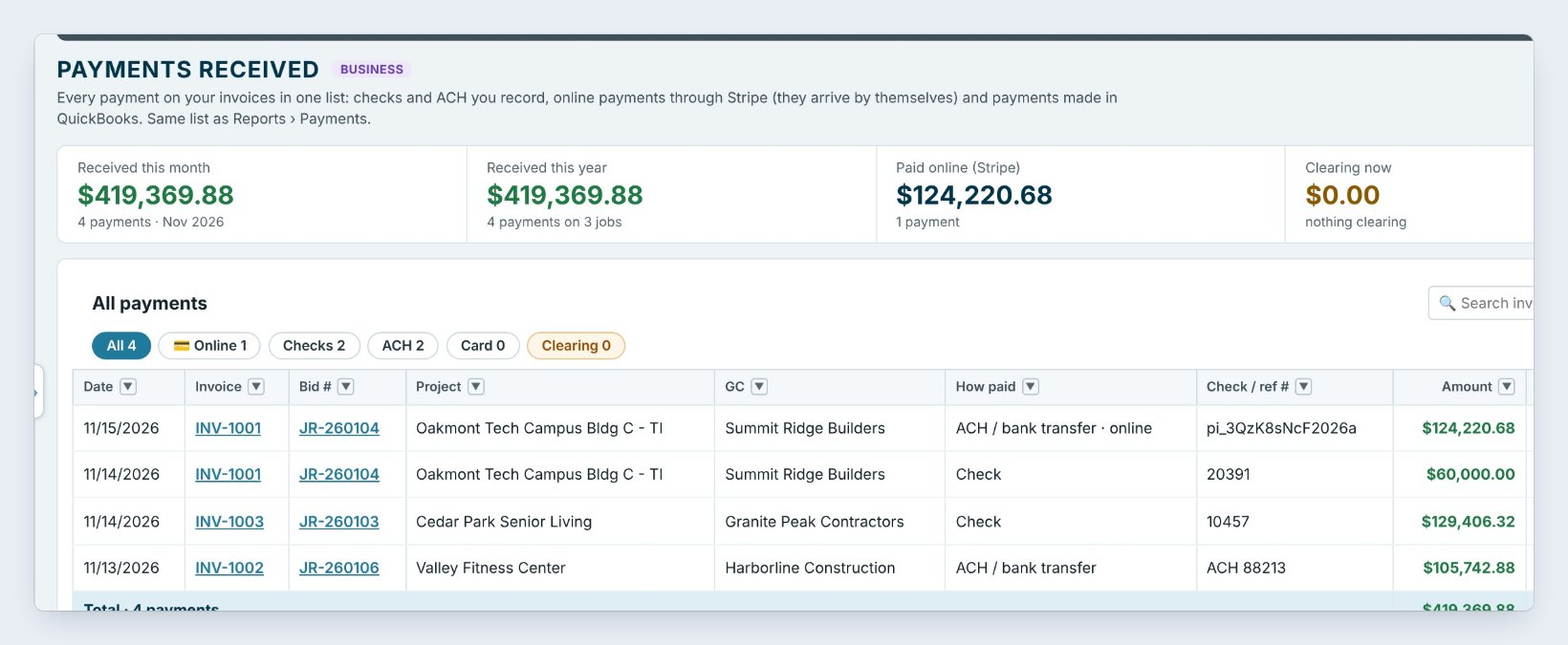
Invoicing › Payments received lists checks and ACH you recorded next to online payments, which arrive by themselves and are marked Online (Stripe). The tiles show what came in this month and this year, what was paid online, what is still clearing and the card fees GCs paid.
Worked example: Oakmont Tech Campus Bldg C
INV-1001 billed the 40% deposit on a $511,724.13 contract for Summit Ridge Builders:
| Line | Amount |
|---|---|
| Deposit 40% of contract | $204,689.65 |
| Less retainage 10% | −$20,468.97 |
| Amount due | $184,220.68 |
| Paid by check #20391 on 11/14 | $60,000.00 |
| Paid online by ACH on 11/15 (Stripe) | $124,220.68 |
| Balance | $0.00 |
The ACH payment recorded itself on 11/15 and shows as In bank 11/15. No card fee applied, because the GC paid by bank transfer.
What to do next
Next, send the invoices themselves with the QuickBooks Online guide or from Invoicing in CFE BidWise.
Put a Pay Now button on your next invoice
Online payments are part of CFE BidWise. Start with the 30-day free trial, no credit card.
Frequently Asked Questions
Does CFE BidWise hold my money?
No. Payments go straight to your own Stripe account and from there to your bank. CFE BidWise only records that the invoice was paid.
What does Stripe charge?
About 0.8% for a bank transfer (ACH), capped at $5, and about 2.9% plus 30 cents for a card. You can add a card fee of up to 3% so the GC covers it; it is never added to checks, ACH or debit cards.
Can a GC pay part of an invoice?
Only if you turn on Allow partial payments. With it off, the GC pays the full amount due.
Who can connect Stripe?
Only the Master user can connect or disconnect the Stripe account.

Written by
Cristian Valcu – Founder & CEO, Commercial Flooring Estimating LLC
Cristian has estimated commercial flooring for over 20 years and built CFE BidWise around the way flooring contractors actually price, propose and track their bids.
Last updated: