
CFE guide · Invoicing and getting paid
Create Invoices From the Bid and Record Every Payment
Invoices in CFE BidWise start from the Won bid’s sell prices: the base bid, accepted alternates and approved change orders. Pick a job on New invoice, send it by email with the PDF attached, and record each check or ACH once. The same payment shows on the job, the invoice and Reports › Payments, and Collect & bill tells you who is late.


Why invoice from the estimating app?
When invoices are typed into a separate program, the won number gets retyped, an accepted alternate is missed and nobody on the estimating side knows what the GC has paid.
In CFE BidWise the invoice comes from the same bid, so the price is already right, and the payments you record show up on the job, the Bid Tracker and the reports without typing them twice.
The five steps
- Set up onceNumbering, terms, retainage, email look.
- Pick the jobNew invoice: what is due this month.
- Send itEmail with the PDF, or print.
- Record the paymentRecord once; it shows everywhere.
- Chase what is lateCollect & bill: who owes you, what to do next.
1Set up your invoices once
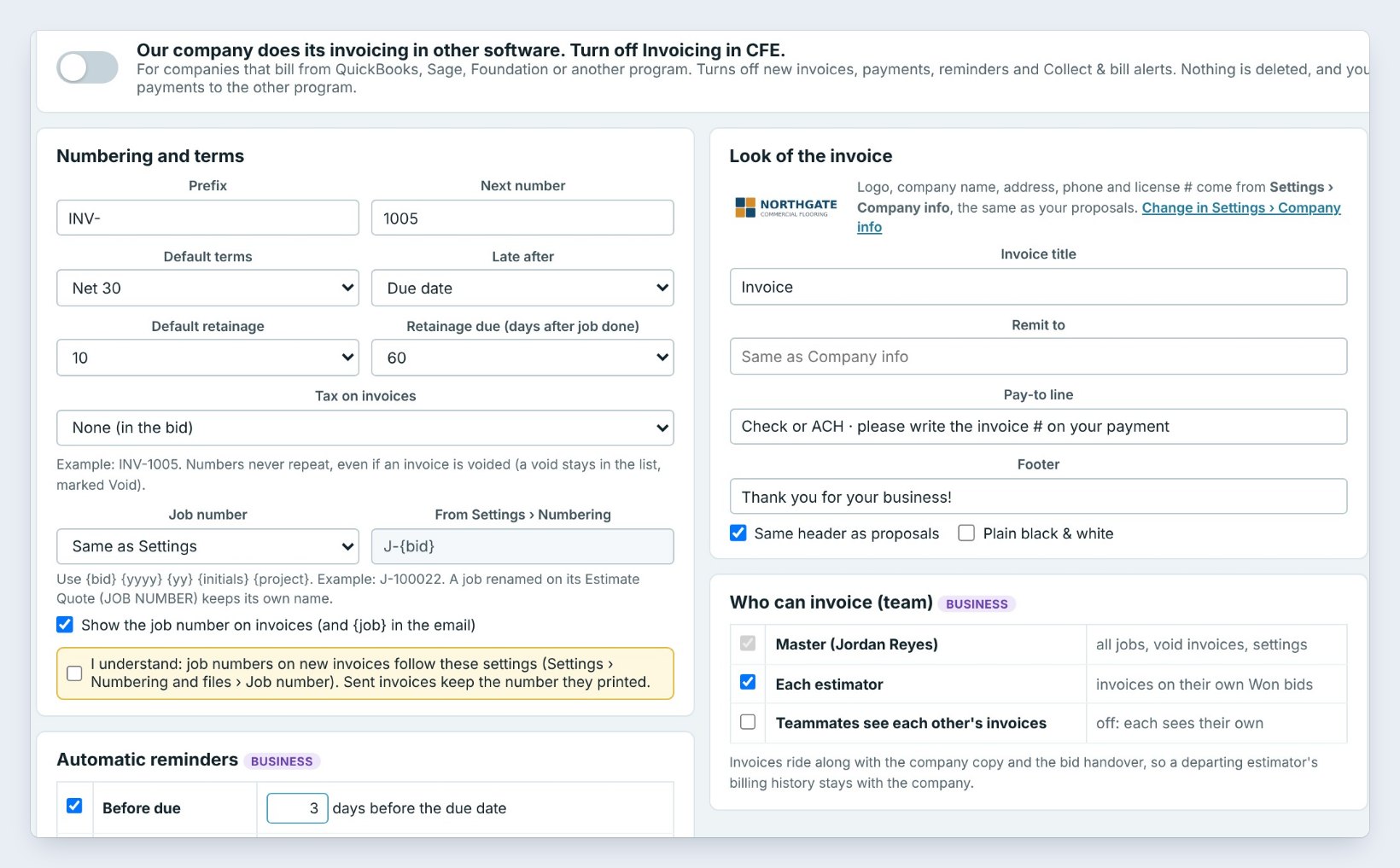
In Invoicing › Invoice settings, set the prefix and next number, here INV-1005, the default terms, Net 30, and default retainage, 10%. The invoice uses your logo and company info from Settings, with a pay-to line such as Check or ACH, please write the invoice # on your payment.
Write the email subject and message once with fill-ins such as {number}, {project} and {amount}, tick Attach the invoice PDF, and pick the email look: Classic, Branded or Modern summary.
2Pick the job on New invoice
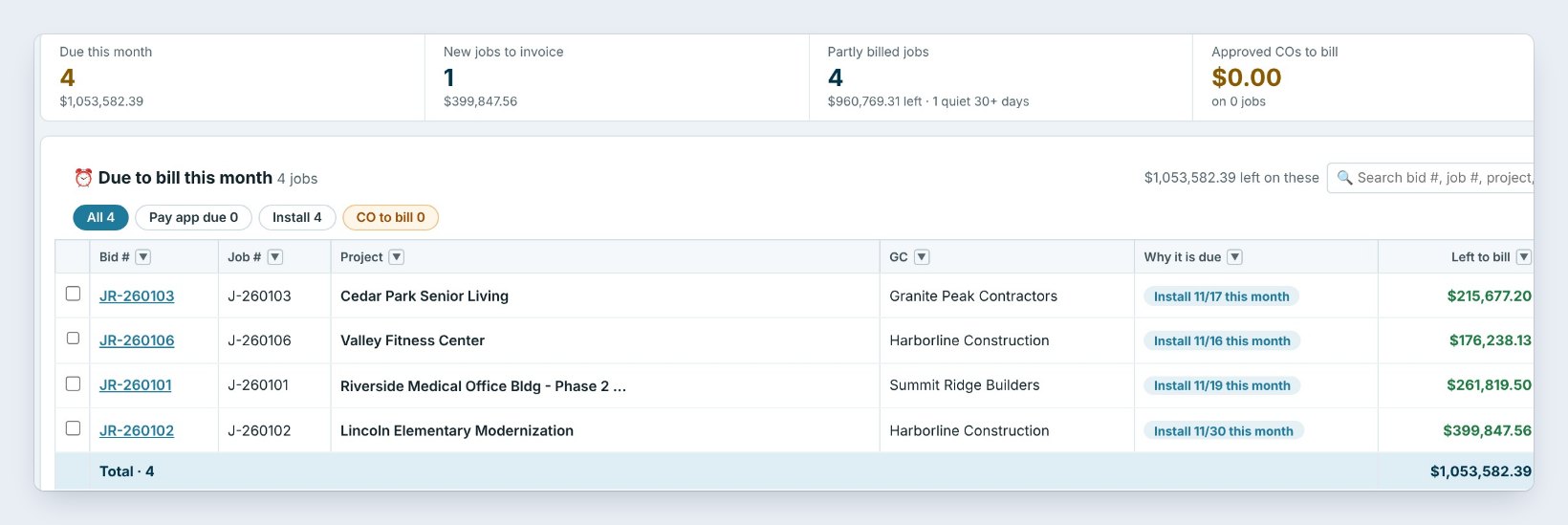
Click New invoice. Due to bill this month lists the jobs that should go out now and why, such as Install 11/16 this month, with what is left to bill on each. New jobs, not invoiced yet lists Won jobs that never had an invoice, like Lincoln Elementary Modernization, $399,847.56.
Click Invoice on a row, or Deposit for a first invoice of the deposit %. Tick several jobs and click Invoice selected to make all their drafts at once.
Send the deposit invoice the day the job is Won. The deposit pays for the material order, and every day it waits is a day you are financing the GC.
3Send the invoice
The invoice opens next to its email. Check the To address, the subject and the message, preview the PDF, and click Send now, or Open in my email program to send it from Outlook. The invoice is marked Sent and the job’s billing history records who sent it and when.
Prefer paper? Print and Save PDF are on the same screen. With online payments on, the invoice also carries a Pay Now button.
4Record each payment once
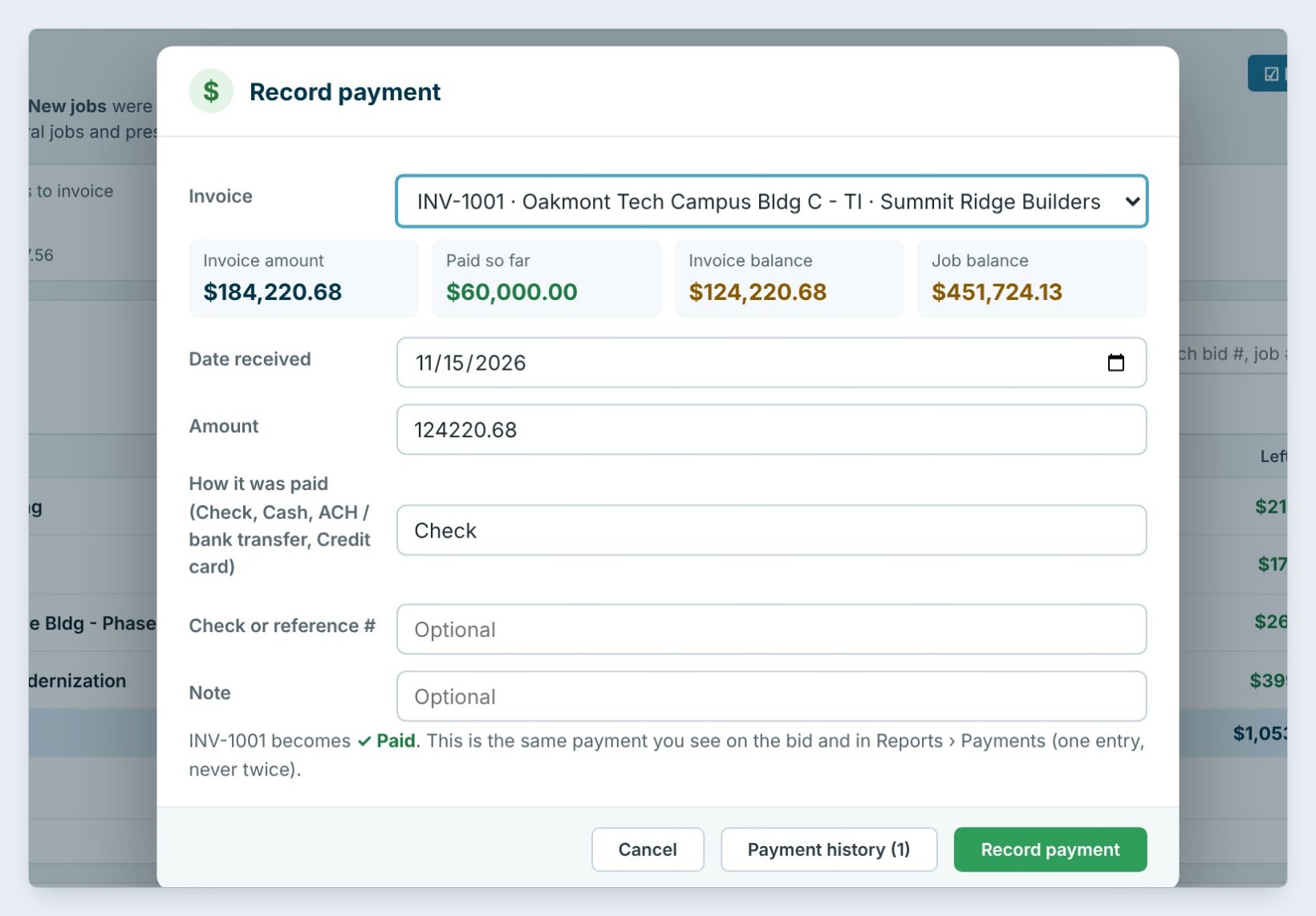
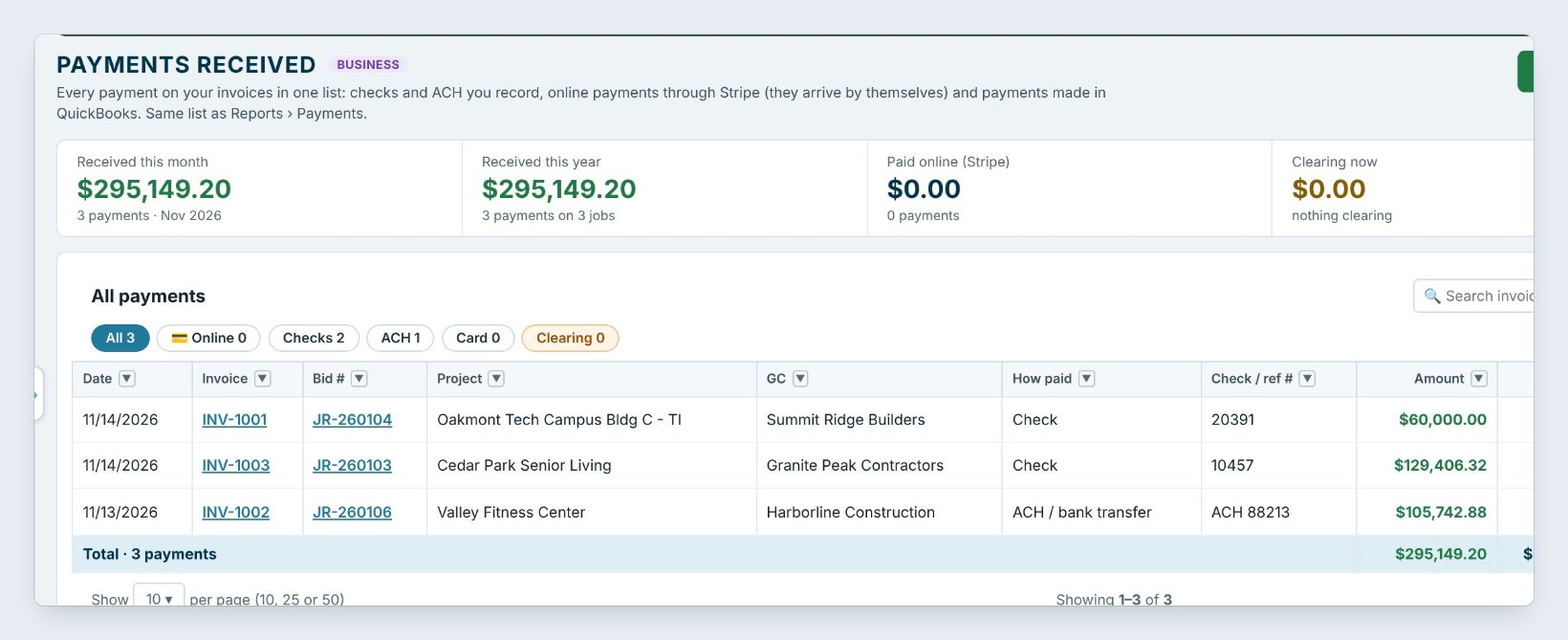
When a check comes in, click Record payment, pick the invoice, here INV-1001 for Oakmont Tech Campus with $124,220.68 left, and fill in the date, the amount, how it was paid and the check or reference number. INV-1001 becomes Paid.
It is the same payment you see on the bid and in Reports › Payments: one entry, never twice. Payments received lists them all, with a receipt for each.
5Chase what is late with Collect & bill
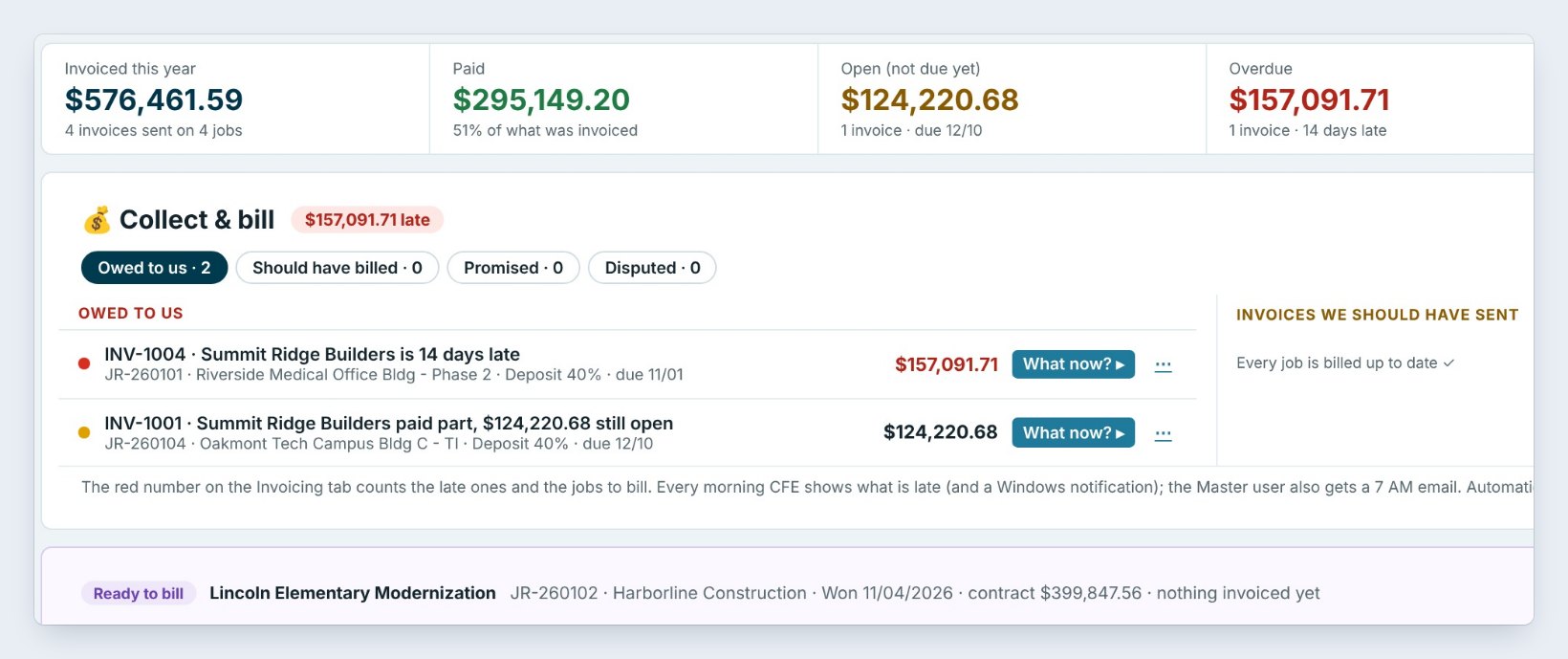
The Invoices tab totals the year: $576,461.59 invoiced, $295,149.20 paid, $157,091.71 overdue. Collect & bill lists what is Owed to us, such as INV-1004, Summit Ridge Builders is 14 days late, with a What now button for the GC’s AP phone, what was sent and the next step, and Invoices we should have sent.
The red number on the Invoicing tab counts the late ones and the jobs to bill, and they show on My day too.
Worked example: INV-1001, Oakmont Tech Campus Bldg C – TI
Summit Ridge Builders, contract $511,724.13, billed a 40% deposit:
| Line | Amount |
|---|---|
| Deposit 40% of contract | $204,689.65 |
| Less retainage 10% | −$20,468.97 |
| Invoice amount | $184,220.68 |
| Check #20391, 11/14/2026 | $60,000.00 |
| Balance after the check | $124,220.68 |
| Job balance after this invoice | $451,724.13 |
The second payment of $124,220.68 was recorded on 11/15 and INV-1001 became Paid; the retainage of $20,468.97 is held until the job is done.
What to do next
Add a Pay Now button to your invoices, or send won jobs to QuickBooks Online instead.
Bill your next Won job from the bid
Invoicing is part of CFE BidWise. Start with the 30-day free trial, no credit card.
Frequently Asked Questions
Where does the invoice amount come from?
From the Won bid’s sell prices: the base bid, accepted alternates and approved change orders. Nothing is retyped.
Is invoicing on CFE Personal?
Yes. Invoices, deposits, sending and recording payments are on both plans. Progress billing, pay apps, retainage, receivables, GC statements, automatic reminders and QuickBooks Online come with CFE Business.
Can I bill several jobs at once?
Yes, on CFE Business: tick the jobs on New invoice and click Invoice selected to make all their drafts.
I already invoice in QuickBooks. Can I turn this off?
Yes. In Invoice settings, turn on Our company does its invoicing in other software. Nothing is deleted, and you can turn it back on any time.

Written by
Cristian Valcu – Founder & CEO, Commercial Flooring Estimating LLC
Cristian has estimated commercial flooring for over 20 years and built CFE BidWise around the way flooring contractors actually price, propose and track their bids.
Last updated: