
CFE guide · Estimating
Import a Measure Square 8 Takeoff Into Your Estimate
Export the Summary report PDF from Measure Square 8 and open it in Import Takeoff. CFE BidWise reads each line, with usage, net area and accessories as sub-lines, checks it against your Import Rules, and shows the waste and the location. Untick what should stay out, then Transfer to Estimate Quote. Nothing is priced: you add the labor and material prices.


Why import instead of retype?
Retyping a takeoff is where the expensive mistakes happen: a 1 in place of a 7, a room left off, square feet typed where the grid wanted square yards. On a big job it also costs an hour of the estimator’s day.
Import Takeoff reads the Summary report you already export from Measure Square 8, checks every line before it goes in, and fills the Estimate Quote with the quantities, units and notes, so you can go straight to pricing.
The four steps
- Open the takeoffImport from Other Software › Measure Square 8.
- Check the linesType, quantity, waste and location, line by line.
- Fix or leave outRight-click to edit; untick to leave out.
- TransferInto a new or existing estimate, any sheet.
1Open the Measure Square 8 Summary report
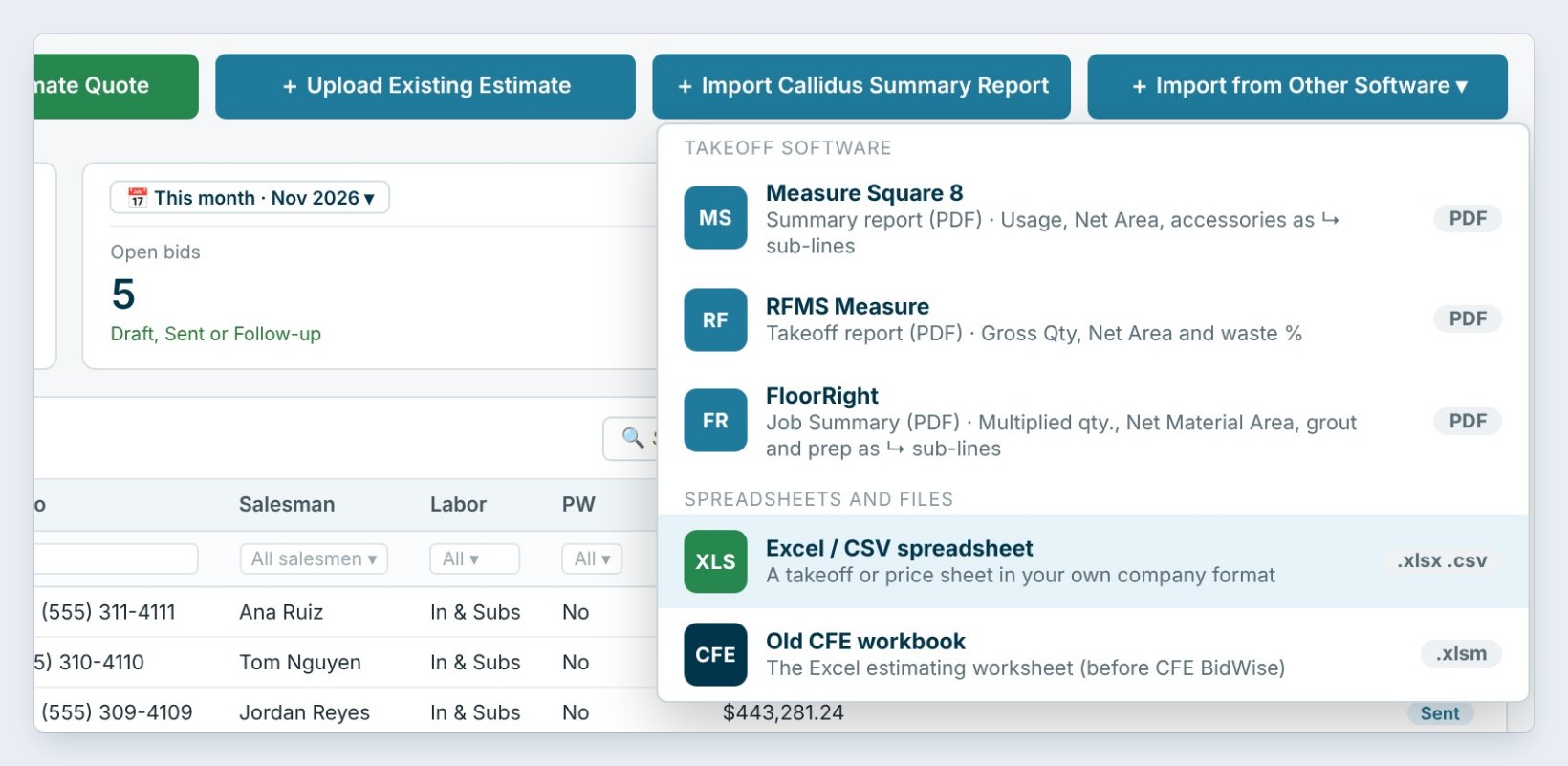
In Measure Square 8, export the Summary report as a PDF. In CFE BidWise, click Import from Other Software on the dashboard and pick Measure Square 8, then Open a takeoff PDF, or drop the file on the page.
The PDF is read on this computer and is not uploaded anywhere. The app tells by itself which program the report came from.
2Check each line in the preview
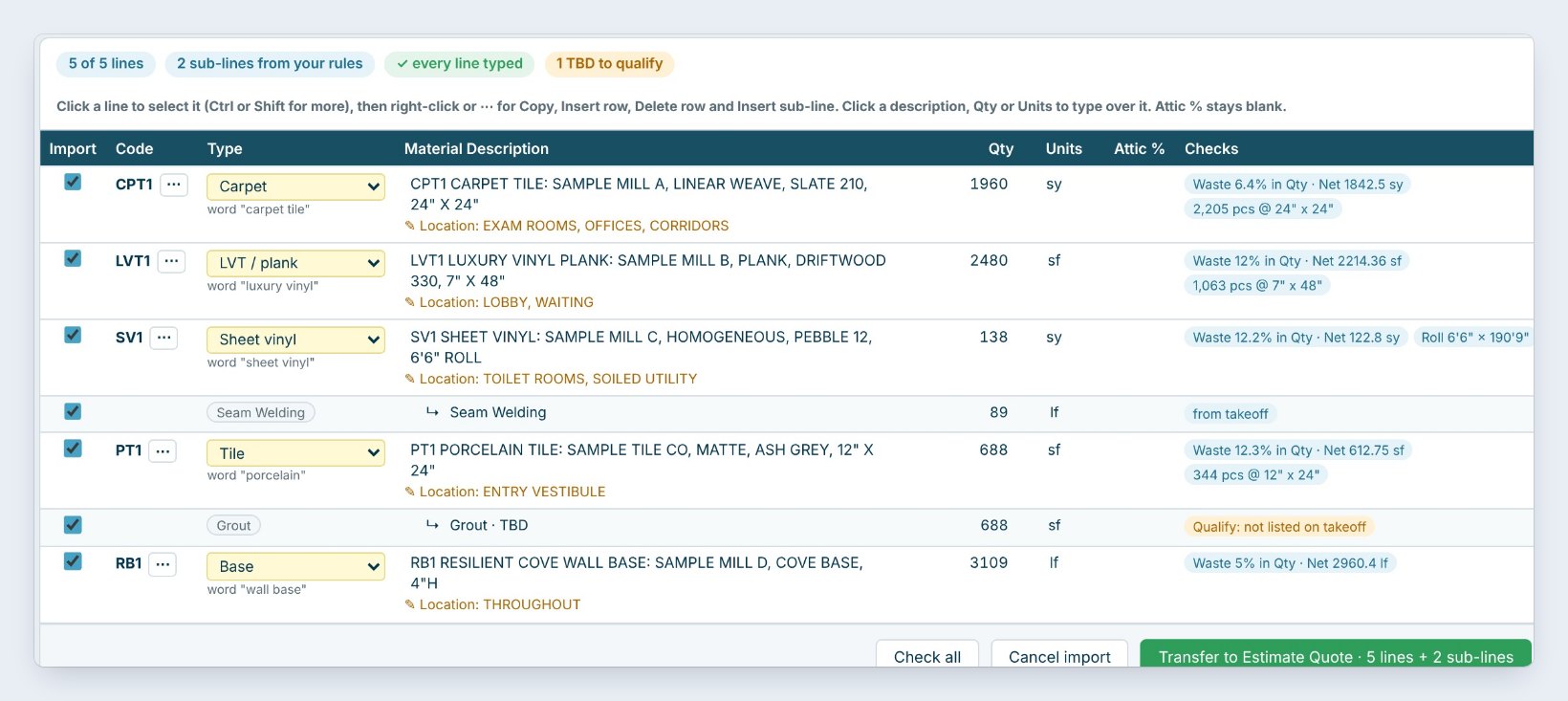
The Import preview lists every line with its Code, the Type your Import Rules gave it, the description, the Qty and Units. The Checks column shows the waste in the quantity, the net area and the pieces, and the location from the takeoff, such as Exam rooms, offices, corridors.
Your rules add sub-lines by themselves: Seam Welding under the sheet vinyl and Grout under the porcelain tile. A line marked TBD to qualify, like grout not listed on the takeoff, is one to check before you bid.
Read the yellow Checks before you transfer. A TBD sub-line is the takeoff telling you something is missing, and it is cheaper to ask now than after the bid.
3Fix a line or leave it out
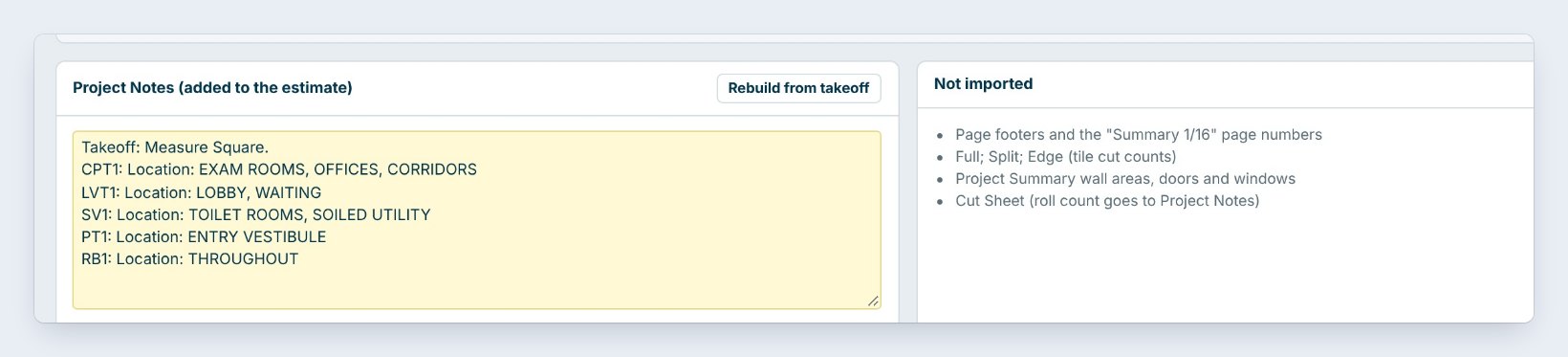
Click a description, quantity or units to type over it. Right-click a line to copy it, insert a row, delete it or add a sub-line. Untick the Import box on a line to leave it out.
Below, Project Notes collects each line’s location and goes into the estimate’s notes. Not imported lists what was skipped, such as page footers, the project summary and the cut sheet, so you know nothing was lost.
4Transfer to the Estimate Quote
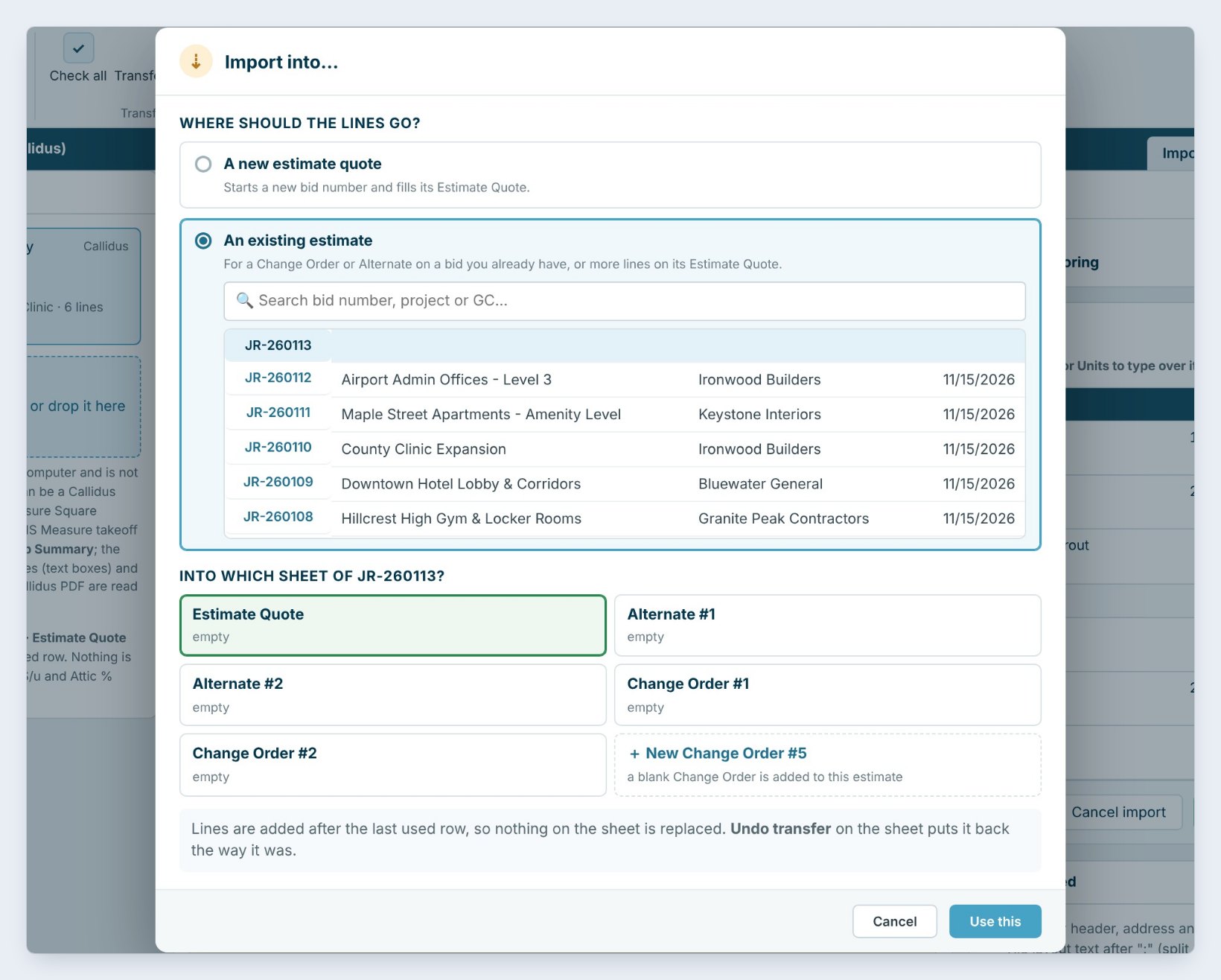
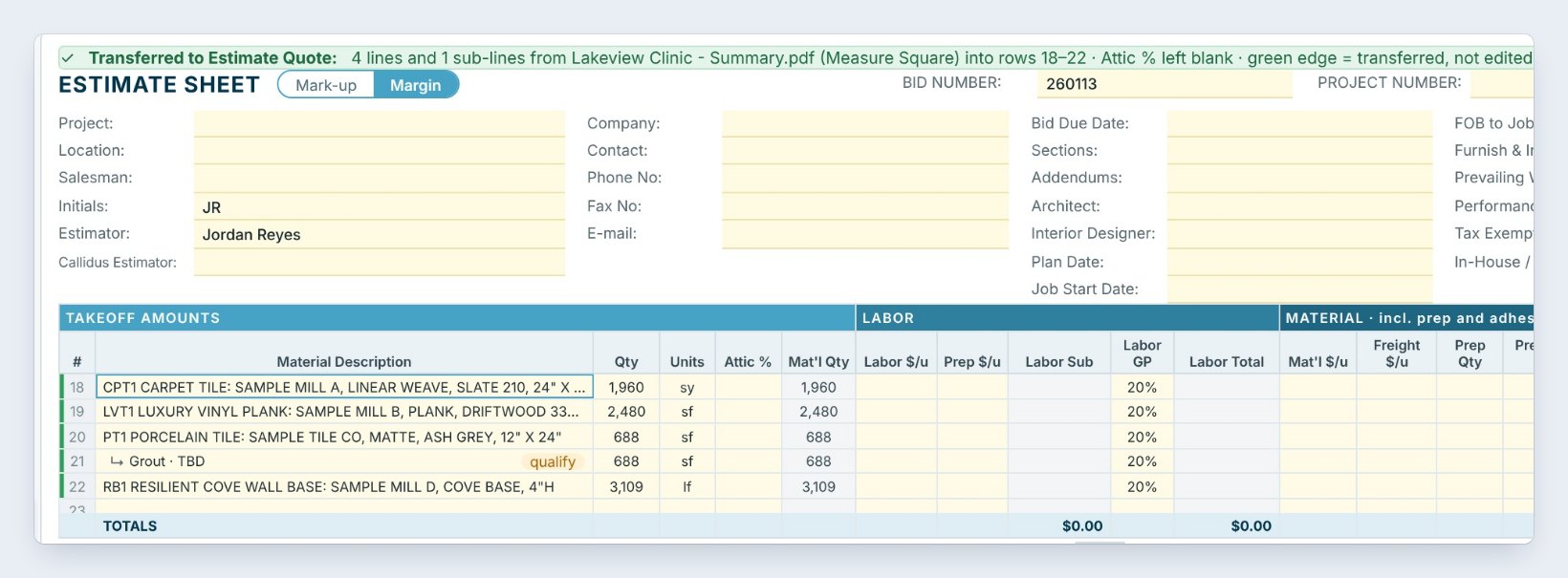
Click Transfer to Estimate Quote. Choose A new estimate quote, or An existing estimate for a change order or alternate on a bid you already have, and which sheet: the Estimate Quote, an alternate or a change order.
The lines are added after the last used row, so nothing on the sheet is replaced. A green bar says what was transferred, with Undo transfer. Nothing is priced: labor, material price and attic % stay blank for you.
Worked example: Lakeview Clinic
The Measure Square 8 Summary report for Lakeview Clinic had 5 lines. After the Import Rules:
| Code | Type | Qty | Check |
|---|---|---|---|
| CPT1 | Carpet tile | 1,960 sy | Waste 6.4%, net 1,842.5 sy |
| LVT1 | LVT / plank | 2,480 sf | Waste 12%, net 2,214.36 sf |
| SV1 + Seam Welding | Sheet vinyl | 138 sy + 89 lf | Waste 12.2% |
| PT1 + Grout | Tile | 688 sf + 688 sf | Grout TBD to qualify |
| RB1 | Base | 3,109 lf | Waste 5%, net 2,960.4 lf |
5 lines and 2 sub-lines went into JR-260113 in one click, with the locations in Project Notes and the grout flagged to qualify.
What to do next
Importing from another program? See the Callidus import guide and the Excel or CSV import guide.
Import your next Measure Square 8 takeoff
Import Takeoff is part of CFE BidWise. Start with the 30-day free trial, no credit card.
Frequently Asked Questions
Which Measure Square report do I export?
The Summary report, as a PDF. CFE BidWise reads its usage, net area and accessories.
Is my takeoff uploaded anywhere?
No. The PDF is read on your computer and stays there.
Does the import price the lines?
No. Quantities, units, descriptions and notes come in; labor, material price and attic % stay blank for you to price.
Can I import into a change order?
Yes. Choose An existing estimate and pick the change order or alternate sheet, or add a new change order.

Written by
Cristian Valcu – Founder & CEO, Commercial Flooring Estimating LLC
Cristian has estimated commercial flooring for over 20 years and built CFE BidWise around the way flooring contractors actually price, propose and track their bids.
Last updated: