
CFE guide · Schedule and the field
Book Installs and Schedule Your Crews
Book an install on any Won job in a few clicks: the first day, how many work days and the crew. CFE BidWise warns you before you book if the material is not here or the crew is already booked, then shows the job on the month, on each crew’s week and on the Problems list until it is ready.


Why schedule in the estimating app?
The install date lives on a whiteboard, the crew’s phone and the GC’s schedule, and none of them knows the material is still on a truck. A crew that shows up to a job with 4 of 34 lines on site costs a day of labor and a call from the super.
In CFE BidWise the schedule sits next to the Material List and the change orders, so every install shows whether it is ready before the crew rolls.
The five steps
- Set up your crewsIn-house crews and subs, each with a color.
- Book an installJob, first day, work days, crew.
- See the month and the weekMonth view and Week by crew.
- Fix what is not readyProblems: material not here, crews booked twice.
- Keep job notesCalls, visits and follow-ups on each job.
1Set up your crews
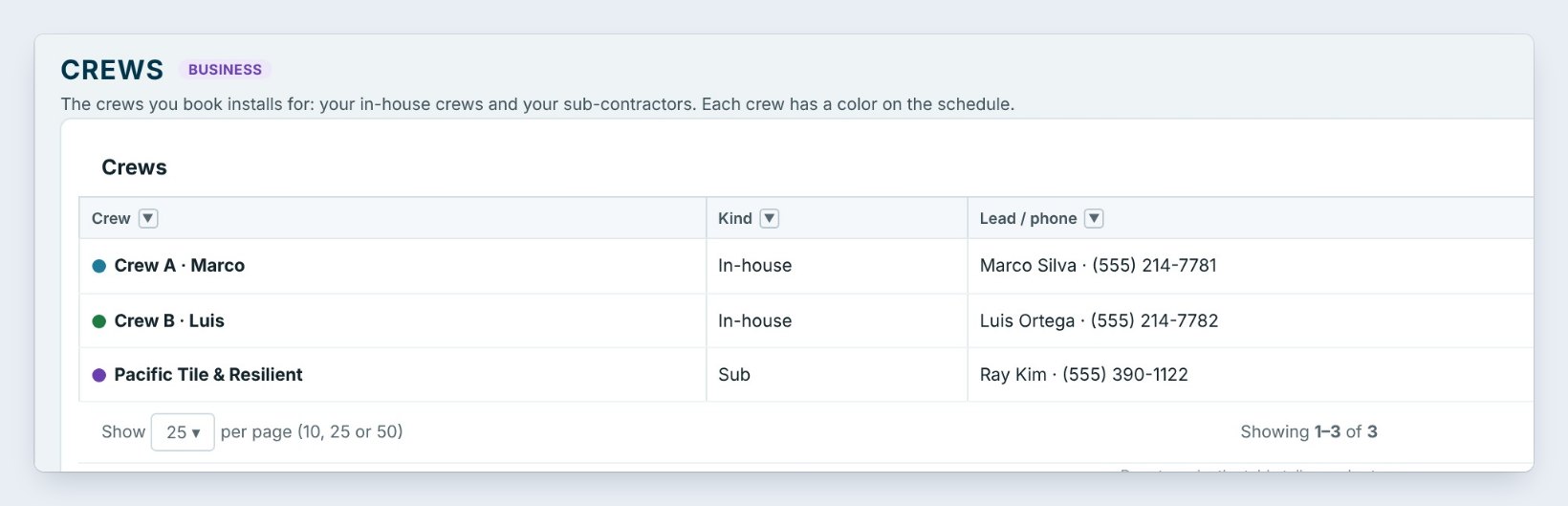
In Schedule › Crews, add each crew you book: in-house crews such as Crew A · Marco and Crew B · Luis, and subs such as Pacific Tile & Resilient. Each has a lead, a phone and a color on the schedule, and the list shows how many days each is booked in the next 30.
2Book an install
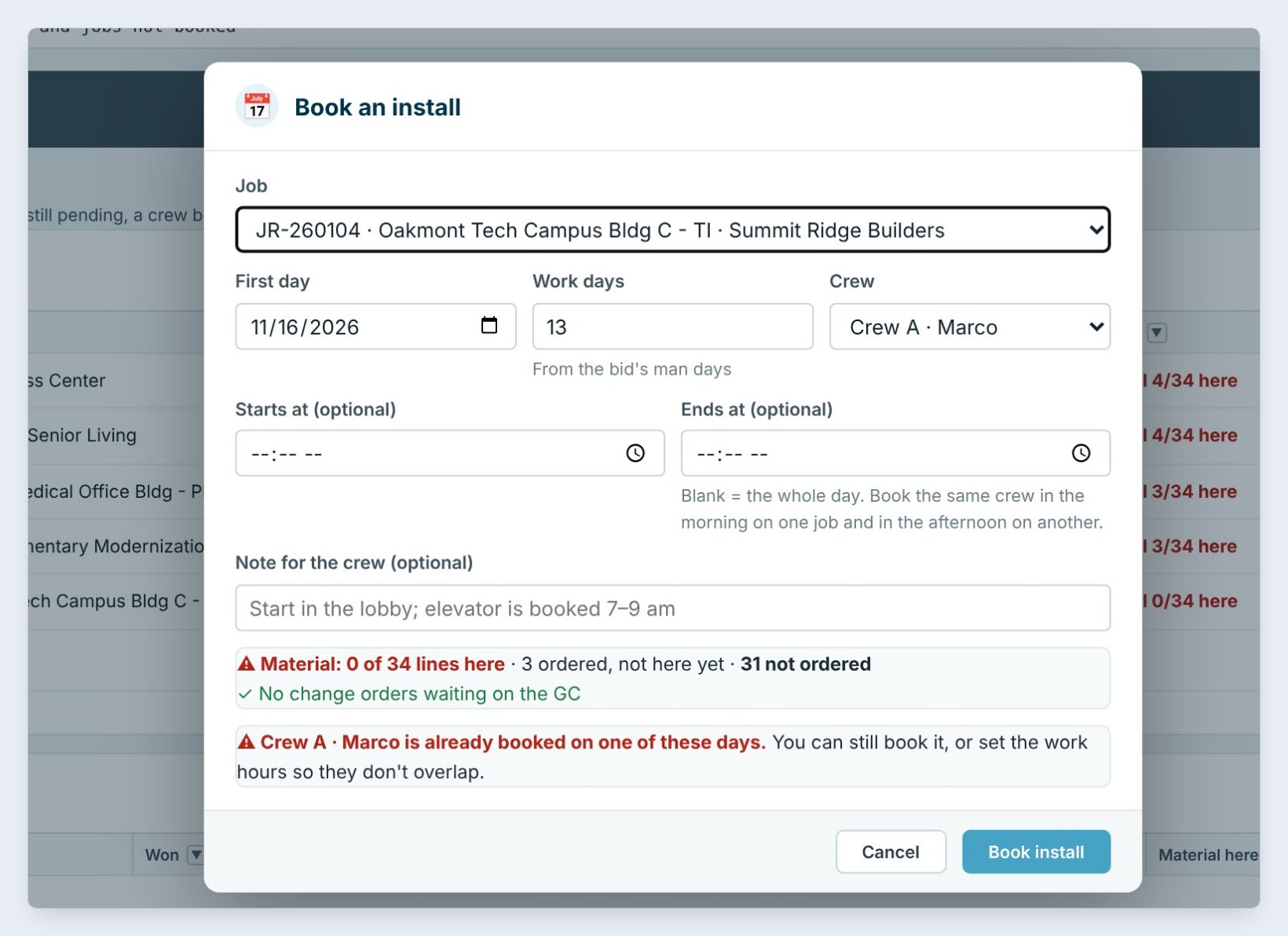
Click Book install and pick the Job, here JR-260104, Oakmont Tech Campus Bldg C. Set the First day, the Work days, 13 here from the bid’s man days, and the Crew. Leave the start and end times blank for the whole day, or set them to book the same crew on two jobs in one day. Add a note for the crew, such as Start in the lobby; elevator is booked 7 to 9 am.
Before you book, CFE BidWise checks the job: Material: 0 of 34 lines here, and Crew A · Marco is already booked on one of these days. You can still book it, with your eyes open.
Book from the man days on the estimate. If the bid says 13 crew days and you book 8, you know before the job starts that the labor will run over.
3See the month and each crew’s week
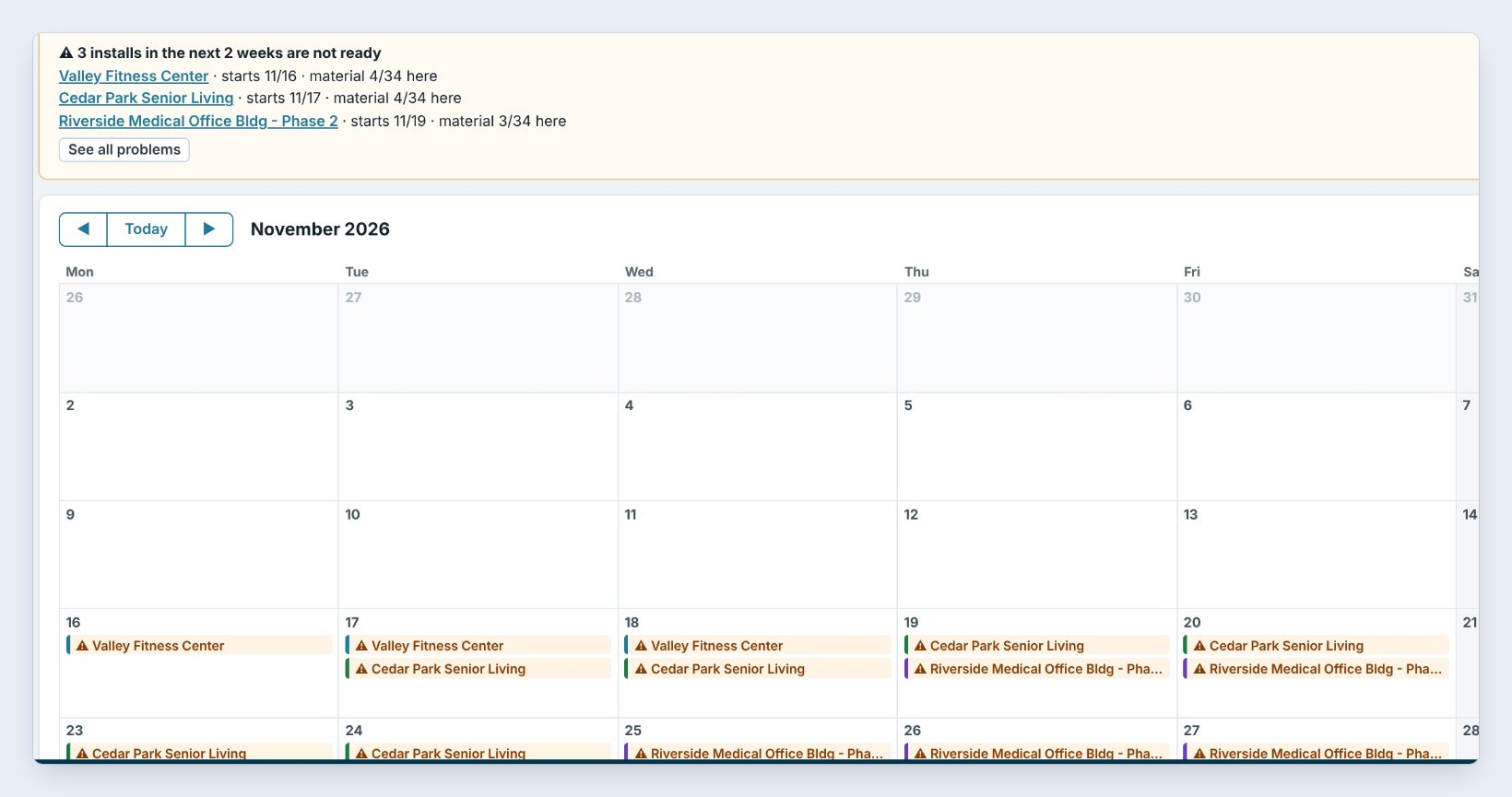
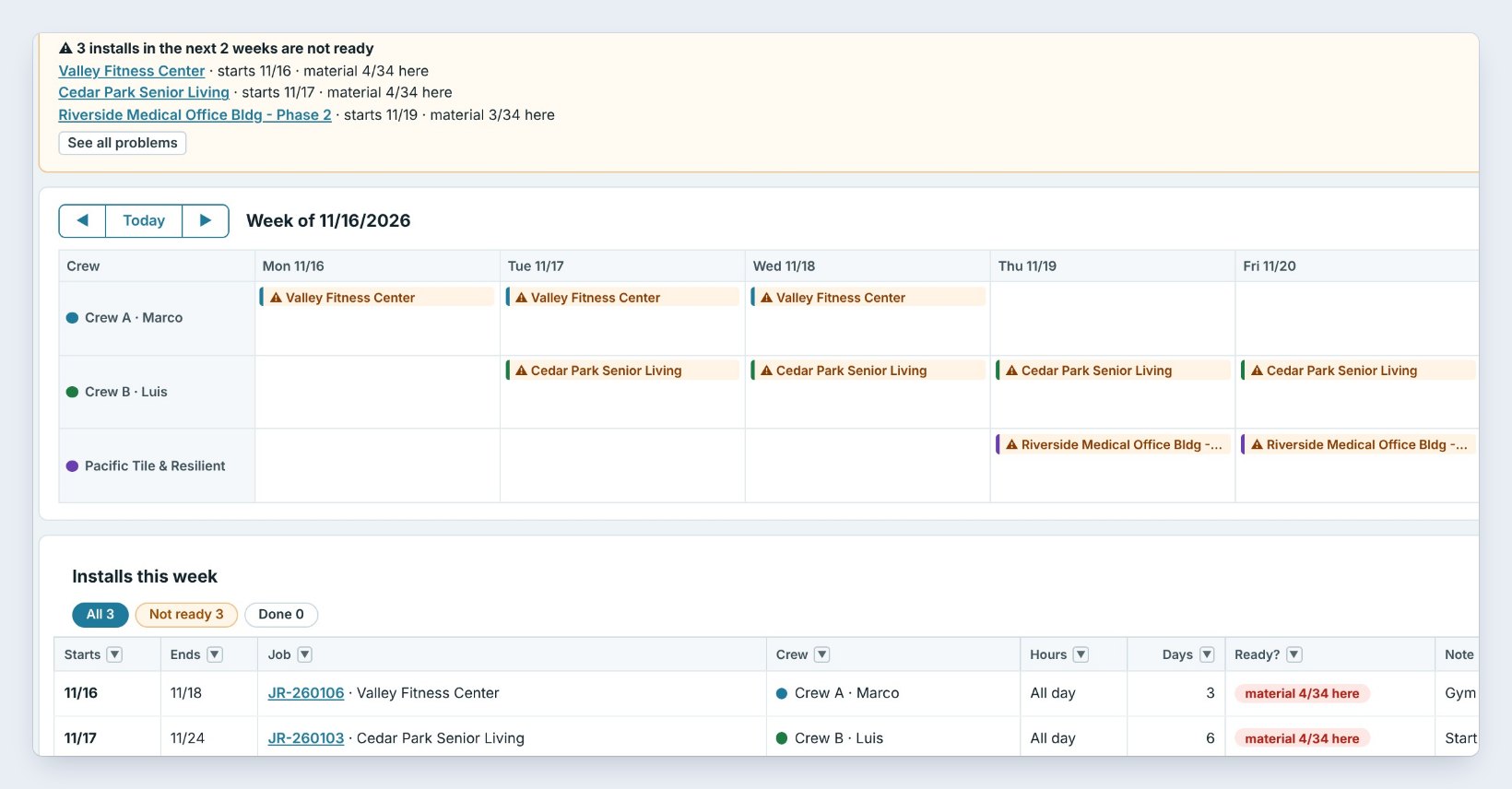
Month shows every booked install. A warning sign means it is not ready, and the yellow box on top lists the installs in the next 2 weeks that are not, such as Valley Fitness Center, starts 11/16, material 4/34 here. Click a day to book, or a job to move it, change the crew or mark it done.
Week by crew gives each crew a row, so you see who is free on Thursday. Below it, Installs this week lists each one with the crew, the hours, the days, whether it is ready and the note.
4Fix what is not ready on Problems
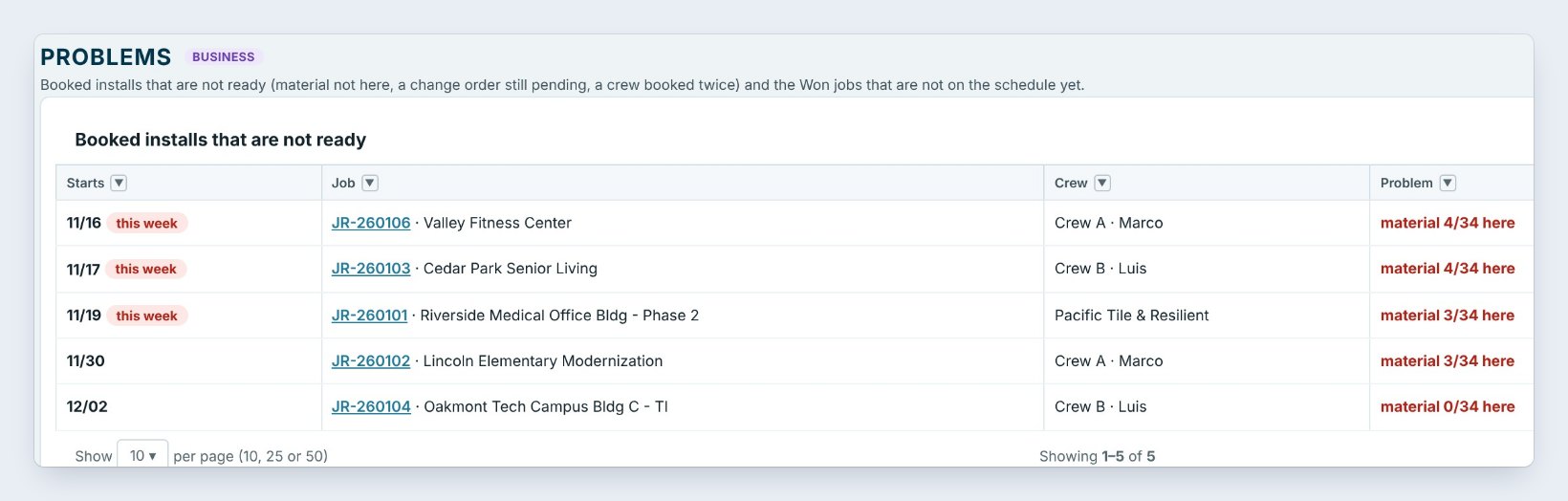
Problems lists the booked installs that are not ready, material not here, a change order still pending or a crew booked twice, with a Move button and an Ordering button that opens the job’s Material List. Below are the Won jobs not booked yet, so no job slips off the schedule.
5Keep the job’s notes and follow-ups
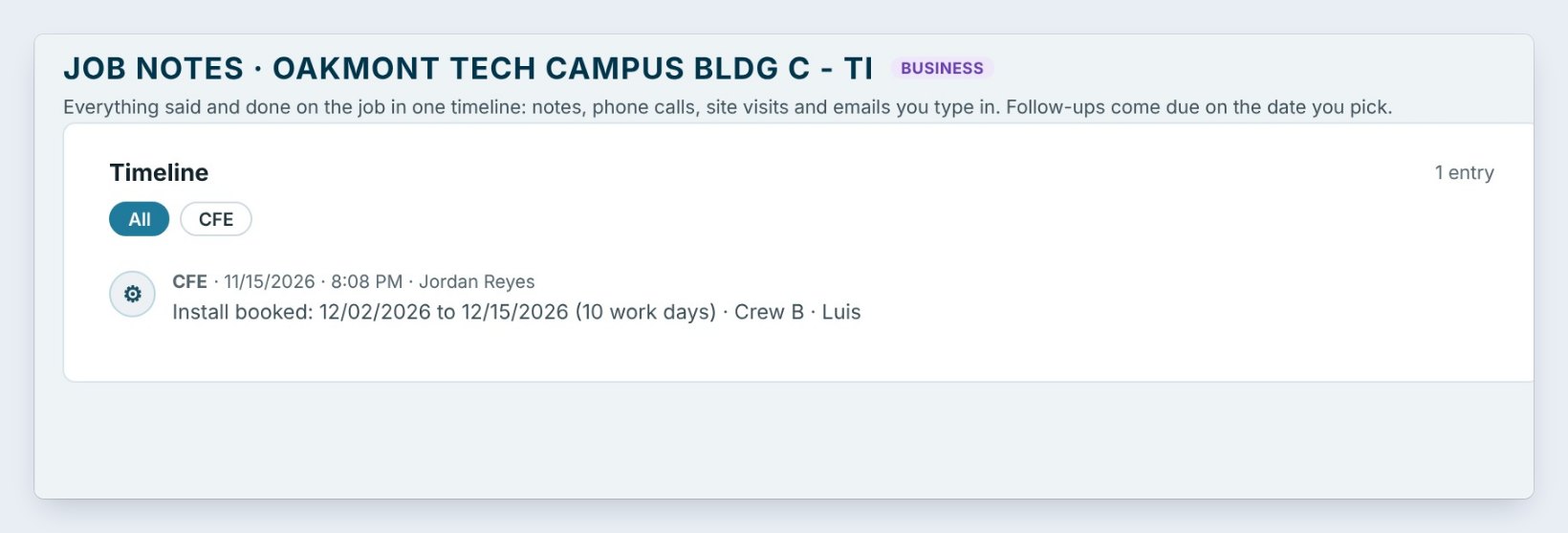
Every booking writes itself on the job’s Job notes timeline: Install booked: 12/02/2026 to 12/15/2026, 10 work days, Crew B · Luis. Add your own notes, phone calls and site visits, and set a Follow-up for a date; it shows on My day when it is due.
Worked example: the week of November 16
Three crews and three installs, two of them not ready on Monday morning:
| Crew | Job | Days | Ready? |
|---|---|---|---|
| Crew A · Marco | Valley Fitness Center, 11/16–11/18 | 3 | Material 4/34 here |
| Crew B · Luis | Cedar Park Senior Living, 11/17–11/24 | 6 | Material 4/34 here |
| Pacific Tile & Resilient | Riverside Medical Office Bldg – Phase 2, from 11/19 | – | Material 3/34 here |
From Problems, Jordan opened Ordering for each job, found the late delivery and moved Cedar Park by one day instead of sending Crew B to wait for material.
What to do next
Send the job to the crew’s phone with the Field app, and get the material in with the Material List.
Book your next install where the material is
Scheduling is part of CFE BidWise. Start with the 30-day free trial, no credit card.
Frequently Asked Questions
Can I book a sub as well as my own crews?
Yes. Add subs to Schedule › Crews next to your in-house crews; each gets a color on the schedule.
What makes an install not ready?
Material not here yet, a change order still pending, or the crew booked twice. The install shows a warning sign on the schedule and is listed on Problems.
Is the schedule on CFE Personal?
Booking installs, the month view, crews and job notes are on both plans. Week by crew and the Problems list are shown here on CFE Business.
Can I book the same crew on two jobs in one day?
Yes. Set start and end times, for example the morning on one job and the afternoon on another, so the hours do not overlap.

Written by
Cristian Valcu – Founder & CEO, Commercial Flooring Estimating LLC
Cristian has estimated commercial flooring for over 20 years and built CFE BidWise around the way flooring contractors actually price, propose and track their bids.
Last updated: