
CFE guide · Estimating
Add Subcontractors and Additional Costs to the Bid
Two boxes under the takeoff grid hold the costs that are not flooring lines. Sub-contractors takes up to two sub quotes (Sub #1 and Sub #2), each with its quote number, amount and a profit % that follows your Mark-up / Margin setting. Additional / Misc prices items like a carpet assessment fee, travel or zone pay, disposal and moisture tests as Value × $ Amount plus GP %. Each sub also has a profile sheet with its quote, scope, insurance and an approval checklist.

Why subs and extras need their own place
A flooring bid often carries work the company does not install: epoxy, wood, abatement. The sub’s quote has to be on the bid with your profit on it, and the sub has to be insured and approved before the GC sees their name. On top come the costs that are not tied to a square foot: dumpsters, travel pay, moisture tests.
When those go in a spreadsheet margin note, they get left off. CFE - Advanced Estimating Worksheet gives them two fixed boxes on the Estimate Quote, both feeding the Sub Total Job Cost, so they are on every bid and every proposal.
The four steps
- Enter the sub quotesSub-contractors box: sub, Quote #, amount, Profit %.
- Fill the sub profileLeft menu, Sub #1 or Sub #2.
- Approve the subTick the requirements; Approved, On Hold, Processing or Denied.
- Add the other costsAdditional / Misc: Value × $ Amount + GP %.
1Enter the sub quotes on the estimate
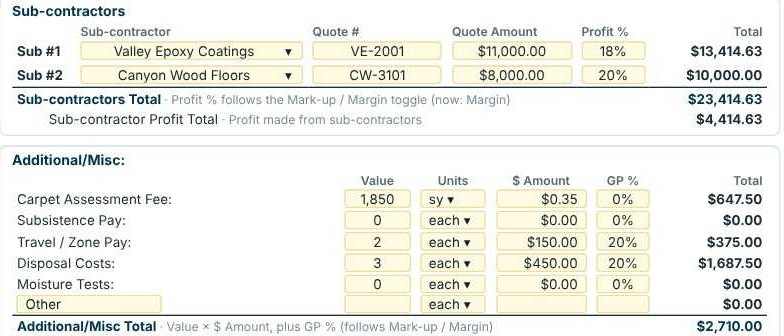
In the Sub-contractors box under the grid, pick the sub for Sub #1 or Sub #2 from your saved list, then type the Quote #, Quote Amount and Profit %. The Profit % follows the Mark-up / Margin toggle, so on Margin an $11,000 quote at 18% is $13,414.63. The box shows the Sub-contractors Total and the Sub-contractor Profit Total, the profit you make from subs.
2Fill the sub’s profile
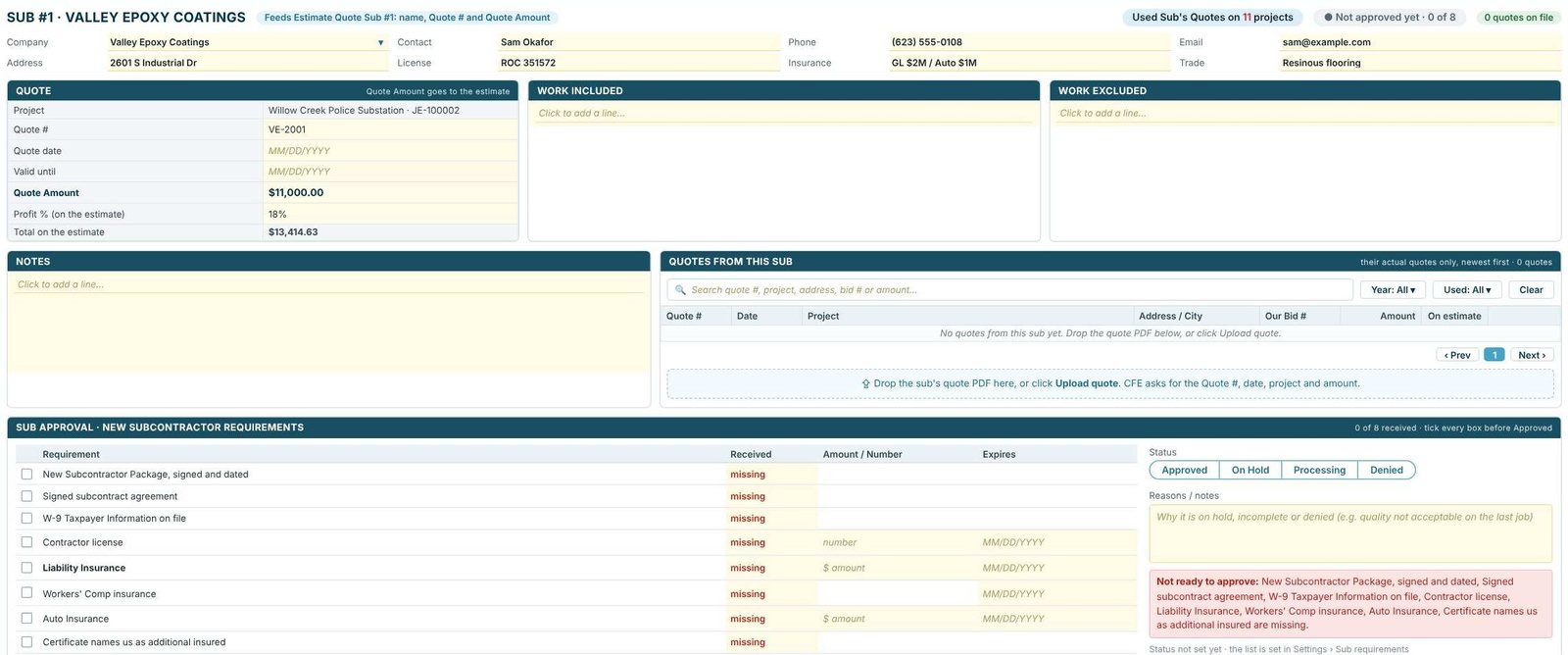
Open Sub #1 or Sub #2 in the left menu. The profile feeds the estimate’s Sub line (name, Quote # and Quote Amount) and holds the rest: contact, license, insurance and trade; the quote’s date and valid-until date; Work Included and Work Excluded; and Quotes from this sub, where you drop the sub’s PDF or press Upload quote. Use in Sub #1 and Update amount push the quote to the estimate, and Save to sub list keeps the sub for the next bid.
Fill in Work Excluded from the sub’s own quote, word for word. When the GC asks why the epoxy price does not include the cove base, the answer is already on your sheet.
3Approve the sub against your requirements
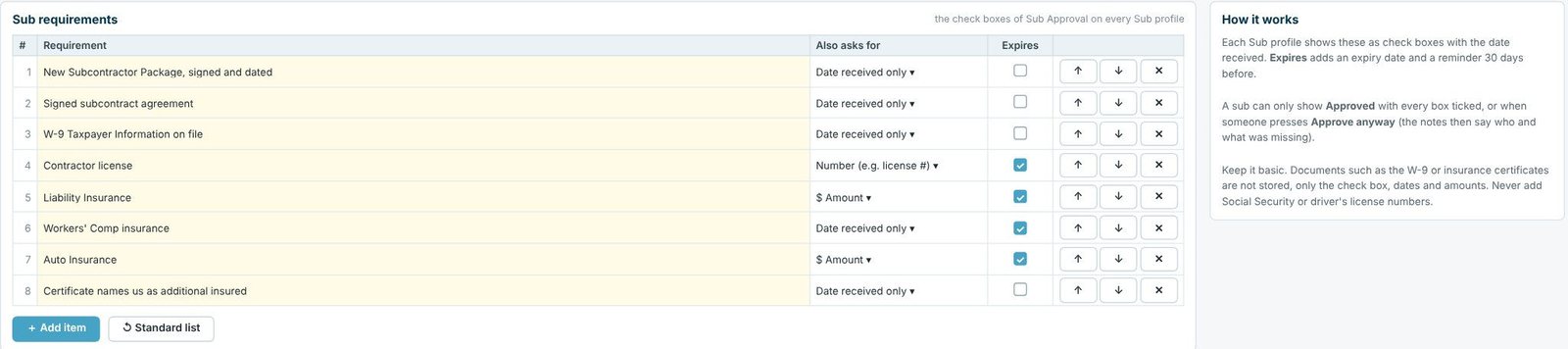
The Sub Approval checklist on each profile comes from Settings › Sub requirements. The sample has eight: the new subcontractor package, signed subcontract agreement, W-9, contractor license, liability, workers’ comp and auto insurance, and a certificate naming you as additional insured. Each can ask for a date, a number or an amount, and Expires adds an expiry date with a reminder 30 days before. A sub shows Approved only with every box ticked, or when someone presses Approve anyway and the notes say what was missing. The Email sub-contractor box writes the missing documents email for you. Only the check boxes, dates and amounts are kept, not the documents.
4Add the costs that are not flooring lines
The Additional / Misc box has rows for Carpet Assessment Fee, Subsistence Pay, Travel / Zone Pay, Disposal Costs, Moisture Tests and Other. Each row is Value × $ Amount, in the units you pick (sy, each and so on), plus a GP % that follows Mark-up / Margin. For travel on out-of-town work, the travel and subsistence calculator works the numbers out.
Worked example: the police substation, below the grid
Willow Creek Police Substation, on Margin.
| Item | Entry | Total |
|---|---|---|
| Sub #1 Valley Epoxy Coatings (VE-2001) | $11,000.00 at 18% | $13,414.63 |
| Sub #2 Canyon Wood Floors (CW-3101) | $8,000.00 at 20% | $10,000.00 |
| Sub-contractors Total | Profit from subs: $4,414.63 | $23,414.63 |
| Carpet Assessment Fee | 1,850 sy × $0.35 at 0% | $647.50 |
| Travel / Zone Pay | 2 each × $150.00 at 20% | $375.00 |
| Disposal Costs | 3 each × $450.00 at 20% | $1,687.50 |
| Additional / Misc Total | $2,710.00 |
On Margin, $11,000 ÷ (1 − 0.18) = $13,414.63 and 3 × $450 ÷ (1 − 0.20) = $1,687.50. Both totals go into the Sub Total Job Cost, which then gets tax, bond and burden.
What to do next
Next, keep your subs’ cards in the GC and sub-contractor database, and list them on the proposal with the List of Sub-Contractors box in proposal terms.
Put your subs on the bid
Sub profiles, approvals and additional costs are in the 30-day free trial. No credit card.
Frequently Asked Questions
How do I add a subcontractor quote to a CFE estimate?
In the Sub-contractors box under the takeoff grid, pick the sub for Sub #1 or Sub #2 and type the Quote #, Quote Amount and Profit %. The Profit % follows your Mark-up / Margin setting.
Can CFE track subcontractor insurance and paperwork?
Yes. Each sub profile has an approval checklist from Settings › Sub requirements, with dates, numbers, amounts and expiry reminders 30 days before. Only the check boxes, dates and amounts are kept, not the documents.
Where do disposal and travel costs go?
In the Additional / Misc box: each row is Value × $ Amount plus a GP %, with rows for carpet assessment fees, subsistence, travel or zone pay, disposal, moisture tests and other costs.
When does a sub show as Approved?
Only when every requirement is ticked, or when someone presses Approve anyway, with notes that say what was missing.

Written by
Cristian Valcu – Founder & CEO, Commercial Flooring Estimating LLC
Cristian has estimated commercial flooring for over 20 years and built CFE - Advanced Estimating Worksheet around the way flooring contractors actually price, propose and track their bids.
Last updated: