
Import RFMS Measure Takeoffs into CFE BidWise
Open the RFMS Measure takeoff report PDF from Import from Other Software, and CFE BidWise turns it into Estimate Quote lines. Gross Qty goes to Qty and Net Area to Net, with the waste % shown as a check.
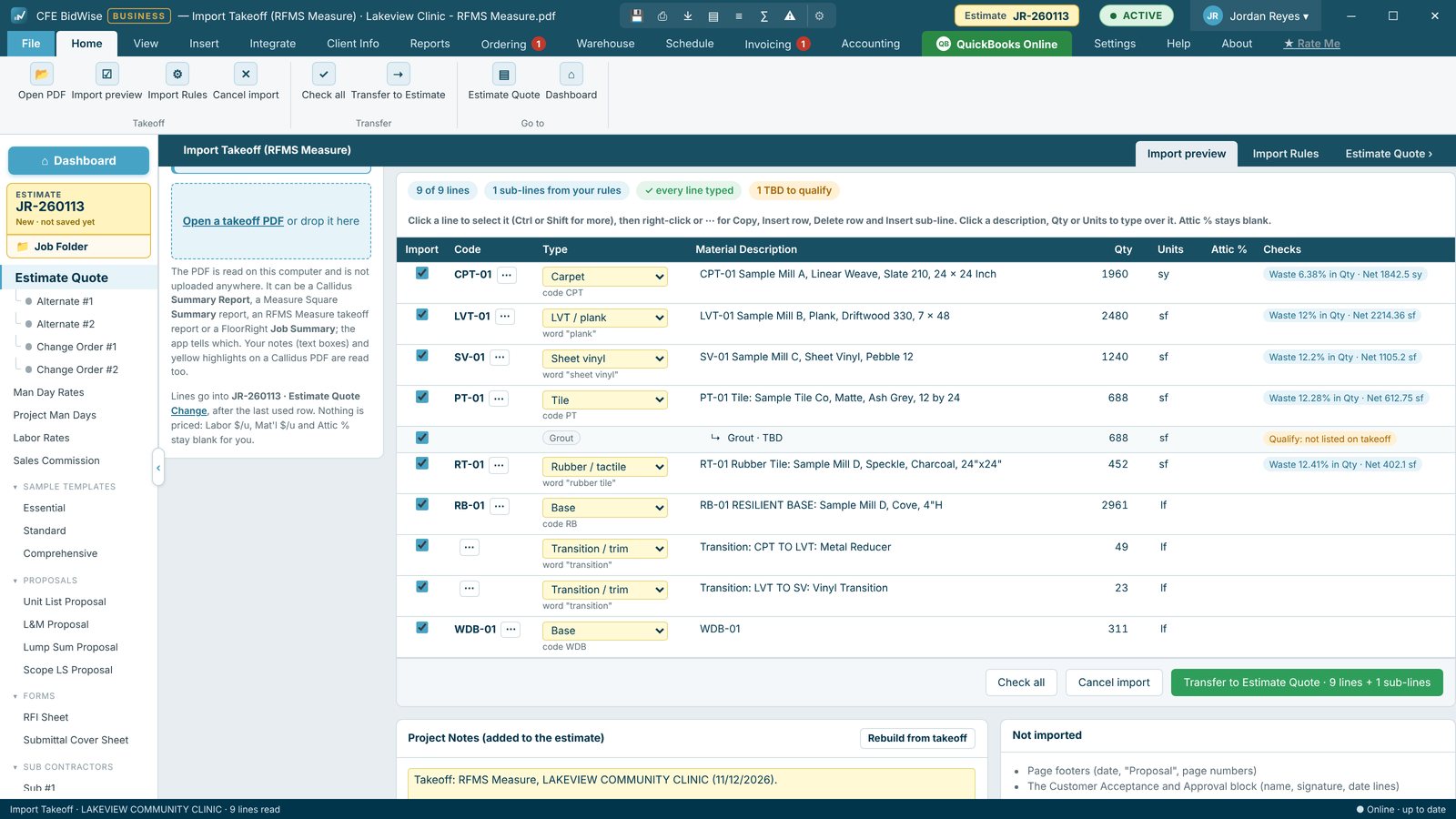
What comes in
Gross Qty becomes the Qty and Net Area the Net, and the waste % is shown as a check. Reports without a Net Area column work too. TS lines import as Transition / trim, grout and base corners sit under their product, stair treads come in as Stairs, and "No Material" lines come in unticked.
How to import
- In RFMS Measure, save or print the takeoff report PDF.
- In CFE BidWise, press Import from Other Software on the Dashboard (or Integrate › Import, or File › Import) and pick RFMS Measure.
- Check the preview: lines to check are flagged, and you can fix any line.
- Pick the estimate or change order and import. Your Labor GP and Mat'l GP fill in right away.
- Gross Qty to Qty, Net Area to Net
- Waste % shown as a check
- Transitions, stairs and base recognized
- No Material lines unticked
- RFMS product codes mapped to types
Try CFE BidWise free for 30 days
Every feature unlocked, with a switch to try it as Personal or Business. No credit card. After the trial, the Estimate Quote and Dashboard keep working for free, or pick Personal ($69.99 a month) or Business ($129.99 a month per user).
Frequently Asked Questions
Does it work without a Net Area column?
Yes. Reports without a Net Area column import too.
What happens to No Material lines?
They come in unticked. You can change that in Import Rules › Rules per software.
CFE BidWise is made by Commercial Flooring Estimating LLC, built by a flooring professional with over 20 years in the business. Last updated: