
CFE guide · Proposals and field paperwork
Hand the Job to the Installers and the Office
Work Orders turn the won estimate into the paperwork each team needs. For Installers lists the install scope with the ordered quantities, the estimate’s labor prices, the labor description and the man days, for the bid and every change order, and prints as an Installer Job Order for the installer’s company to sign. For Office pulls the contract amount, the bid details, an office checklist from contract to closeout, and the material cost estimated against actual.

Why the work order should come from the estimate
The estimate is the most accurate description of the job anyone has: every product, every quantity, every labor price and the days it should take. Then the job is won and the crew gets a marked-up plan, the office gets an email, and the man days the estimate was built on never reach the people who have to hit them.
CFE - Advanced Estimating Worksheet builds the work orders from the estimate and the Material List. The installers see what to put down, where, for how much and in how many days. The office sees what the contract is worth, what paperwork is still open and whether the material is on budget. Change orders stay in their own sections, so later work never blurs into the base bid.
The four steps
- Open For InstallersWork Orders › For Installers: scope, labor, man days.
- Let the crew fill it inArea / Room, Date Done and Done are the crew’s.
- Print the Installer Job OrderPrices shown or hidden; one CO or all.
- Open For OfficeContract, bid details, checklist, cost.
1Open the work order for installers

Open For Installers under Work Orders in the left menu. The banner says Scope, quantities and the estimate’s labor prices · the Pick Ticket prints without prices, and Project Man Days sits at the top (32.16 on the Eastgate sample). Fill in the header the estimate cannot know: Start Date, Crew Lead and the Site Contact; Labor shows the labor type and wage from the estimate (Subs · Standard wage here). Each section is an Install Scope: the Estimate Quote, then every change order, with its own Labor Sub and Project Man Days.
2Let the crew fill in the area and the dates
The columns are Area / Room, Material, Qty (ordered), Units, Labor $/u, Prep $/u, Labor Sub, Labor Description, Man Days, Date Done and Done. The legend explains them: Qty is what was ordered on the Material List · “est.” = not ordered yet, estimated qty · Area and Date Done are filled in by the crew. So the quantity follows purchasing: once the office enters an Ordered Qty on the Material List, the crew sees that number instead of the estimate. Under each product, its ↳ Prep and ↳ Adhesive lines show the quantities; Prep & Adhesive switches between Per line and Combined.
Send the crew the man days with the scope. A crew that knows the base bid carried 4.38 man days for 3,500 lf of straight base knows on day three whether the job is on track.
3Print the Installer Job Order
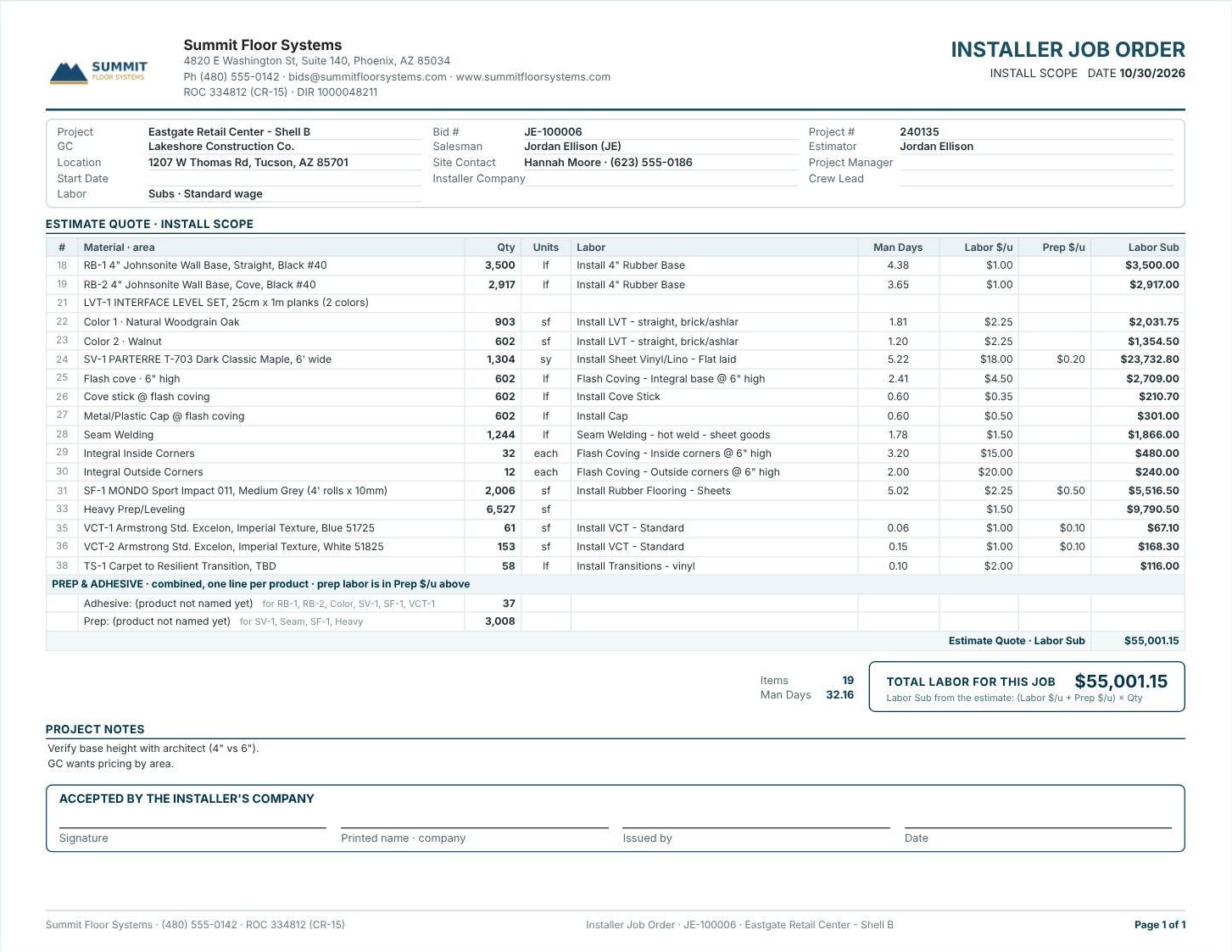
Press Print Installer Job Order. The toolbar picks Portrait or Landscape, Prices Shown or Hidden, change orders Separate or Attached, and which sheet to print: Project or CO #1 to CO #4. The order lists the scope with Labor, Man Days, Labor $/u, Prep $/u and Labor Sub, then Items, Man Days and TOTAL LABOR FOR THIS JOB, worked out as (Labor $/u + Prep $/u) × Qty. Below come the Project Notes from the estimate and Accepted by the installer’s company with signature, printed name, issued by and date. Edit, Save Modified and Reset change the printout without touching the estimate; Print Pick Ticket prints the same scope without prices.
4Give the office its work order
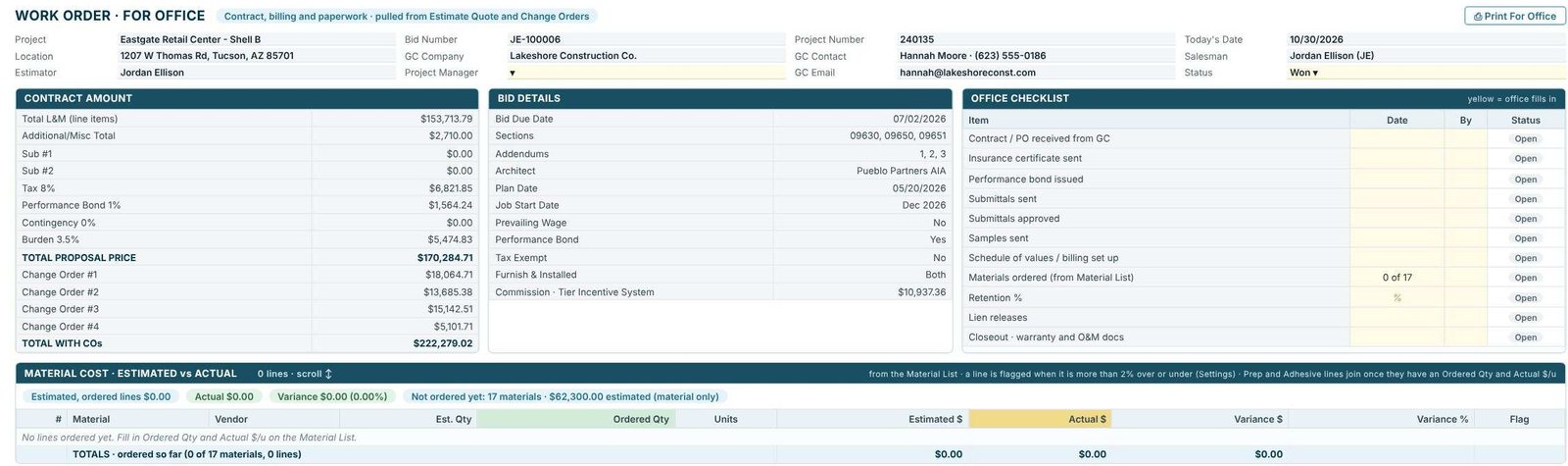
Open For Office: Contract, billing and paperwork · pulled from Estimate Quote and Change Orders. Pick the Project Manager from your users and the Status. Contract Amount breaks the price down, Bid Details repeats the sections, addenda, architect, plan date, job start, prevailing wage, bond, tax and commission, and the Office Checklist runs from Contract / PO received from GC through insurance, bond, submittals, samples, schedule of values, Materials ordered (from Material List) (0 of 17 here), retention and lien releases to Closeout · warranty and O&M docs, each with Date, By and Status. Material Cost · Estimated vs Actual comes from the Material List and flags a line more than 2% over or under (set in Settings). Each change order follows in its own box, kept separate so later orders stay apart from the main estimate.
Worked example: the contract amount on Eastgate
Eastgate Retail Center – Shell B, Work Order for Office, Contract Amount.
| Item | Amount |
|---|---|
| Total L&M (line items) | $153,713.79 |
| Additional / Misc | $2,710.00 |
| Tax 8% | $6,821.85 |
| Performance Bond 1% | $1,564.24 |
| Burden 3.5% | $5,474.83 |
| Total Proposal Price | $170,284.71 |
| Change Orders #1 to #4 | $18,064.71 + $13,685.38 + $15,142.51 + $5,101.71 = $51,994.31 |
| Total with COs | $222,279.02 |
$153,713.79 + $2,710.00 + $6,821.85 + $1,564.24 + $5,474.83 = $170,284.71, and $170,284.71 + $51,994.31 = $222,279.02: the same amount as every proposal for the job. Subs, contingency and the other zero lines are left out of this table.
What to do next
Next, pull the materials with the warehouse order and pick ticket, check the man days the scope is built on, and print the job’s sheets from Reports.
Hand off your next job in minutes
Work orders for installers, office and warehouse are in the 30-day free trial. No credit card.
Frequently Asked Questions
What is on the CFE installer work order?
The install scope from the estimate: area, material, ordered quantity, units, labor and prep per unit, labor sub, labor description, man days, and Date Done and Done for the crew, for the bid and each change order.
Can I print an installer job order without prices?
Yes. Set Prices to Hidden on the Installer Job Order, or print the Installer Pick Ticket, which prints without prices.
What does the office work order track?
The contract amount with change orders, the bid details, an office checklist from contract to closeout with date, by and status, and the material cost estimated against actual.
Where does the quantity on the work order come from?
From the Material List: Qty is what was ordered. Lines not ordered yet show the estimated quantity marked est.

Written by
Cristian Valcu – Founder & CEO, Commercial Flooring Estimating LLC
Cristian has estimated commercial flooring for over 20 years and built CFE - Advanced Estimating Worksheet around the way flooring contractors actually price, propose and track their bids.
Last updated: