
CFE guide · Tracking and reports
Won Jobs: Where We Are
The Won jobs, where we are bar on the Dashboard counts every open Won job by phase. Contract, Submittals, Ordering, Material coming, Ready to schedule, Scheduled, Installing, Punch list, Billing, Retainage, Closed and On hold, each with a number. Click a phase to show only those jobs, Waiting on someone for jobs held up by a GC, a submittal or late material, Show all to clear it, and Project phases for the full board.


Why a bar of phases?
“Where are we on that job?” is the question everyone asks: the owner, the GC, the accountant. Usually somebody has to go and find out.
The Won jobs bar answers it for every job at once, on the screen you open first, and one click shows the jobs in any phase.
The five steps
- Find the barOn the Dashboard, under the tiles.
- Read the phasesContract to Scheduled.
- Click a phaseShow only those jobs.
- Waiting on someoneHeld up by the GC or material.
- Project phasesThe full board, and settings.
1Find the Won jobs bar on the Dashboard

Open the Dashboard. Right under the tiles, above the Bid Tracker, is Won jobs · where we are.
It says how many Won jobs are open, here 22 open, and click a phase to show only those. Every Won job is in one phase, worked out from what BidWise already knows: submittals, ordering, the warehouse, the schedule, the crew phones and invoicing.
2Read the phases, in the order a job runs


The chips run left to right in the order a job runs. Contract, 2: won, but the signed contract, insurance certificate or bond is not in yet. Submittals, 2: waiting on the GC. Ordering, 2: approved, material not ordered yet. Material coming, 3.
Ready to schedule, 2: all the material is here and no install is booked. Scheduled, 2: an install is booked with a start date ahead.
3Click a phase to show only those jobs

Then Installing, 1, Punch list, 2, $ Billing, 3: the work is done and there is money still to bill or collect. Retainage, 2, Closed, 3, and On hold, 1.
Click a chip, such as $ Billing 3, and the Bid Tracker below shows only those three jobs. Click Show all to see every job again.
Click $ Billing every Friday. Those are jobs where the work is done and money is still out, and they are the fastest cash you have.
4See who is waiting on someone

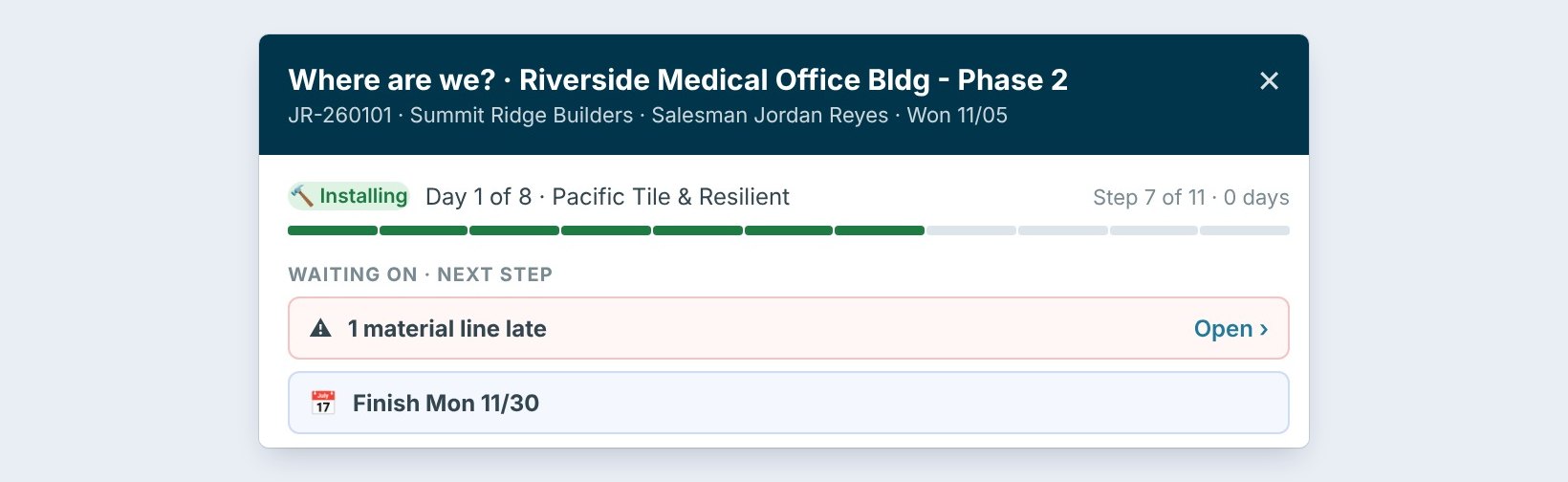
On the right, Waiting on someone, 6, counts the jobs held up by someone else: a change order to sign, a submittal sent back, or late material. Click it to show only those six.
Click any job to open Where are we?: the phase, the day, and what it is waiting on, such as 1 material line late on Riverside Medical.
5Open Project phases, and what can go wrong
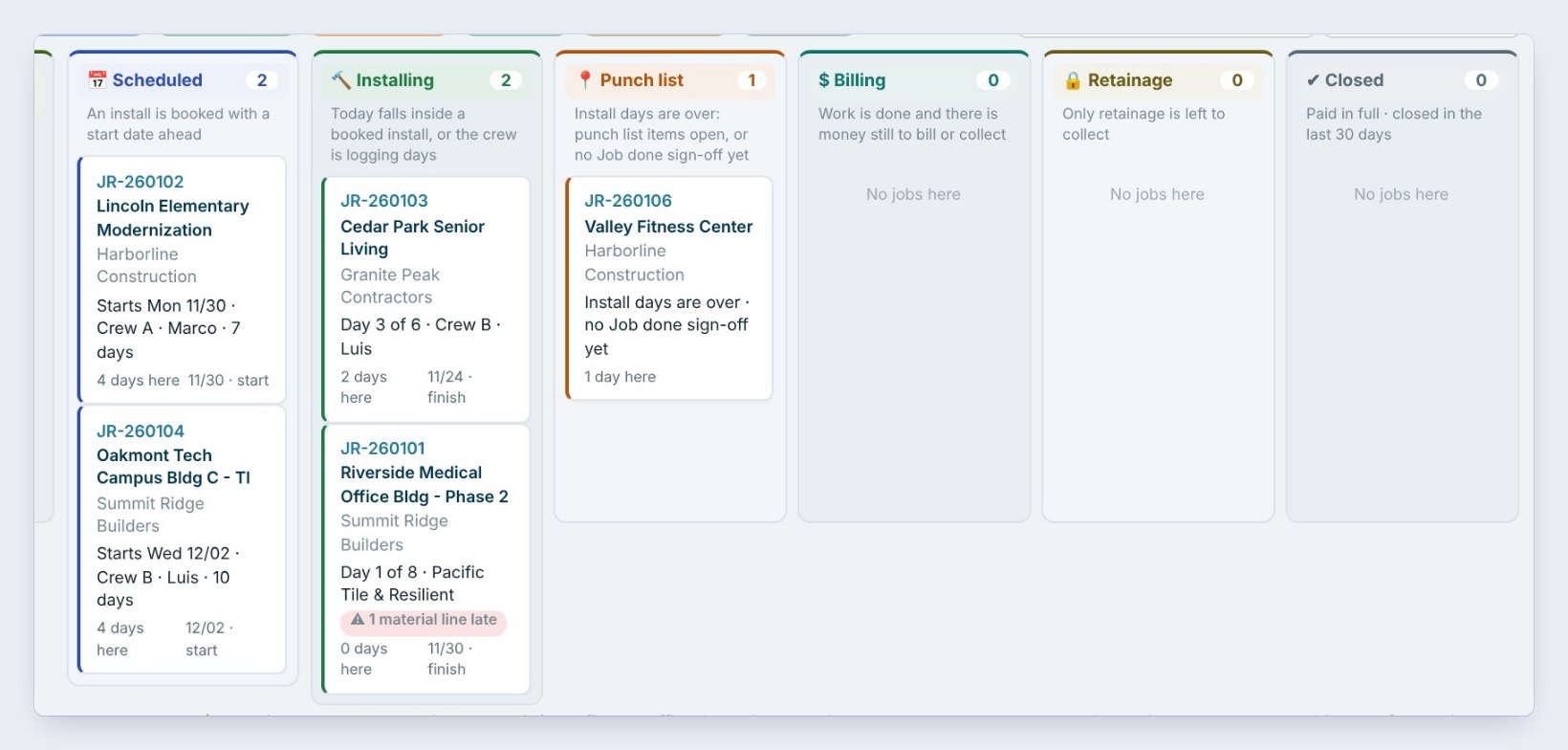

Click Project phases › at the end of the bar for the full board: a column per phase and a card per job, longest in the phase first.
The bar is not on the Dashboard. In Phase settings, tick Show the ‘Won jobs · where we are’ strip. A job is in the wrong phase. Open it on Project phases and use Set phase by hand. A job is missing. Only Won jobs show; mark it Won in the Bid Tracker.
Worked example: Monday morning, 22 open jobs
The owner opens the Dashboard and reads the bar:
| Click | Shows | Action |
|---|---|---|
| Contract 2 | Two jobs without a signed contract | Salesman gets the paperwork today |
| Waiting on someone 6 | Six jobs held up by a GC or material | PM calls the GCs |
| $ Billing 3 | Three jobs done, money still out | Accountant bills them this week |
| Show all | Every job again |
Five minutes, and every person knows which jobs are theirs this week.
What to do next
Next: use the Project phases board and phase settings.
See every Won job at a glance
Project phases is part of CFE BidWise Business. Start with the 30-day free trial, no credit card.
Frequently Asked Questions
Where do the phases come from?
From what BidWise already has: the contract, submittals, ordering, the warehouse, the schedule, the crew phones and invoicing. A phase can also be set by hand.
What does Waiting on someone count?
Won jobs held up by someone else: a change order to sign, a submittal sent back, or late material.
Can I hide the bar?
Yes. Untick Show the Won jobs, where we are strip in Phase settings.

Written by
Cristian Valcu – Founder & CEO, Commercial Flooring Estimating LLC
Cristian has estimated commercial flooring for over 20 years and built CFE BidWise around the way flooring contractors actually price, propose and track their bids.
Last updated: