
CFE guide · Schedule and the field
Crews and Trades
Crews lists every crew you book installs for: in-house crews and subs. Each has a lead, a phone, a color on the schedule and the trades it installs. Availability and Find next open crew only offer a crew for its trades. Under Settings › Installers you add each installer, their level, and the crew-day and T&M rates.


Why set up crews and trades?
Not every crew can heat-weld sheet vinyl, and not every sub does carpet. When the schedule knows who installs what, it never offers the wrong crew.
The installers and their levels feed job costs: what a crew day really costs, so the labor budget on every job is right.
The five steps
- Open CrewsSchedule tab, Crews.
- Tick the tradesWhat this crew installs.
- Add the installersSettings, Installers, with a level.
- Crew day and T&MMen in a crew, hours, T&M rates.
- What can go wrongCrew members, and missing trades.
1Open Crews
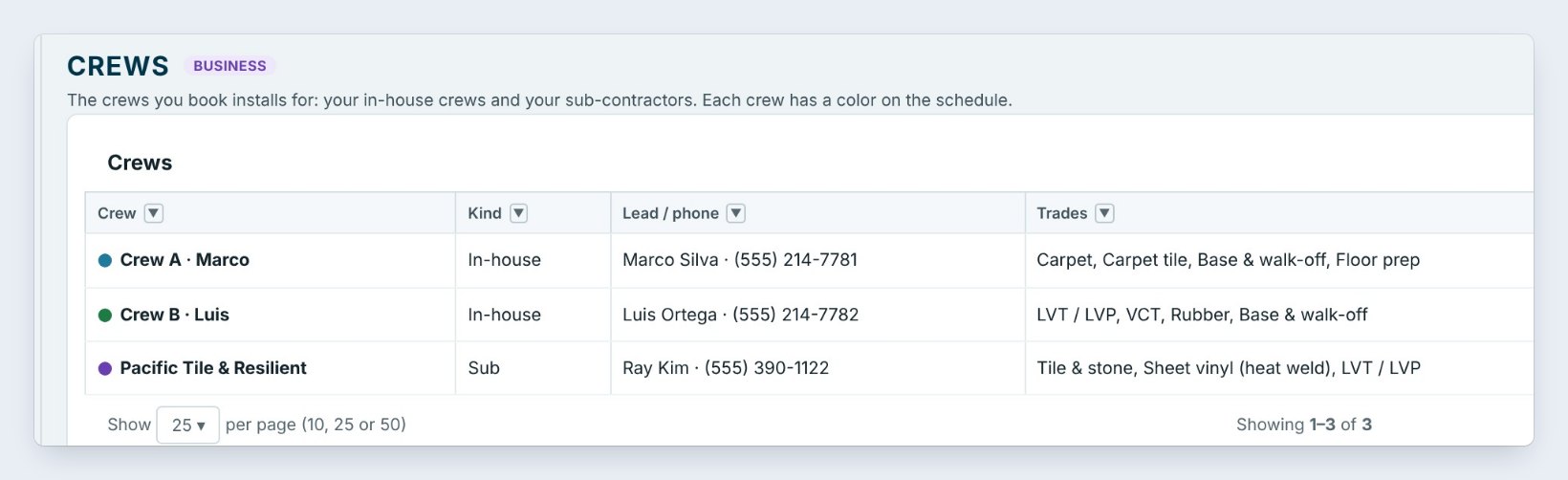
On the Schedule tab, click Crews. Here there are three: Crew A, Marco and Crew B, Luis are in-house, and Pacific Tile & Resilient is a sub, with Ray Kim as the lead.
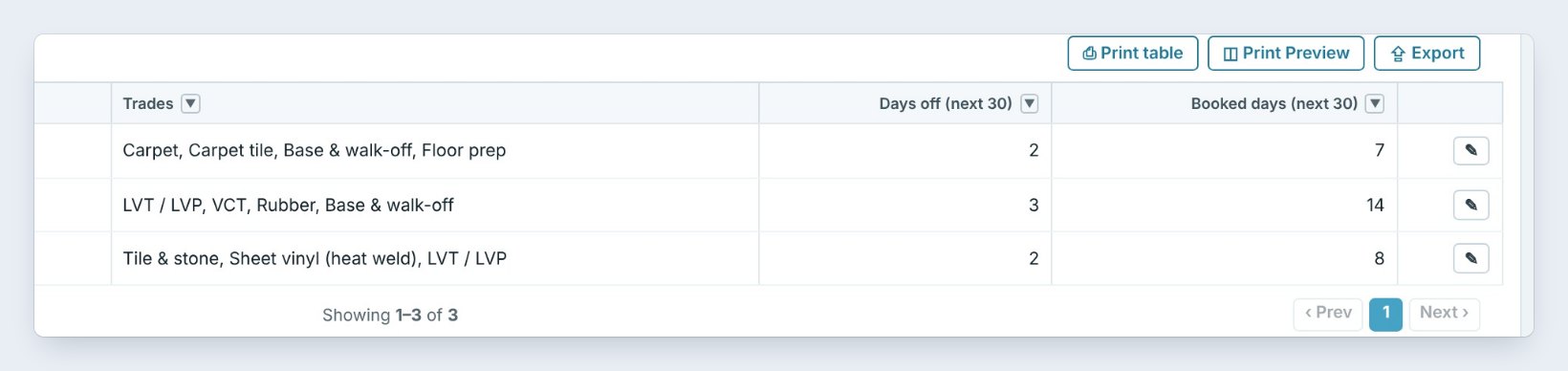
Each row shows the Trades, the Days off and the Booked days in the next 30 days. Crew B has 14 booked days, the busiest.
2Add a crew, and tick its trades
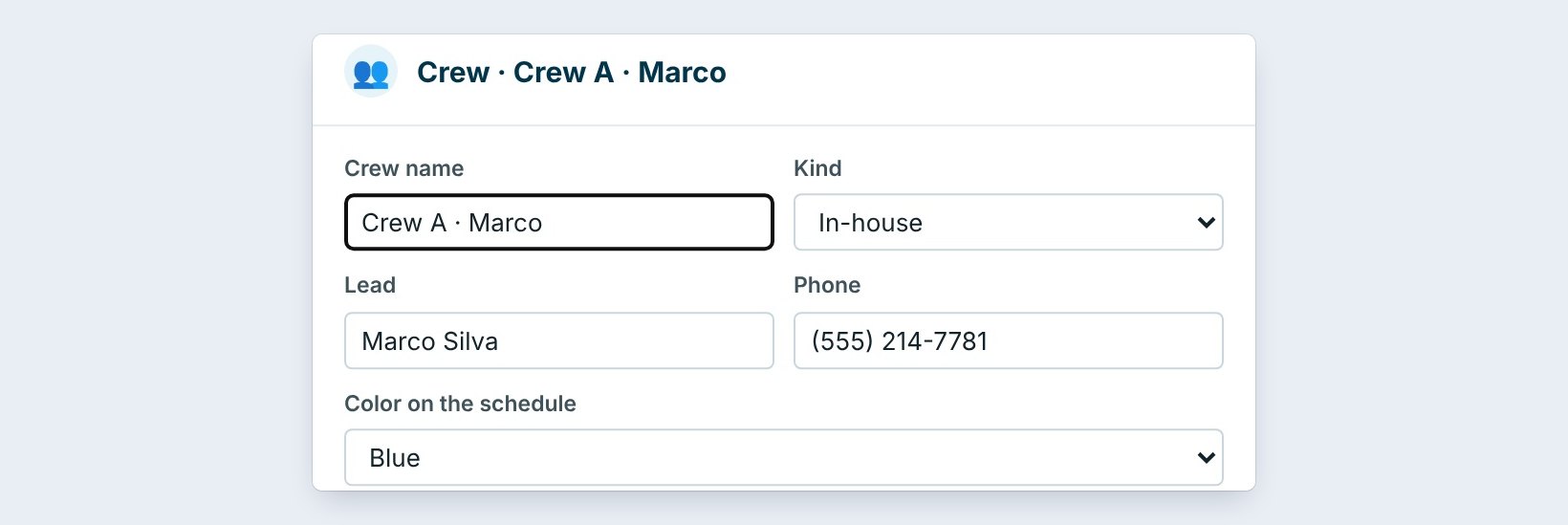
Click Add a crew, or the pencil on a row. Type the Crew name, pick the Kind, In-house or Sub, and type the Lead and Phone. Pick a Color on the schedule.
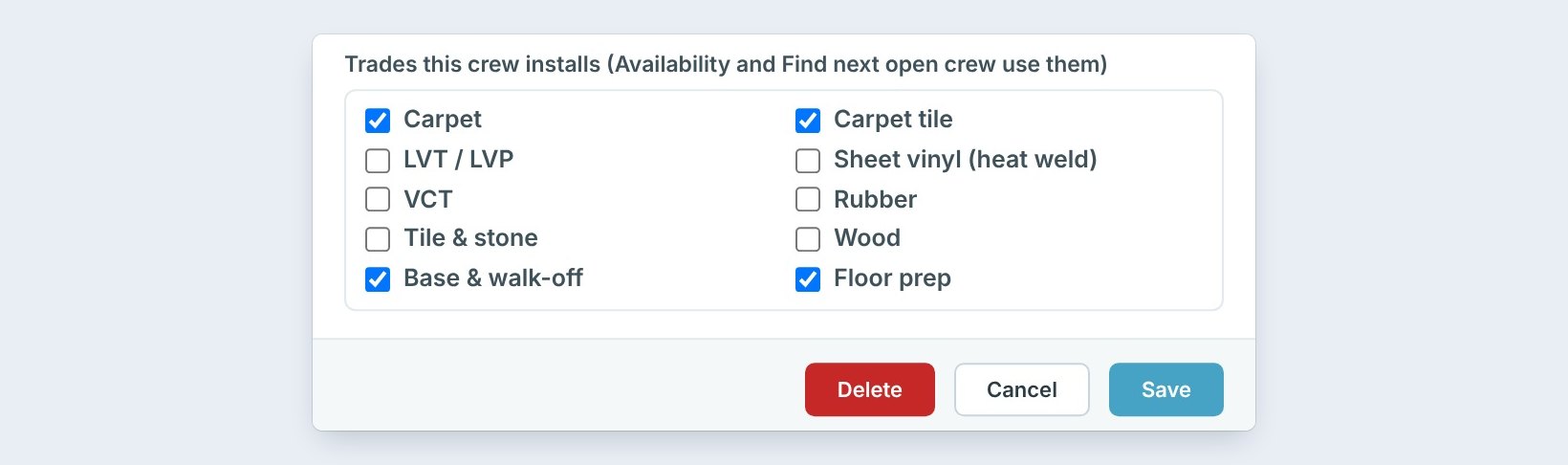
Tick the Trades this crew installs: carpet, carpet tile, LVT and LVP, sheet vinyl with heat weld, VCT, rubber, tile and stone, wood, base and walk-off, floor prep. Crew A does carpet, carpet tile, base and floor prep. Click Save.
Tick only what the crew does well, not everything it could do. Find next open crew trusts these boxes, so a crew with every box ticked gets offered for jobs it should not take.
3Add the installers and their level
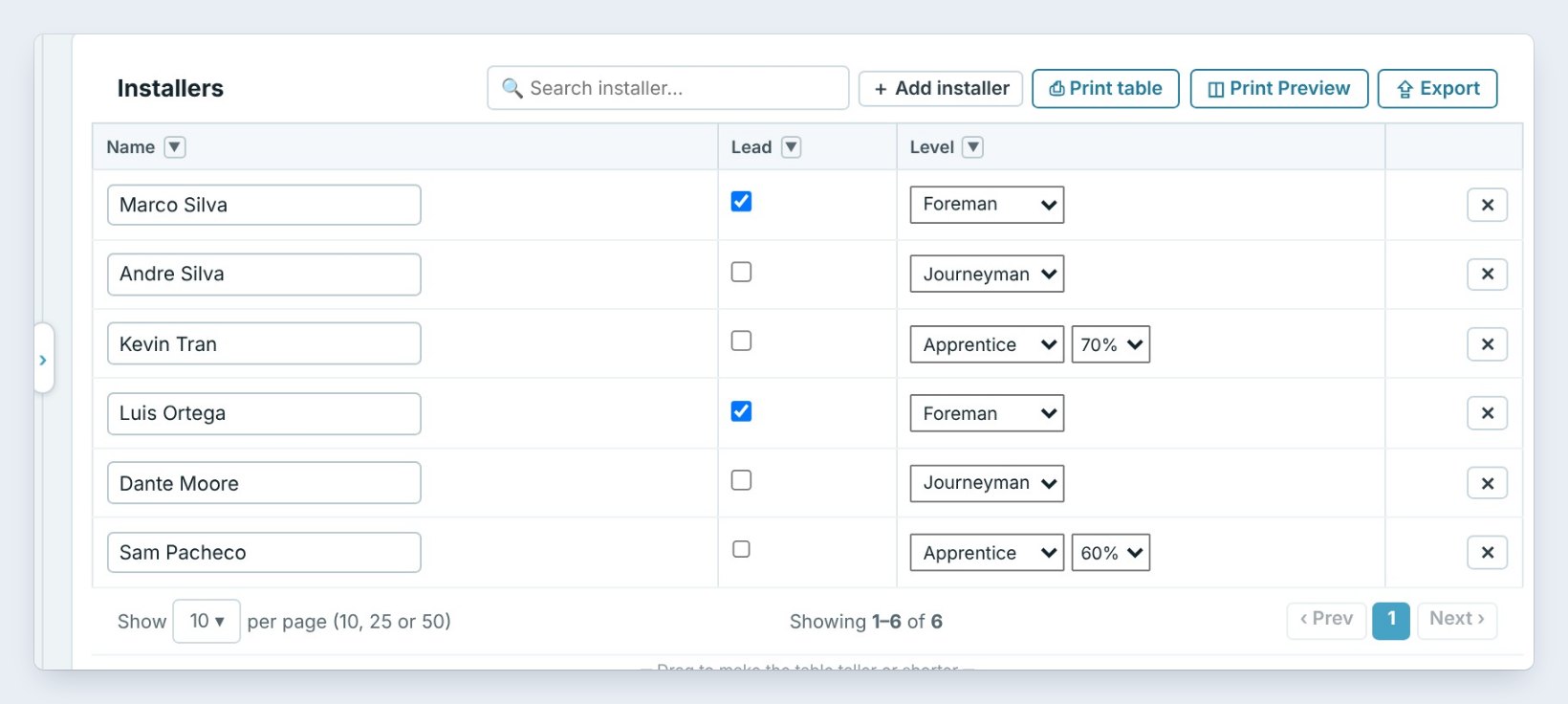
Click From Settings › Installers, or Settings › Installers. Add each installer, tick Lead for the crew lead, and pick the Level: Foreman, Journeyman or Apprentice. An apprentice gets a percent, such as 70% or 60% of the journeyman rate.
Pay rates are not here. They are in Accounting › In-House Pay, behind the Accounting password, so the team sees names and levels but not what people are paid.
4Set the crew day and T&M rates
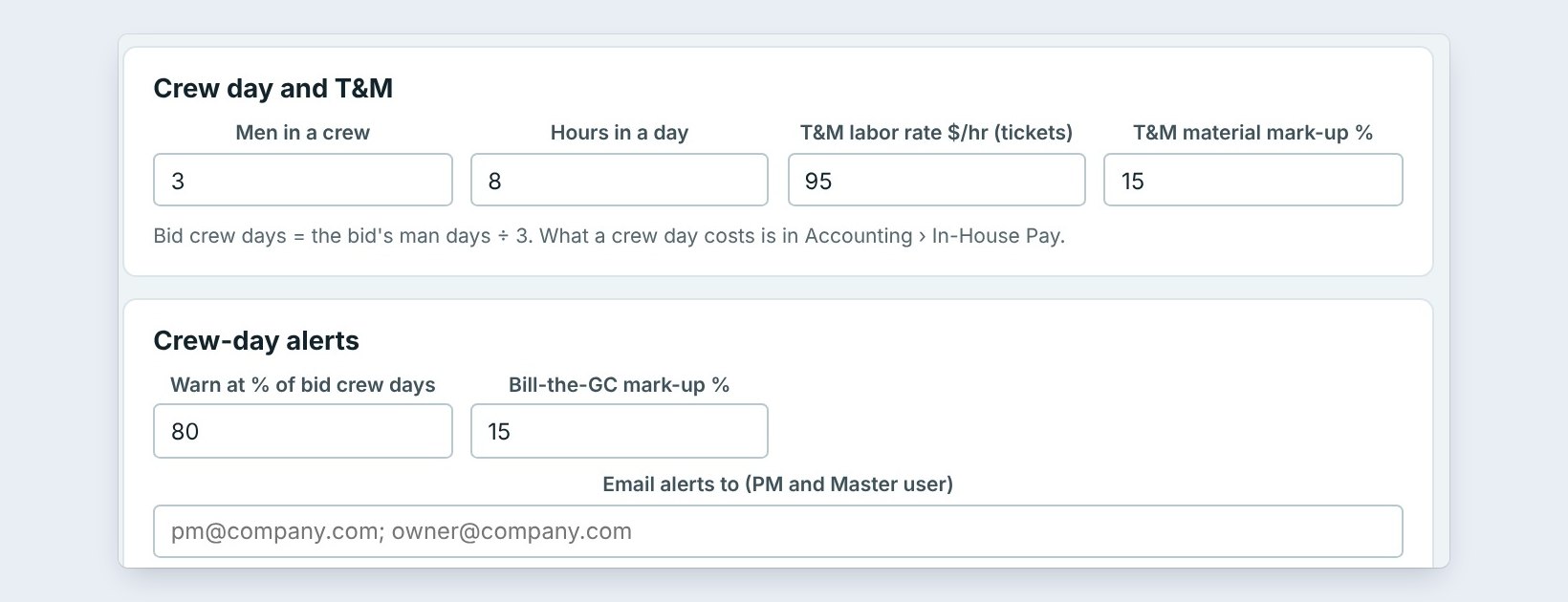
Under Crew day and T&M, set Men in a crew, here 3, and Hours in a day, 8. Bid crew days are the bid’s man days divided by 3. The T&M labor rate, $95 an hour, and the T&M material mark-up, 15%, are used on extra work tickets.
Under Crew-day alerts, Warn at 80% of the bid crew days, and type who gets the email. Click Save installers.
5What can go wrong, and how to fix it

The crew day cost looks wrong. Tick who is on each crew under Crews at the bottom of Installers. Crew A is Marco, Andre and Kevin. A crew day is costed from the people on it.
A crew is never offered. Its trades are not ticked. Open the crew and tick them.
A sub shows a crew day cost. Subs are paid by their own price, so set the Kind to Sub.
Worked example: three crews at Northgate
Northgate sets up its crews once:
| Crew | Kind | People | Trades |
|---|---|---|---|
| Crew A, Marco | In-house | Marco (foreman), Andre, Kevin (70%) | Carpet, carpet tile, base, floor prep |
| Crew B, Luis | In-house | Luis (foreman), Dante, Sam (60%) | LVT and LVP, VCT, rubber, base |
| Pacific Tile & Resilient | Sub | Ray Kim, lead | Tile and stone, sheet vinyl, LVT |
Now a sheet vinyl job only goes to Pacific Tile, and a carpet tile job only to Crew A.
What to do next
Next: book an install with the next open crew.
Book the right crew every time
Crews and the schedule are part of CFE BidWise Business. Start with the 30-day free trial, no credit card.
Frequently Asked Questions
Where are the pay rates?
In Accounting, In-House Pay, behind the Accounting password. Installers only has names, leads, levels, crews and the T&M rates.
What is a crew day?
One day of the whole crew: by default 3 men for 8 hours. Bid crew days are the bid’s man days divided by the men in a crew.
Can a sub be on the schedule?
Yes. Add it as a crew with the Kind set to Sub, with its own trades and color.

Written by
Cristian Valcu – Founder & CEO, Commercial Flooring Estimating LLC
Cristian has estimated commercial flooring for over 20 years and built CFE BidWise around the way flooring contractors actually price, propose and track their bids.
Last updated: