
CFE guide · Estimating
Calculate Sales Commission Five Ways on One Bid
The Sales Commission sheet works out all five common commission systems side by side from the estimate’s Sub Total Job Cost, profit and change orders: Tier Incentive, Point for Point, Per Overall Job Total, Per Overall Gross Profit and Shop Cut with Split Remainder. Fill the bubble for the system your shop uses, and that one feeds the commission line on the estimate. On the police substation sample the five systems pay between $17,769 and $26,714.

Why work out commission in the estimate?
Commission is usually worked out after the job closes, in a spreadsheet only the owner understands. The salesman does not know what a bid is worth to them while they are pricing it, and arguments start when the check is written.
CFE - Advanced Estimating Worksheet puts the commission on the estimate itself. The Sales Commission sheet is linked to the estimate’s Sub Total Job Cost (not tax, bond, contingency or burden), its profit and its change orders, so the number moves as the bid is priced. Everyone sees the same math.
The four steps
- Open Sales CommissionLeft menu, under Labor Rates.
- Set the tier tableProfit bands and the points each one pays.
- Set the percentagesLight orange cells are the salesman’s %.
- Pick your systemFill the bubble; it feeds the estimate.
1Open the Sales Commission sheet
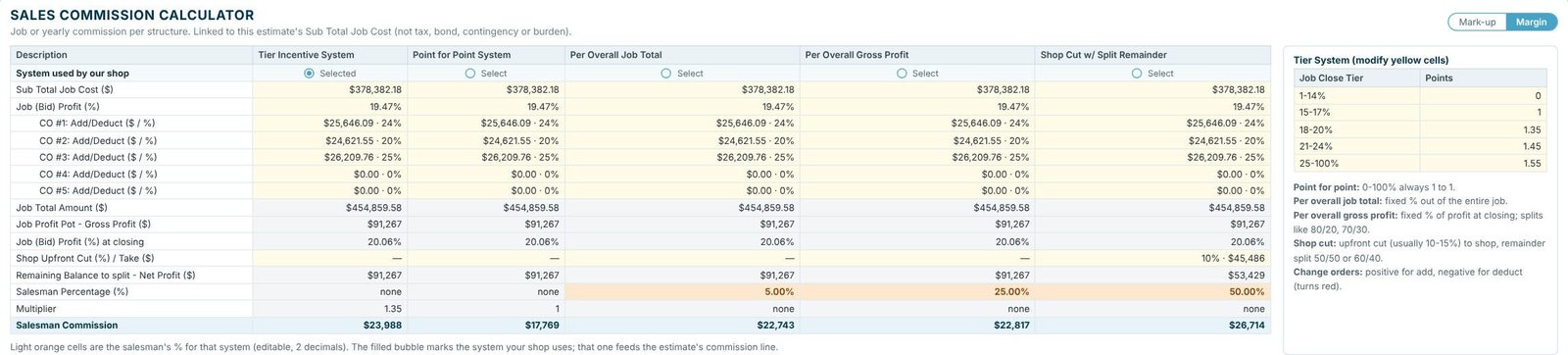
Open Sales Commission from the left menu. Each column is one system, fed by the same numbers from the estimate: Sub Total Job Cost, Job (Bid) Profit %, each change order or alternate as an add or deduct, Job Total Amount, the gross profit pot and the profit % at closing. The sheet has its own Mark-up / Margin switch, matching the estimate.
2Set your tier table
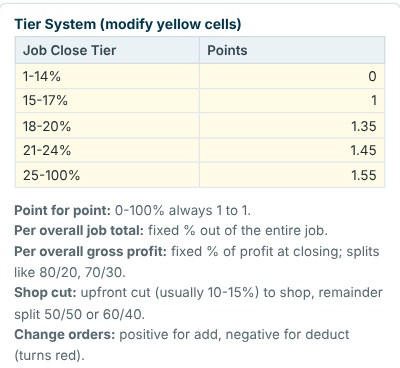
If your shop pays more for better-priced jobs, the Tier System box sets the bands. In the sample, a job closing at 1–14% profit pays 0 points, 15–17% pays 1, 18–20% pays 1.35, 21–24% pays 1.45 and 25% and up pays 1.55. Change the yellow cells to your own plan.
A tier plan pays the salesman to hold price. Moving a job from 17% to 18% profit lifts the multiplier from 1 to 1.35 on this table, which is exactly the conversation you want before a bid goes out.
3Set the salesman’s percentages
The light orange cells are the salesman’s percentage for each system, editable to two decimals: 5% of the job total, 25% of gross profit, and 50% of the remainder after the shop’s upfront cut in the sample. Change orders count as positive for an add and negative for a deduct, which turns red.
4Pick the system your shop uses
In the System used by our shop row, fill the bubble for your system. That one feeds the Commission Type box on the estimate, which shows the amount for the bid. The default type is set in Settings › Estimate defaults. To keep commission off the screen and the printouts when a client is looking, turn it off with View › Commission.

Worked example: Willow Creek Police Substation
Sub Total Job Cost $378,382.18 at 19.47% bid profit, with $76,477.40 of add alternates, for a Job Total Amount of $454,859.58. The gross profit pot is $91,267, and the job closes at 20.06%.
| System | How it pays | Salesman commission |
|---|---|---|
| Tier Incentive (selected) | Gross profit × bid profit % × tier multiplier 1.35 | $23,988 |
| Point for Point | Same, with the multiplier always 1 | $17,769 |
| Per Overall Job Total | 5% of $454,859.58 | $22,743 |
| Per Overall Gross Profit | 25% of $91,267 | $22,817 |
| Shop Cut w/ Split Remainder | 10% upfront to the shop, 50% of the remainder | $26,714 |
Tier Incentive is the selected system, so the estimate’s commission box shows Tier Incentive $23,988.34. The difference between the lowest and highest system on this one bid is $8,945, which is why it pays to see all five before you write a commission plan.
The five systems in plain words
- Tier Incentive: the better the profit, the higher the multiplier, set by your tier table.
- Point for Point: the multiplier is always 1, at any profit from 0 to 100%.
- Per Overall Job Total: a fixed % of the entire job.
- Per Overall Gross Profit: a fixed % of the profit at closing, for splits like 80/20 or 70/30.
- Shop Cut with Split Remainder: an upfront cut to the shop (usually 10–15%), with the remainder split 50/50 or 60/40.
What to do next
Next, see how the profit that pays the commission is set in markup or margin, and follow each bid to Won on the Bid Tracker.
Compare commission plans free
The Sales Commission sheet is in the 30-day free trial. No credit card.
Frequently Asked Questions
What is commission calculated on in CFE?
The Sales Commission sheet is linked to the estimate’s Sub Total Job Cost, not tax, bond, contingency or burden, along with its profit and change orders.
Which commission systems does CFE support?
Five: Tier Incentive, Point for Point, Per Overall Job Total, Per Overall Gross Profit, and Shop Cut with Split Remainder. All five are worked out side by side.
How do change orders affect commission?
Each change order or alternate is added as a positive amount for an add or a negative amount for a deduct, which shows in red.
Can I hide the commission from a client?
Yes. View › Commission hides the commission box on screen and on the printouts.

Written by
Cristian Valcu – Founder & CEO, Commercial Flooring Estimating LLC
Cristian has estimated commercial flooring for over 20 years and built CFE - Advanced Estimating Worksheet around the way flooring contractors actually price, propose and track their bids.
Last updated: