
CFE guide · BidWise Job Board
Job Bid Board Settings: Board Rules, Spec Sections and Statuses
On the Job Bid Board, click Bid Board settings on the ribbon. Under Board rules, turn on Same GC, same job: block, Same job, different GC: alert and Not taken after 2 days: remind, and pick who can delete. Add your Estimating companies, edit the Scope · spec sections, and read the Statuses on the board. The rules apply to every BidWise and BidWise Sales user.


Why it matters
Two salesmen bid the same job to the same GC, at two different prices. The GC notices before you do. Or a bid sits on the board for a week because nobody took it.
The board rules stop the first and flag the second, for every BidWise and BidWise Sales user in the company. You set them once.
The 6 steps
- Open the settingsBid Board settings.
- Duplicate bidsBlock, or alert.
- Remind and the rest2 days, bid time, delete.
- Spec sectionsThe company list.
- StatusesNew to Completed.
- What can go wrongBlocked bid, missing section.
1Open Bid Board settings

Open the Job Bid Board and click Bid Board settings on the ribbon. The page is Settings › Job Bid Board.
It is Hub Master only. The rules apply to every BidWise and BidWise Sales user in the company. Back to the board returns to the list.
2Stop duplicate bids

Same GC, same job: block. A second quote to the same GC for the same project cannot be saved or sent. Both salesmen and the Hub Master are told.
Same job, different GC: alert. It is allowed, since you may bid the job to three GCs, but both salesmen and the Hub Master get a notice.
3Set the reminder and the other rules
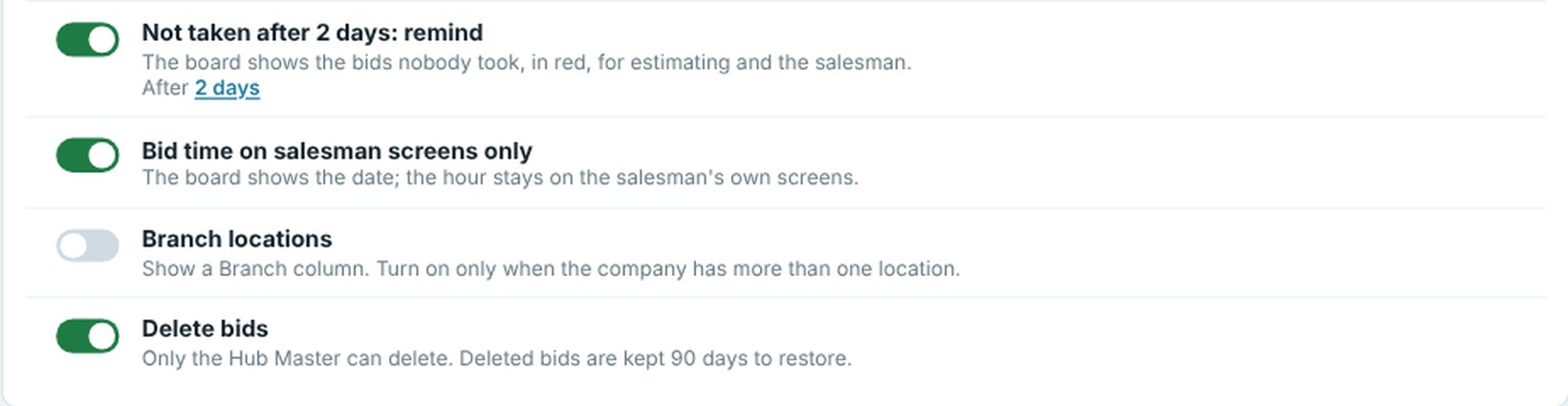
Not taken after 2 days: remind. Bids nobody took show in red for the estimators and the salesman. Click 2 days to change it.
Bid time on salesman screens only keeps the board to the date. Turn on Branch locations only with more than one location. Delete bids: only the Hub Master can delete, and deleted bids are kept 90 days.
4Edit the scope and spec sections

Scope · spec sections is the company list every bid picks from: 03 35 50 Polished concrete, 09 30 00 Tiling, 09 65 00 Resilient, 09 68 00 Carpeting and more, plus Moisture mitigation and Floor prep / leveling.
Click + Add a section for your own, or the × to remove one. A section added on a bid is saved here for the whole company.
5Read the statuses on the board

Statuses on the board lists every status a bid can have: New, Prep, Taking Off, Sent, Costing, Revision, Standby, Completed, No Bid, On Hold and Cancelled.
Sent means outsourced to an estimating company. Cancelled bids stay on the board, crossed out in grey.
Keep the reminder at 2 days in the busy season. A bid nobody took for two days is usually one nobody will take without a nudge.
6What can go wrong, and how to fix it

A salesman cannot save a bid. The same GC already has a quote for that project. Open the first bid, or ask the Hub Master.
Nobody can delete a bid. Only the Hub Master can. Restore a deleted one from the Deleted filter within 90 days.
Estimating companies on the right are covered in the next guide.
Worked example: the Demo Flooring Company board rules
What Dana turned on:
| Rule | Setting | Why |
|---|---|---|
| Same GC, same job | Block | No two prices to one GC |
| Same job, different GC | Alert | Bid it to every GC, but know it |
| Not taken | Remind after 2 days | No bid sits |
| Branch locations | Off | One location |
| Delete bids | Hub Master only, kept 90 days | Nothing lost by mistake |
Five switches, set once for every user.
What to do next
Next, add an outside takeoff company in Add an estimating company. Or see all the step-by-step guides.
One set of rules for every bid
Download CFE BidWise and set up your Job Bid Board. The Job Bid Board comes with every CFE BidWise plan. Start with the 30-day free trial, no credit card.
Frequently Asked Questions
Who can change the board rules?
Only the Hub Master.
Do the rules apply to BidWise Sales?
Yes. To every BidWise and BidWise Sales user in the company.
How long are deleted bids kept?
90 days.

Written by
Cristian Valcu – Founder & CEO, Commercial Flooring Estimating LLC
Cristian has estimated commercial flooring for over 20 years and built CFE BidWise around the way flooring contractors actually price, propose and track their bids.
Last updated: