
CFE guide · BidWise Job Board
Profit Margin or Mark-Up: Who Sets the Profit % for Your Salesmen
Solo, the salesman picks Profit margin or Profit mark-up in Settings › How I use it. Margin is profit ÷ selling price; mark-up is profit ÷ cost. Once linked, BidWise Sales follows the setting the Hub Master picks in CFE BidWise (Settings › Profit mode), so every % on bids, change orders and closed jobs means the same thing, and commission is figured with the right formula.


Why it matters
A salesman says they bid a job at 20%. The estimator hears 20% mark-up, the owner hears 20% margin. On a $100,000 job that is a $3,333 difference in profit, and in commission figured from it.
BidWise uses one setting for the whole company, so a % on a bid, a change order or a closed job means the same thing to everyone.
The 5 steps
- Margin or mark-upThe two formulas.
- Solo: pick itSettings › How I use it.
- Linked: the company sets itSettings › Profit mode.
- In the Estimate QuoteThe Mark-up / Margin toggle.
- What can go wrongCommission looks off.
1Know the two ways to figure profit


Profit margin is profit ÷ selling price. A $100,000 job at 20% margin makes $20,000 profit.
Profit mark-up is profit ÷ cost. The same $100,000 at 20% mark-up makes $16,667: $83,333 of cost times 20%. Same job, same 20%, a different number.
2Solo: the salesman picks it

Solo, with no company link, the salesman picks it in Settings › How I use it, under My profit % is.
Every bid then says which one it uses: Profit % job bid at (margin) 23, You picked MARGIN. Change orders and the closing % use the same setting.
3Linked: the company sets it for everyone

Once BidWise Sales is linked, the choice is no longer the salesman’s. It reads Profit MARGIN, set by Demo Flooring Company. It follows the setting the Hub Master picks in CFE BidWise, under Settings › Profit mode.
If the Hub Master changes it, every linked BidWise Sales follows the new setting. The salesman agreed to this in point 4 of the linking disclaimer.
4See it in the Estimate Quote
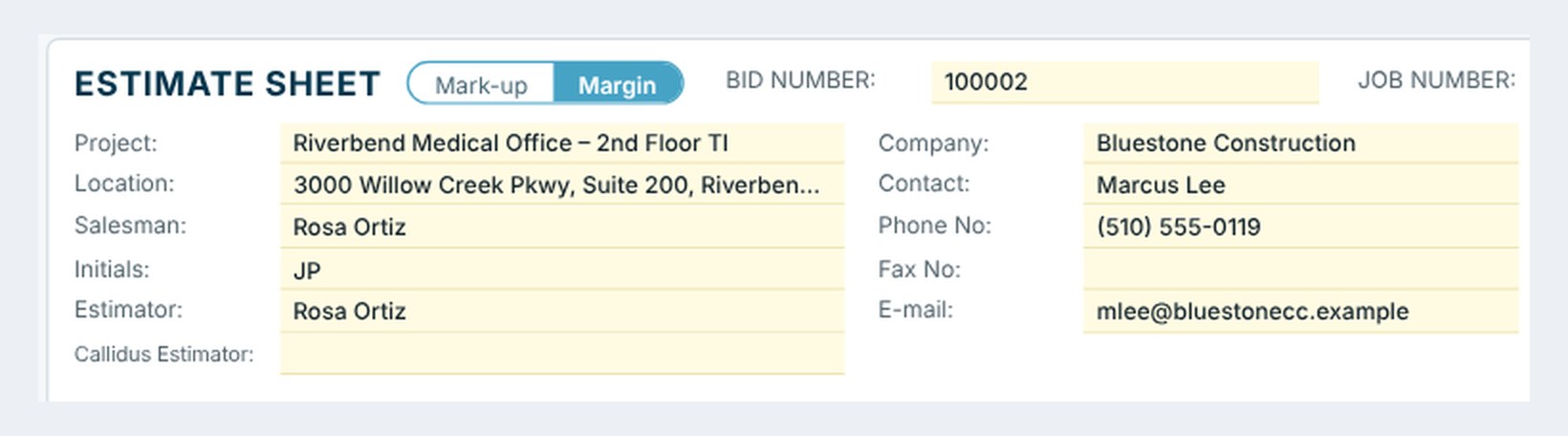

In the Estimate Quote, the toggle at the top of the estimate sheet shows Mark-up or Margin, here Margin. The status bar reads Mode: MARGIN.
The recap shows Profit % 24.33% and Total Profit $15,215.12 on a proposal price of $69,498.16. On margin, that is profit ÷ price.
Pick the mode your owner already uses to talk about jobs, and set it before the salesmen link. Changing it later changes what every old % means.
5What can go wrong, and how to fix it

The salesman cannot change it. Their BidWise Sales is linked. Only the Hub Master can, in CFE BidWise › Settings › Profit mode.
Commission changed after the link. They were using mark-up and the company uses margin, or the other way around. The same % now means something else; check the profit % on their bids.
Two estimators disagree on a job’s profit. Look at the toggle on the estimate sheet. Both should read the same mode.
Worked example: one job, two answers
$100,000 selling price, 20%:
| Mode | Formula | Profit |
|---|---|---|
| Margin | Profit ÷ selling price | $20,000 |
| Mark-up | Profit ÷ cost ($83,333) | $16,667 |
| Difference | $3,333 |
One company setting, and everyone means the same $20,000.
What to do next
Next, open Estimate Quote for a salesman in Give a salesman a BidWise seat. Or see all the step-by-step guides.
One % for the whole company
Download CFE BidWise and set your profit mode once. The Job Bid Board comes with every CFE BidWise plan. Start with the 30-day free trial, no credit card.
Frequently Asked Questions
What is the difference between margin and mark-up?
Margin is profit ÷ selling price. Mark-up is profit ÷ cost.
Can a linked salesman pick their own?
No. Linked, BidWise Sales follows the company setting.
Where does the Hub Master set it?
In CFE BidWise, Settings › Profit mode.

Written by
Cristian Valcu – Founder & CEO, Commercial Flooring Estimating LLC
Cristian has estimated commercial flooring for over 20 years and built CFE BidWise around the way flooring contractors actually price, propose and track their bids.
Last updated: