
CFE guide · BidWise Sales
BidWise Sales Commission Setup: Five Commission Systems Side by Side, and Your Draw
Click Commission, then Commission setup. Click the bubble for the system your company pays: Tier Incentive, Point for Point, % of Job Sub Total, % of gross profit or Shop cut with split remainder. Type your percentages in the orange cells. The bottom row shows what each system would pay on this year’s won jobs. Tick My company pays me a commission draw to track it.


Why it matters
Commission plans in flooring are rarely simple. Tier points on profit, a cut for the shop first, a draw against what you earn: most salesmen cannot check their pay stub, and most owners cannot explain it in one sentence.
BidWise Sales figures your commission on every won job with your company’s system, and shows what the other systems would pay, side by side. It is private: only you see this tab.
The 6 steps
- Open My commissionCommission › My commission.
- Pick your systemClick the bubble.
- Type your numbersThe orange cells.
- Tier pointsProfit at close.
- Your drawDraw per month.
- What can go wrongZero commission, wrong total.
1Open My commission
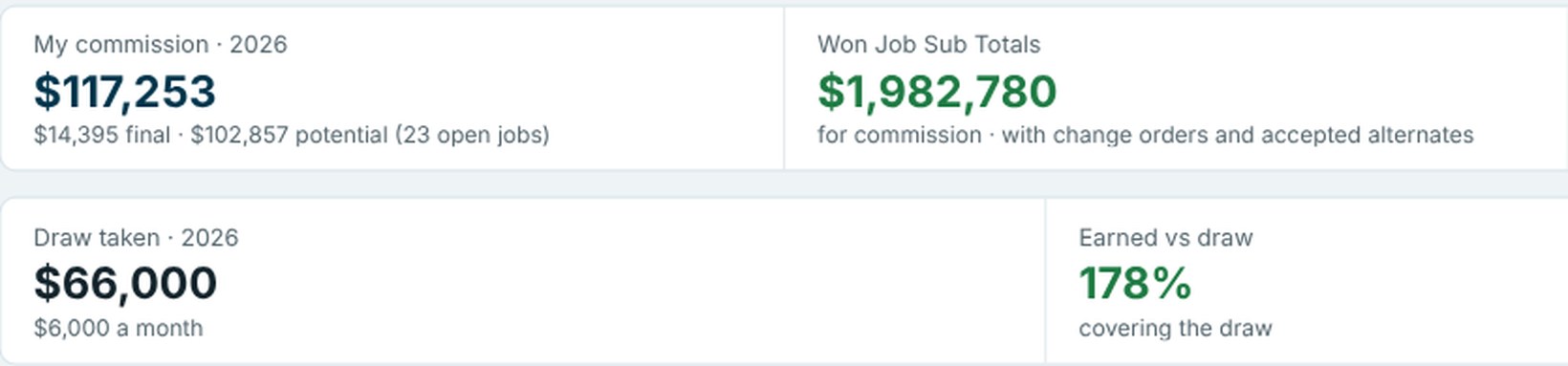

Click Commission on the ribbon. My commission is private: it never shows on the Dashboard, so a screen left open shows no pay.
The tiles read $117,253 for 2026, $14,395 final and $102,857 still potential on 23 open jobs. It comes from $1,982,780 of won Job Sub Totals and $403,037 gross profit. My system is Tier Incentive.
2Pick the system your company pays

Click Commission setup. The table has five columns, one per system. Click the bubble on System used by my company. Here it is Tier Incentive.
How it works says each in one line: Tier Incentive is gross profit × profit % × tier points. Point for Point is gross profit × profit %, 1 to 1. The other three are a fixed % of the Job Sub Total, a fixed % of gross profit, or a shop cut first with the rest split.
3Type your percentages in the orange cells
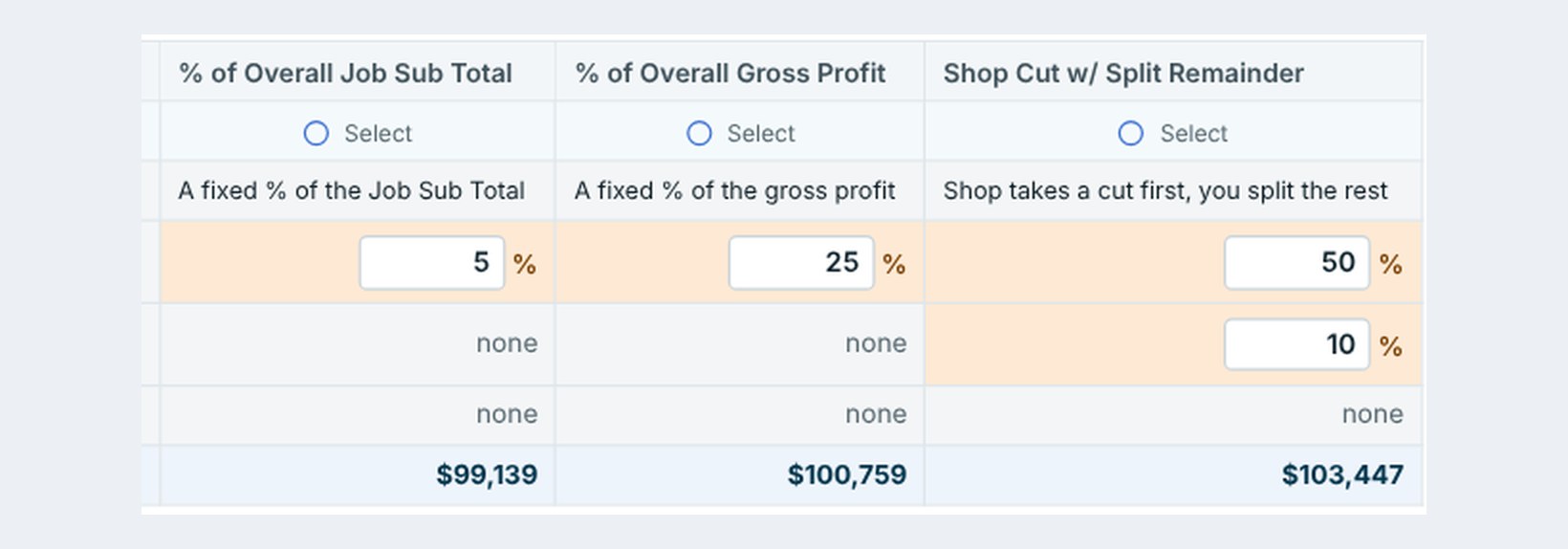
The orange cells are yours to change, and it saves as you type. % of overall Job Sub Total is set to 5%. % of overall gross profit is 25%.
Shop Cut w/ Split Remainder takes a 10% shop cut first, and you get 50% of the rest. Type what your company agreed to when you were hired.
4Set the tier points
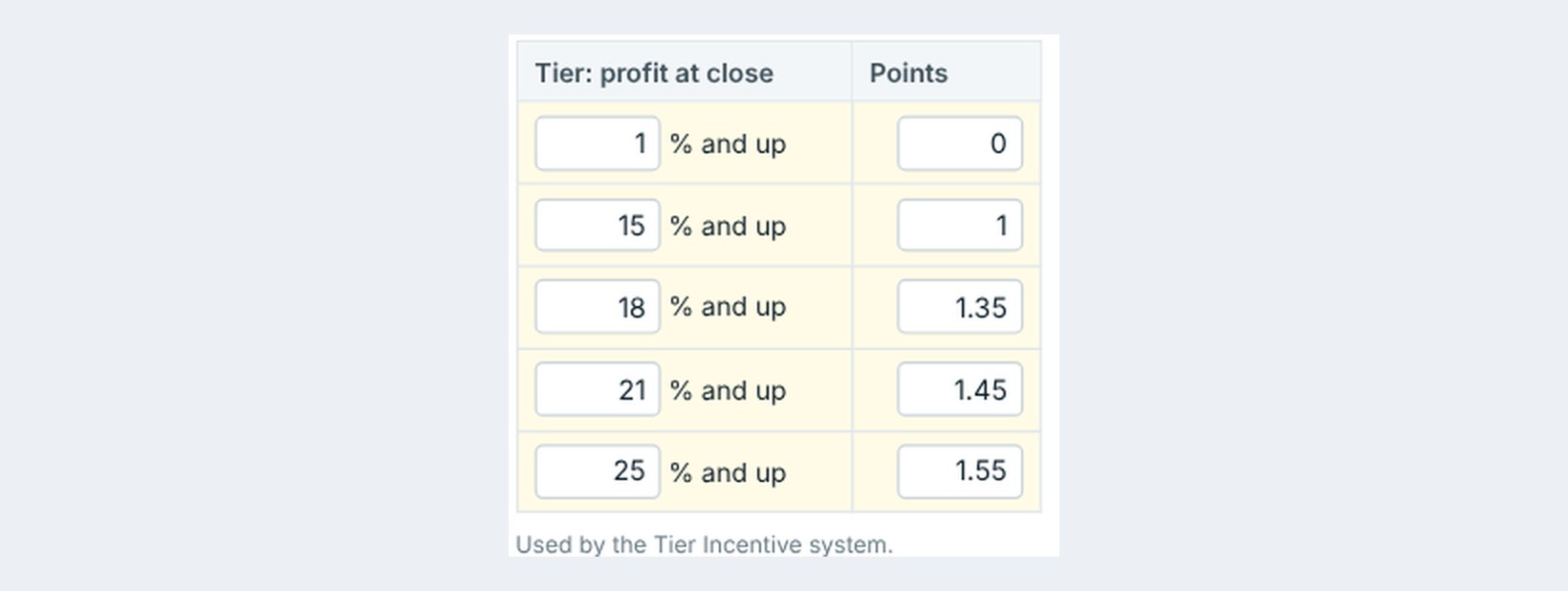
For Tier Incentive, the table on the right sets the points by profit at close. Under 15% pays 0 points. 15% and up pays 1, 18% pays 1.35, 21% pays 1.45 and 25% and up pays 1.55.
So a job closed at 22% pays 1.45 times the gross profit × profit %. Selling at a better margin pays you more.
Check the bottom row, Potential commission. On these jobs Tier Incentive pays $117,253 and Point for Point $83,828. That gap is what the tiers are worth to you.
5Track your commission draw


The note under the table explains the math: commission is figured on the Job Sub Total, before tax, bond, burden and contingency, plus change orders and accepted alternates, with the profit % you typed on each won bid.
Tick My company pays me a commission draw, type $6,000 a month and the start, January 2026. The tiles show draw taken $66,000, earned vs draw 178%, and $51,253 earned above the draw.
6What can go wrong, and how to fix it
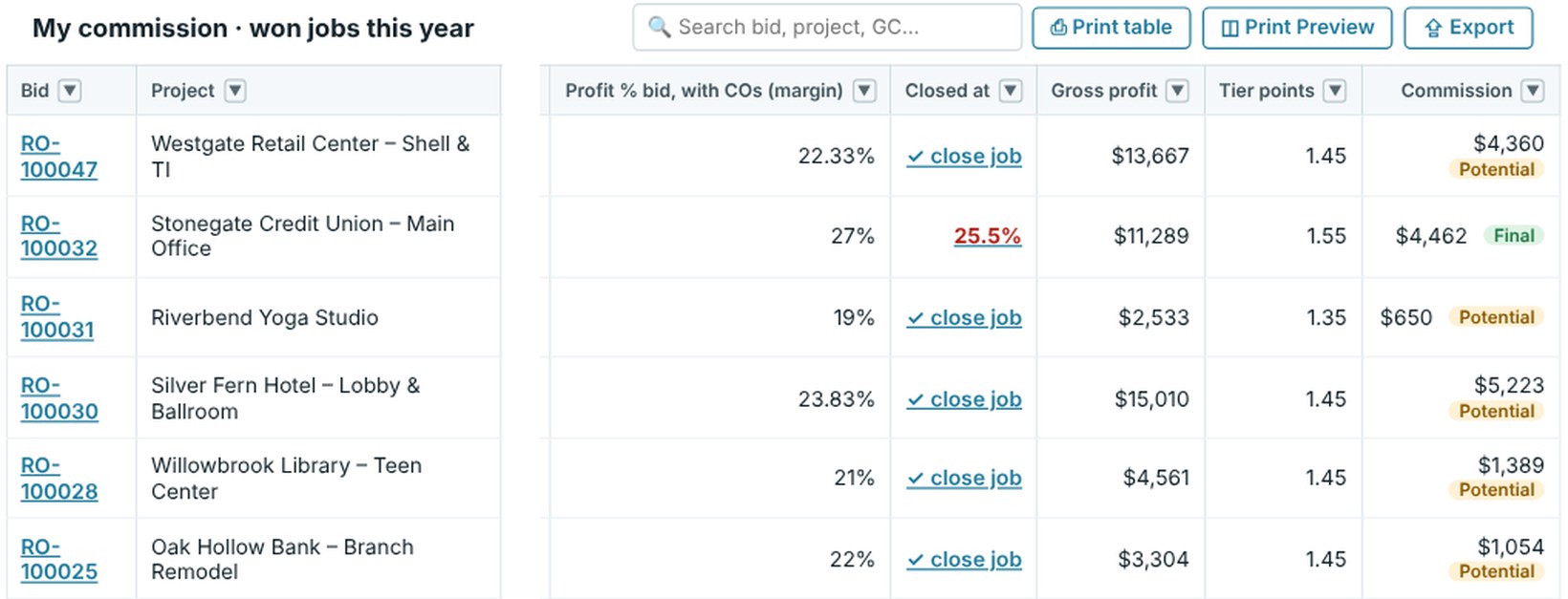
A won job pays $0. Its profit % is under 15%, so the tier pays 0 points. Check the profit % on the bid.
Commission is still Potential. The job is not closed. Click close job on its line and type the profit % it closed at; the commission turns Final.
The numbers do not match your pay stub. Check the system bubble and the orange cells against your agreement with the company.
Worked example: what each system pays Rosa on this year’s jobs
Same won jobs, five systems:
| System | Setting | Potential commission |
|---|---|---|
| Tier Incentive (Rosa’s) | Tier points by profit at close | $117,253 |
| Point for Point | 1 to 1 | $83,828 |
| % of Job Sub Total | 5% | $99,139 |
| % of gross profit | 25% | $100,759 |
| Shop cut, split remainder | 10% shop, 50% split | $103,447 |
Rosa’s draw is $6,000 a month. She has earned $51,253 above it this year.
What to do next
Next, start the company side with Start the Job Bid Board: your first job. Or see all the step-by-step guides.
Know what every job pays you
BidWise Sales is free for salesmen. Download it and check your commission today. It works offline, your numbers stay on your PC, and it links to CFE BidWise when your company has it.
Frequently Asked Questions
Who can see my commission?
Only you in BidWise Sales. In your company’s BidWise, only Accounting, the office manager and the Hub Master see it.
What is the Job Sub Total?
The bid before tax, bond, burden and contingency. Commission is figured on it, never on the total bid price.
When is commission final?
When you close the job and type the profit % it closed at.

Written by
Cristian Valcu – Founder & CEO, Commercial Flooring Estimating LLC
Cristian has estimated commercial flooring for over 20 years and built CFE BidWise around the way flooring contractors actually price, propose and track their bids.
Last updated: