
Price Check: a Price Database Built From Your Own Jobs
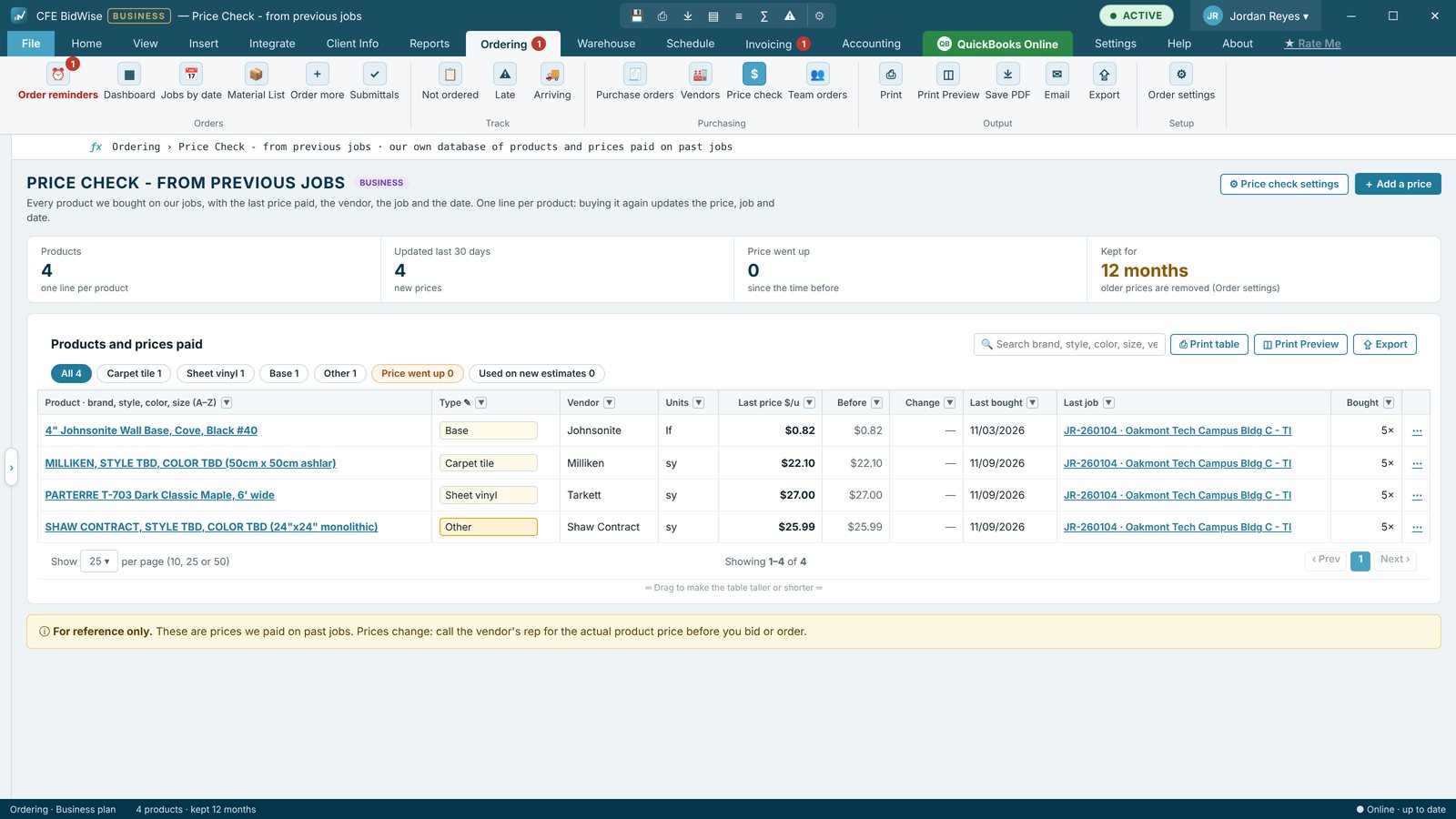
Price Check is a database of every flooring product your company has bought, built by itself from your past jobs. Each product gets one line with the last price you paid, the vendor, the job and the date, and the change from the time before, with its full price history. Use this price on new estimates, and the next bid with that product starts from what you really paid.
| Where prices come from | Actual $/u on Material Lists, purchase orders and prices added by hand |
|---|---|
| One line per | Product name and unit |
| Shown | Last price, vendor, job, date, change from last time, history |
| Kept for | 3 to 24 months, or all |
| On new estimates | Use this price fills Mat'l $/u for that product |
| Plans | Personal and Business; Business adds price-went-up alerts and who sees it |
Why your own prices beat a price list
Flooring prices move. Manufacturers raise prices mid-year, freight changes, and the same carpet tile costs differently from two distributors. A price list from last spring, or a number remembered from the last job, quietly pushes a bid too high to win or too low to make money.
The most reliable number you have is what you actually paid, recently, for that exact product. Price Check keeps that number for every product, without anyone maintaining a spreadsheet.
How the database builds itself
Every time your company buys flooring, CFE BidWise already knows the product, the unit, the vendor, the job and the price, from the actual $/u on the job's Material List and from the purchase orders you send. Price Check turns those into one line per product:
- Names are cleaned up: the finish tag (CPT-1, LVT-2) and the area after the dash are dropped, so the line starts with the brand, style, color and size.
- Buying the same product again updates the last price, vendor, job and date, and moves the old price into its history with the change up or down in percent.
- Each product gets a Type (carpet tile, LVT / LVP, sheet vinyl, VCT, rubber, base, adhesive, prep, and so on) that you can change, or type a new type.
- Add a price by hand for a quote you received, fix a name, or remove a line; a removed product comes back only when you buy it again.
Compare and bid
Search by material, job or vendor, filter by type and open any product's price history to see what it cost on every job. Press Use this price on new estimates and the next estimate line with that product starts from what you paid, ready for your Material GP. The Vendors dashboard also compares what you paid per unit against what you estimated.
Your settings
Order settings › Price check database decides how long prices are kept (3 to 24 months, or all), which sources count, whether prep and adhesive lines are included and, on Business, who on the team sees it. A note reminds everyone that prices are for reference: call the vendor's rep for today's price before you bid or order.
Price went up (Business)
On CFE BidWise Business, a Price went up chip and tile, and alerts on the Ordering dashboard, flag products that cost more than the time before, so you catch an increase before it eats the margin on the next bid.
Use Price Check on a new estimate
- Open Ordering › Price check.
- Search for the product or filter by type, and open its price history.
- Press Use this price on new estimates.
- Type the product on a new estimate line: Mat'l $/u starts from what you paid.
- Builds itself from Material Lists and purchase orders
- One line per product with last price, vendor, job and date
- Change from last time and full price history
- Use this price on new estimates
- Keep 3 to 24 months, or all
- Price went up alerts on Business
Price Check with price history and Use this price on new estimates.
Adds Price went up alerts on the Ordering dashboard and who on the team sees prices.
Compare every feature, Personal vs Business
Try CFE BidWise free for 30 days
Every feature unlocked, with a switch to try it as Personal or Business. No credit card. After the trial, the Estimate Quote and Dashboard keep working for free, or pick Personal ($69.99 a month) or Business ($129.99 a month per user).
Frequently Asked Questions
Where do Price Check prices come from?
From the actual price per unit on your jobs' Material Lists and from your purchase orders, plus any price you add by hand.
Does it change my old bids?
No. Use this price on new estimates only fills new estimate lines with that product.
How long are prices kept?
You choose in Order settings: 3 to 24 months, or all.
Is Price Check on the Personal plan?
Yes. Business adds price-went-up alerts and the choice of who sees prices.
CFE BidWise is made by Commercial Flooring Estimating LLC, built by a flooring professional with over 20 years in the business. Last updated: