
CFE guide · Tracking and reports
Project Phases: Board, Settings and Bill Ahead
Project phases shows every Won job as a card in its phase column, from Contract to Closed. BidWise works out the phase from submittals, ordering, the warehouse, the schedule, the crew phones and invoicing. Click a card for Where are we?. Drag a card on to move it, and when moving to Billing early, pick Bill ahead of the work. Phase settings sets the phases, their names and when a job counts as stuck.


Why a phases board?
A job that sits in Submittals for three weeks, or in Punch list with nobody signing off, does not ring any alarm. It just costs money and makes the GC wait.
The board shows every job in its phase, with red days when it has been there too long, so nothing sits quietly.
The five steps
- Open the boardProject phases, a column per phase.
- Where are we?Every step for one job.
- Move a job, bill aheadDrag the card on.
- Phase settingsNames, stuck days, the strip.
- Print, and what can go wrongPrint the board; fix a wrong phase.
1Open the Project phases board
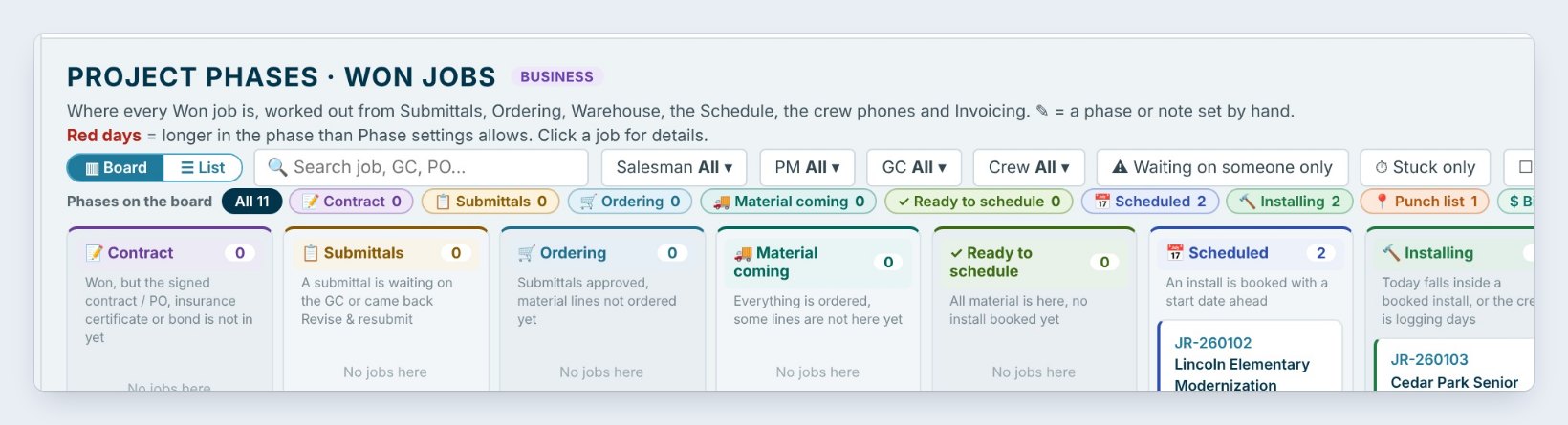
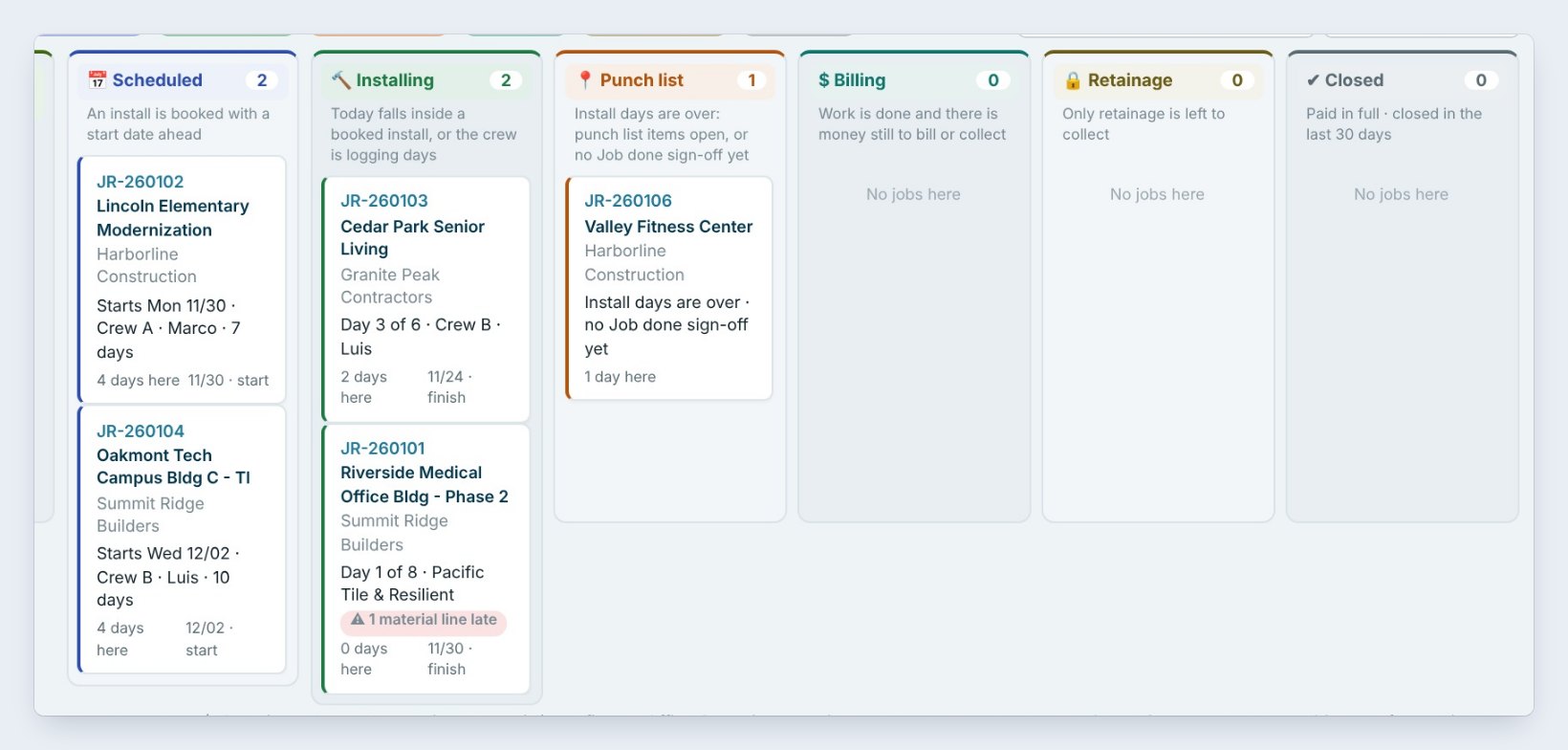
Click Project phases on the Home ribbon. Each column is a phase, with a line saying when a job is put there, and each card is a job: Lincoln Elementary is Scheduled, starting Mon 11/30 with Crew A for 7 days; Cedar Park Senior Living is Installing, day 3 of 6.
Filter by salesman, PM, GC or crew, or click Waiting on someone only or Stuck only. Red days mean longer in the phase than Phase settings allows.
2Click a card: Where are we?
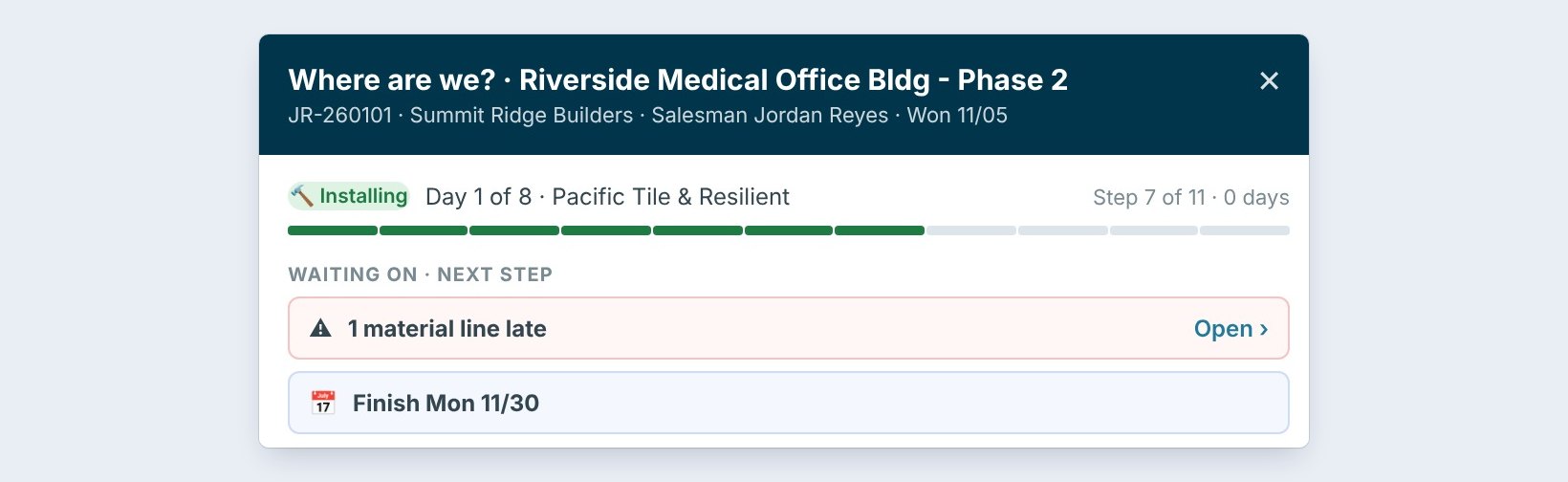
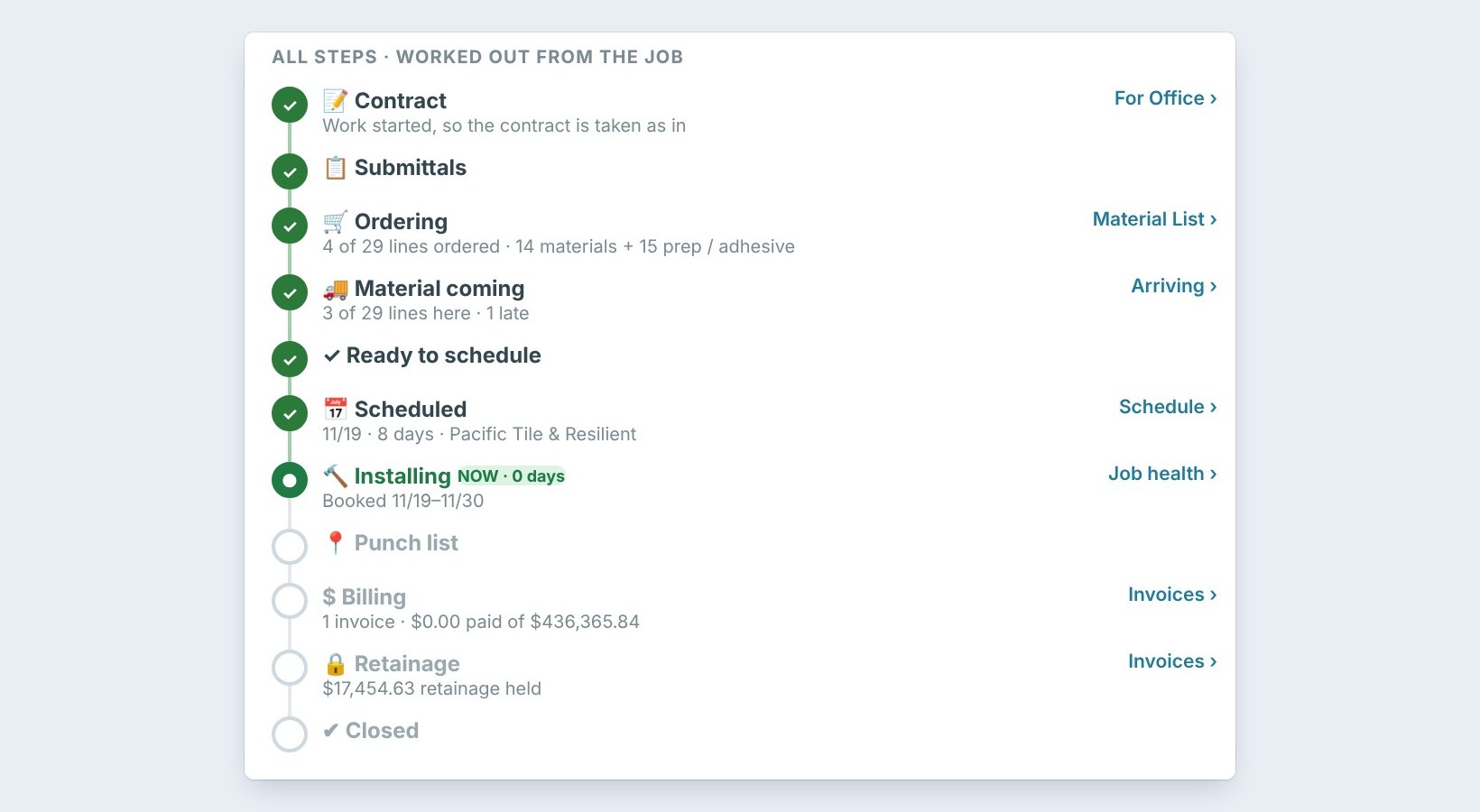
Click Riverside Medical Office Bldg, Phase 2. Where are we? shows Installing, day 1 of 8, step 7 of 11, and Waiting on: 1 material line late, finish Mon 11/30.
Every step is listed with a link to the screen behind it: Contract, Submittals, Ordering with 4 of 29 lines ordered, Material coming, Scheduled, Installing, then Punch list, Billing, Retainage and Closed. At the bottom: Open the Schedule, Set phase by hand and Email the GC an update.
3Move a job on, and bill ahead of the work
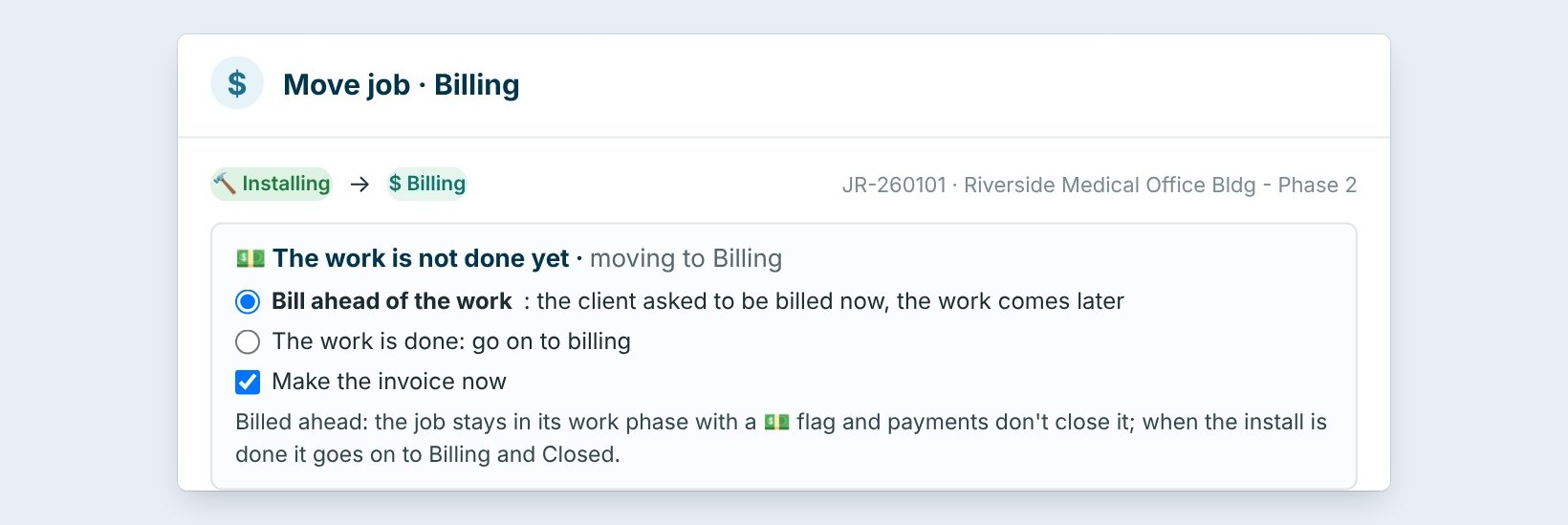
Drag a card to the next column, and a window asks what was done, and fills the Office Checklist. Here Riverside Medical goes from Installing to $ Billing, but the work is not done yet.
Pick Bill ahead of the work: the GC asked to be billed now, and the work comes later. The job stays in its work phase with a flag, and payments do not close it. Tick Make the invoice now, type a note, and click Move to Billing.
Use Bill ahead for stored material and owner-requested early billing only. The job stays in Installing, so Job Check still watches the crew and the punch list.
4Set the phases for the company
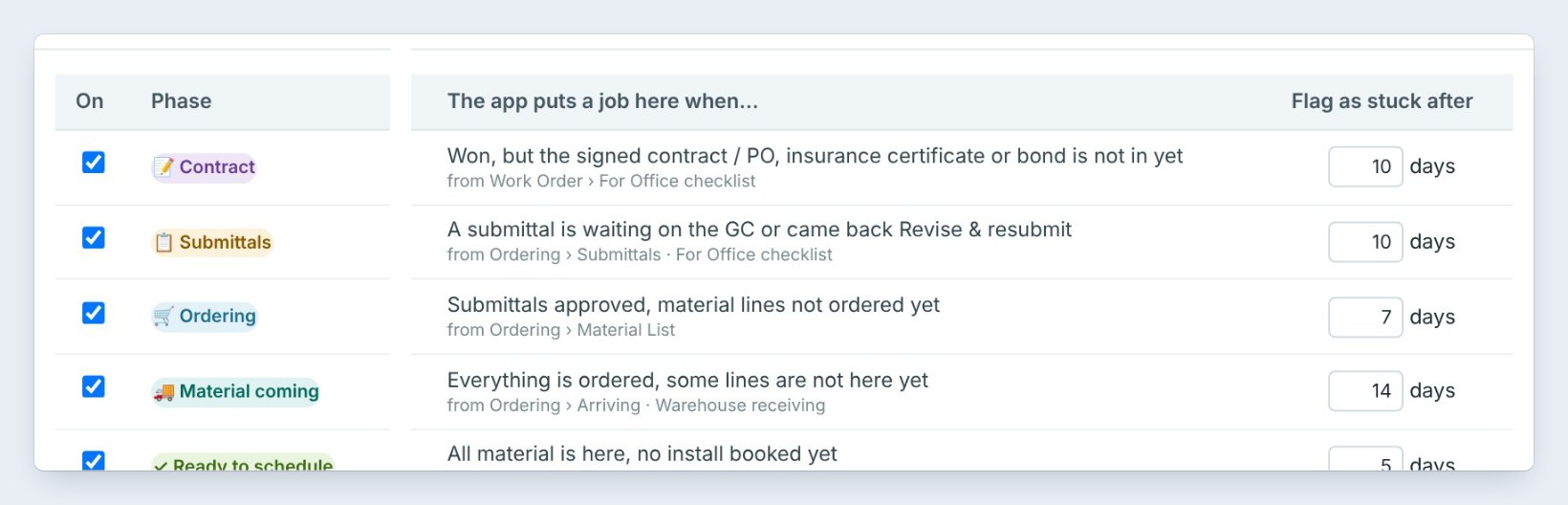
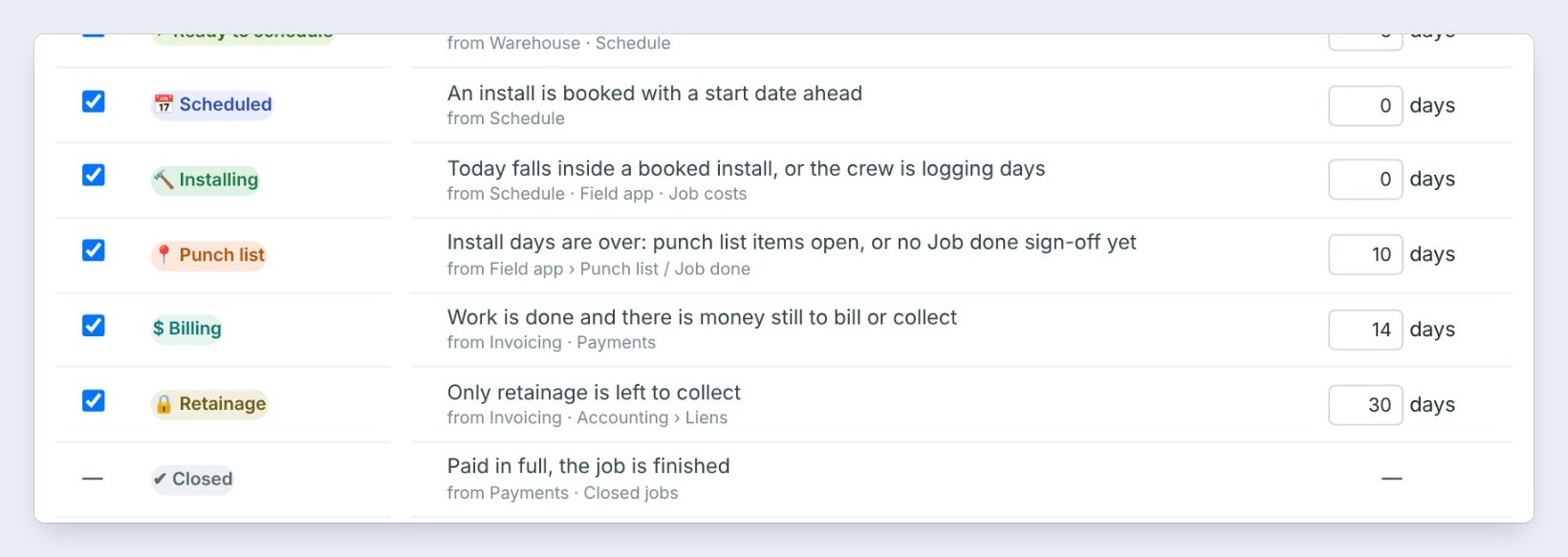
Click Phase settings. Each phase can be turned off, renamed, and given Flag as stuck after days: Contract 10, Ordering 7, Material coming 14, Ready to schedule 5, Billing 14, Retainage 30.
When a job is stuck, remind the PM and the salesman on My day. Under Bid Tracker, show the Phase column and the Won jobs, where we are strip. Closed jobs leave the board after 30 days. Click Save.
5Print the board, and what can go wrong
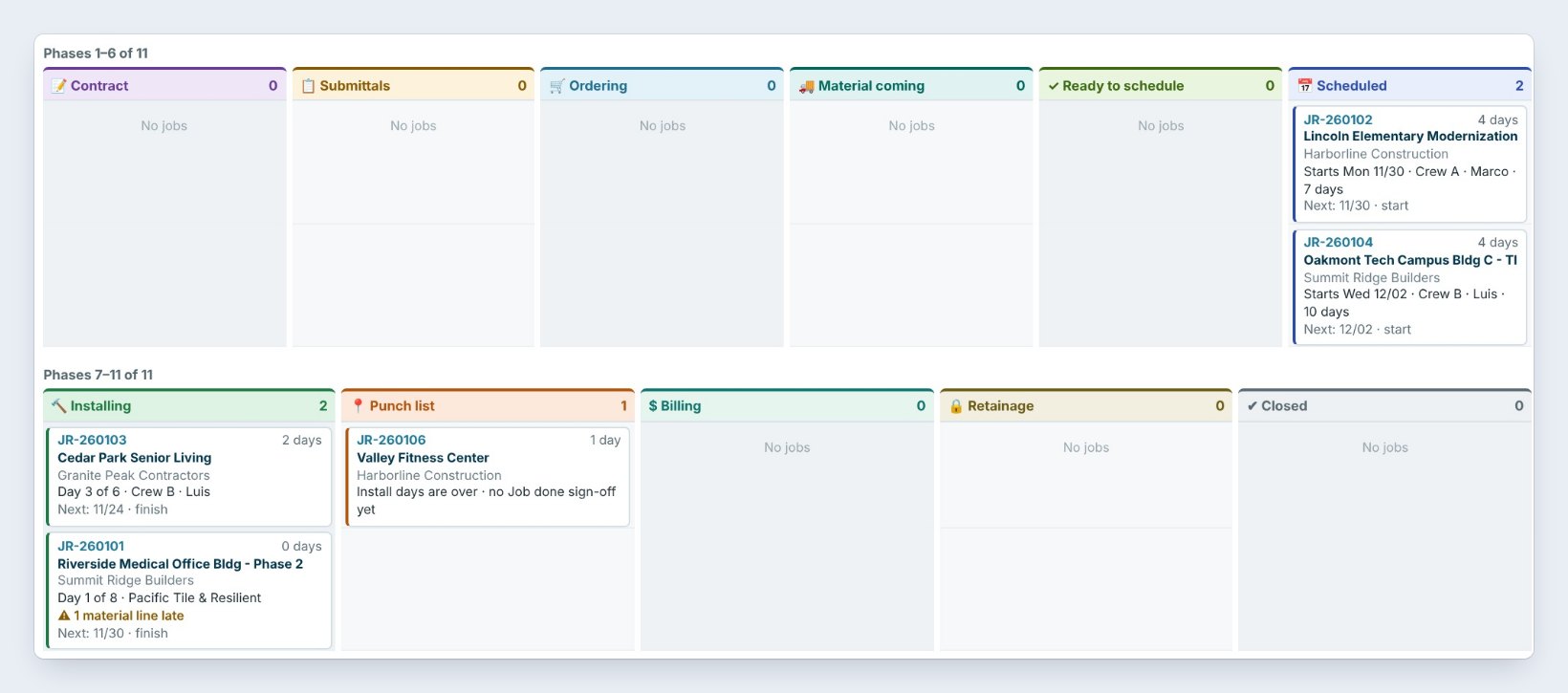
Click Print for the board as filtered, a column per phase, or TV board to show it on the shop screen.
A job is in the wrong phase. Open Where are we? and click Set phase by hand; it is held there until the app’s own steps catch up. A job looks stuck but is fine. Raise its phase’s stuck days in Phase settings, or type 0 for never stuck.
Worked example: the Monday board
Jordan walks the board on November 19:
| Job | Phase | What happens |
|---|---|---|
| Lincoln Elementary | Scheduled | Starts 11/30 with Crew A |
| Riverside Medical, Phase 2 | Installing, day 1 of 8 | 1 material line late, PM chases it |
| Riverside Medical, Phase 2 | Bill ahead | GC asked for billing now; invoice made |
| Valley Fitness Center | Punch list | No Job done sign-off; crew lead calls in |
One look at the board, and every job has a next step and an owner.
What to do next
Next: bill stored material on a progress invoice.
Keep every Won job moving
Project phases is part of CFE BidWise Business. Start with the 30-day free trial, no credit card.
Frequently Asked Questions
Do I have to move jobs by hand?
No. BidWise works out the phase from what it already has. Dragging a card or Set phase by hand is only for when you know more than the app.
What is Bill ahead of the work?
Billing a job before the work is done, when the GC asks for it. The job stays in its work phase with a flag, and payments do not close it.
What does stuck mean?
Longer in a phase than the days set in Phase settings. Stuck days show in red, and the PM and salesman are reminded on My day.

Written by
Cristian Valcu – Founder & CEO, Commercial Flooring Estimating LLC
Cristian has estimated commercial flooring for over 20 years and built CFE BidWise around the way flooring contractors actually price, propose and track their bids.
Last updated: