
CFE guide · BidWise Job Board
The Job Bid Board on the 40 Sample Jobs: Change Order and Alternate Dots
Open the Job Bid Board. All 40 sample jobs are there in BidWise Demo and in the Sales Demo. The dots after the quote number are the bid’s change orders and alternates: gray Draft, orange Submitted, green Accepted, red Denied. Hover a dot for its name, and click the dots to open the list under the bid.


Why it matters
A bid is rarely just one number. Alternates go out with it, and change orders follow once the job is won. Opening every bid to see where they stand takes all day.
The dots show it on the board itself, so the estimator and the salesman see at a glance which alternates were accepted and which change orders are still waiting.
The 4 steps
- Open the boardAll 40 sample jobs.
- Read the colorsGray, orange, green, red.
- Open the dotsThe list under the bid.
- Same dots in the Sales DemoThe salesman sees them too.
1Open the Job Bid Board
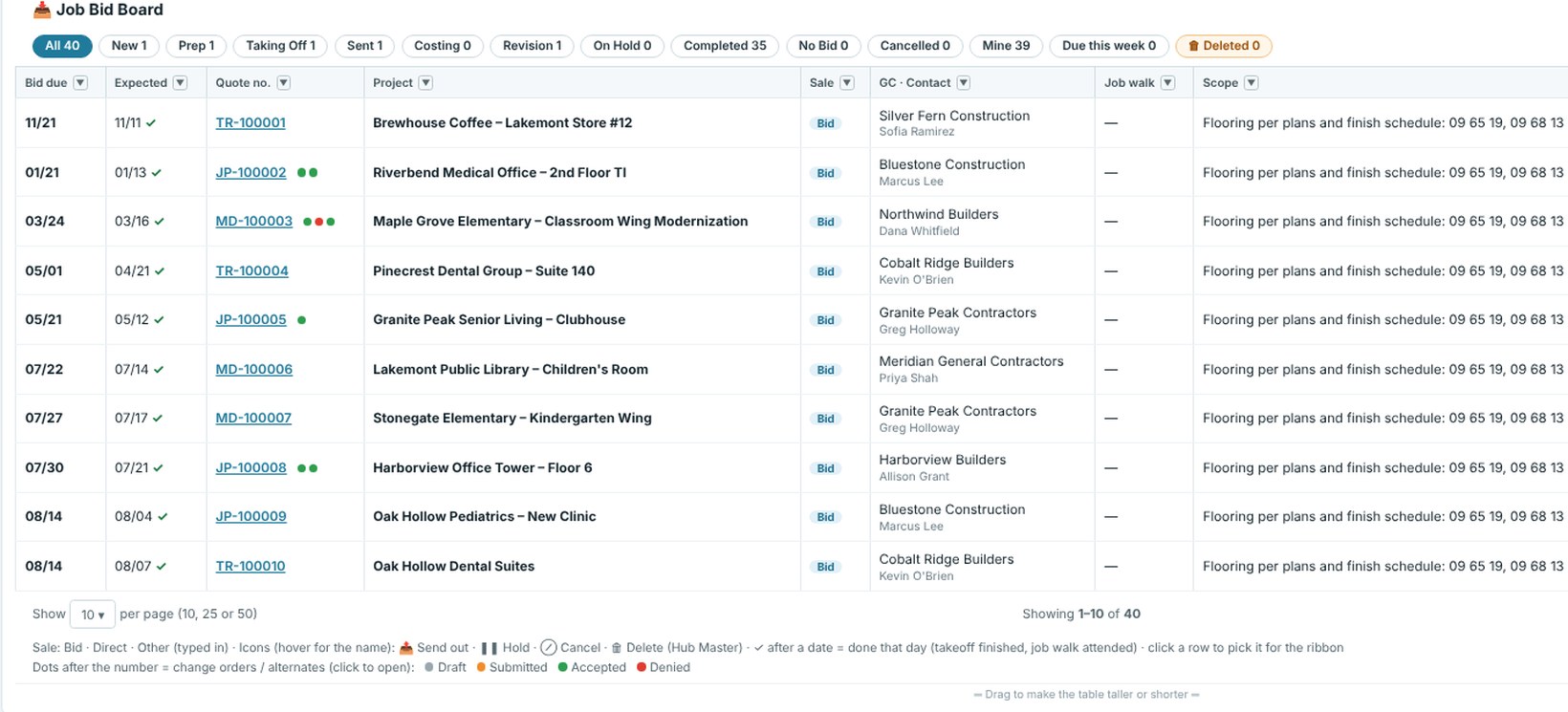
Click Job Bid Board on the Home ribbon. All 40 sample jobs are there: 1 New, 1 in Prep, 1 Taking Off, 1 Sent, 1 in Revision and 35 Completed.
After some quote numbers you see small dots, such as the three after MD-100003 Maple Grove Elementary.
2Read the dot colors


Each dot is one change order or alternate. Gray is Draft, orange is Submitted to the GC, green is Accepted and red is Denied. The legend is under the board.
Hover a dot for its name, here MD-100003-ALT-2, Alternate #2, Denied.
3Click the dots to open the list
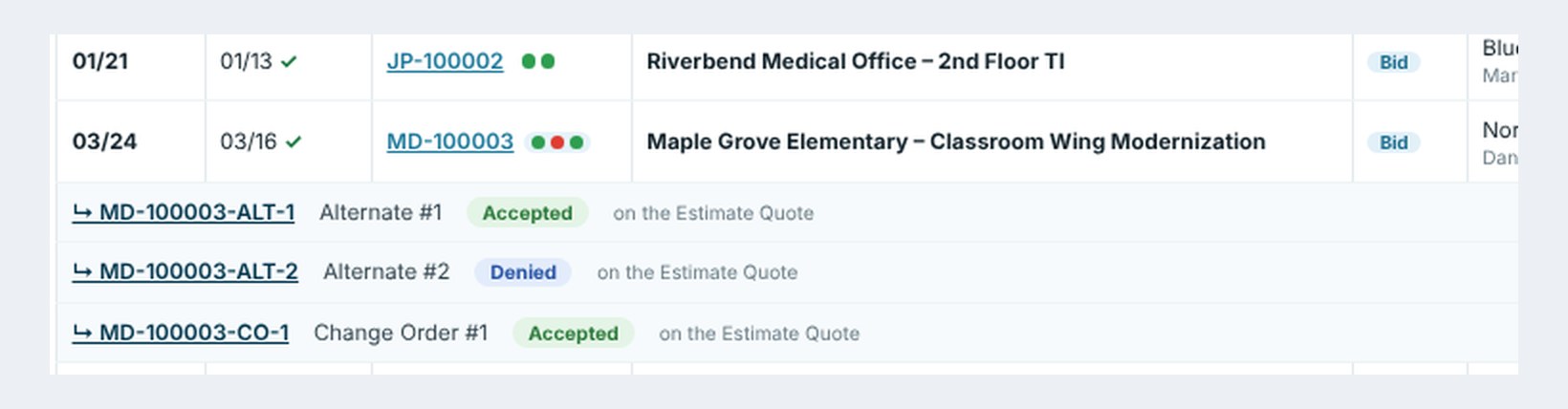
Click the dots. The list opens under the bid: Alternate #1 Accepted, Alternate #2 Denied and Change Order #1 Accepted, each on the Estimate Quote. Click the dots again to close it.
New Quote moves a bid’s change orders and alternates onto the Estimate Quote, so nothing is typed twice.
4See the same dots in the Sales Demo
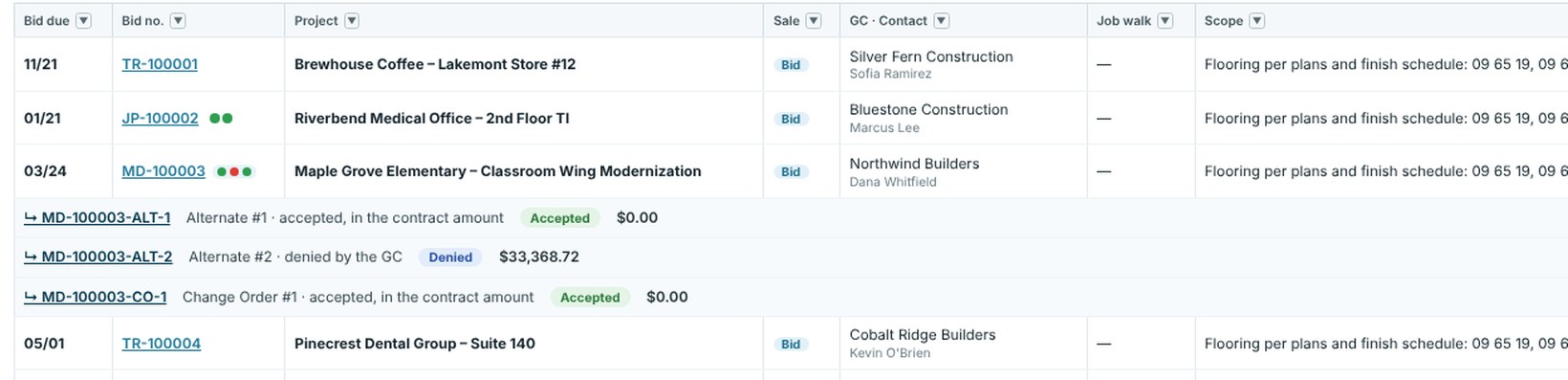
Open the blue BidWise Sales Demo and its Job Bid Board. The salesman sees the same dots on their own bids, with the Job Total of each bid.
In the Sales app a change order that is not accepted or denied yet reads Not accepted yet.
Worked example: Maple Grove Elementary
MD-100003, Classroom Wing Modernization:
| Dot | What | Status |
|---|---|---|
| Green | Alternate #1 | Accepted |
| Red | Alternate #2 | Denied |
| Green | Change Order #1 | Accepted |
Two count, one does not. The commission guide shows what that means for the salesman.
What to do next
Next, see which ones count toward commission in Commission on the sample jobs. Or see all the step-by-step guides.
See the dots yourself
Try it on 40 sample jobs in the BidWise Demo. The board comes with BidWise Personal and Business. The demo runs on its own sample data, so nothing touches your real jobs.
Frequently Asked Questions
Is the Job Bid Board free?
No. The Job Bid Board comes with CFE BidWise Personal and Business. The free BidWise Demo lets you try it on 40 sample jobs.
Are all 40 sample jobs on the board?
Yes, in BidWise Demo and in the BidWise Sales Demo.
What do the colors mean?
Gray Draft, orange Submitted, green Accepted, red Denied.
Does the board show prices?
Not in BidWise. In BidWise Sales the salesman sees the Job Total of their own bids.

Written by
Cristian Valcu – Founder & CEO, Commercial Flooring Estimating LLC
Cristian has estimated commercial flooring for over 20 years and built CFE BidWise around the way flooring contractors actually price, propose and track their bids.
Last updated: