
CFE guide · BidWise Job Board
Send a Takeoff Out to an Estimating Company and Get It Back
Pick the bid on the Job Bid Board and click Send out. Pick the estimating company, the Expected back date and what to send: bid invite, plans, addendums, specs. Tick Put it on their guest page and click Send out. The board shows Sent with the company’s short name. Their Received, Taking off and Takeoff complete come back to the board and the bid’s History.


Why it matters
An outsourced takeoff usually means an email with plans attached, and then silence. Did they get it? Are they on it? Will it be back before the bid date?
Sent from the board, the job shows who has it and when it is due back, and the estimating company tells you each step from its guest page. The salesman is told too.
The 6 steps
- Send outCompany and expected back.
- Their guest pageTick it, then Send out.
- Sent on the boardOutsourced, Summit.
- Their updatesIn the History.
- CompletedExpected date ticked.
- What can go wrongNo updates, wrong company.
1Click Send out and pick the company
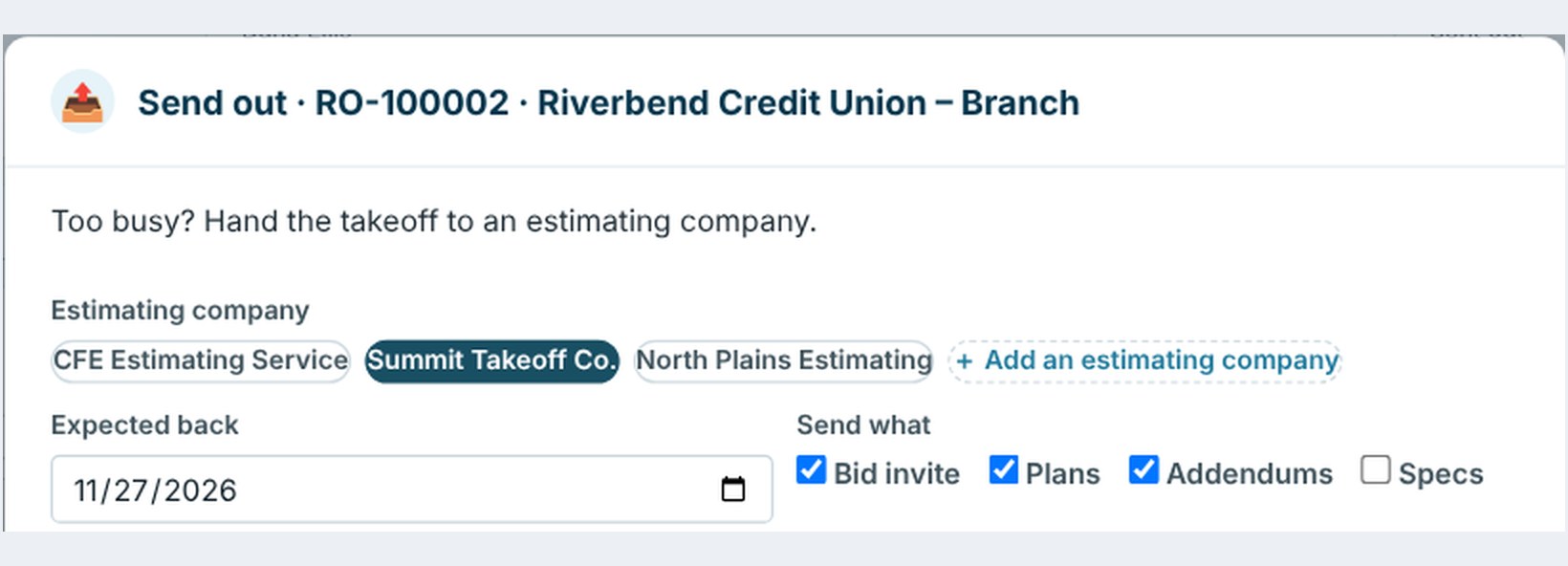
Click the bid on the board, here RO-100002 Riverbend Credit Union – Branch, and click Send out on the ribbon. Too busy? Hand the takeoff to an estimating company.
Pick the company, Summit Takeoff Co., and the Expected back date, 11/27/2026. Under Send what, tick Bid invite, Plans and Addendums.
2Put it on their guest page
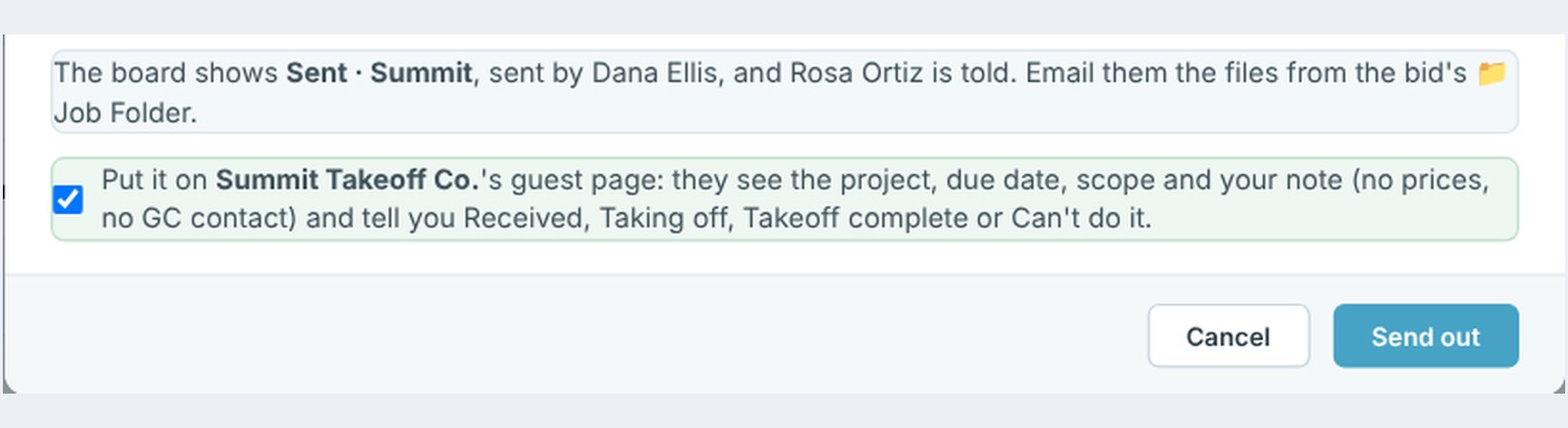
The window says what will happen: the board shows Sent · Summit, sent by Dana Ellis, and Rosa Ortiz, the salesman, is told. Email them the files from the bid’s Job Folder.
Tick Put it on Summit Takeoff Co.’s guest page. They see the project, due date, scope and your note, with no prices and no GC contact. Click Send out.
3See it Sent on the board
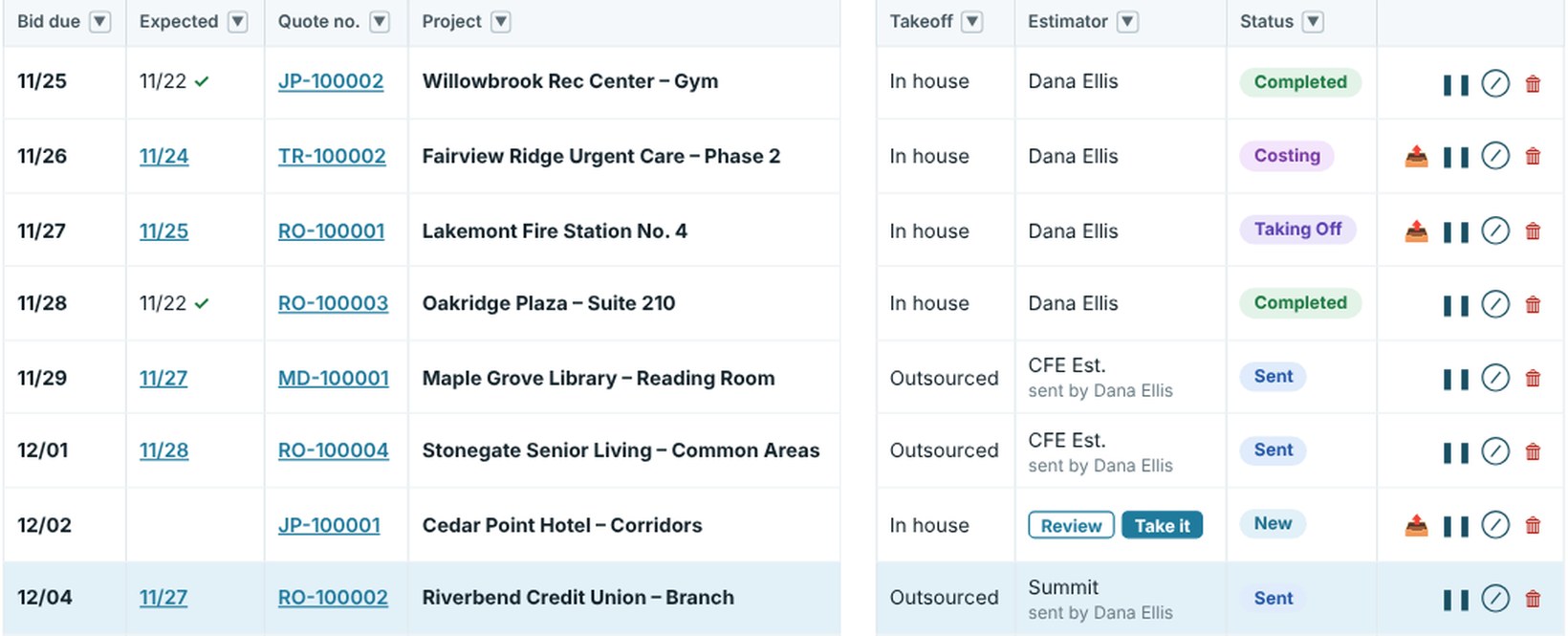
On the board, the line reads Expected 11/27, Takeoff Outsourced, Summit sent by Dana Ellis, and the status Sent.
The Sent out tile counts every outsourced job. Two others went to CFE Est. the same way.
4Watch their updates come back
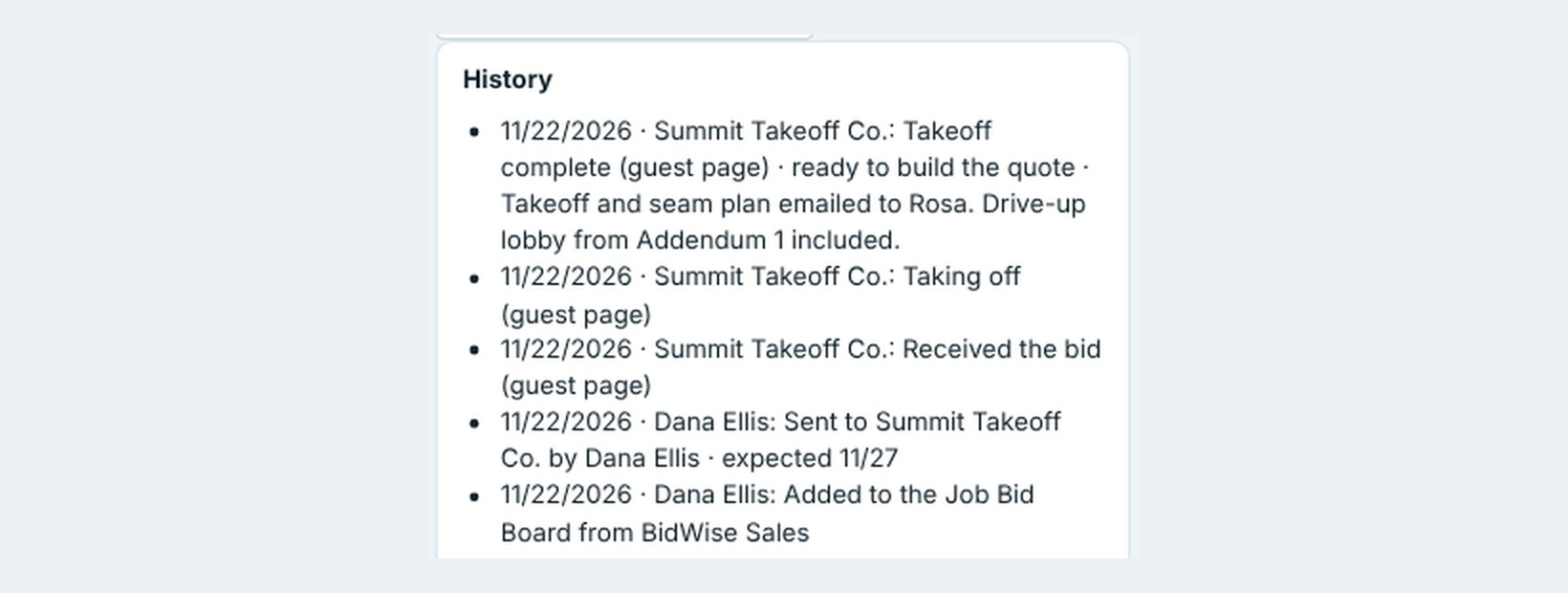
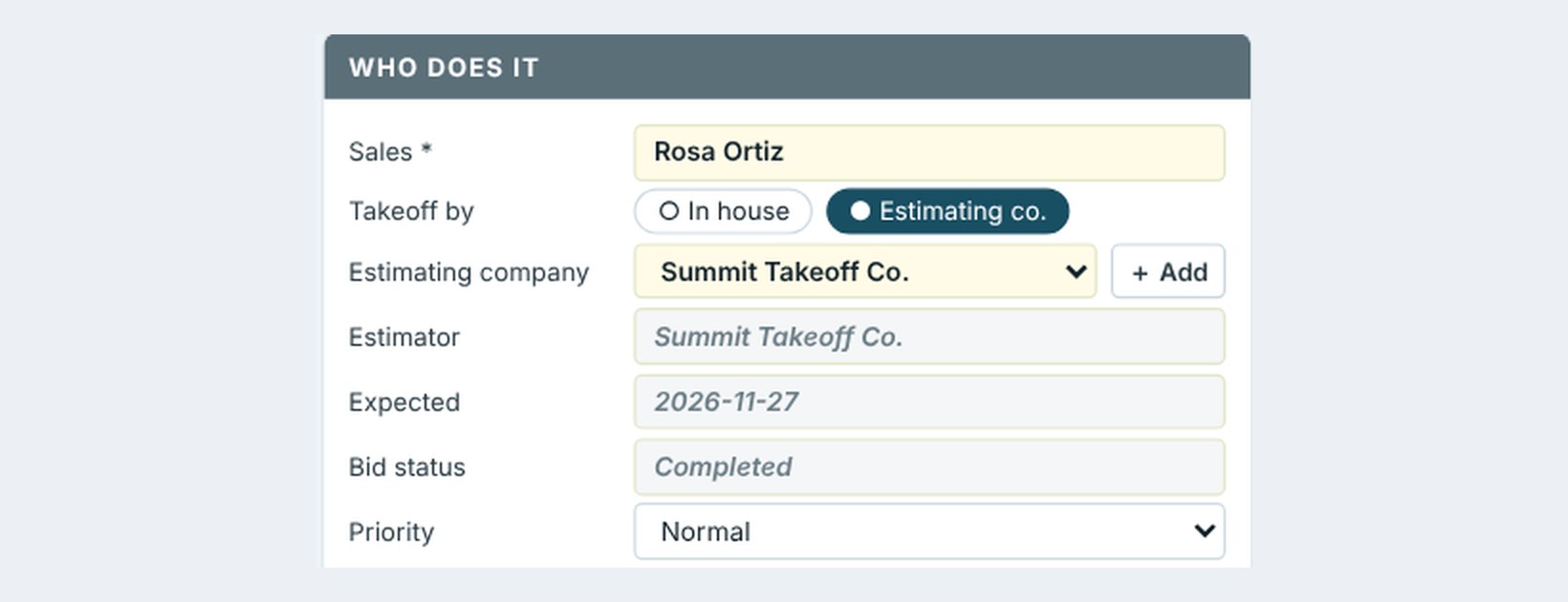
Open the bid. The History lists each step Summit pressed on its guest page: Received the bid, Taking off, then Takeoff complete, with their note: Takeoff and seam plan emailed to Rosa. Drive-up lobby from Addendum 1 included.
Who does it shows Takeoff by: Estimating co., Summit Takeoff Co., and the bid status Completed.
5See it Completed, and build the quote
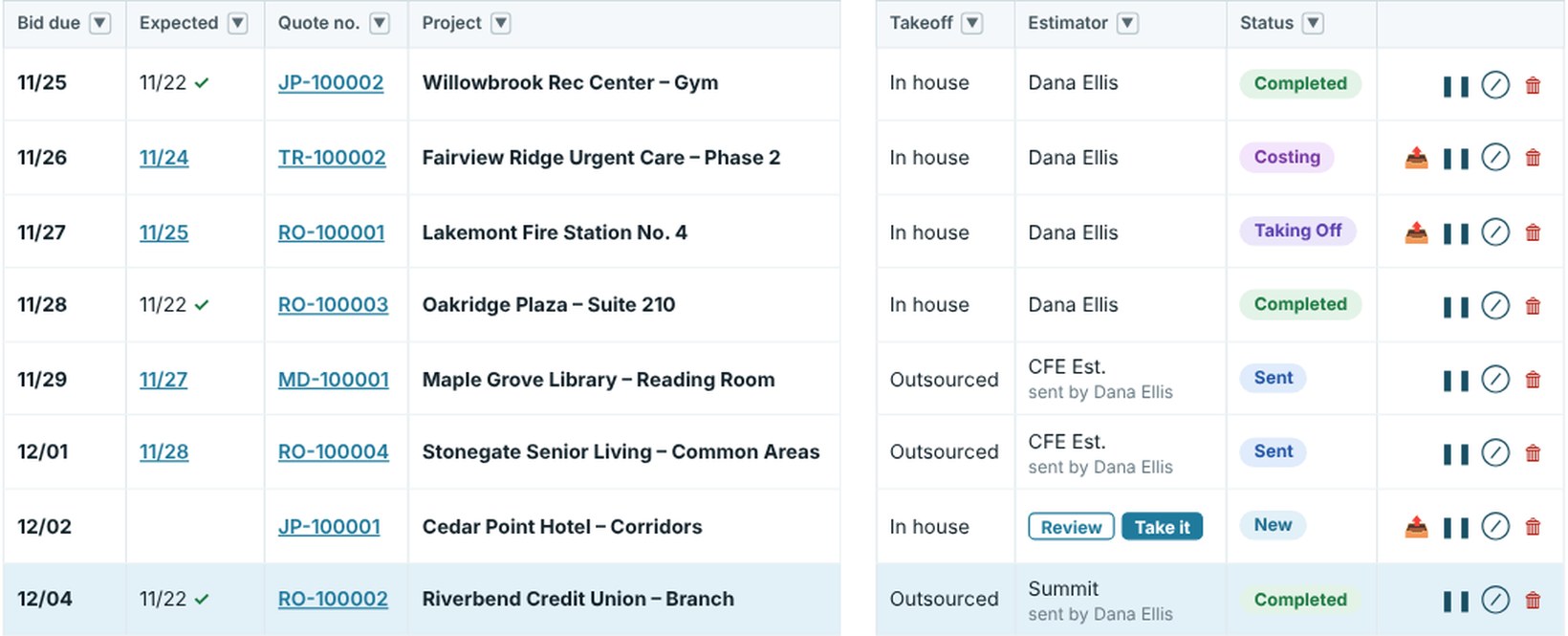
On the board, Riverbend now reads Completed, with 11/22 ✓ in Expected: back five days early.
Open the bid and click New Quote from this bid. Price it with the quantities from their takeoff.
Give the estimating company an expected date two days before your own. A takeoff that comes back late still leaves you time to price it.
6What can go wrong, and how to fix it

No updates come back. The guest page box was not ticked, or the company never signed in. Check the Guest page column in Bid Board settings.
They have no plans. The guest page shows no files. Email them from the bid’s Job Folder.
Sent to the wrong company. Open the bid and change the Estimating company under Who does it, then Send out again.
Worked example: Riverbend Credit Union, outsourced
From the History of RO-100002:
| When | Who | What |
|---|---|---|
| 11/22 | Dana Ellis | Sent to Summit Takeoff Co., expected 11/27 |
| 11/22 | Summit Takeoff Co. | Received the bid |
| 11/22 | Summit Takeoff Co. | Taking off |
| 11/22 | Summit Takeoff Co. | Takeoff complete, seam plan emailed to Rosa |
Dana never called to ask where it was.
What to do next
Next, see the estimating company’s side in The guest page, step by step. Or see all the step-by-step guides.
Outsource a takeoff, and know where it is
Download CFE BidWise and send your first takeoff out. The Job Bid Board comes with every CFE BidWise plan. Start with the 30-day free trial, no credit card.
Frequently Asked Questions
Does the estimating company see my prices?
No. The guest page shows the project, due date, scope, spec sections and your note only.
How do they get the plans?
By email, from the bid’s Job Folder.
Is the salesman told?
Yes. The salesman on the bid is told when it is sent out.

Written by
Cristian Valcu – Founder & CEO, Commercial Flooring Estimating LLC
Cristian has estimated commercial flooring for over 20 years and built CFE BidWise around the way flooring contractors actually price, propose and track their bids.
Last updated: